
Products compared
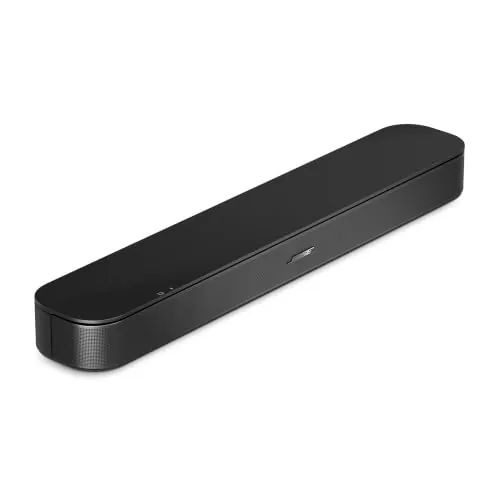
Bose
Bose TV Speaker (2nd Gen), Black
A compact, single soundbar intended to connect to a TV over HDMI ARC/CEC or optical, with Bluetooth also documented for compatible devices.
Model 901067-1100
Amazon ASIN B0H8D3QLLJ
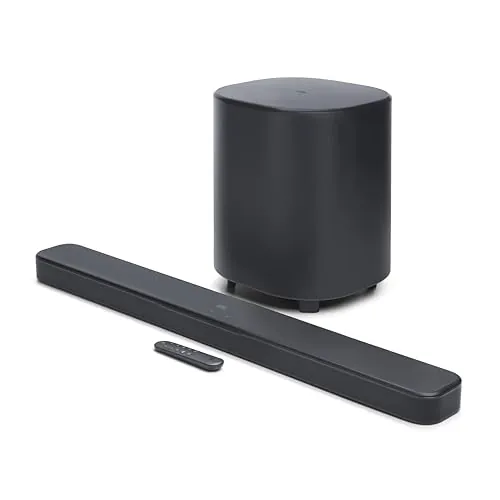
JBL
JBL Bar 500MK2, Black
A 5.1 soundbar package with a separate wireless subwoofer; the soundbar has HDMI eARC output, HDMI input, optical and Bluetooth connections, plus JBL One app/network setup.
Model JBLBAR500M2BLKAM
Amazon ASIN B0FHBVS6GC
Differences that matter
What matters most to you?
Choose a priority to see what it changes.
Sources for Bar footprint and extra component
Sources for TV connection and included cable
Sources for Other listening and control paths
Sources for Power and daily placement
Start with the space, not the channel count
The Bose TV Speaker (2nd Gen) is the straightforward fit when you want one low-profile bar under the screen. Its listed width is about 23.5 inches. JBL's Bar 500MK2 bar is 37 inches wide and comes with a separate subwoofer that is about 12.8 × 15.7 × 12.8 inches. Measure the furniture and check outlet locations for both components before treating the JBL's wireless subwoofer link as a placement solution: the manual still shows a power cord at the subwoofer.
Bose describes placement centered below the TV on a flat surface, with an optional wall bracket sold separately. JBL's exact box list includes wall-mount brackets and a template. These are package and placement differences; neither one tells you how the systems will perform in a particular room.
Match the TV ports to the connection you will actually use
Bose lists HDMI ARC/CEC and optical inputs. Its package includes an HDMI cable, while the optical cable is sold separately. The Bose guide says HDMI CEC lets a TV remote control speaker volume; that behavior still relies on the TV's own setup and settings.
JBL lists HDMI eARC output, one HDMI input and optical. Its manual walks through ARC/eARC TV setup, a source-to-bar HDMI route when appropriate, and optical as another TV connection. It recommends eARC for Atmos playback and notes that CEC compatibility is not guaranteed. Treat the TV manual as the deciding document for its port, settings and supported format; a bar's port list alone cannot guarantee a result with every television.
Decide whether the extra source and app paths matter
Both product pages list Bluetooth. JBL additionally lists JBL One app and network-based services. JBL's manual describes network setup and states service availability can depend on country or account conditions. Choose those paths only if you expect to use them and can meet the setup requirements; they are additional features, not evidence of better sound.
The JBL HDMI input can provide a place to connect a source device directly to the bar, while Bose's compared setup is the TV connection plus optical and Bluetooth. Draw a small diagram of your actual sources—TV, streamer, game system—and mark the HDMI ports each will occupy. Then confirm which device connects to the television and whether the TV passes the format you need.
A three-minute pre-buy check
1. Measure the TV shelf and compare it with the bar width; if considering JBL, measure a second spot for the subwoofer and find an AC outlet. 2. Read the TV's port labels and write down whether ARC/eARC or optical is available. 3. Count HDMI sources and decide if JBL's HDMI input changes your wiring plan. 4. Check cable contents: Bose includes HDMI but not optical; JBL's manual and listing include an HDMI cable, while power cord count can vary by region. 5. If you require a particular sound format, app service or remote-control behavior, confirm that exact TV/source combination in its documentation before buying.
If the room only works with one compact bar, Bose's form and stated connections may be the cleaner fit. If the second component, power point and source-routing options fit your room, the JBL package offers a different documented setup. This guide does not rank their listening results.
Product details
Bose TV Speaker (2nd Gen), Black
JBL Bar 500MK2, Black
- Soundbar dimensions
- 37 × 2.0 × 4.1 inches (W × H × D) Source
- Subwoofer dimensions
- 12.8 × 15.7 × 12.8 inches (W × H × D) Source
- TV and source ports
- HDMI eARC output, one HDMI input and optical input; Bluetooth and JBL One app/network functions are also listed Source
- Subwoofer power
- The subwoofer connects wirelessly for audio but has its own AC power cord Source
Before you buy
Community discussions
Deciding where a streaming stick will plug in
JBL Bar 500MK2, Black
A JBL Bar 500MK2 owner described plugging the streaming stick into the soundbar and linking the bar to a TCL television.
What to check
List the connections your sources need. Compare plugging them into the television and routing through the bar, using the exact device port labels and manuals.
Common questions
Does the JBL subwoofer need a power outlet if it is wireless?
Yes. JBL describes a wireless audio connection between the subwoofer and bar, while the manual shows a separate AC power cord for the subwoofer. Plan both its position and an outlet.JBL Bar 500MK2 product page, U.S. black item JBLBAR500M2BLKAMJBL Bar 500MK2 Owner's Manual
Does the Bose TV Speaker (2nd Gen) include an optical cable?
Bose lists an HDMI cable in the package and says the optical cable is sold separately. If your TV uses optical, verify that you already have a suitable cable or add one to your setup plan.Bose TV Speaker (2nd Gen) product page
Which one fits a TV with limited HDMI ports?
Bose documents HDMI ARC/CEC and optical. JBL documents HDMI eARC/ARC output, one HDMI input and optical. The better route depends on the exact TV and source: check those manuals and whether the source connects to the TV or the JBL input before ordering.Bose TV Speaker (2nd Gen) product pageJBL Bar 500MK2 product page, U.S. black item JBLBAR500M2BLKAMJBL Bar 500MK2 Owner's Manual
Sources and scope
This is a specification and setup comparison, not a listening test. It does not establish which system sounds louder, clearer, deeper or better in a particular room. TV port behavior and available audio formats depend on the exact television, source and content.
Related comparisons
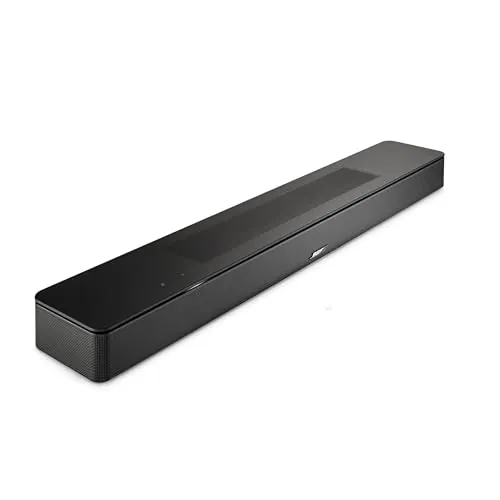
JBL Bar 500MK2 vs Bose Smart Soundbar: Included Subwoofer, TV Ports and Placement
This U.S. comparison focuses on four purchase checks: what arrives in the box, where a game console or player connects, the space each bar and bass setup needs, and which remote workflow is documented. JBL's Bar 500MK2 Black page lists a separate wireless subwoofer, one HDMI video input and one eARC output. Bose's Smart Soundbar package lists one bar with HDMI and optical cables; Bose describes bass modules as compatible optional add-ons and documents TV audio over eARC/ARC or optical. No matched listening test was performed, so choose by package, wiring and placement rather than an audio-quality ranking.
Read comparison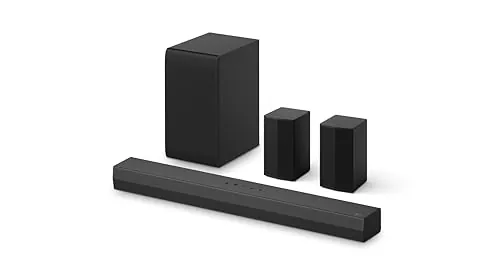
JBL Bar 500MK2 vs LG S40TR: Rear Speakers, Power and TV Wiring
This U.S. comparison answers a practical setup question, not which system sounds better. LG's S40TR product page lists rear speakers in the box; its footnote says the pair must connect to each other by wire and one speaker needs AC power. JBL's Bar 500MK2 box list names the main bar and a wireless subwoofer, while its manual shows that subwoofer has its own power connector. JBL also documents an HDMI IN for a player or console and HDMI OUT to the TV's eARC/ARC port. Before choosing, map the TV connection, outlet locations and rear-speaker cable path in your room.
Read comparison