
Products compared
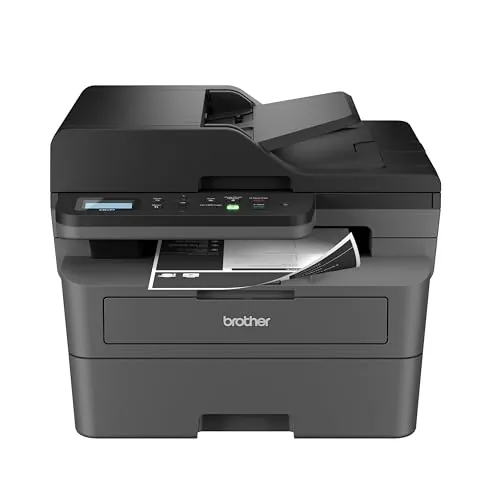
Brother
Brother DCP-L2640DW Wireless Monochrome Laser Multi-Function Printer
US monochrome laser printer/copier/scanner; Brother identifies the exact model as DCP-L2640DW.
Model DCP-L2640DW
Amazon ASIN B0CPLFTPCV
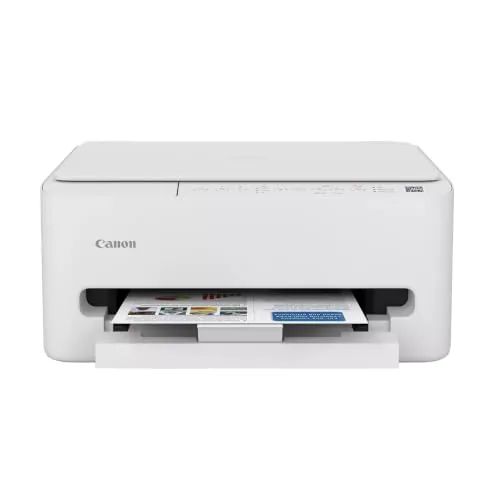
Canon
Canon PIXMA TS4320 Wireless Multi-Function Home Printer
Canon U.S.A. SKU 7181C002; color inkjet printer/copier/scanner with a flatbed scanner.
Model PIXMA TS4320
Amazon ASIN B0FMBGXC2C
Differences that matter
What matters most to you?
Choose a priority to see what it changes.
Sources for Print output and supply system
Sources for Multi-page original handling
Sources for Scan limits to check
Decide whether color printing is required
The main output distinction is simple: Brother labels the DCP-L2640DW monochrome, while Canon's PIXMA TS4320 is the color inkjet model in this pair. The Brother's maker page lists black-and-white laser print/copy/scan functions and TN830-family toner with a DR830 drum. Canon's exact TS4320 specification lists its hybrid system as PG-295 pigment black plus CL-286 dye color.
This is a feature-fit choice, not a judgment about text sharpness, photo appearance, page yield, or total supply cost. If color output is non-negotiable, start with the Canon; if your recurring work is black-and-white documents, the Brother remains an option. Brother also lists color scanning, so monochrome describes its print output rather than every scanner function.
Match the scanner to the originals you handle
For batches of paper originals, the Brother's listed 50-page ADF gives you a feeder workflow for multi-page scan and copy jobs. The Brother page lists duplex scanning as No, so do not assume it automatically captures both sides of a double-sided original.
Canon specifies a flatbed scanner and ADF capacity as N/A. Plan to place originals individually on the glass. That can suit occasional one-page scans, but this guide does not claim a real-world speed or convenience test.
Both makers list automatic two-sided printing. That feature concerns printed sheets; it does not mean that the Brother automatically scans both sides.
Plan paper loading and consumables without guessing costs
Brother lists 250 sheets of standard paper input; Canon lists a 100-sheet cassette. Use those published capacities to compare loading needs, then check where each tray opens in your actual workspace. Capacity does not tell you how often your household will refill it.
The listed supply families also differ: Brother names TN830-family toner and the DR830 drum, while Canon specifies PG-295 black and CL-286 color ink. These identifiers help you check the correct consumables for each model. They do not establish price, yield, or cost per page, which are outside this comparison.
Product details
Brother DCP-L2640DW Wireless Monochrome Laser Multi-Function Printer
Before you buy
Community discussions
Comparing a feeder scan with the flatbed
Brother DCP-L2640DW Wireless Monochrome Laser Multi-Function Printer
A Brother DCP-L2640DW owner saw skewed scans through the automatic feeder in macOS Image Capture but reported straight scans on the flatbed. They saw similar skew on the replacement unit, with the cause unresolved.
What to check
Compare how long it takes to scan a stack of your own forms. Inspect how the feeder handles corners and page alignment before deciding how often you would use it.
Testing a scan after adding the printer on Windows
Brother DCP-L2640DW Wireless Monochrome Laser Multi-Function Printer
One Windows 11 user could print a few test pages after adding a DCP-L2640DW, then the printer appeared offline when they tried to scan. They had not found the cause.
What to check
Do one network print and one network scan from your computer, then check whether both still work later. The printer being visible in one workflow does not confirm the other.
Common questions
Does the Brother DCP-L2640DW print in color?
No. Brother identifies it as a monochrome black-and-white laser multifunction printer. Its specification page lists color scanning, which is separate from print output.Brother DCP-L2640DW Wireless Monochrome Laser Multi-Function Printer
Which printer has an automatic document feeder?
Brother lists a 50-page-capacity ADF on the DCP-L2640DW. Canon lists the PIXMA TS4320 scanner as flatbed and ADF capacity as N/A.Brother DCP-L2640DW Wireless Monochrome Laser Multi-Function PrinterCanon Support for PIXMA TS4320: Technical Specifications
Can both automatically print on both sides?
Both manufacturers list automatic two-sided printing. Brother separately lists duplex scanning as No, so this print feature does not automate scanning both sides of an original.Brother DCP-L2640DW Wireless Monochrome Laser Multi-Function PrinterCanon Support for PIXMA TS4320: Technical Specifications
What supplies should I look up?
Brother lists TN830-family black toner and DR830 drum unit. Canon lists PG-295 pigment black and CL-286 dye color ink tanks. These are supply identifiers only; this comparison makes no yield or cost-per-page claim.Brother DCP-L2640DW Wireless Monochrome Laser Multi-Function PrinterCanon Support for PIXMA TS4320: Technical Specifications
Sources and scope
This is a feature-fit guide based on exact-model manufacturer specifications, not a head-to-head print or scan test. Comparative quality, speed, long-term reliability, supply yield, and cost per page are not established. Paper capacities are listed specifications, not predicted refill intervals.
Related comparisons

Canon PIXMA TR7120 vs TS4320: ADF, Ink and Paper Handling
For the exact white U.S. models TR7120 (7178C002) and TS4320 (7181C002), the meaningful difference is document handling: TR7120 has a 35-sheet ADF and 1.42-inch OLED, while TS4320 has a flatbed and no display. Canon lists the same PG-295 black and CL-286 color cartridges, a 100-sheet plain-paper cassette, dual-band Wi-Fi and USB for both. Both print two-sided; that does not establish automatic duplex scanning.
Read comparison
Canon PIXMA TR8620a vs TS4320: Do You Need Separate Ink Tanks and an ADF?
The TR8620a adds five individual ink tanks, a 20-sheet Letter / 5-sheet Legal ADF, a second paper feed, and fax. The TS4320 uses two cartridges and a flatbed. Canon documents automatic two-sided printing for TR8620a. Published TS4320 automatic-duplex records disagree, so verify that feature if it affects your choice.
Read comparison