
Products compared

Canon
Canon PIXMA TR8620a Wireless Home Office All-in-One Printer
Black U.S. configuration with print, copy, scan, fax, flatbed, and ADF.
Model 4451C032
Amazon ASIN B09TRZLPXP
Canon
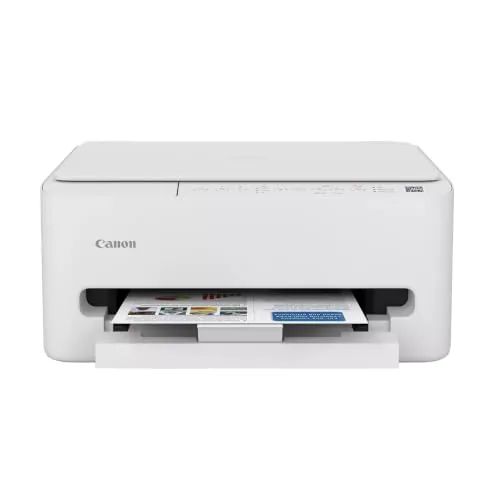
Canon PIXMA TS4320 Wireless Multi-Function Home Printer
White U.S. configuration with print, copy, scan, and a flatbed; no ADF.
Model 7181C002
Amazon ASIN B0FMBGXC2C
Differences that matter
What matters most to you?
Choose a priority to see what it changes.
Sources for Multi-page originals and scanning
Sources for Printing both sides and keeping media loaded
Sources for Everyday printer functions
Count ink modules as a replacement workflow, not a savings estimate
The TR8620a has five individual tanks: PGI-280 pigment black and CLI-281 dye black, cyan, magenta, and yellow. Canon's replacement instructions say to remove the tank whose ink runs out and install its replacement in the matching position.
The TS4320 uses two cartridges: PG-295 pigment black and CL-286 dye color containing cyan, magenta, yellow, and black. That means fewer cartridge modules to keep track of, with color combined in one unit. Neither the five-versus-two count nor the listed cartridge codes establish yield or running cost.
Match the scanner to how many originals you handle
For recurring stacks of single-sided originals, the TR8620a's ADF takes up to 20 plain-paper Letter sheets or 5 Legal sheets. Canon also says its ADF cannot automatically scan a two-sided original, so do not mistake a stack feeder for automatic duplex scanning.
Use the TS4320 flatbed if scanning is occasional and placing pages on the glass one by one fits your routine. For two-sided printing, check the exact unit and driver.
Plan the paper you keep loaded and the tasks you send
Canon lists a 100-sheet front cassette plus a 100-sheet rear tray on the TR8620a, and describes keeping plain paper in front while putting photo or other paper in the rear tray. The TS4320 has a 100-sheet cassette. If you switch media often, the second feed can reduce the need to swap what is loaded; if you print one type of paper at a time, the TS4320's single cassette may be enough.
The TR8620a is a print/copy/scan/fax machine; the TS4320 is listed for print/copy/scan. Before buying, check whether fax, multi-page feeder input, or keeping two paper types ready will actually be used. Those concrete jobs are the reasons to select the TR8620a, not a claim that it prints or scans better.
Product details
Canon PIXMA TR8620a Wireless Home Office All-in-One Printer
- Ink system
- Five individual tanks: PGI-280 pigment black and CLI-281 dye black, cyan, magenta, and yellow. Source
- ADF capacity
- Up to 20 Letter plain-paper sheets or 5 Legal sheets; the ADF does not automatically scan duplex originals. Source
- Paper feeds and output
- 100-sheet front cassette plus a 100-sheet rear tray; automatic two-sided printing. Source
Canon PIXMA TS4320 Wireless Multi-Function Home Printer
- Ink system
- Two cartridges: PG-295 pigment black and CL-286 dye color containing cyan, magenta, yellow, and black. Source
- Original handling
- Flatbed scanner for originals up to Letter/A4; Canon lists ADF capacity as N/A and supports multi-page PDF output. Source
- Paper feed and output
- 100-sheet cassette. Canon's Windows guide describes auto duplex for Letter or A4; confirm against the exact unit and driver. Source
Before you buy
Community discussions
Occasional photo prints and batches of originals
Canon PIXMA TR8620a Wireless Home Office All-in-One Printer
A small-office shopper in Europe considered the TR8620a for occasional printing, photos and monthly scans. They wanted a document feeder even though their overall print volume was low.
What to check
Count how many loose pages you usually scan at once and note which photo or document stocks you want to keep loaded.
A TR8620a owner compares photo prints on plain paper
Canon PIXMA TR8620a Wireless Home Office All-in-One Printer
A TR8620a owner posted photos printed on standard Letter paper before and after changing groups of ink tanks.
What to check
If photos matter to you, try one of your own images on the paper you actually use and check which individual tanks or cartridges the printer takes.
A TR8620a buyer checks scan support on Apple Silicon
Canon PIXMA TR8620a Wireless Home Office All-in-One Printer
A Canadian TR8620a buyer wanted to resume scanning on an M1 iMac after driver updates stopped for their old all-in-one. They asked which software to use with the new printer.
What to check
Check support for your operating system and the scan software you need, especially if you plan to scan through the feeder.
Common questions
Do both printers automatically print on both sides?
Canon documents automatic two-sided printing for TR8620a. Canon's TS4320 Windows driver guide describes automatic two-sided printing for Letter or A4. The ENERGY STAR record for TS4320/K10633 says automatic duplex output is unavailable. Verify the exact unit and driver if this feature matters.Canon PIXMA TR8620a U.S. product pageCanon PIXMA TS4320 U.S. product pageCanon TS4300 Series Windows Driver Duplex PrintingENERGY STAR Certified Canon TS4320 record (conflict check only)
Can the TR8620a ADF scan a stack of two-sided originals in one pass?
No. Canon's TR8600-series manual says a duplex original cannot be scanned automatically by the ADF. The feeder can load a stack, but duplex-original scanning needs an additional manual step.Canon Inkjet Manuals: TR8600 series — Loading Documents in the ADFCanon Support for PIXMA TR8620a
Can the TS4320 still make a PDF from several pages without an ADF?
Canon lists multi-page PDF scanning support for the TS4320. Because its scanner is a flatbed and ADF capacity is N/A, you place each original on the glass rather than feeding a stack through a document feeder.Canon Support for PIXMA TS4320Canon Inkjet Manuals: TS4300 series — Loading Originals on PlatenCanon Inkjet Manuals: TS4300 series online manual and model list
Does the five-tank printer necessarily cost less to run?
The source documents establish different cartridge layouts, not page yield or cost per page. The TR8620a separates five ink colors; the TS4320 combines its color inks in one cartridge. Compare applicable cartridge yields and current terms for your own usage before drawing a cost conclusion.Canon Support for PIXMA TR8620aCanon Support for PIXMA TS4320
Sources and scope
This guide compares features documented for TR8620a (4451C032) and TS4320 (7181C002). The TR8620a ADF cannot scan both sides automatically. Canon's TS4320 Windows driver guide describes automatic two-sided printing for Letter or A4. The ENERGY STAR record for TS4320/K10633 says automatic duplex output is unavailable. Verify the exact unit and driver if this feature matters.
- Canon Support for PIXMA TR8620a
- Canon PIXMA TR8620a U.S. product page
- Canon Inkjet Manuals: TR8600 series — Replacing Ink Tanks
- Canon Inkjet Manuals: TR8600 series — Loading Documents in the ADF
- Canon Support for PIXMA TS4320
- Canon PIXMA TS4320 U.S. product page
- Canon Inkjet Manuals: TS4300 series — Replacing a FINE Cartridge
- Canon Inkjet Manuals: TS4300 series — Loading Originals on Platen
- Canon Inkjet Manuals: TS4300 series online manual and model list
- Canon TS4300 Series Windows Driver Duplex Printing
- ENERGY STAR Certified Canon TS4320 record (conflict check only)
Related comparisons

Canon PIXMA TR7120 vs TR8620a: Ink, Paper Feeds and Scanning
Both printers can automatically print on both sides and use an ADF, but neither automatically scans both sides of an original through that feeder. TR7120 holds up to 35 Letter sheets in its ADF; TR8620a holds 20 and adds fax, five individual ink tanks, a 100-sheet rear feed and Ethernet. Match the exact cartridge family and the paper or scan task you do most.
Read comparisonCanon PIXMA TR7120 vs TS4320: ADF, Ink and Paper Handling
For the exact white U.S. models TR7120 (7178C002) and TS4320 (7181C002), the meaningful difference is document handling: TR7120 has a 35-sheet ADF and 1.42-inch OLED, while TS4320 has a flatbed and no display. Canon lists the same PG-295 black and CL-286 color cartridges, a 100-sheet plain-paper cassette, dual-band Wi-Fi and USB for both. Both print two-sided; that does not establish automatic duplex scanning.
Read comparison