
Products compared

Canon
Canon PIXMA TR7120 Wireless Multi-Function Home Printer
US model SKU 7178C002; print, copy and scan model with a 35-sheet ADF and two-tank PG-295/CL-286 system.
Model TR7120 (7178C002)
Amazon ASIN B0FMB4JBJ8

Canon
Canon PIXMA TR8620a Wireless Home Office All-In-One Printer
US model 4451C032; print, copy, scan and fax with five individual ink tanks, a 20-sheet Letter ADF, and front cassette plus rear tray.
Model TR8620a (4451C032)
Amazon ASIN B09TRZLPXP
Differences that matter
What matters most to you?
Choose a priority to see what it changes.
Sources for Ink replacement layout
Sources for One-sided ADF batch size
Sources for Paper feed arrangement
Match cartridge layout to how you handle replacements
The TR7120 has two tanks: PG-295 pigment black and a CL-286 dye-based cartridge containing cyan, magenta, yellow and black. The TR8620a uses five individual tanks: PGI-280 pigment black and separate CLI-281 black, cyan, magenta and yellow. This changes which tank you replace when one color runs low; the cartridge count alone does not show which setup costs less for your pages.
Before adding ink to your cart, match the printer's full model code to the tank number. The similar Canon model-family names do not make these cartridge sets interchangeable.
Use the ADF for one-sided stacks and the platen for delicate originals
Canon lists the TR7120 ADF for up to 35 plain-paper sheets and five legal sheets. The TR8620a ADF holds 20 Letter sheets or five legal sheets. If you regularly scan a bigger one-sided Letter stack, TR7120 means fewer reloads; if your document sets are short, that capacity difference may not decide the purchase.
Both manuals state that the ADF cannot automatically scan a double-sided original. Automatic duplex printing is supported on both, but it describes printed output—not two-sided ADF scanning. For books, photos or fragile paper, use the platen; for duplex originals, plan manual page turns or use a duplex-scanning document scanner.
Choose the paper paths and connections you will actually use
TR7120 lists one 100-sheet cassette for plain paper. TR8620a adds a rear tray alongside its 100-sheet front cassette; Canon lists up to 100 plain sheets in that rear tray, with lower limits for some photo-paper sizes. A useful setup might keep Letter paper in the cassette and load another supported paper type in the rear tray—but check the media table for the chosen paper rather than assuming every size works in both feeds.
TR8620a is the feature-fit option when built-in fax or wired Ethernet matters. Canon lists TR7120 with USB and dual-band Wi-Fi (2.4/5 GHz); its TR8620a US specs list USB, Ethernet and 2.4 GHz Wi-Fi. Confirm your network's actual connection requirements before buying.
Product details
Canon PIXMA TR7120 Wireless Multi-Function Home Printer
TR7120 is the simpler of these two Canon home-office layouts: a PG-295 pigment-black tank and a combined CL-286 dye-based color tank, one 100-sheet cassette and a larger ADF load for one-sided multi-page jobs. It does not add the TR8620a's fax function or second paper feed.
- Ink tanks
- PG-295 pigment black plus CL-286 dye-based color (cyan, magenta, yellow and black); two tanks total Source
- ADF capacity
- 35 sheets of plain paper; 5 sheets of legal-size paper Source
- Paper and network inputs
- 100-sheet plain-paper cassette; Hi-Speed USB and 2.4/5 GHz Wi-Fi; no fax listed in Canon's print/copy/scan function set Source
Canon PIXMA TR8620a Wireless Home Office All-In-One Printer
TR8620a uses five separate ink tanks and adds fax, a rear paper tray and a wired Ethernet interface. Its ADF accepts up to 20 Letter sheets (five legal), and Canon documents manual handling for double-sided originals rather than automatic duplex scanning through the feeder.
- Ink tanks
- Five individual tanks: PGI-280 pigment black and CLI-281 dye-based black, cyan, magenta and yellow Source
- ADF capacity
- 20 sheets of Letter-size plain paper; 5 sheets of legal-size paper Source
- Paper feeds
- 100-sheet front cassette plus rear tray for up to 100 sheets of plain paper or supported photo-paper loads Source
- Fax and network
- Fax, Ethernet, USB and 2.4 GHz Wi-Fi are listed by Canon US Source
Before you buy
Community discussions
Testing several sheets from the rear tray
Canon PIXMA TR8620a Wireless Home Office All-In-One Printer
A TR8620a owner said one sheet of cardstock printed normally, then the next fed at an angle and triggered a no-paper warning.
What to check
Check the supported size, weight and feed for your stock. Print a few sheets from the tray you will use before starting a large run.
Planning for high-coverage color pages
Canon PIXMA TR8620a Wireless Home Office All-In-One Printer
A TR8620a owner saw low warnings on three color tanks after about 20 high-quality Letter prints with substantial image coverage.
What to check
Consider how much of your usual page is in color and which tanks you can replace individually. Use the manufacturer’s stated yield conditions when comparing supplies.
Common questions
Which cartridges fit these exact Canon models?
Canon lists PG-295 pigment black and CL-286 dye-based color for TR7120. TR8620a uses PGI-280 pigment black plus four CLI-281 dye tanks: black, cyan, magenta and yellow. Verify the model code on the printer and cartridge package before ordering.Canon Support for PIXMA TR7120: US specificationsCanon Support for PIXMA TR8620a: US specifications
Can either model automatically scan both sides through the ADF?
No. Canon's TR7100 and TR8600 series manuals say double-sided originals cannot be scanned automatically by the ADF. Both models support automatic two-sided printing, which is a different workflow.Canon TR7100 series manual: Loading Documents in the ADFCanon TR8600 series manual: Loading Documents in the ADFCanon Support for PIXMA TR7120: US specificationsCanon Support for PIXMA TR8620a: US specifications
Does the TR8620a have a larger ADF than the TR7120?
No. For Letter-size plain paper, Canon lists 20 sheets for TR8620a and 35 plain-paper sheets for TR7120. Both list five legal-size sheets, so the TR7120's larger capacity is specifically useful for larger non-legal simplex batches.Canon Support for PIXMA TR7120: US specificationsCanon Support for PIXMA TR8620a: US specifications
When is the TR8620a's second paper feed useful?
It has a 100-sheet front cassette and a rear tray that Canon lists for up to 100 plain sheets or smaller quantities of supported photo paper. That can keep a second supported media type ready; check the rear-tray media table for your exact paper.Canon Support for PIXMA TR8620a: US specifications
Which should I choose for Wi-Fi or Ethernet?
Canon lists TR7120 with dual-band 2.4/5 GHz Wi-Fi and USB. TR8620a lists USB, Ethernet and 2.4 GHz Wi-Fi. Match the interface to your network; do not infer that either connection guarantees better print speed.Canon Support for PIXMA TR7120: US specificationsCanon Support for PIXMA TR8620a: US specifications
Sources and scope
This is a feature and workflow comparison based on Canon US specifications and series manuals. It does not estimate ink cost, cartridge yield, print quality or speed under your workload. Confirm the exact model code and ink cartridge numbers on the product and replacement-supply listings before ordering.
Related comparisons

Canon PIXMA TR7120 vs TS6520: ADF, Ink, Duplex & Space Compared
The Canon PIXMA TR7120 adds a 35-sheet letter / 5-sheet legal automatic document feeder (ADF); the TS6520 scans from its flatbed only. Both use PG-295 black and CL-286 color ink, list a 100-sheet plain-paper cassette, and print automatically on both sides. Compare the feeder's real workflow value with the height and access your space allows.
Read comparison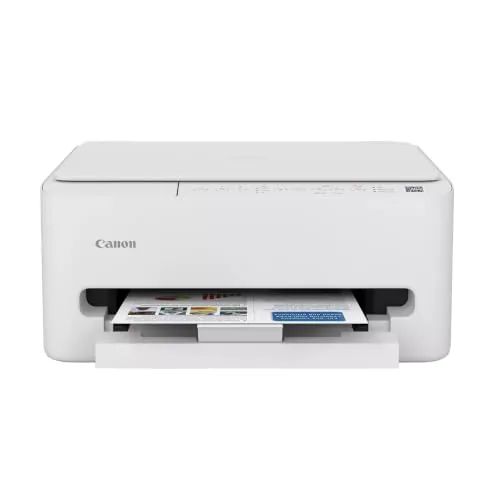
Canon PIXMA TR7120 vs TS4320: ADF, Ink and Paper Handling
For the exact white U.S. models TR7120 (7178C002) and TS4320 (7181C002), the meaningful difference is document handling: TR7120 has a 35-sheet ADF and 1.42-inch OLED, while TS4320 has a flatbed and no display. Canon lists the same PG-295 black and CL-286 color cartridges, a 100-sheet plain-paper cassette, dual-band Wi-Fi and USB for both. Both print two-sided; that does not establish automatic duplex scanning.
Read comparison