
Products compared

Canon
Canon PIXMA TR7120 Wireless Color Inkjet Printer, White
U.S. white model 7178C002 with automatic document feeder
Model TR7120 (7178C002)
Amazon ASIN B0FMB4JBJ8

Canon
Canon PIXMA TS6520 Wireless Color Inkjet Printer, White
U.S. white model 7179C002 with flatbed scanner and no ADF
Model TS6520 (7179C002)
Amazon ASIN B0FMBTJLX6
Differences that matter
What matters most to you?
Choose a priority to see what it changes.
Sources for Scanning and copying originals
Sources for Genuine ink to keep on hand
Sources for Paper input and two-sided printing
Sources for Listed height by printer state
The real difference is how originals reach the scanner
The TR7120 combines a flatbed with an automatic document feeder; Canon rates the feeder for 35 sheets of letter-size paper or 5 legal-size sheets, up to an 8.5 × 14-inch original. That is a concrete advantage when multi-page copy or scan jobs happen regularly.
The TS6520 has a flatbed scanner and no ADF. Canon lists multi-page PDF scanning, but the flatbed does not feed a document stack through the machine. Expect a platen-based workflow for pages rather than automatic stack feeding.
The ADF also has a limit that matters: Canon's TR7100-series manual says a double-sided original cannot be scanned automatically with the ADF. Automatic two-sided printing is a separate feature and is listed for both models.
Ink and print-paper basics do not separate them
Canon lists the same genuine ink family for both: PG-295 pigment black and CL-286 dye color, in standard and XL sizes. That makes replacement-code planning straightforward across this pair, but it does not show equal cartridge yield or cost per page.
Both models list a cassette for 100 sheets of plain paper and automatic two-sided printing. The TR7120's ADF is for originals being copied or scanned; it is not another printer-paper input tray.
Compare height in the state you actually use
Canon lists the TR7120 at 8.2 inches high when closed and 9.5 inches with paper installed. It lists the TS6520 at 6.7 inches in both states. Those figures help compare listed configurations, but they do not include the working room to raise a lid, load originals into the feeder, reach the cassette, or use controls.
Before choosing on height alone, measure the space with the scanner lid open and the paper path accessible. A cabinet that clears the closed figure may still be awkward for scanning or refilling paper.
Product details
Canon PIXMA TR7120 Wireless Color Inkjet Printer, White
- ADF capacity
- 35 letter-size sheets or 5 legal-size sheets; maximum original 8.5 × 14 in Source
- Paper cassette
- 100 sheets of plain paper Source
- Automatic two-sided printing
- Yes Source
- Listed height
- 8.2 in closed; 9.5 in with paper installed Source
- Genuine ink family
- PG-295 pigment black and CL-286 dye color; Canon lists standard and XL sizes Source
Canon PIXMA TS6520 Wireless Color Inkjet Printer, White
- Scanner
- Flatbed only; maximum original 8.5 × 11.7 in; no ADF Source
- Paper cassette
- 100 sheets of plain paper Source
- Automatic two-sided printing
- Yes Source
- Listed height
- 6.7 in closed and with paper installed Source
- Genuine ink family
- PG-295 pigment black and CL-286 dye color; Canon lists standard and XL sizes Source
Before you buy
Community discussions
Trying the exact sticker paper you buy
Canon PIXMA TR7120 Wireless Color Inkjet Printer, White
A PIXMA TR7120 owner said sticker paper that usually fed successfully stopped feeding on a later print attempt.
What to check
Check the supported paper type and feed path for the exact stock. If you use it frequently, try a small batch from the paper you plan to buy.
Testing invitation cardstock first
Canon PIXMA TS6520 Wireless Color Inkjet Printer, White
A PIXMA TS6520 user reported that ordinary paper fed successfully but a sheet of 110 lb cardstock for invitations did not, even after changing the settings.
What to check
Check the supported media for your exact cardstock. Test a single sheet from the batch you plan to use before committing to a long print run.
Common questions
How many pages can the TR7120 ADF hold?
Canon lists up to 35 letter-size sheets or 5 legal-size sheets. The maximum ADF original size is 8.5 × 14 inches.Canon Support for PIXMA TR7120Canon PIXMA TR7120, TS6520, & TS4320 brochure
Does the TS6520 scan multi-page documents?
Canon lists multi-page PDF scanning, but the TS6520 has a flatbed and no ADF. It does not feed a stack of document pages automatically; plan on using the platen for originals.Canon Support for PIXMA TS6520Canon TS6500 series manual: Loading Based on Use
Can the TR7120 automatically scan both sides of an original through its ADF?
No. Canon's TR7100-series online manual states that a double-sided original cannot be scanned automatically with the ADF. That limitation concerns scanning originals, not the separate automatic two-sided print feature.Canon TR7100 series manual: Loading Documents in the ADFCanon Support for PIXMA TR7120
Do the TR7120 and TS6520 use the same genuine ink?
Canon lists PG-295 pigment black and CL-286 dye color for both printers, with standard and XL cartridge sizes. The shared codes do not establish equal page yield or ink cost.Canon Support for PIXMA TR7120Canon Support for PIXMA TS6520Canon PIXMA TR7120, TS6520, & TS4320 brochure
Which one prints on both sides automatically?
Canon lists two-sided printing for both. This is distinct from feeding or scanning a double-sided original.Canon Support for PIXMA TR7120Canon Support for PIXMA TS6520
Is the TS6520 shorter after paper is installed?
Canon lists the TS6520 at 6.7 inches high both closed and with paper installed. For the TR7120, Canon lists 8.2 inches closed and 9.5 inches with paper installed. Measure open-lid and loading clearance separately.Canon Support for PIXMA TR7120Canon Support for PIXMA TS6520
Sources and scope
This guide compares Canon's published specifications and instructions. It does not report hands-on tests, print-speed results, ink yield, or cost per page. Product dimensions are listed states, not operating-clearance measurements.
Related comparisons

Canon PIXMA TR7120 vs TR8620a: Ink, Paper Feeds and Scanning
Both printers can automatically print on both sides and use an ADF, but neither automatically scans both sides of an original through that feeder. TR7120 holds up to 35 Letter sheets in its ADF; TR8620a holds 20 and adds fax, five individual ink tanks, a 100-sheet rear feed and Ethernet. Match the exact cartridge family and the paper or scan task you do most.
Read comparison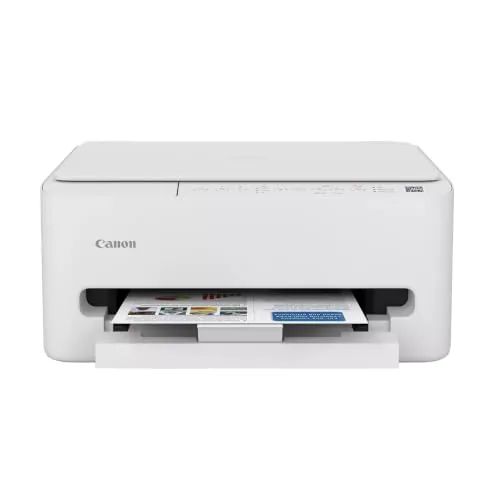
Canon PIXMA TR7120 vs TS4320: ADF, Ink and Paper Handling
For the exact white U.S. models TR7120 (7178C002) and TS4320 (7181C002), the meaningful difference is document handling: TR7120 has a 35-sheet ADF and 1.42-inch OLED, while TS4320 has a flatbed and no display. Canon lists the same PG-295 black and CL-286 color cartridges, a 100-sheet plain-paper cassette, dual-band Wi-Fi and USB for both. Both print two-sided; that does not establish automatic duplex scanning.
Read comparison