
Products compared
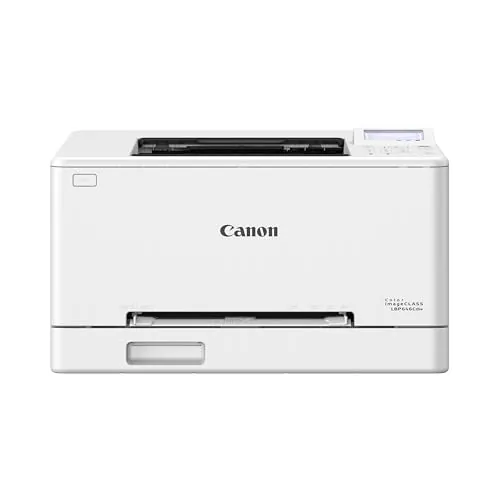
Canon
Canon Color imageCLASS LBP646Cdw Wireless Duplex Laser Printer
The exact U.S. Canon model/SKU is 6929C008. Canon lists its functions as print only, a 250-sheet standard cassette and a one-sheet manual feed slot. It supports USB, Ethernet, Wi-Fi and Wi-Fi Direct and uses Genuine Toner 075 or 075 H. This fit is for a buyer who has no need for in-device scanning or copying.
Model LBP646Cdw (U.S. SKU 6929C008)
Amazon ASIN B0FMBVCX6S
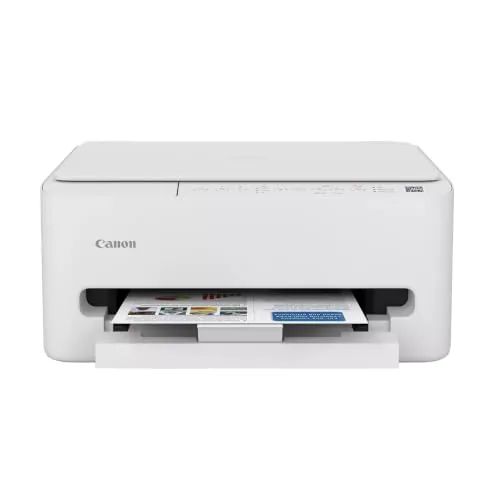
Canon
Canon PIXMA TS4320 Wireless Multi-Function Home Printer
Canon's U.S. SKU 7181C002 identifies this white TS4320 as a print/copy/scan model with a flatbed platen and no ADF. It has a 100-sheet plain-paper cassette and automatic two-sided printing. Canon lists Hi-Speed USB, dual-band Wi-Fi and wireless direct connection; the listed ink system is PG-295 pigment black and CL-286 dye color.
Model PIXMA TS4320 (U.S. SKU 7181C002)
Amazon ASIN B0FMBGXC2C
Differences that matter
What matters most to you?
Choose a priority to see what it changes.
Sources for Paper loading and two-sided printing
Sources for Placement with paper loaded and panels in use
Sources for Toner and ink supply family
Decide whether print-only is enough
Canon specifies the U.S. LBP646Cdw (SKU 6929C008) for print only. It does not include the scan/copy functions needed to turn a paper original into a digital file or duplicate it at the device. PIXMA TS4320 (SKU 7181C002) adds copy and scan; Canon identifies its scanner as a flatbed with a platen for originals up to 8.5 × 11.7 inches, and lists ADF capacity as N/A.
For a single original or occasional home paperwork, the TS4320's platen may cover the need. If you expect to process a multi-page stack often, plan for flatbed handling page by page because this model has no ADF listed. If you already have another scanner/copier or never scan, the LBP's print-only specification may fit better.
Match the paper path and duplex routine
LBP646Cdw has a 250-sheet standard cassette plus a separate one-sheet manual feed slot. That gives it a documented main-paper load and a single-sheet path for a different job. TS4320 lists a 100-sheet plain-paper cassette; its manual shows the front cassette and an output tray that pulls out before printing. Canon does not establish an additional feed path for TS4320 in the cited specs, so check the exact media instructions for any job that needs one.
Canon identifies the LBP646Cdw as duplex and its manual exposes a 2-Sided Printing setting. The TS4320 specification lists 2-Sided (Duplex) Printing. These are print features; they do not indicate duplex scanning through an ADF. Check the intended paper type and size in the model documentation before assuming a particular job can use two-sided printing.
Plan supplies and the connection you already have
The LBP646Cdw uses Canon Genuine Toner 075 or 075 H CMYK toner cartridges; TS4320's two-tank hybrid ink system uses PG-295 pigment black and CL-286 dye color. Treat those as distinct refill families. The cited pages do not establish a comparable cost per page or supply life in your kind of documents.
Canon lists USB, Gigabit Ethernet, Wi-Fi and Wi-Fi Direct for LBP646Cdw. TS4320 lists Hi-Speed USB and dual-band 2.4/5 GHz Wi-Fi; its setup guide also describes Wireless Direct, which connects devices at 2.4 GHz. If your printer must attach to a wired Ethernet network, Canon lists that port only on the LBP model here. For a particular router, mobile device or computer, verify current setup requirements rather than treating the feature list as a compatibility guarantee.
A pre-buy placement check
Canon gives TS4320 dimensions as 14.8 × 14 × 6.7 inches closed and 14.8 × 21 × 6.7 inches with paper installed. For LBP646Cdw, Canon lists unit dimensions of 16.8 × 16.5 × 10.5 inches without specifying tray position. Sketch the available space, then measure the space needed to load paper, pull out output, open the PIXMA document cover and reach USB/network connections.
The manufacturer dimensions are a placement starting point, not clearance instructions. Leave enough room for how you actually load and retrieve paper; compare like-for-like orientation and operating state before concluding that one will fit a shelf or cabinet.
Product details
Canon Color imageCLASS LBP646Cdw Wireless Duplex Laser Printer
- Functions and paper feed
- Print only; 250-sheet standard cassette plus 1-sheet manual feed slot. Source
- Duplex printing
- Canon identifies the U.S. printer as a duplex model; its exact-family manual includes a 2-Sided Printing setting. Source
- Connections and supplies
- USB 2.0 High-Speed, Gigabit Ethernet, Wi-Fi 802.11b/g/n and Wi-Fi Direct; Genuine Toner 075 or 075 H. Source
Canon PIXMA TS4320 Wireless Multi-Function Home Printer
- Functions and scanning
- Print, copy and scan; flatbed scanner sized for up to 8.5 × 11.7 in originals; no ADF listed. Source
- Paper and duplex
- 100-sheet plain-paper cassette and 2-sided (duplex) printing. Source
- Supplies and connections
- Hybrid two-ink-tank system: PG-295 pigment black and CL-286 dye color; Hi-Speed USB, dual-band 2.4/5 GHz Wi-Fi and Wireless Direct. Source
Before you buy
Community discussions
A TS4320 owner tests grayscale photos on matte paper
Canon PIXMA TS4320 Wireless Multi-Function Home Printer
A new TS4320 owner reported a blue tint in grayscale photos on matte paper and asked what else to check before returning the unit.
What to check
For specialty print jobs, start with the supported media lists and try one representative file on the stock you use.
Common questions
Can the LBP646Cdw scan or copy?
No scan or copy function is listed for the LBP646Cdw; Canon specifies its function as Print. TS4320 is Canon's print/copy/scan option in this pair and uses a flatbed, with no ADF listed.Canon Support for Color imageCLASS LBP646Cdw, U.S. specificationsCanon PIXMA TS4320 Wireless Multi-Function Home Printer, U.S. SKU 7181C002
Which has more room for loaded plain paper?
Canon lists 250 sheets in the LBP646Cdw's standard cassette and a separate 1-sheet manual feed slot. TS4320 lists a 100-sheet plain-paper cassette. This is manufacturer capacity, not an observed loading test.Canon Support for Color imageCLASS LBP646Cdw, U.S. specificationsCanon PIXMA TS4320 Wireless Multi-Function Home Printer, U.S. SKU 7181C002
Can the TS4320 scan a stack automatically?
Canon identifies a flatbed scanner sized for originals up to 8.5 × 11.7 inches and lists ADF capacity as N/A. Plan to use the platen for originals rather than relying on an automatic document feeder.Canon PIXMA TS4320 Wireless Multi-Function Home Printer, U.S. SKU 7181C002Canon PIXMA TS4300 series Online Manual: Front View
Are consumables interchangeable?
No. Canon specifies toner 075/075 H for LBP646Cdw and PG-295 black plus CL-286 color ink tanks for PIXMA TS4320. They are different printer and supply families.Canon Color imageCLASS LBP646Cdw Wireless Duplex Laser Printer, U.S. SKU 6929C008Canon PIXMA TS4320 Wireless Multi-Function Home Printer, U.S. SKU 7181C002
Do both support two-sided printing and Ethernet?
Canon describes LBP646Cdw as duplex and its manual has a 2-Sided Printing setting; the TS4320 specs list 2-sided (duplex) printing. Canon lists Ethernet for LBP646Cdw; its TS4320 page lists USB and Wi-Fi, not Ethernet.Canon Color imageCLASS LBP646Cdw Wireless Duplex Laser Printer, U.S. SKU 6929C008Canon imageCLASS LBP647Cdw / LBP646Cdw U.S. User's Guide: Printer SettingsCanon PIXMA TS4320 Wireless Multi-Function Home Printer, U.S. SKU 7181C002
Sources and scope
This is a feature and setup comparison from Canon's U.S. specifications, not a print-quality, speed, reliability, ink/toner-life or ownership-cost test. Canon lists the LBP646Cdw as print-only; its specifications show a 250-sheet cassette and a one-sheet manual feed slot. TS4320 has a 100-sheet cassette, flatbed scanner and no ADF listed. The TS4320 dimensions are given both closed and with paper installed, while the LBP646Cdw page provides unit dimensions without stating tray position; use the dimensions as a placement screen and measure working clearance. Canon lists duplex printing for both, but scanning and copying are not duplex-feed capabilities: TS4320 has a flatbed with no ADF. Prices are omitted.
- Canon Color imageCLASS LBP646Cdw Wireless Duplex Laser Printer, U.S. SKU 6929C008
- Canon Support for Color imageCLASS LBP646Cdw, U.S. specifications
- Canon imageCLASS LBP647Cdw / LBP646Cdw U.S. User's Guide: Printer Settings
- Canon PIXMA TS4320 Wireless Multi-Function Home Printer, U.S. SKU 7181C002
- Canon PIXMA TS4320 / TS4300 series Online Manual
- Canon PIXMA TS4300 series Setup Guide: Changing the Connection Mode
- Canon PIXMA TS4300 series Online Manual: Front View
Related comparisons

Canon PIXMA TR7120 vs TS4320: ADF, Ink and Paper Handling
For the exact white U.S. models TR7120 (7178C002) and TS4320 (7181C002), the meaningful difference is document handling: TR7120 has a 35-sheet ADF and 1.42-inch OLED, while TS4320 has a flatbed and no display. Canon lists the same PG-295 black and CL-286 color cartridges, a 100-sheet plain-paper cassette, dual-band Wi-Fi and USB for both. Both print two-sided; that does not establish automatic duplex scanning.
Read comparison
Canon PIXMA TR8620a vs TS4320: Do You Need Separate Ink Tanks and an ADF?
The TR8620a adds five individual ink tanks, a 20-sheet Letter / 5-sheet Legal ADF, a second paper feed, and fax. The TS4320 uses two cartridges and a flatbed. Canon documents automatic two-sided printing for TR8620a. Published TS4320 automatic-duplex records disagree, so verify that feature if it affects your choice.
Read comparison