
Products compared
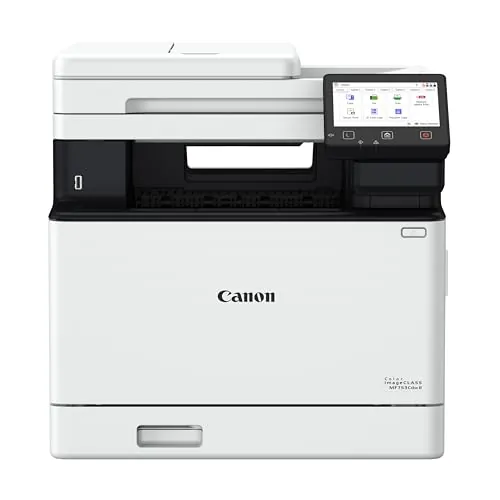
Canon
Canon Color imageCLASS MF753Cdw II
U.S. Color imageCLASS II generation; manufacturer SKU 7185C011
Model MF753Cdw II
Amazon ASIN B0FP3LJ74G
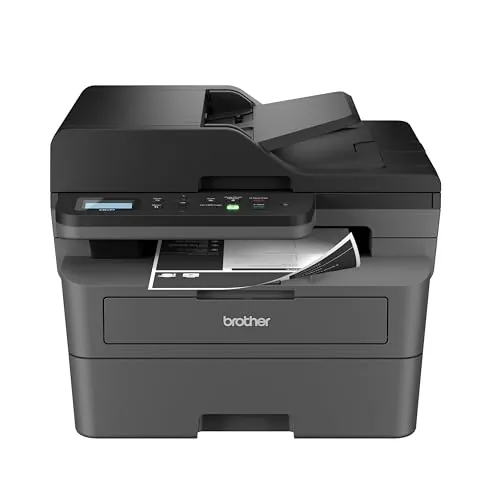
Brother
Brother DCP-L2640DW Wireless Compact Monochrome Laser Multi-Function Printer
U.S. monochrome print/copy/scan model; exact DCP-L2640DW, not the related MFC fax model
Model DCP-L2640DW
Amazon ASIN B0CPLFTPCV
Differences that matter
What matters most to you?
Choose a priority to see what it changes.
Sources for Two-sided paper workflow
Sources for Listed multifunction jobs
Sources for Consumable family to verify
Start with the pages you actually produce
The largest distinction is not a small spec-sheet difference: Canon's MF753Cdw II is a color laser multifunction printer, while Brother's DCP-L2640DW is monochrome. If color charts, marked-up documents, or color handouts are routine, the Brother's stated black-and-white output does not meet that job. If your print queue is text-only, color support may not be needed; neither conclusion says which machine produces better-looking pages.
Canon also lists print, scan, copy, and fax. Brother lists print, scan, and copy for this exact DCP model. The DCP name matters: do not attribute features from a nearby Brother MFC product to the DCP-L2640DW. If fax is a hard requirement, use the exact model page or manual to confirm before ordering.
Separate two-sided printing from two-sided scanning
Both manufacturers list automatic duplex printing, so each can print on the front and back of supported paper. For scanning, the answer changes: Canon specifies a 50-sheet ADF that scans both sides in one pass. Brother lists a 50-page feeder, but its DCP-L2640DW specifications say duplex scanning is not available and duplex copying is also unavailable.
Think about a weekly stack of contracts, forms, or school papers. If both sides need to become one scanned file, the Canon's documented feeder behavior reduces manual page turning. With the Brother, plan to turn and re-feed two-sided originals or use another scanning workflow. The feeder capacity numbers are similar, but the side-handling behavior is not.
Check supplies by exact model, not by brand
The Canon MF753Cdw II uses Canon Genuine Toner 069 / 069 H in four colors. Brother lists TN830-series black toner and a separate DR830 drum for the DCP-L2640DW. These are different supply families and different consumable arrangements. Before buying, check which starter toner and drum are included in the exact listing and confirm the replacement part numbers on the manufacturer page.
This is a compatibility and replenishment check, not a claim that one printer costs less to run. Manufacturer yields depend on stated test methods and actual page coverage; without a matched use profile and current verified supply prices, a per-page or lifetime-cost winner would be misleading.
Product details
Canon Color imageCLASS MF753Cdw II
The MF753Cdw II is the color and fax-capable option here. Canon specifies a 50-sheet feeder that scans both sides in one pass, which is the most consequential workflow difference if you routinely digitize two-sided originals.
Brother DCP-L2640DW Wireless Compact Monochrome Laser Multi-Function Printer
The DCP-L2640DW is a black-and-white printer with copy and scan functions. Its automatic two-sided printing should not be mistaken for automatic two-sided scanning: Brother lists duplex scanning and duplex copying as unavailable.
Before you buy
Community discussions
Comparing a feeder scan with the flatbed
Brother DCP-L2640DW Wireless Compact Monochrome Laser Multi-Function Printer
A Brother DCP-L2640DW owner saw skewed scans through the automatic feeder in macOS Image Capture but reported straight scans on the flatbed. They saw similar skew on the replacement unit, with the cause unresolved.
What to check
Run one real original through the Brother feeder and compare the result with its flatbed. Include a two-sided stack in the comparison if the Canon’s duplex scanning would save you a pass.
Planning for occasional black-and-white paperwork
Brother DCP-L2640DW Wireless Compact Monochrome Laser Multi-Function Printer
A US home user comparing the DCP-L2640DW with a Canon laser needed to scan and print black-and-white paperwork a few times a month. They wanted to print without internet service.
What to check
Sort the pages you actually print into occasional monochrome paperwork and jobs that need color or two-sided scanning. Then check the local connection you expect to use.
Common questions
Can both printers print on both sides of a sheet automatically?
Yes. The manufacturers list automatic duplex printing for both. That says nothing by itself about scanning two-sided originals.Canon Color imageCLASS MF753Cdw II product page and specificationsBrother DCP-L2640DW product page and specifications
Which one scans two-sided originals without manually turning them?
Canon specifies that the MF753Cdw II's 50-sheet ADF scans both sides in one pass. Brother lists a 50-page ADF for the DCP-L2640DW but marks duplex scanning as no.Canon Color imageCLASS MF753Cdw II product page and specificationsBrother DCP-L2640DW product page and specifications
Does the Brother DCP-L2640DW include fax?
Brother's exact DCP-L2640DW product page describes monochrome printing, copying, and scanning, and its listed functions omit fax. If fax matters, confirm the exact model before checkout rather than assuming a related MFC model's features apply.Brother DCP-L2640DW product page and specifications
Are their toner cartridges interchangeable?
No. Canon specifies the 069 / 069 H CMYK family for MF753Cdw II; Brother specifies TN830-series black toner and DR830 drum for DCP-L2640DW. Confirm the supplies against the exact model on the manufacturer's page.Canon Color imageCLASS MF753Cdw II product page and specificationsBrother DCP-L2640DW product page and specifications
Sources and scope
Check the exact printer manual for the paper, scanning and supply settings you use most.
Related comparisons
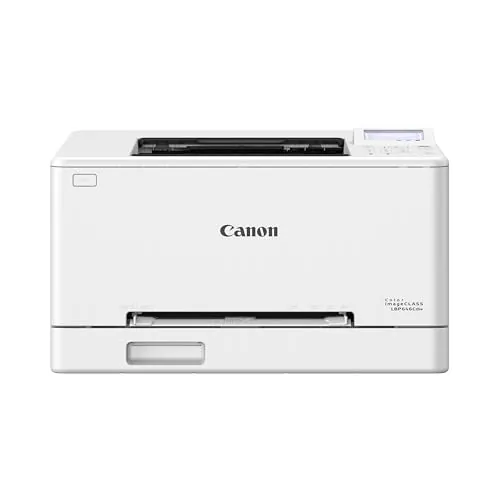
Canon MF753Cdw II vs LBP646Cdw: All-in-One Tasks, Paper Feed and Toner Fit
Canon's U.S. specs distinguish these by task and paper handling: the MF753Cdw II prints, scans, copies and faxes, with a 50-sheet duplex ADF and 50-sheet multipurpose tray. The LBP646Cdw is print-only, has a one-sheet manual feed, and is shorter and shallower. Both list the same 250-sheet cassette and USB/Ethernet/Wi-Fi options. They use different Canon toner families, so check the exact model before ordering supplies.
Read comparison
Canon PIXMA TS6520 vs Brother DCP-L2640DW: Color Printing or Batch Scanning?
These all-in-ones solve different parts of a home-office workflow. The Canon PIXMA TS6520 prints in color and has automatic two-sided printing, but its scanner is a flatbed with no document feeder, so you place originals one at a time. The Brother DCP-L2640DW prints and copies in black and white, yet it can scan in color and feeds up to 50 pages for multi-page jobs. Its duplex feature is for printing; Brother lists duplex scanning as unavailable. Check both the printed output you need and how you digitize paperwork before choosing.
Read comparison