
Products compared

Canon
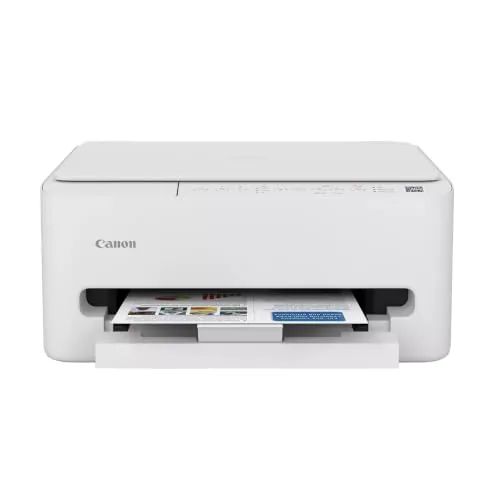
Canon PIXMA TS6520 Wireless Multi-Function Home Printer
U.S. white model; Canon SKU 7179C002; all-in-one inkjet with a 1.42-inch monochrome OLED.
Model TS6520
Amazon ASIN B0FMBTJLX6
Canon
Canon PIXMA TS4320 Wireless Multi-Function Home Printer
U.S. white model; Canon SKU 7181C002; all-in-one inkjet without an OLED display.
Model TS4320
Amazon ASIN B0FMBGXC2C
Differences that matter
See ink and printer status at the device
Canon PIXMA TS6520 Wireless Multi-Function Home Printer · Canon documents an OLED status and settings display on the TS6520; the TS4320 support specification lists Display as N/A.
View TS6520 on Amazon (paid link)Sources for At-printer display
Sources for Replacement ink
Sources for Paper loading and two-sided printing
Quick answer: the screen is the main documented upgrade
The TS6520 is the one to choose when you want a compact on-printer screen to check ink and status or change settings at the machine. Canon lists the TS4320 without a display. For print and scan workflow, however, the official specifications line up closely: both list the same ink family, one 100-sheet cassette, automatic two-sided printing and a flatbed scanner without an ADF.
That means the OLED does not solve a paper-feed or multi-page scan need. If your deciding question is whether the TS6520 is a better scanner or handles more originals at once, Canon's listed hardware does not support that conclusion.
Ink: check the family, not just the PIXMA name
Canon identifies a two-tank hybrid ink system for both printers: PG-295 pigment black and CL-286 dye color. The listed standard and XL options are PG-295 / PG-295XL and CL-286 / CL-286XL. The same codes are a useful practical tie-breaker if you already keep this ink on hand, but they do not show which printer will cost less to run; use-specific page yield and actual purchase cost are outside this comparison.
At checkout, match the exact cartridge number and printer generation on the package. Similar PIXMA model names can use other codes, so the family name alone is not a safe replacement check.
Paper handling: one cassette and automatic print duplex on each
Canon lists a cassette with capacity for 100 sheets of plain paper and automatic two-sided printing for each model. For ordinary home documents, that supports a straightforward workflow: load the paper you use most, then let the printer print both sides when the job is set up for duplex.
If your routine alternates letter paper, envelopes or photo stock, remember this comparison documents one cassette on each. Plan for changing the loaded stock as needed. The automatic duplex statement is about printed sheets; it should not be read as automatic document feeding for scans or copies.
Scanning: useful flatbed tasks, but pages are handled one at a time
Canon lists a flatbed scanner, with ADF capacity N/A, on both printers. Its support specifications list saving to a computer, attaching to email, multi-page PDF, scanning to the Canon PRINT app and wireless scanning. The online manuals provide separate scanning-to-computer and scanning-to-phone/tablet instructions for each model series.
A multi-page PDF option describes the output file, not a tray that pulls in a stack of originals. If a household member scans a signed sheet now and then, flatbed placement is a simple fit. If work or school requires repeated unattended stacks, neither model provides the documented feeder mechanism; keep looking for an ADF-equipped all-in-one.
Before buying: check the exact listing and your routine
Confirm the selected printer code is TS6520 / 7179C002 or TS4320 / 7181C002. Both official Canon U.S. product pages list the model SKU and supply their exact identity; marketplace titles can be abbreviated, so check the selected variation before paying.
Then answer three practical questions: Will you use the TS6520 display at the printer? Are you comfortable loading one paper type in a single cassette? Can you place scan originals one by one on the glass? If the first answer is yes, the TS6520 has a documented reason to choose it. The other two answers are the same for both models and can point you toward a different printer class.
Product details
Canon PIXMA TS6520 Wireless Multi-Function Home Printer
- Supported ink family
- PG-295 or PG-295XL black; CL-286 or CL-286XL color Source
- Paper feed
- One cassette; Canon lists capacity as 100 sheets of plain paper Source
- Scanner and feeder
- Flatbed scanner; ADF capacity listed as N/A Source
- On-device display
- 1.42-inch monochrome OLED; Canon says it shows ink levels and printer status and allows settings changes Source
Canon PIXMA TS4320 Wireless Multi-Function Home Printer
- Supported ink family
- PG-295 or PG-295XL black; CL-286 or CL-286XL color Source
- Paper feed
- One cassette; Canon lists capacity as 100 sheets of plain paper Source
- Scanner and feeder
- Flatbed scanner; ADF capacity listed as N/A Source
- On-device display
- Display listed as N/A; printer still has a physical control panel Source
Before you buy
Community discussions
Checking a grayscale photo on your usual matte paper
Canon PIXMA TS4320 Wireless Multi-Function Home Printer
A new PIXMA TS4320 owner reported a blue tint in grayscale photos. They tried matte paper, other print settings and nozzle cleaning, and were still looking for a solution.
What to check
Make one grayscale test print on the exact paper you use. If both machines fit your desk, see whether their different control panels affect how you reach the print settings.
Proofing color on the paper you buy
Canon PIXMA TS6520 Wireless Multi-Function Home Printer
A TS6520 owner reported that prints on matte sticker paper and plain paper looked less saturated than they wanted. Changing the app they printed from did not resolve it in their setup.
What to check
Print a small proof from your usual app before loading a full project. Check the result independently from the shared ink family and tray size.
Common questions
Do the TS6520 and TS4320 use different ink cartridges?
No difference is listed by Canon: both use PG-295 or PG-295XL pigment black and CL-286 or CL-286XL dye color. Verify the code on the printer and ink package before checkout; this guide does not compare cartridge cost or page yield.Canon Support for PIXMA TS6520Canon Support for PIXMA TS4320
Does the TS6520 feed a stack of pages for scanning?
No. Canon lists a flatbed scanner and ADF capacity N/A for the TS6520. The TS4320 has the same listed scan hardware, so frequent unattended multi-page scanning is a reason to compare an ADF model instead.Canon Support for PIXMA TS6520Canon Support for PIXMA TS4320
Can both printers print automatically on both sides?
Canon lists automatic two-sided printing for each. That is a print-paper feature; it does not add an ADF for scanning originals.Canon PIXMA TS6520 Wireless Multi-Function Home PrinterCanon PIXMA TS4320 Wireless Multi-Function Home Printer
What does the TS6520 OLED add?
Canon says the 1.42-inch monochrome display can show ink levels and printer status and lets you change settings. It does not change the shared ink family, cassette, duplex-print listing or flatbed scan setup documented here.Canon PIXMA TS6520 Wireless Multi-Function Home PrinterCanon Support for PIXMA TS6520Canon Support for PIXMA TS4320
Sources and scope
This is a source-based comparison of the assigned U.S. PIXMA TS6520 (SKU 7179C002) and TS4320 (SKU 7181C002), not hands-on testing. Canon's specifications show the same listed ink family, cassette capacity, automatic two-sided printing and flatbed scan hardware for both. Neither has an ADF. Canon's online manuals document loading and scanning workflows, but no print-quality, scan-speed, reliability, yield-cost or cost-per-page comparison is claimed. Confirm the printer model and ink code on the exact product and cartridge package before ordering.
Related comparisons

Canon PIXMA TR7120 vs TS6520: ADF, Ink, Duplex & Space Compared
The Canon PIXMA TR7120 adds a 35-sheet letter / 5-sheet legal automatic document feeder (ADF); the TS6520 scans from its flatbed only. Both use PG-295 black and CL-286 color ink, list a 100-sheet plain-paper cassette, and print automatically on both sides. Compare the feeder's real workflow value with the height and access your space allows.
Read comparisonCanon PIXMA TR7120 vs TS4320: ADF, Ink and Paper Handling
For the exact white U.S. models TR7120 (7178C002) and TS4320 (7181C002), the meaningful difference is document handling: TR7120 has a 35-sheet ADF and 1.42-inch OLED, while TS4320 has a flatbed and no display. Canon lists the same PG-295 black and CL-286 color cartridges, a 100-sheet plain-paper cassette, dual-band Wi-Fi and USB for both. Both print two-sided; that does not establish automatic duplex scanning.
Read comparison