
Products compared
Cricut
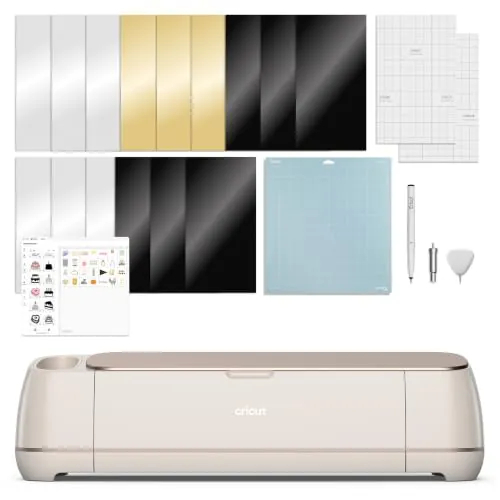
Cricut Maker 4 Seashell Digital Content Bundle
The exact listing is the Maker 4 Seashell Digital Content Bundle. Cricut lists specialty-tool and material workflows for Maker 4, but its product page does not verify everything included in this retailer bundle.
Model 8002707
Amazon ASIN B0DTQBZ3J3
Cricut
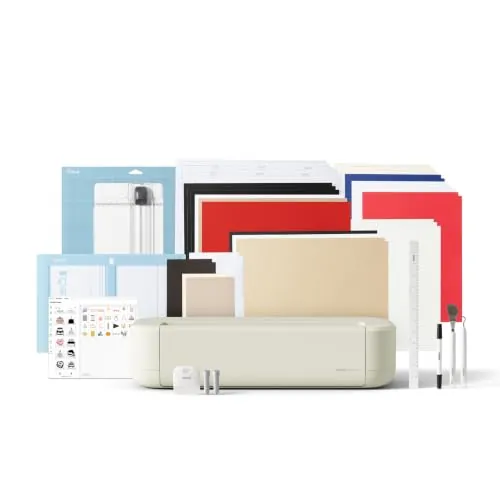
Cricut Explore 5 Taupe Essential Bundle + Digital Content
The exact listing is the Explore 5 Taupe Essential Bundle + Digital Content. Cricut lists Explore 5 workflows for decals, stickers, apparel, printable materials, vinyl, iron-on, cardstock and cards. Its general bundle guide does not confirm the contents of this retailer package.
Model 8003147
Amazon ASIN B0GJFL3WHS
Differences that matter
A planned material/process specifically uses Maker 4 specialty tooling
Cricut Maker 4 Seashell Digital Content Bundle · Cricut documents Maker 4 engraving and Knife Blade paths; verify the exact stock/tool pair and whether the separate tool is in the offer.
View 8002707 on Amazon (paid link)Sources for Tool and project paths
Sources for Long matless Smart Materials
Sources for Bundle contents and digital content
Sources for Design Space and Access
Start with the project, not the material-count headline
Cricut describes Maker 4 with an expanded tool set and examples including engraving and Knife Blade work on specified chipboard or balsa. Selected tools are sold separately, so compare the exact material/tool pairing with the box list for the offer you plan to buy.
Explore 5 is documented for everyday decals, stickers, apparel, cards, vinyl, iron-on, cardstock and printable projects. If those are the jobs you expect to make, shortlist it without paying for a specialty path you do not plan to use. Material counts describe maker-listed compatibility, not a guaranteed result on every stock.
A long matless run is shared; width still needs a check
Both Cricut product pages describe Smart Materials cuts without a mat up to 12 ft. Maker 4’s page provides an 11.7 in x 12 ft maximum size; the reviewed Explore 5 page states the length but not a matching maximum width.
Before buying for a long sign, decal, or apparel graphic, measure design width and confirm the material and settings. The equal listed length does not establish equal width or cutting results.
Do not assume the generic bundle table is your exact box
These are different marketplace offers: Maker 4 Seashell Digital Content Bundle and Explore 5 Taupe Essential Bundle + Digital Content. Cricut says Explore 5 machines come in varied bundles and tools shown may differ. Its current maker-site list is not proof of every item in this ASIN.
Check the live offer for the included machine, blade/tool, mat, materials, hand tools, and digital entitlement. Cricut’s support says to complete New Product Setup and then find the included image set under Purchased/Image Sets in Design Space.
The app and a membership are separate decisions
Cricut describes Design Space as free and says Maker 4 does not require a subscription. Its Explore 5 page also presents a free Design Space app and optional Cricut Access for additional library content.
A bonus image set tied to an offer is distinct from an ongoing Access membership. If the entitlement affects your choice, check the exact offer and confirm it appears in the account after setup.
Product details
Cricut Maker 4 Seashell Digital Content Bundle
Shortlist when a planned project uses a Maker 4-listed specialty tool/material path; confirm the exact pairing and offer inventory.
- Published tool/material range
- 300+ materials; 13 compatible tools. Selected specialty tools sold separately. Source
- Smart Materials cut size
- Maximum listed size 11.7 in x 12 ft; matless continuous cuts up to 12 ft. Source
- Digital content setup
- Cricut says included image sets appear under Purchased after new machine setup; exact offer image count not verified. Source
Cricut Explore 5 Taupe Essential Bundle + Digital Content
Shortlist for common workflows Cricut lists when the exact kit and account-linked content meet your project plan.
- Published materials/workflows
- 100+ materials; Cricut lists vinyl, iron-on, cardstock, printable projects, decals, stickers, apparel and cards. Source
- Matless length
- Smart Vinyl and Smart Iron-On cuts up to 12 ft without a mat; reviewed exact-model source does not state a matching maximum cut width. Source
- Design Space
- Free Design Space app; additional content can be purchased individually or accessed through optional Cricut Access. Source
Before you buy
Community discussions
Which projects will you make first?
Cricut Maker 4 Seashell Digital Content Bundle
A Maker 4 owner bought it with pottery stencils in mind and says their first projects included cards and labels.
What to check
List the projects you plan to make first. Check the material path for cards and labels, then check any specialty tools you would need for later projects.
Common questions
Is a 12-foot matless cut a reason to choose Maker 4?
Not on length alone. Cricut lists matless Smart Materials cuts up to 12 ft for both. Maker 4’s page also lists a maximum cut size of 11.7 in x 12 ft; the reviewed Explore 5 source has no matching maximum-width figure. Check your project width and material.Cricut Maker 4 – The Premium Cutting MachineCricut Explore 5 | Cricut Shop
Which machine should I check for a specialty material?
Start with Cricut’s exact compatibility guidance. Maker 4’s page names engraving and Knife Blade use, including specified chipboard/balsa up to 2.4 mm; Explore 5 lists common materials and a separate Deep Cutting Tool for specified foam/rubber up to 1.5 mm. These are model-specific examples, not a general thickness ranking.Cricut Maker 4 – The Premium Cutting MachineCricut Explore 5 | Cricut Shop
Do I need Cricut Access to use either machine?
No. Cricut says Maker 4 does not require a subscription, and its Explore 5 page describes free Design Space with optional Access for additional library content. Check your offer separately for any included image set.Cricut Maker 4 – The Premium Cutting MachineCricut Explore 5 | Cricut Shop
How can I check what images came with the digital bundle?
Cricut says to finish machine setup and then look for included image sets in Design Space under Purchased/Image Sets. The available sources do not confirm the image count for either exact bundle.Cricut Explore & Cricut Maker Digital Content Bundle
Sources and scope
Feature-fit guidance from Cricut’s published specifications and support pages; no controlled cut-quality, speed, or durability testing. Manufacturer sources do not verify every item in either exact marketplace bundle.
Related comparisons
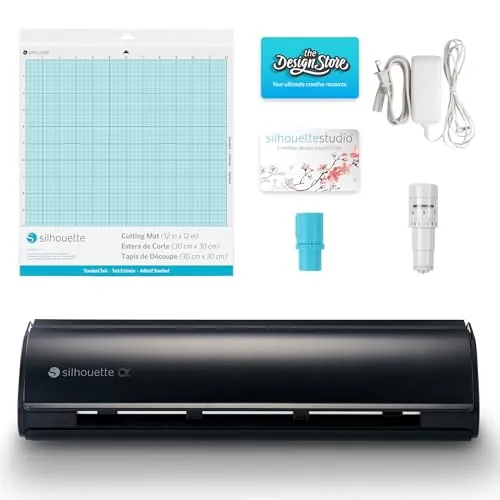
Cricut Explore 5 Essential Bundle vs Silhouette CAMEO 5 Alpha: Mat, Roll and SVG Fit
Cricut Explore 5 documents matless cuts up to 12 ft on Smart Vinyl or Smart Iron-On; Silhouette CAMEO 5 Alpha lists up to 16 ft with lined material. Their conditions differ. For outside SVG files, Cricut documents an upload path in Design Space, while Silhouette Studio Basic does not open SVG; the exact Alpha listing does not state an upgraded edition. Check your longest project, material type, desktop OS and exact bundle contents before choosing.
Read comparisonCricut Maker 4 vs Silhouette CAMEO 5 Alpha: Match the Machine to Your Craft Workflow
For Cricut Maker 4 (8002707, Seashell) versus Silhouette CAMEO 5 Alpha (SILH-CAMEO-5A, matte black), start with the exact project material and tool. Maker 4 documents its Adaptive Tool operations and matless Cricut Smart Materials workflow; CAMEO 5 Alpha lists a longer matless run with lined material and four-point Print & Cut registration. Software tiers and what comes in the exact seller box can also change the choice.
Read comparison