
Products compared
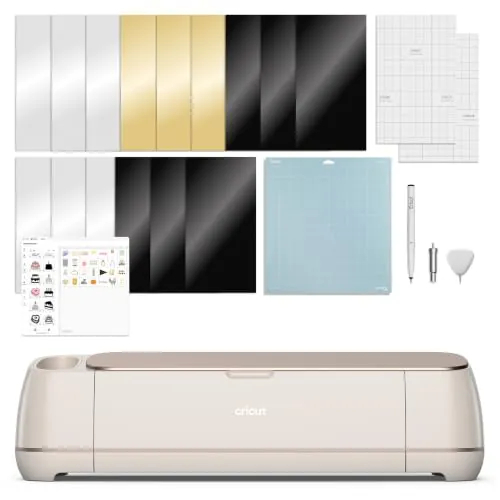
Cricut
Cricut Maker 4 Smart Cutting Machine (Seashell)
Maker 4 in Seashell. Cricut lists a Fine-Point Blade and housing, Accessory Adapter, USB-C cable, 12 × 12 in Light Grip mat, Fine Point Pen, Mini Weeder and starter material in its standard box; additional tools and accessories vary by project and seller offer.
Model 8002707
Amazon ASIN B0DTQBZ3J3
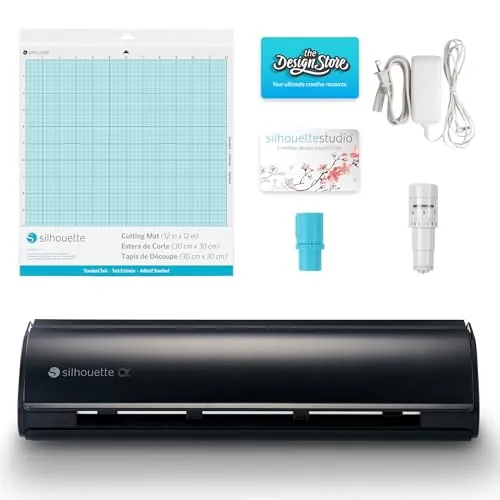
Silhouette America
Silhouette CAMEO 5 Alpha Smart Cutting Machine (Matte Black)
CAMEO 5 Alpha in matte black, not CAMEO 5 Alpha Plus. Silhouette’s exact-model page lists a 12-inch standard-tack cutting mat, AutoBlade Type B, Sketch Pens Adapter, AC adapter/power cable set and Studio software download; specialty tools beyond those listed should be checked separately.
Model SILH-CAMEO-5A
Amazon ASIN B0FQFYVF8B
Differences that matter
What matters most to you?
Choose a priority to see what it changes.
Sources for Matless material and listed run
Sources for Specialty-tool workflow
Sources for Design file and device workflow
Sources for Maker-listed maximum material thickness
Sources for Print & Cut registration
Start with the material and tool—not the machine name
The useful first question is what you plan to make and which exact material it uses. Maker 4’s guide names Adaptive Tool operations such as fabric cutting, metal engraving and leather debossing; it also says some tools are sold separately. CAMEO 5 Alpha lists a standard AutoBlade and pen adapter, then advertises additional tool options including embossing and foil stamping. Neither list proves that the other machine cannot perform an unlisted job.
Before comparing offers, note the exact technique and material, find each maker’s tool instructions, and confirm that the required accessory is compatible and included. A product title alone does not establish which tools come with a particular offer.
Long rolls have material-specific limits
Cricut says Maker 4 can feed Smart Materials without a mat, with a listed cut limit up to 12 ft; for other brands of vinyl or iron-on, Cricut requires a machine mat. Silhouette lists CAMEO 5 Alpha at 11.6 inches by 16 ft with lined material. Plan around the material named in each spec, not just the larger number.
Measure your design and the machine’s full in-feed/out-feed route on the work surface. If your material does not match the maker’s stated matless type, plan the appropriate mat workflow or ask the manufacturer about that specific stock.
Check design files, registration and software tiers
Both makers document Print & Cut. Silhouette lists a four-point registration-mark system on CAMEO 5 Alpha; Cricut’s Maker 4 guide lists Print Then Cut on white and colored materials but does not give a registration-point count. This is a feature-list comparison, not an alignment test.
For imported files, Cricut documents SVG uploads in Design Space. Silhouette’s Studio FAQ places SVG opening at Designer Edition or above and SVG saving at Business Edition. Silhouette Go is documented for iOS and Android; Cricut says Maker 4 can work offline through Design Space on desktop and iOS, not Android. Confirm current software version, platform and license needs before you buy.
Product details
Cricut Maker 4 Smart Cutting Machine (Seashell)
- Matless cut length
- Up to 12 ft for Cricut Smart Materials only; other brands of vinyl or iron-on must be used on a machine mat. Source
- Documented Maker 4 tool route
- Adaptive Tool System; Cricut lists fabric cutting, metal engraving and leather debossing. Required specialty tools may be sold separately. Source
- Maker-series listed material thickness
- Cricut lists 3/32 in (2.4 mm) maximum for Maker machines; check the exact material/tool instructions. Source
Silhouette CAMEO 5 Alpha Smart Cutting Machine (Matte Black)
- Lined-material cut length
- Silhouette lists 11.6 in × 16 ft with lined material; its specification does not make that length universal to arbitrary media. Source
- Print & Cut registration
- Silhouette lists a four-point registration-mark system. This is a manufacturer specification, not a measured alignment result. Source
- Maximum material thickness
- Silhouette lists 3 mm maximum; verify the exact material and operation rather than treating this as a universal cutting guarantee. Source
Before you buy
Community discussions
Planning a first stationery project
Silhouette CAMEO 5 Alpha Smart Cutting Machine (Matte Black)
A first-time CAMEO 5 Alpha owner used the machine for wedding stationery and considered the tools and software when choosing it.
What to check
List the paper, design files and tools your first project needs. Check which accessories the exact machine includes and which you would need to buy separately.
Learning the software on a first vinyl project
Cricut Maker 4 Smart Cutting Machine (Seashell)
A new Maker 4 owner described learning Design Space while putting together a layered vinyl design.
What to check
Try designing a small version of the project in the software. Check how you would manage layers and what materials or accessories you need before buying.
Common questions
Which machine has the longer matless cut listing?
Silhouette lists 11.6 in × 16 ft with lined material for CAMEO 5 Alpha. Cricut lists up to 12 ft for Smart Materials and requires a mat for other-brand vinyl and iron-on. Confirm your specific roll type and dimensions before planning a long cut.Cricut Maker 4 Quick Start GuideSilhouette CAMEO 5 Alpha | Professional Cutting Machine
Does either box include every specialty tool?
No such conclusion is supported. Cricut lists several specialty tools as sold separately. Silhouette’s base CAMEO 5 Alpha page lists the AutoBlade and Sketch Pen Adapter, while its additional tool options include embossing and foil tools. Check the exact offer and the tool needed for your material.Cricut Maker 4 Quick Start GuideSilhouette CAMEO 5 Alpha | Professional Cutting Machine
Can I use my own SVG designs?
Cricut documents uploading SVG files into Design Space. Silhouette’s software FAQ says SVG opening in Studio requires Designer Edition or higher and saving SVG requires Business Edition. Check the current software tier and the exact task you need before choosing.How to upload images into Design SpaceExplore Silhouette Software Suite
Is CAMEO 5 Alpha’s four-point registration a tested accuracy advantage?
No. Silhouette lists four-point registration on its product page, but this guide includes no matched Print & Cut test. Treat it as a documented feature, not a measured accuracy result.Silhouette CAMEO 5 Alpha | Professional Cutting Machine
Sources and scope
This is a manufacturer-documented feature and workflow comparison, not a controlled cutting test. Material ratings and tool claims are specific to the stated feed/material and required accessory; confirm exact compatibility and included contents before purchase.
Related comparisons
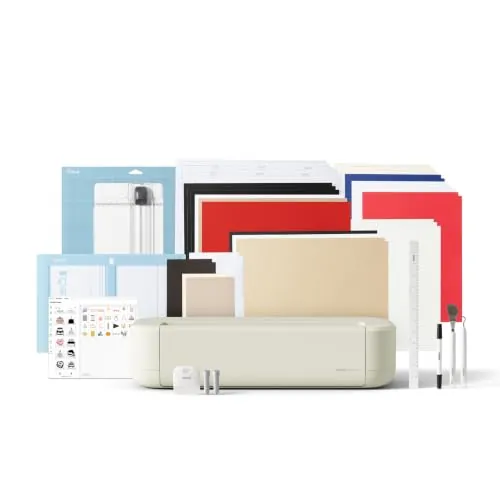
Cricut Maker 4 vs Explore 5: Match the Tool Path to Your Projects
This U.S. comparison is for the Maker 4 Seashell Digital Content Bundle and Explore 5 Taupe Essential Bundle + Digital Content. Match the actual material and tool first: Maker 4 has Cricut-listed engraving and Knife Blade paths, while Explore 5 is documented for common vinyl, paper, printable, and card workflows. Both list matless cuts up to 12 ft, so check width and exact kit contents before choosing.
Read comparisonCricut Explore 5 Essential Bundle vs Silhouette CAMEO 5 Alpha: Mat, Roll and SVG Fit
Cricut Explore 5 documents matless cuts up to 12 ft on Smart Vinyl or Smart Iron-On; Silhouette CAMEO 5 Alpha lists up to 16 ft with lined material. Their conditions differ. For outside SVG files, Cricut documents an upload path in Design Space, while Silhouette Studio Basic does not open SVG; the exact Alpha listing does not state an upgraded edition. Check your longest project, material type, desktop OS and exact bundle contents before choosing.
Read comparison