
Products compared
DYMO
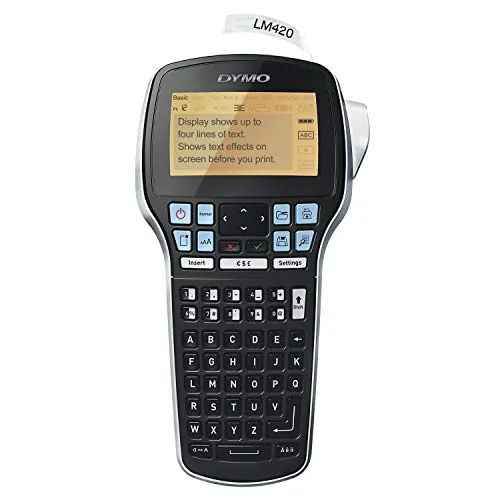
DYMO LabelManager 420P Label Maker
U.S. listing for the rechargeable LabelManager 420P with charging adapter; DYMO's exact 420P page lists a D1 starter cassette, battery pack, adapter, USB cable and quick-start guide.
Model LabelManager 420P (item 1768815)
Amazon ASIN B004647694
Brother
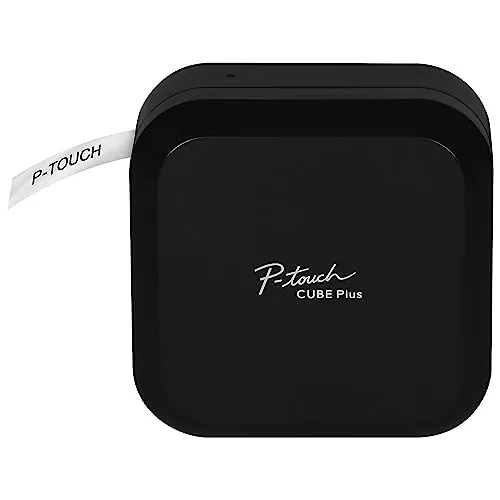
Brother P-touch CUBE Plus PT-P710BT Bluetooth Label Maker
Black retailer offer. The exact U.S. product page names the PT-P710BT and lists phone/tablet apps, computer software, a built-in Li-ion battery, USB cable and two starter tapes.
Model PT-P710BT
Amazon ASIN B07HB8LNSY
Differences that matter
What matters most to you?
Choose a priority to see what it changes.
Sources for Tape family and maximum listed width
Sources for Recharge and listed package
Sources for Current computer/app setup check
Choose the input routine before the labeler
DYMO's 420P includes a keyboard and display, and its manual says it can work as a standalone label printer. It also supports a USB link to a computer. PT-P710BT has no built-in keyboard: Brother describes phone/tablet label design with its apps over Bluetooth and a P-touch Editor workflow from a computer over USB. The U.S. product page also mentions laptop Bluetooth, while the exact-model brochure maps PC/Mac to USB; verify that wireless laptop route with Brother if it is a must-have.
That gives a concrete split: choose the 420P when quick entry at the machine is important; choose Brother when you want to compose from a mobile device or desktop software. Both have computer paths, so simply owning a computer does not decide the comparison.
Match your cassette family and label width
The 420P guide names DYMO D1 widths of 6, 9, 12 and 19 mm. Brother's PT-P710BT brochure names P-touch TZe tape up to 24 mm. If you already have tape, check the printed cassette family before ordering a machine; do not plan to reuse one brand's cassette in the other's labeler.
For a width requirement above 19 mm and no greater than 24 mm, Brother has the documented width ceiling in this pair. At widths up to 19 mm, either product's listed range may work, but the tape family remains different. This is a media-fit comparison, not an output-quality result.
Check charging, starter tape and software
DYMO's U.S. 420P product page lists a rechargeable battery pack, charging adapter and USB cable, along with a black-on-white 19 mm × 10 ft D1 starter tape. Brother's exact U.S. page lists a built-in Li-ion battery, USB cable and two 24 mm starter tapes: black on white and black on premium glitter gold. If a wall adapter or specific tape length matters, confirm the exact retailer carton before checkout.
Software requirements change. DYMO's exact model page names DYMO Connect for Desktop, while Brother's U.S. product and downloads pages name software for the exact model. Check those exact pages for your operating system and desired app; the 420P guide's older DYMO Label v.8 references are not current compatibility proof.
Product details
DYMO LabelManager 420P Label Maker
- Input and connection
- On-device keyboard and four-line backlit display for standalone entry; USB computer connection is also documented. Source
- Tape family and widths
- DYMO D1 cassettes in 6, 9, 12 and 19 mm widths. Source
- Power and included items
- Rechargeable battery pack; the exact 420P product page lists a charging adapter, USB cable and black-on-white 19 mm × 10 ft D1 starter cassette. Source
Brother P-touch CUBE Plus PT-P710BT Bluetooth Label Maker
- Input and connection
- No built-in keyboard; the exact-model brochure maps Bluetooth to mobile devices and USB to PC/Mac. The U.S. product page also mentions laptop Bluetooth, so verify that path if essential. Source
- Tape family and widths
- Brother P-touch TZe tape, maximum 24 mm; the brochure explicitly names TZe for PT-P710BT. Source
- Power and included items
- Built-in Li-ion battery and USB cable; exact U.S. page lists black-on-white 24 mm × 4 m and black-on-premium-glitter-gold 24 mm × 2 m starter tapes. Source
Before you buy
Community discussions
Check the labeler against your carry routine
Brother P-touch CUBE Plus PT-P710BT Bluetooth Label Maker
A shopper looking for a Bluetooth label printer to carry in a backpack said the PT-P710BT was too large for all-day carry.
What to check
If you plan to carry a label maker all day, compare the PT-P710BT and any case with your bag before choosing; one shopper ruled it out for their backpack routine.
Common questions
Can I enter labels directly on the machine?
The DYMO LabelManager 420P has its own keyboard and display and its user guide describes standalone printing. Brother describes the PT-P710BT as keyboard-less and controlled from mobile apps or computer software.DYMO LabelManager 420P High-Performance Label MakerLabelManager 420P User GuideP-touch CUBE Plus PTP710BT Bluetooth Connected Label Maker
Are DYMO D1 and Brother TZe tapes interchangeable?
No interchangeability is documented. The 420P guide specifies DYMO D1 cassettes; the PT-P710BT brochure specifies Brother TZe. Match the tape family to the exact labeler, then check width.LabelManager 420P User GuideP-touch CUBE Plus PT-P710BT Brochure
Which one can print on wider tape?
The 420P's D1 choices go up to 19 mm. The PT-P710BT brochure lists TZe tape up to 24 mm. Those are each maker's published maximum tape widths, not a print-quality comparison.LabelManager 420P User GuideP-touch CUBE Plus PT-P710BT Brochure
Do both have a USB computer workflow?
Yes. DYMO documents a USB computer connection for the 420P, and Brother's exact-model brochure maps USB to PC/Mac for PT-P710BT. Brother's U.S. product page also mentions laptop Bluetooth; if that wireless path is essential, verify current software support before buying.LabelManager 420P User GuideP-touch CUBE Plus PT-P710BT BrochureP-touch CUBE Plus PTP710BT Bluetooth Connected Label Maker
Sources and scope
This is a feature and setup comparison from model-specific manufacturer material, not a print-quality, speed, adhesion, durability or ease-of-use test. DYMO's 420P supports D1 tape through 19 mm; Brother's PT-P710BT brochure specifies TZe through 24 mm. Current operating-system requirements and app availability can change; check the exact model support/download page for the device you intend to use. The DYMO 420P guide describes older DYMO Label software, so it is not treated as proof of current software compatibility.
Related comparisons
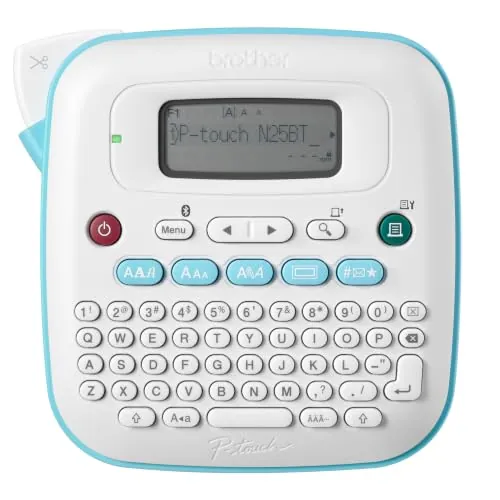
Brother PT-P710BT vs PT-N25BT: Choose by Tape and Input Style
Both Brother label makers support Design&Print 2 from a mobile device, but their physical workflow and media differ. The PT-N25BT adds a QWERTY keyboard and preview screen while using only 12 mm Btag tape. The keyboardless PT-P710BT uses TZe tape up to 24 mm and supports desktop P-touch Editor through its included USB cable. Check your tape cassette, required width, and host connection before buying.
Read comparison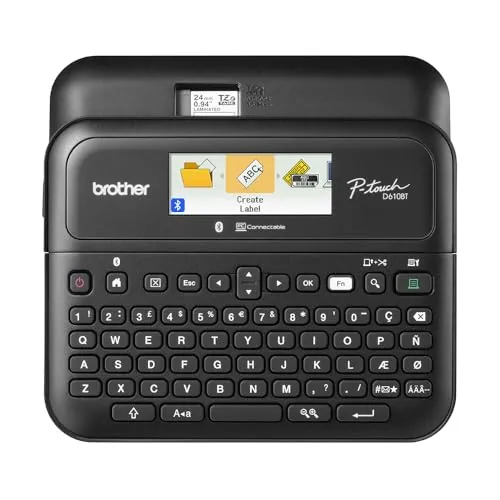
Brother PT-D610BT vs PT-P710BT: On-Printer Keyboard or App-First Labels?
Both exact US Brother models use TZe tape up to 24 mm. The practical choice is where you compose a label: the PT-D610BT has a QWERTY keyboard and two-line color display, while the PT-P710BT has no screen or keyboard and is driven from Brother mobile apps or P-touch Editor on a computer. Their Brother US standard-box contents and power paths also differ; check the seller's carton before assuming it matches Brother's standard list.
Read comparison