
Products compared
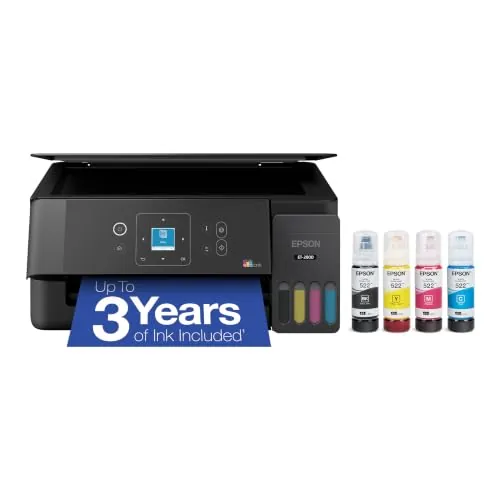
Epson
Epson EcoTank ET-2900 Wireless All-in-One Color Supertank Printer - Black
Black U.S. ET-2900, identified by Epson as model C11CL63201.
Model C11CL63201
Amazon ASIN B0GSSBQGX7
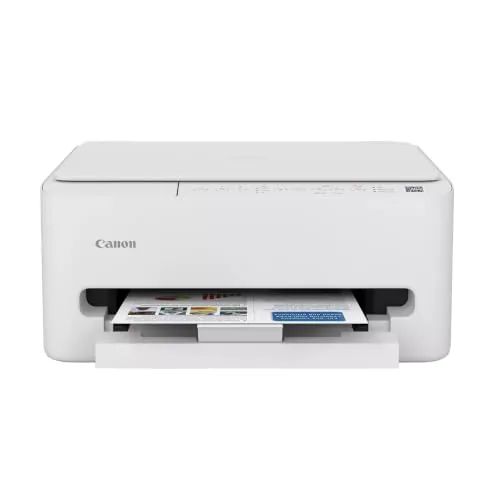
Canon
Canon PIXMA TS4320 Wireless Multi-Function Home Printer - White
White U.S. PIXMA TS4320, Canon SKU 7181C002.
Model 7181C002
Amazon ASIN B0FMBGXC2C
Differences that matter
What matters most to you?
Choose a priority to see what it changes.
Sources for Ink replenishment task
Decide what ink handling you want
These exact U.S. models ask you to replenish ink differently. Epson's black ET-2900 C11CL63201 uses built-in tanks refilled with uniquely keyed EcoFit bottles. Canon's white TS4320 7181C002 uses PG-295 black and CL-286 color cartridges. If you would rather pour ink into a tank than replace cartridges, that points toward Epson; if swapping two cartridges is the routine you prefer, that points toward Canon.
That is a supplies-handling distinction, not a cost verdict. This guide does not compare refill prices, actual yield, how often each household will replace supplies, or total ownership cost. Check that the correct bottles or cartridges are easy for you to source before ordering.
Treat the TS4320 duplex specification as unresolved
Epson's ET-2900-series guide is explicit about its path: the computer driver prints odd and even pages separately, and you turn or reload the paper between passes. The guide says the option is unavailable for borderless printing, lists manual duplex only for supported North American paper types, and notes that the Windows feature may fail over a network or shared printer.
Canon's exact TS4320 U.S. support page lists 2-sided printing; Canon's product page advertises auto 2-sided printing, and its Windows driver guide describes printing without turning the paper for Letter or A4. But the ENERGY STAR record for Canon TS4320 / K10633 says automatic duplex output is not capable. The sources do not explain why they disagree. Do not make automatic duplex the reason to select the TS4320 until Canon confirms how that specification applies to your exact SKU and setup.
Check loading access and the pages you scan
Both list 100 sheets of plain paper, but the feed path is different: the Epson guide shows a rear paper feeder and Canon identifies a cassette. Measure the shelf height above an ET-2900 and the forward space available for a TS4320 cassette and output tray before choosing a home for either printer. The published sheet count does not include working clearance.
Both support mobile scanning in their manufacturer documentation: Epson's exact support page names Smart Panel for iOS and Android, and Canon's TS4320 support lists scanning to Canon PRINT and wireless scanning. Canon specifies a flatbed scanner and no ADF, so multi-page originals need to be handled individually on the glass. Choose by the app and workflow you would actually use; these specifications do not compare scan quality or speed.
Product details
Epson EcoTank ET-2900 Wireless All-in-One Color Supertank Printer - Black
Epson identifies the black ET-2900 as C11CL63201. Its product page describes large built-in tanks and uniquely keyed EcoFit bottles; its guide shows the rear paper feeder and manual duplex workflow. Epson's exact support page says Smart Panel supports printer or scanner operations from iOS and Android devices.
Canon PIXMA TS4320 Wireless Multi-Function Home Printer - White
Canon's exact U.S. product page identifies SKU 7181C002 and lists two-sided printing. Its exact TS4320 support page names PG-295 black and CL-286 color cartridges, a 100-sheet cassette, a flatbed scanner and scan-to-Canon-PRINT support. Duplex documentation conflicts with an exact-model ENERGY STAR record, so verify that feature on the unit and driver you intend to use.
Before you buy
Community discussions
Testing the app you use to print from an iPad
Epson EcoTank ET-2900 Wireless All-in-One Color Supertank Printer - Black
An EcoTank ET-2900 owner reported that a phone and an iPad stopped printing reliably after initially working in Cricut Design Space and Canva. Printing from their Mac continued to work.
What to check
If most jobs start on a phone or tablet, verify the mobile route before comparing ink supplies. Try a multipage job from that device as well as the printer’s own app.
Common questions
Does the Canon PIXMA TS4320 have automatic duplex printing?
Canon's exact U.S. TS4320 support and product pages, plus its TS4300-series Windows driver guide, describe automatic two-sided printing for Letter or A4. However, an ENERGY STAR record for Canon TS4320 / K10633 says automatic duplex output is not capable. Confirm with Canon for the exact 7181C002 unit and driver before relying on it.Canon PIXMA TS4320 Support and Technical SpecificationsCanon PIXMA TS4320 U.S. product pageCanon TS4300 Series Manual and Model ListCanon TS4300 Series Windows Driver Duplex PrintingENERGY STAR Certified Canon TS4320 record (conflict check only)
How is two-sided printing handled on the Epson ET-2900?
The guide that explicitly covers the ET-2900 series describes manual two-sided printing in its Windows example: after odd pages print, turn or reload the paper for the even pages. It says this is unavailable for borderless printing, and the North American supported-paper list says manual two-sided printing only.Epson ET-2900 Series User's Guide
Are the paper capacities different?
Both manufacturers list a 100-sheet capacity; Canon specifies plain paper. Epson's guide shows a rear paper feeder, while Canon lists a cassette. Loading direction may matter more than capacity if a printer will sit under a shelf or close to a wall.Epson EcoTank ET-2900 Black (C11CL63201) product pageEpson ET-2900 Series User's GuideCanon PIXMA TS4320 Support and Technical Specifications
Can I scan to a phone from both printers?
Epson's exact support page says ET-2900 supports Smart Panel printer or scanner operations on iOS and Android. Canon's TS4320 support page lists scan to Canon PRINT app and wireless scanning. Both are flatbed workflows; the Canon support page lists no ADF.Epson ET-2900 (C11CL63201) SupportCanon PIXMA TS4320 Support and Technical Specifications
Sources and scope
Canon's exact TS4320 U.S. product and support pages, plus its TS4300-series Windows driver guide that lists TS4320 in scope, describe automatic two-sided printing for Letter or A4. An ENERGY STAR record for Canon TS4320 / K10633 says automatic duplex output is not capable. This guide cannot reconcile the discrepancy, so do not rely on automatic duplex without checking the exact unit, driver and current manufacturer support. Epson's ET-2900-series guide documents only manual two-sided printing for North American paper guidance; its Windows example requires turning/reloading paper, excludes borderless printing and notes network/shared-printer limits. No ink-cost, yield, print-quality or speed winner is claimed.
- Epson EcoTank ET-2900 Black (C11CL63201) product page
- Epson ET-2900 (C11CL63201) Support
- Epson ET-2900 Series User's Guide
- Canon PIXMA TS4320 Support and Technical Specifications
- Canon PIXMA TS4320 U.S. product page
- Canon TS4300 Series Manual and Model List
- Canon TS4300 Series Windows Driver Duplex Printing
- Canon TS4300 Series Scanning to Smartphone/Tablet
- ENERGY STAR Certified Canon TS4320 record (conflict check only)
Related comparisons

Canon PIXMA TR7120 vs TS4320: ADF, Ink and Paper Handling
For the exact white U.S. models TR7120 (7178C002) and TS4320 (7181C002), the meaningful difference is document handling: TR7120 has a 35-sheet ADF and 1.42-inch OLED, while TS4320 has a flatbed and no display. Canon lists the same PG-295 black and CL-286 color cartridges, a 100-sheet plain-paper cassette, dual-band Wi-Fi and USB for both. Both print two-sided; that does not establish automatic duplex scanning.
Read comparisonCanon PIXMA TR7120 vs Epson EcoTank ET-2900: Ink, Scanning and Two-Sided Printing
The Canon PIXMA TR7120 (7178C002) and Epson EcoTank ET-2900 (C11CL63201) handle ink and paper differently. Canon replaces PG-295/CL-286 cartridges, feeds stacks of compatible originals through a 35-sheet ADF, and prints two-sided automatically. Epson refills built-in tanks with keyed EcoFit bottles and scans on a flatbed; its computer driver prints odd and even pages separately, asking you to turn the paper between sides. Both list a 100-sheet plain-paper supply, but Canon uses a cassette and Epson a rear feeder.
Read comparison