
Products compared

Canon
Canon PIXMA TR7120 Wireless Multi-Function Home Printer
White all-in-one inkjet with a two-cartridge hybrid system, flatbed plus ADF, automatic two-sided printing and a 100-sheet plain-paper cassette.
Model TR7120 (7178C002)
Amazon ASIN B0FMB4JBJ8
Epson
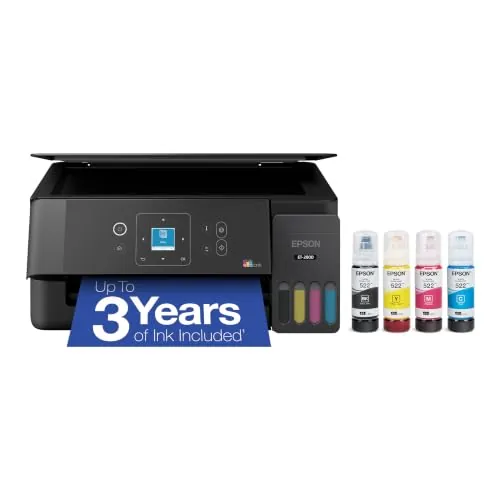
Epson EcoTank ET-2900 Wireless All-in-One Color Supertank Printer – Black
Black all-in-one with built-in refill tanks, keyed EcoFit bottles, a flatbed scanner and a 100-sheet rear paper feeder.
Model ET-2900 (C11CL63201)
Amazon ASIN B0GSSBQGX7
Differences that matter
What matters most to you?
Choose a priority to see what it changes.
Sources for Scanning a stack versus a single original
Choose the recurring ink task, not a claimed savings number
Canon's exact TR7120 page identifies a two-cartridge hybrid supply system and lists PG-295 pigment black and CL-286 dye color cartridges. Epson's exact black ET-2900 page identifies built-in tanks and keyed EcoFit bottles. Those facts answer how you replenish ink; they do not tell how long supplies last in your home or what each printed page will cost.
Before buying, note the exact supply code you would keep on hand and whether you prefer a cartridge replacement or a bottle refill. Compare the printer and replacement supplies at current checkout for your own likely usage; this guide does not add a yield-to-cost estimate or break-even claim.
For scanning, count the pages and inspect the originals
The Canon TR7120 ADF can take a compatible group of same-size, same-weight plain-paper originals: up to 35 sheets for A4/Letter or 5 sheets for Legal. The originals face up in the feeder. The manual says other sizes are single-sheet, and warns against feeding wrinkled, torn, glued, coated or sticky-noted pages, photos, and documents with clips or staples. Use the platen for those originals.
The ADF does not make duplex scanning automatic. Canon's instructions say to turn a double-sided original and scan the other face separately. For an inbox stack of 80 Letter forms, plan multiple ADF batches, not one full-stack pass. Epson's ET-2900 has a flatbed; Epson's shared guide says ADF is reserved for ET-4900/L5390, so place each original on the glass one at a time.
Separate print duplex from scan duplex
For printing, Canon lists automatic two-sided output. Epson's ET-2900 computer driver instead prints the odd pages first, then asks you to turn the stack before it prints the even pages; Epson says this option does not work for borderless printing. If your routine includes two-sided handouts, this is a recurring handling difference.
This distinction does not carry over to scanning. The Canon's ADF still cannot automatically scan both faces of a duplex original, so flip those pages and scan the reverse side. Epson's ET-2900 scan path is the flatbed, where each original is placed individually.
Plan the paper path at your desk
Both manufacturers list 100 sheets of plain paper, but the intake differs. Canon lists a cassette. Epson lists a rear feeder; its ET-2900 manual directs you to raise/pull out the support, center the paper with printable side up, load short-edge first, set the size and type on the LCD, and slide out the output tray. The manual says to return unused paper to its package if it will remain loaded for a while.
Measure the actual shelf and wall clearance behind the Epson and front clearance for its output tray. If changing from plain letter paper to specialty media, use the exact supported-media list and paper-specific capacity, then select the correct media type; the 100-sheet headline applies to the plain-paper tray, not every stock.
Product details
Canon PIXMA TR7120 Wireless Multi-Function Home Printer
- Ink system
- Two-cartridge hybrid system; Canon lists PG-295 pigment black and CL-286 dye color cartridge supplies. Source
- Scanning
- Flatbed plus ADF: up to 35 same-size plain-paper sheets for A4/Letter or up to 5 Legal sheets; double-sided originals cannot be scanned automatically through the ADF. Source
- Two-sided printing and paper
- Automatic two-sided printing; 100 sheets of plain paper in its cassette. Source
Epson EcoTank ET-2900 Wireless All-in-One Color Supertank Printer – Black
- Ink system
- Built-in ink tanks refill from uniquely keyed EcoFit bottles; Epson says bottle fit is designed to avoid mix-ups. Source
- Scanning
- High-resolution flatbed scanner. Epson's shared guide says ADF is only available on ET-4900/L5390, not the ET-2900 series. Source
- Two-sided printing and paper
- The computer driver prints odd pages, then prompts you to turn the paper and print even pages; not available for borderless printing. 100-sheet paper tray, loaded from the rear feeder. Source
Before you buy
Community discussions
Checking the paper path with sticker stock
Canon PIXMA TR7120 Wireless Multi-Function Home Printer
A TR7120 owner said a new pack of sticker paper they had used before stopped feeding consistently.
What to check
If you print stickers, check the exact stock against Canon’s media and loading guidance. Try a few sheets from the new pack before a larger job.
Common questions
Does the Canon TR7120 scan both sides of a document automatically?
No. Canon's TR7100-series ADF instructions, linked from the exact TR7120 U.S. support page, state that a double-sided original cannot be scanned automatically through the ADF. You must turn it and scan the second side separately. The product's automatic two-sided printing feature applies to printed pages, not duplex scanning.Canon Support for PIXMA TR7120TR7100 Series User Guide: Loading Documents in the ADF
How many pages can the TR7120 ADF take?
Canon lists up to 35 A4/Letter plain-paper originals or 5 Legal sheets. Its manual specifies same-size, same-thickness, same-weight plain documents, and only one sheet for other listed sizes. It also excludes originals such as photos, coated pages, sticky notes and documents with fasteners from the ADF instructions.PIXMA TR7120 Wireless Multi-Function Home Printer — U.S. Product PageTR7100 Series User Guide: Supported Originals
Does the Epson ET-2900 automatically print on both sides?
The ET-2900-series guide documents driver-based two-sided printing by separate odd-page and even-page passes: after the first pass, turn the paper according to the driver instructions. Epson says this option is unavailable for borderless printing. This is manual paper handling, unlike the TR7120's listed automatic two-sided printing.ET-2900 Series User's Guide: Printing on 2-SidesPIXMA TR7120 Wireless Multi-Function Home Printer — U.S. Product Page
Can I compare the two ink systems by lifetime cost from these specs?
No. The sources identify Canon's replacement cartridges and Epson's keyed bottle-refilled tanks, but this comparison does not model your print volume, page coverage, settings, media, replacement ink purchases or actual yield. Decide first which replenishment task you prefer, then compare current printer and supply offers separately for your own use pattern.PIXMA TR7120 Wireless Multi-Function Home Printer — U.S. Product PageEcoTank ET-2900 Wireless All-in-One Color Supertank Printer — Black, Model C11CL63201
Sources and scope
This guide compares documented supply and paper-handling workflows; it does not calculate lifetime ink cost or claim a print-quality, speed, reliability, or savings winner. Canon's TR7100-series guide applies to the TR7120 because Canon's exact-model support page links that series manual. Epson's shared ET-2900-series guide states ADF is only available on ET-4900/L5390, not ET-2900. Canon's ADF is limited by document size and stock, and it does not automatically scan both sides of a double-sided original. Epson's two-sided print procedure requires user handling between sides and is unavailable for borderless printing.
- PIXMA TR7120 Wireless Multi-Function Home Printer — U.S. Product Page
- Canon Support for PIXMA TR7120
- TR7100 Series User Guide: Loading Documents in the ADF
- TR7100 Series User Guide: Supported Originals
- EcoTank ET-2900 Wireless All-in-One Color Supertank Printer — Black, Model C11CL63201
- Epson Shared User's Guide: Introduction to the Manuals (ET-2900 Series Scope)
- ET-2900 Series User's Guide: Printing on 2-Sides
- ET-2900 Series User's Guide: Loading Paper in the Rear Paper Feeder
Related comparisons

Canon PIXMA TR7120 vs TR8620a: Ink, Paper Feeds and Scanning
Both printers can automatically print on both sides and use an ADF, but neither automatically scans both sides of an original through that feeder. TR7120 holds up to 35 Letter sheets in its ADF; TR8620a holds 20 and adds fax, five individual ink tanks, a 100-sheet rear feed and Ethernet. Match the exact cartridge family and the paper or scan task you do most.
Read comparison
Canon PIXMA TR7120 vs TS6520: ADF, Ink, Duplex & Space Compared
The Canon PIXMA TR7120 adds a 35-sheet letter / 5-sheet legal automatic document feeder (ADF); the TS6520 scans from its flatbed only. Both use PG-295 black and CL-286 color ink, list a 100-sheet plain-paper cassette, and print automatically on both sides. Compare the feeder's real workflow value with the height and access your space allows.
Read comparison