
Products compared
Google Fitbit
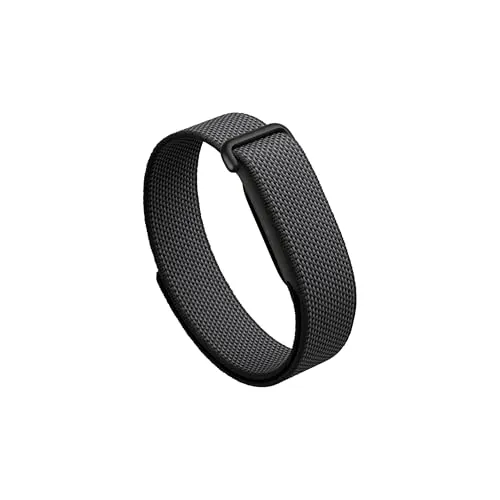
Google Fitbit Air – Obsidian
Exact retailer offer is the Obsidian Google Fitbit Air (model GA09509). It is screenless and uses the Google Health phone app for setup, workout quick start and data review. The assigned Obsidian woven band is the standard-size version, not the separate Pokémon Sleep band or an optional silicone band.
Model GA09509
Amazon ASIN B0GTMTZF3V
Google Fitbit
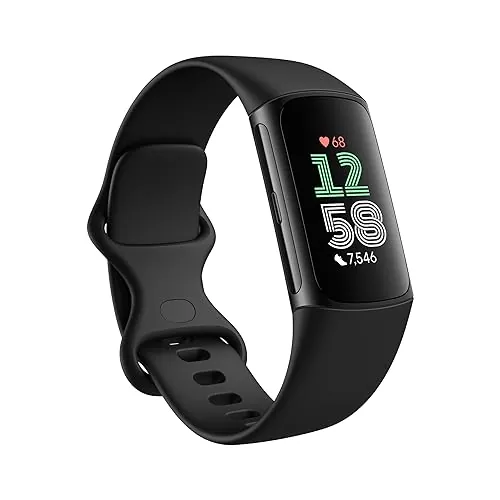
Google Fitbit Charge 6 – Obsidian/Black
Exact retailer offer is Charge 6 in the Obsidian case/Black band color. Google documents an AMOLED touchscreen, an on-device Exercise app and over 40 exercise types. Its US technical specs list small and large standard bands and a charging cable; check that the selected marketplace offer matches this exact model and contents.
Model GA05183-NA
Amazon ASIN B0CC62ZG1M
Differences that matter
What matters most to you?
Choose a priority to see what it changes.
Sources for Where you start and view a workout
Sources for Phone and GPS dependency
Sources for Standard band fit to check
Sources for Charging and box items
Sources for Phone OS compatibility to verify
Decide where the workout screen should be
Air is deliberately screenless. Google's current workout guide places its quick-start control at the top of the Google Health app's Fitness tab and says live exercise data from Air appears in the app. That makes the phone part of the workout-control routine; it is not a screen-on-wrist option.
Charge 6 puts an Exercise app on its color touchscreen. Google lists over 40 exercise types, real-time stats, GPS data and a workout summary from the tracker. Its touch/swipe navigation and side button give you a way to check the session from your wrist. These are interface differences, not evidence that one tracker measures activity more accurately.
Phone-free GPS is different from phone-free setup
For a GPS route, Air uses phone-connected GPS: Google says the phone supplies the GPS sensors and should stay near the tracker during the workout. Google's Air instructions also put the workout selection in the phone app and require location permissions for connected GPS.
Charge 6 supports built-in, connected and Dynamic GPS modes. Built-in mode can record the route when you leave your phone behind. You still need a compatible phone and the Google Health app to set the device up and sync it. Choose this distinction if you regularly run or ride without your phone; do not read it as full independence from a phone.
Measure the band before ordering
For the Obsidian Fitbit Air, Google lists the included standard textile band for wrists 130–210 mm. Other band materials and special editions use different ranges, so check the exact band on the offer. Google's fit guidance says to wear Air above the wrist bone and adjust the woven band snugly, leaving room for a pinky finger.
Google's Charge 6 US specs list small and large standard bands in the box. The ranges are 5.1–6.7 inches and 6.7–8.3 inches in circumference. Measure first and verify the seller's exact Obsidian/Black offer and package contents. Neither published size range guarantees personal comfort.
Resolve the Android compatibility mismatch before checkout
The Google Store device-spec pages for Air and Charge 6 each list Android 11+ and iOS 16.4+ for setup and use. Google's separate, general Google Health app requirements page currently lists Android 14+ and iOS 16.4+. Since both trackers require that app for setup, treat the discrepancy as unresolved rather than assuming that an Android 11–13 phone will work with a fresh installation. Check Google Play or Google support against your exact phone and OS first.
Both device workflows include a charging cable. Google lists 90 minutes for Air and two hours for Charge 6 to charge from zero to full. Those are manufacturer values, not matched measurements, and they do not establish which tracker lasts longer in your settings.
Product details
Google Fitbit Air – Obsidian
- Workout start and view
- Google documents a workout quick-start in the Google Health app's Fitness tab; live exercise data is shown in the app. Air has no screen. Source
- GPS workflow
- Phone-connected GPS. Google says the phone's GPS sensors are used and the phone must stay near the tracker during a GPS workout. Source
- Assigned band fit
- The US specs list the standard textile band for 130–210 mm wrist circumference; the Obsidian offer is the textile standard-band color. Measure your wrist and confirm the exact offer. Source
- Charging and box
- Google lists a USB-C charging cable in the box and a 90-minute 0–100% charge time. Up-to-7-day battery is a manufacturer estimate, not a comparison test. Source
Google Fitbit Charge 6 – Obsidian/Black
- On-wrist workouts
- Google lists an Exercise app, real-time stats and over 40 exercise types; the display is a color AMOLED touchscreen navigated by touch/swipes and a side button. Source
- GPS modes
- Google's device table lists built-in, phone-connected and Dynamic GPS for Charge 6. Built-in GPS can record a route without carrying the phone; setup and syncing still use the Google Health app and phone. Source
- Band sizing
- Google's US specs say the box includes small and large bands: 5.1–6.7 in and 6.7–8.3 in wrist circumference, respectively. Source
- Charging and box
- Google's US technical specs list a charging cable and a two-hour 0–100% charge time; battery life depends on settings and use. No battery-life winner is claimed. Source
Before you buy
Community discussions
A first-time buyer weighing an app-based routine
Google Fitbit Air – Obsidian
One prospective Fitbit Air buyer was comfortable starting workouts on a phone and preferred getting notifications there.
What to check
Decide which actions you want to start or check on your wrist, and which you are happy to do on your phone.
Common questions
Can Fitbit Air show workout stats on the band?
Air has no screen. Google says its workout quick start is in the Google Health app's Fitness tab and live exercise data appears in the app. Charge 6's Exercise app provides real-time stats on its display.How can custom workouts help with my daily fitness?Get started with the Fitbit Charge 6
Can Charge 6 record a route without my phone?
Google lists built-in GPS for Charge 6, which can record a route without carrying the phone. Setup and data syncing still require the Google Health app on a compatible phone. Air instead uses phone-connected GPS and needs the phone nearby during the route workout.Use GPS on your Fitbit device or Pixel WatchGet started with the Fitbit Charge 6
Will either tracker set up on Android 11, 12 or 13?
Google's model-specific Air and Charge 6 pages say Android 11 or newer, but Google's general Google Health app setup page currently says Android 14 or higher. Because setup needs that app, buyers on Android 11–13 should check current Google Play availability or ask Google support before purchasing. The published iOS minimum is 16.4 on both device pages.Tech Specs & Battery Life of Google Fitbit AirFitbit Charge 6 Technical SpecsGoogle Health app setup requirements
Which included band is more likely to fit?
The assigned Air Obsidian standard woven band is listed for 130–210 mm wrist circumference. Charge 6's US specs list small (5.1–6.7 inches) and large (6.7–8.3 inches) bands. Measure your wrist and check the exact offer; those published ranges do not guarantee individual comfort.Tech Specs & Battery Life of Google Fitbit AirFitbit Charge 6 Technical Specs
Can I compare the stated charging times as a battery winner?
No. Google lists 90 minutes for Air and two hours for Charge 6 for 0–100% charging, but those specifications are not a controlled charging or battery-life comparison. Battery life depends on settings and use.Tech Specs & Battery Life of Google Fitbit AirFitbit Charge 6 Technical Specs
Sources and scope
Google's device pages list Android 11+ for these trackers. Its general Google Health app setup page lists Android 14+. Check installation and setup requirements for your exact phone.
- Tech Specs & Battery Life of Google Fitbit Air
- Get started with Google Fitbit Air
- How can custom workouts help with my daily fitness?
- Use GPS on your Fitbit device or Pixel Watch
- Fitbit Charge 6 Technical Specs
- Get started with the Fitbit Charge 6
- How do I navigate my Fitbit device?
- Google Health app setup requirements
Related comparisons
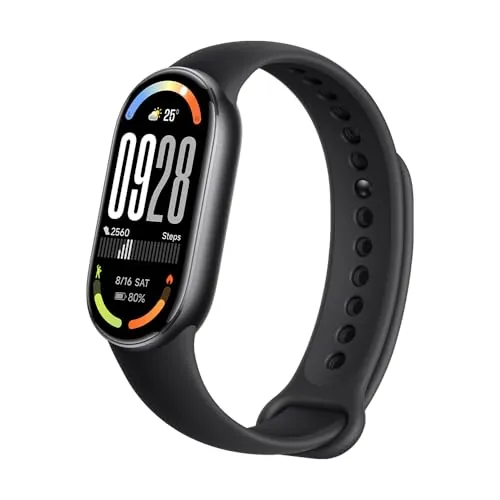
Xiaomi Smart Band 10 vs Google Fitbit Air: Screen, App and Fit
Xiaomi Smart Band 10 has a 1.72-inch touch display for on-wrist checks. Google Fitbit Air is screenless: it uses a status light for device status and Google Health on your phone for setup and data checks. Compare the companion-app requirements, wrist-size range and charging cable before you choose.
Read comparison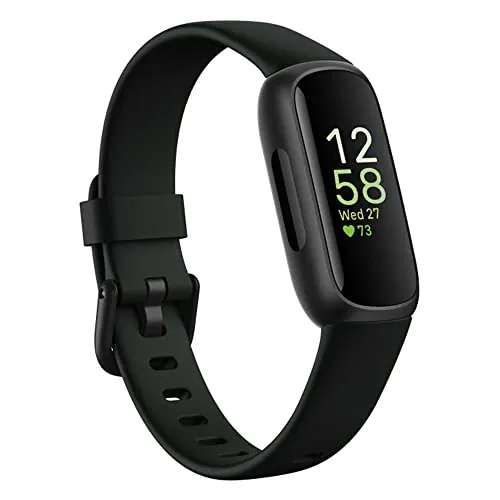
Fitbit Air vs Inspire 3: Screen, Band Fit and Charging
Google Fitbit Air is screenless: Google directs you to the Google Health app for data and uses a status light on the tracker. Inspire 3 adds an AMOLED touchscreen with tap, swipe and button navigation. Their included bands also differ: Google lists one 130–210 mm textile band for the standard Air configuration and both small and large classic bands for Inspire 3. Measure your wrist and check the exact retailer bundle before choosing.
Read comparison