
Products compared
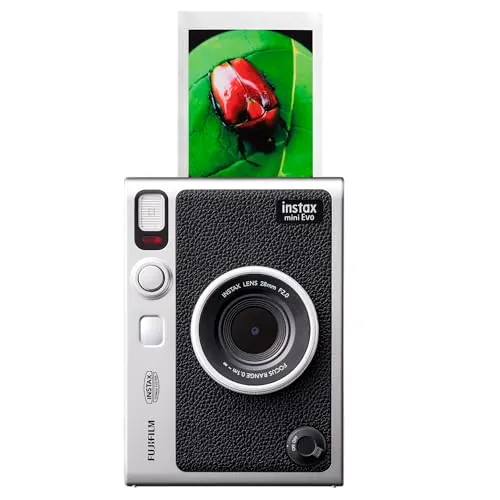
Fujifilm
Fujifilm instax mini Evo (Black)
The black instax mini Evo, part 16812493, stores digital captures for LCD review and selected printing. Confirm any seller-added items on the exact listing.
Model instax mini Evo
Amazon ASIN B09M4DKBQ9
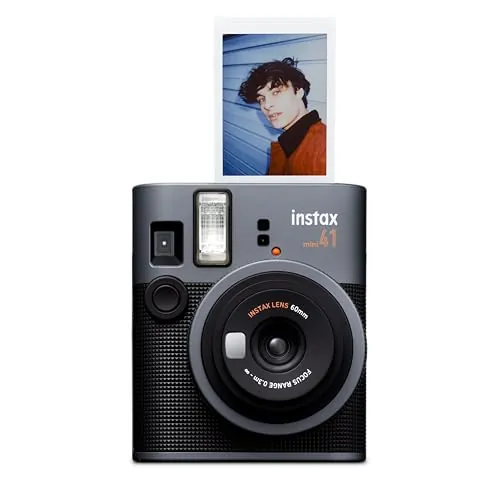
Fujifilm
Fujifilm instax mini 41 (Black)
The black instax mini 41, part 16844408, is a camera-only offer. Check the listing for any seller-added accessories before purchase.
Model instax mini 41
Amazon ASIN B0F2V7RKXH
Differences that matter
What matters most to you?
Choose a priority to see what it changes.
Sources for Capture-to-print workflow
Sources for Controls and close-up framing
Sources for Film and power planning
Decide whether you want to review before a film print
The mini Evo saves each capture to internal memory or a memory card. Its North American English manual describes LCD playback, selecting a stored image and using the print control on the displayed frame. That makes it the sourced fit when you want a chance to review a frame before committing a sheet of film to a print.
The mini 41's manual gives a more direct routine: frame through the viewfinder, press the shutter and take the film that ejects; its counter decreases with each shot. Pick this workflow if that physical, shot-to-ejection sequence is what you want. The documentation supports a workflow distinction, not a claim that the Evo uses less film or that its prints look better.
Match the camera controls to the subjects you shoot
On the mini Evo, Fujifilm documents separate lens-effect and film-effect dials, with 10 options on each, and LCD-based composition. Its camera is a hybrid capture-and-print design: image review and print selection happen on the camera, while app-linked phone printing and remote shooting are additional listed functions.
The mini 41 pairs an optical viewfinder with a lens-ring Close-Up Mode. Fujifilm specifies the mode for 0.3–0.5 m and documents a corrected focus mark in the viewfinder; automatic exposure is also listed. If you expect to photograph nearby subjects, this specific framing path is a useful purchase distinction. It says nothing about which model resolves detail or produces the better print.
Plan film and power before checking out
Both Fujifilm specifications list instax mini film as sold separately. The mini 41 offer is camera-only; check the exact seller listing for any added accessories or film before ordering.
The Evo uses a built-in, non-removable lithium-ion battery; Fujifilm lists a charging time of about two to three hours, with temperature affecting that time. The Mini 41 uses two AA alkaline LR6 cells, and the maker says the supplied cells are for initial use. Choose based on whether you would rather plan charging or carry replacement AA cells. The Mini Evo specification notes a connector transition during manufacturing, so verify the exact unit if a cable you already own is part of the decision.
Product details
Fujifilm instax mini Evo (Black)
- Capture and print
- Hybrid camera with LCD review; the print lever prints the displayed image. Source
- On-camera storage
- About 45 images in internal memory; microSD/microSDHC storage is supported. Source
- Power
- Built-in, non-removable lithium-ion battery; listed charging time about 2–3 hours, depending on temperature. Source
- Film
- FUJIFILM instax mini film; sold separately in the maker's standard specification. Source
Fujifilm instax mini 41 (Black)
- Capture and print
- Viewfinder framing followed by a shutter press and automatic film ejection; the film counter counts down per shot. Source
- Close-up framing
- Close-Up Mode is specified for 0.3–0.5 m and the viewfinder has parallax correction for that mode. Source
- Power
- Two AA-size alkaline LR6 batteries; maker says supplied batteries are for initial use. Source
- Film
- FUJIFILM instax mini instant film; sold separately in the maker's standard specification. Source
Before you buy
Community discussions
One Mini Evo buyer checks the port on a black unit
Fujifilm instax mini Evo (Black)
The OP says a new black Mini Evo ordered from Amazon arrived with Micro-B, while they had expected Type-C after reading that the connector was changing. The post reports that one unit; it does not identify a part or serial number or establish which port all black or brown units have.
What to check
If cable type matters, ask about or inspect the exact Mini Evo unit or box before ordering. This report is a reminder to verify the shipped camera, not evidence that every black or brown unit uses a particular port.
A shopper wants an instant print and a digital original
Fujifilm instax mini Evo (Black)
A shopper asked for both a film print and a digital file. A Mini Evo user described separately sharing printed images in the app and copying unprinted images from a microSD card.
What to check
Walk through what happens if you want to keep a photo without printing it, then check how you would copy the file off the camera.
Common questions
Do these cameras use the same film?
Fujifilm lists instax mini film for both, and both specifications say film is sold separately. Check the exact retail package for any bundled film.instax mini Evo - Specificationsinstax mini 41 - Specifications
Can I see a Mini Evo image before printing it?
Yes. Its North American English manual describes playback on the LCD, selecting an image and printing the displayed frame. The Mini 41 manual instead documents viewfinder framing and automatic film ejection after a shot.instax mini Evo User's Guide / Safety Precautions (North America, English)instax mini 41 User's Guide / Safety Precautions (North America, English)
Does the Mini 41 have a close-up framing mode?
Fujifilm specifies Close-Up Mode for 0.3–0.5 m, and says its viewfinder has parallax correction for that mode. This describes the feature, not a comparison of image results.instax mini 41 - Specifications
Sources and scope
This is a feature-fit comparison based on U.S. Fujifilm product/specification pages and North American English manuals, not a camera or print test. Mini 41 documentation describes a viewfinder and shutter-to-ejection workflow, not an LCD review screen. The Mini Evo charging port varies across documented manufacturing versions; confirm the selected unit if connector type matters. Retailer-added bundle contents can vary. No comparative photo or print quality, exposure consistency, film savings, price timing or performance winner is claimed.
Related comparisons
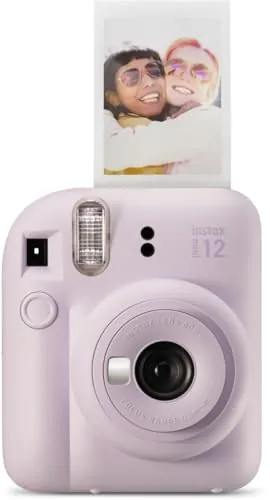
Fujifilm Instax Mini 12 vs Mini EVO: Film Workflow, Controls and Charging
The Lilac Purple instax mini 12 (16806286) and black mini Evo (16812493) use separately sold Instax Mini film but differ in when you choose to print. Mini 12 ejects film after a camera shot; Mini Evo stores digital captures for LCD review and prints the displayed image, and its app can print a phone camera-roll image. Mini 12 uses two AA batteries; Mini Evo has a built-in rechargeable battery. Fujifilm documents Micro-B and USB Type-C Mini Evo units, so check the exact camera if you need a particular cable. This is a workflow comparison, not a picture-quality or film-cost test.
Read comparison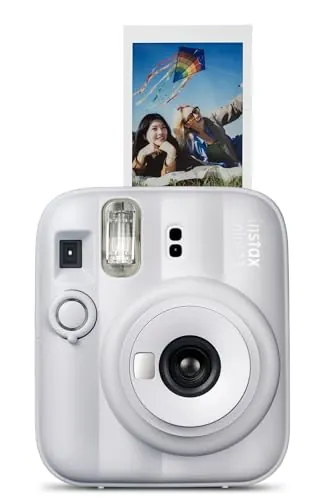
Fujifilm instax mini 13 Clay White vs mini Evo Black: Print Workflow Compared
This compares the Clay White instax mini 13 (part 16963137) with the black instax mini Evo (part 16812493), not mini Evo 2. Mini 13 uses a viewfinder and ejects film after a shot; Mini Evo adds LCD review and stored images that you can choose to print, plus documented lens/film effects and phone-app functions. Both use separately sold instax mini film. Fujifilm documents FI019/Micro-B and FI038/USB Type-C Evo versions; check the exact unit if cable type matters.
Read comparison