
Products compared
Fujifilm
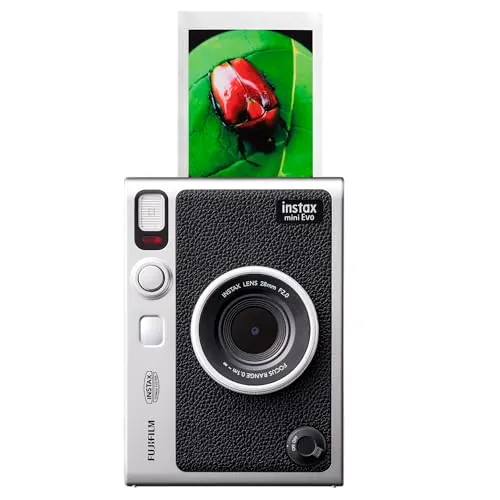
Fujifilm instax mini Evo Hybrid Instant Camera, Black
The black mini Evo (part 16812493) combines camera capture, LCD review and selected mini-film printing; its app also supports phone-photo printing and remote shooting. Fujifilm documents Micro-B and USB Type-C charging versions; check the exact camera if connector type matters.
Model 16812493
Amazon ASIN B09M4DKBQ9
Fujifilm
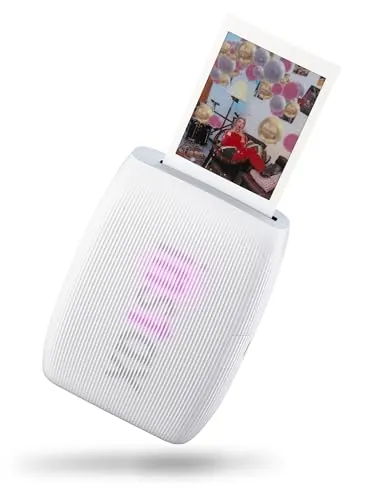
Fujifilm instax mini Link 3 Smartphone Printer, Clay White
The Clay White instax mini Link 3, part 16832194, prints smartphone photos through the dedicated mini Link app. Fujifilm's North American FI033W manual lists an included USB Type-C cable and says the AC adapter is not included.
Model 16832194 / FI033W
Amazon ASIN B0D826GXQ3
Differences that matter
What matters most to you?
Choose a priority to see what it changes.
Sources for Where the picture starts
Sources for Keeping the digital original
Start with the device that holds your photo
The mini Evo can take a picture, store it and show it on the rear LCD before you decide to print. That makes it the clearer fit if you want one device for camera capture and choosing physical prints. It can also print a phone picture through the mini Evo app, so phone printing is not exclusive to Link 3.
The mini Link 3 is a printer for a separate image source. Its everyday Simple Print flow starts with a phone photo and requires the dedicated mini Link app. If your photos already live on your phone and you do not need a camera built into the printer, Link 3 is the more direct route.
Do not treat Evo's app as a full photo backup
Evo stores camera images internally or on an optional microSD/microSDHC card. Fujifilm's FAQ limits transfer to the phone app to images that have been printed or appear in Print History, which holds up to 50 images. So if keeping unprinted originals on a computer matters, add the separate card-copy step to your routine rather than expecting automatic phone sync.
With Link 3's phone-first workflow, the original photo begins in the phone library. The printer has a reprint function, but the manual says its stored reprint image is deleted when the printer is turned off; keep the phone file as your digital original.
Check app, cable and camera compatibility before checkout
Link 3 needs a compatible phone with the mini Link app installed and paired. Its North American FI033W manual lists an included 30 cm USB-C cable but no USB AC adapter. Confirm your phone can currently install the app and whether you already have a suitable adapter.
The black mini Evo needs a cable check if you want to reuse an existing one. Fujifilm provides North American FI019/Micro-B and FI038/USB Type-C manuals, but part 16812493 does not identify the connector on a particular unit. Ask which version is being shipped or inspect its port.
If the plan is to print directly from a Fujifilm camera to Link 3, look up that exact camera/printer combination in Fujifilm's current compatibility guidance and check its latest-firmware note. This avoids relying on a family-level assumption when the source device matters.
Film format is shared, not a deciding difference
Both devices use Fujifilm instax mini instant film, sold separately. That means this choice is about capture and file handling rather than moving to a different print format. Check film-pack availability and your expected number of prints separately; this comparison does not establish which device uses less film.
Product details
Fujifilm instax mini Evo Hybrid Instant Camera, Black
- Capture and print
- Capture to internal memory or a separately sold microSD/microSDHC card, review on the LCD and select a stored frame to print. The phone app adds remote shooting and phone-photo Direct Print. Source
- Phone transfer limit
- Fujifilm says only printed images and images in Print History transfer to the app; Print History holds up to 50 images. Use the card/computer path for unprinted originals you want elsewhere. Source
- Charging version check
- Fujifilm's North American support library has FI019 Micro-B and FI038 USB Type-C manuals. Check the actual mini Evo unit or box to identify the charging port for part 16812493. Source
Fujifilm instax mini Link 3 Smartphone Printer, Clay White
- Phone-photo workflow
- Install and pair the free instax mini Link app, then select a photo from the smartphone for printing. Confirm current app availability and compatibility for your phone before purchase. Source
- Charging box contents
- The North American FI033W manual lists a 30 cm USB Type-C cable as included; the USB AC adapter is sold separately. Source
- Film format
- Uses instax mini instant film, sold separately. Source
Before you buy
Community discussions
One Mini Evo buyer checks the port on a black unit
Fujifilm instax mini Evo Hybrid Instant Camera, Black
The OP says a new black Mini Evo ordered from Amazon arrived with Micro-B, while they had expected Type-C after reading that the connector was changing. The post reports that one unit; it does not identify a part or serial number or establish which port all black or brown units have.
What to check
If cable type matters, ask about or inspect the exact Mini Evo unit or box before ordering. This report is a reminder to verify the shipped camera, not evidence that every black or brown unit uses a particular port.
A Mini Evo owner prints a photo already on their phone
Fujifilm instax mini Evo Hybrid Instant Camera, Black
In a follow-up, the original poster reported printing an edited image from their iPhone photo library through the Mini Evo app’s Direct Print option.
What to check
Try selecting an image in your usual phone photo library and check how you would print it through each device.
A shopper wants an instant print and a digital original
Fujifilm instax mini Evo Hybrid Instant Camera, Black
A shopper asked for both a film print and a digital file. A Mini Evo user described separately sharing printed images in the app and copying unprinted images from a microSD card.
What to check
Decide whether a camera that keeps its own files or a printer fed by your phone fits better. Check how you would save and share unprinted photos.
Common questions
Can the mini Evo print photos from my phone?
Yes. Fujifilm documents a Direct Print function through the mini Evo app. That is an additional workflow; the Evo also captures and stores pictures itself.instax mini Evo North American User's Guide, FI019 / Micro-B
Will every unprinted mini Evo photo transfer to my phone?
No. Fujifilm's FAQ says only printed photos and images in Print History can transfer to the app; the history holds up to 50 images. Use the camera's card-copy workflow for unprinted originals you want elsewhere.FAQ | instax mini Evoinstax mini Evo North American User's Guide, FI019 / Micro-B
Does the Link 3 Clay White include everything needed to charge it?
Its North American FI033W manual lists a USB Type-C charging cable as included but says the USB AC adapter is sold separately. Verify the carton if buying a different region or bundle.instax mini Link 3 North American User's Guide, FI033W
Do these use the same film?
Yes. Fujifilm lists instax mini film for both products, and both sell the film separately.instax mini Evo Hybrid Instant Camera — U.S. product pageinstax mini Link 3 Smartphone Printer — U.S. product page
Is the Black mini Evo USB-C?
Do not infer the port from color or family name. Fujifilm's North American documentation includes FI019 Micro-B and FI038 USB Type-C versions; part 16812493 does not identify the connector on an individual camera. Check the offered unit or box.instax mini Evo official support manual selectorinstax mini Evo North American User's Guide, FI019 / Micro-Binstax mini Evo North American User's Guide, FI038 / USB Type-C
Sources and scope
This compares the black mini Evo, part 16812493, with the Clay White mini Link 3, part 16832194. Fujifilm's U.S. mini Evo page lists Micro-B, and North American support also provides a Type-C FI038 manual; check the exact unit because part 16812493 does not identify the connector. The Link 3 FI033W manual lists an included USB Type-C charging cable and says an AC adapter is not included. These sources support workflow and setup guidance, not print-quality, reliability, image-result or film-cost superiority. Both products use separately sold instax mini film.
- instax mini Evo Hybrid Instant Camera — U.S. product page
- instax mini Evo North American User's Guide, FI019 / Micro-B
- instax mini Evo North American User's Guide, FI038 / USB Type-C
- instax mini Evo official support manual selector
- FAQ | instax mini Evo
- instax mini Link 3 Smartphone Printer — U.S. product page
- instax mini Link 3 North American User's Guide, FI033W
- Fujifilm X Series and instax camera/printer compatibility and workflow
Related comparisons
Fujifilm Instax Mini 12 vs Mini EVO: Film Workflow, Controls and Charging
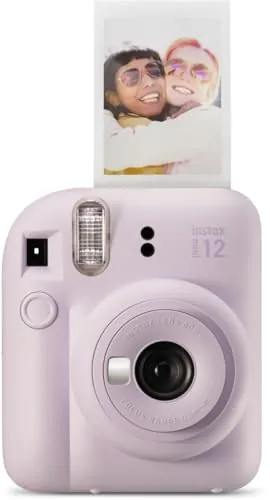
The Lilac Purple instax mini 12 (16806286) and black mini Evo (16812493) use separately sold Instax Mini film but differ in when you choose to print. Mini 12 ejects film after a camera shot; Mini Evo stores digital captures for LCD review and prints the displayed image, and its app can print a phone camera-roll image. Mini 12 uses two AA batteries; Mini Evo has a built-in rechargeable battery. Fujifilm documents Micro-B and USB Type-C Mini Evo units, so check the exact camera if you need a particular cable. This is a workflow comparison, not a picture-quality or film-cost test.
Read comparison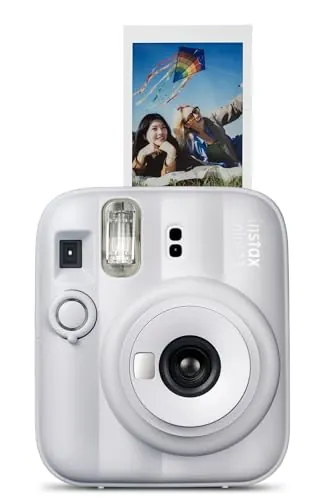
Fujifilm instax mini 13 Clay White vs mini Evo Black: Print Workflow Compared
This compares the Clay White instax mini 13 (part 16963137) with the black instax mini Evo (part 16812493), not mini Evo 2. Mini 13 uses a viewfinder and ejects film after a shot; Mini Evo adds LCD review and stored images that you can choose to print, plus documented lens/film effects and phone-app functions. Both use separately sold instax mini film. Fujifilm documents FI019/Micro-B and FI038/USB Type-C Evo versions; check the exact unit if cable type matters.
Read comparison