
Products compared
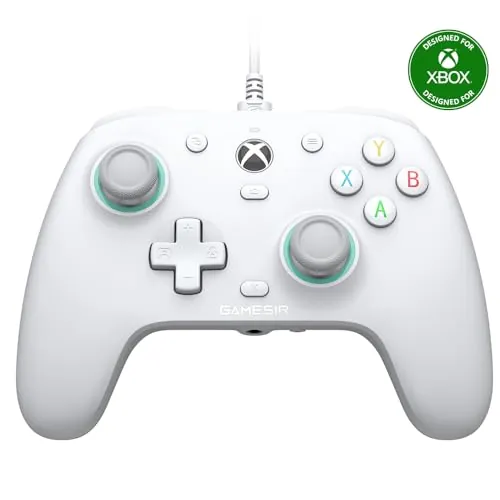
GameSir
GameSir G7 SE Wired Controller for Xbox (White)
White G7 SE wired controller. GameSir’s model manual lists Xbox Series X|S, Xbox One and Windows 10/11 over wired USB-C and describes two lockable rear buttons.
Model G7 SE
Amazon ASIN B0C7GW9F88
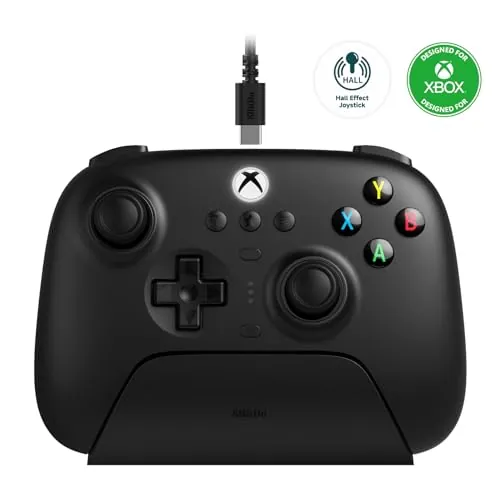
8BitDo
8BitDo Ultimate 3-Mode Controller for Xbox (Black)
Exact listing is the black Ultimate 3-Mode Controller for Xbox. 8BitDo lists wired USB for Xbox, wired USB or 2.4 GHz on Windows, a USB-A 2.4 GHz adapter, a charging dock, rear paddles and Ultimate Software X. The official product page and FAQ conflict about Apple Bluetooth support; this guide does not rely on mobile Bluetooth.
Model Ultimate 3-Mode Controller for Xbox (black; listed model 6922621505402)
Amazon ASIN B0D1VHH4C5
Differences that matter
What matters most to you?
Choose a priority to see what it changes.
Sources for Managing rear inputs
Start with the Xbox cable
Both exact controllers connect to Xbox by wire. GameSir’s G7 SE manual lists a detachable USB-C wired connection for Xbox Series X|S and Xbox One. 8BitDo’s exact-product FAQ says the Ultimate 3-Mode Controller cannot connect wirelessly to Xbox.
If your console is far from your seat, measure the cable route before deciding. The 8BitDo’s included 2.4 GHz receiver does not solve Xbox cable reach.
Choose the Windows desk connection you want
GameSir documents wired USB on Windows 10/11. 8BitDo documents wired USB or a 2.4 GHz connection using the included adapter, plus a charging dock in the box. Its wireless setup page says Windows 10 version 1903 or later is required and instructs users to connect the adapter and select PC/2.4G.
That makes the 8BitDo the fit when the practical goal is to leave a receiver and dock at the PC while returning to wired Xbox play. If wired PC play is acceptable, both have a documented wired route; no input-delay or range comparison is available.
Decide how rear buttons should behave
GameSir documents two remappable rear buttons with physical latches that toggle them on or off, plus button combinations for selecting profiles. That can matter when one controller is shared with someone who does not want those rear inputs active.
8BitDo lists two rear paddles, three custom profiles and a dedicated profile-switch control, with remapping through Ultimate Software X. The pages reviewed do not establish whether its software can physically or digitally disable paddles in the same manner, so confirm that detail if it is essential. Both systems expose configurable controls, but their documented hardware actions differ.
Treat mobile Bluetooth as a separate compatibility question
The 8BitDo product page lists Apple and Android Bluetooth support. Its FAQ, however, says Android is the only platform that supports the controller’s Bluetooth connection. Because those official statements conflict, do not rely on Apple Bluetooth for this purchase without current confirmation from 8BitDo. This conflict does not change the Xbox and Windows connection options compared above.
Product details
GameSir G7 SE Wired Controller for Xbox (White)
- Console and Windows connection
- USB-C wired on Xbox Series X|S, Xbox One and Windows 10/11. The manual identifies a detachable USB-C cable. Source
- Rear-button control
- Two extra remappable rear buttons have quick latches that toggle them on or off; the manual also documents M-button combinations for selecting profiles. Source
- Software named by the maker
- GameSir Nexus is the supported software listed in the G7 SE manual. Source
8BitDo Ultimate 3-Mode Controller for Xbox (Black)
- Xbox connection
- Wired USB only on Xbox Series X|S and Xbox One; 8BitDo’s FAQ explicitly says it cannot connect wirelessly to an Xbox console. Source
- Windows connection and bundled hardware
- Wired USB or 2.4 GHz on Windows 10/11; included items list a USB-A 2.4 GHz adapter, charging dock and USB cable. The specific 2.4 GHz setup guide requires Windows 10 version 1903 or later. Source
- Rear controls and software
- Two rear paddles, three custom profiles, a dedicated profile-switch control and Ultimate Software X support are listed. The cited documentation does not establish whether its software offers a physical on/off override equivalent to GameSir’s latches. Source
Before you buy
Community discussions
Plan for excess cable at a gaming desk
GameSir G7 SE Wired Controller for Xbox (White)
A new GameSir G7 SE owner found the cable longer than they needed for their usual setup.
What to check
Measure the cable route to the Xbox or PC. Decide whether the receiver option available on your planned host matters.
Consider how you want to change profiles during play
GameSir G7 SE Wired Controller for Xbox (White)
A GameSir G7 SE owner wanted to switch saved profiles from the controller during a game.
What to check
Check how each model switches profiles. Decide whether you would use a dedicated control or are happy with a button combination.
Common questions
Can either controller connect wirelessly to an Xbox?
No. GameSir lists wired USB for the G7 SE on Xbox. 8BitDo’s FAQ says the Ultimate 3-Mode Controller for Xbox only connects to Xbox by wire; its 2.4 GHz adapter is a Windows mode.How to Use the GameSir G7 SE — manufacturer manual8BitDo Ultimate 3-mode Controller for Xbox — product page and specifications8BitDo Ultimate 3-mode Controller for Xbox FAQ
What does the 8BitDo 2.4 GHz mode require on Windows?
Connect the included 2.4 GHz adapter to the Windows device, switch the controller to PC/2.4G and power it on. 8BitDo’s setup page specifies Windows 10 version 1903 or later; the product page also lists Windows 11 support.8BitDo Ultimate 3-mode Controller for Xbox — product page and specifications8BitDo Ultimate 3-mode Controller for Xbox: Windows 2.4G setup
Which controller lets me physically turn off its rear buttons?
GameSir’s G7 SE manual documents quick latches for toggling its two rear buttons on or off. The 8BitDo pages reviewed document rear paddles, mapping and profile controls, but do not settle whether its software can disable paddles in the same way.How to Use the GameSir G7 SE — manufacturer manual8BitDo Ultimate 3-mode Controller for Xbox — product page and specifications
Does 8BitDo support Bluetooth on iPhone or iPad?
Its product page lists Apple and Android Bluetooth support, but the official FAQ says Android is the only Bluetooth platform. Treat Apple Bluetooth support as unresolved and confirm it with 8BitDo before relying on it.8BitDo Ultimate 3-mode Controller for Xbox — product page and specifications8BitDo Ultimate 3-mode Controller for Xbox FAQ
Sources and scope
Feature and setup comparison from manufacturer documentation, not a test of latency, wireless range, drift, battery life, durability, comfort or gameplay. Both makers list Hall Effect sticks; that shared specification does not decide this comparison. 8BitDo’s product page lists Apple and Android Bluetooth support, while its FAQ says Bluetooth is supported only on Android. Apple Bluetooth support is unresolved. 8BitDo’s maker pages do not confirm listing data value 6922621505402 as a part number.
Related comparisons
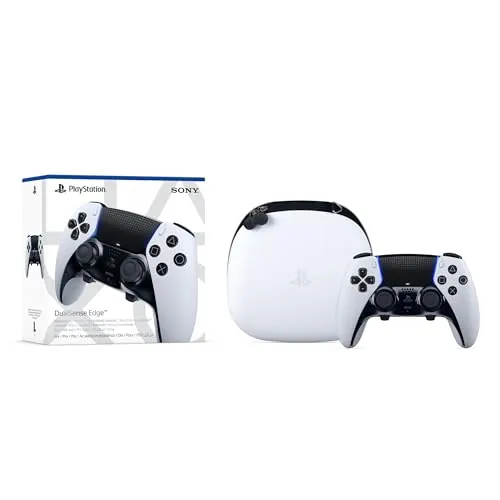
GameSir G7 SE vs DualSense Edge: Xbox, PS5 and PC Fit
For Xbox One or Xbox Series X|S, GameSir documents the wired G7 SE; for PS5, Sony positions DualSense Edge as its customizable controller. On Windows, the choice turns on a cable versus USB or Bluetooth, then on rear-button latches versus removable button shapes and physical trigger stops. Edge's medium or short trigger settings disable trigger effects. GameSir's overview mentions Android, but its detailed requirements and FAQ do not explain that support, so confirm an Android setup with GameSir before buying.
Read comparison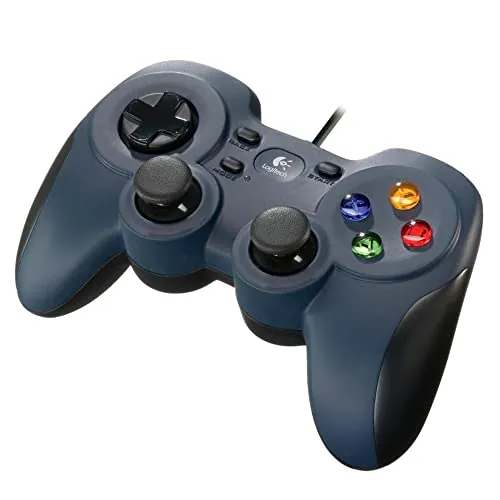
GameSir G7 SE vs Logitech F310: Xbox Support or PC Control Setup?
Choose the wired GameSir G7 SE for Xbox One or Xbox Series X|S, or for its documented Windows 10/11 profiles and rear buttons. The Logitech F310 is a PC controller with a physical XInput/DirectInput switch. Check software availability before relying on DirectInput mapping.
Read comparison