
Products compared
HP
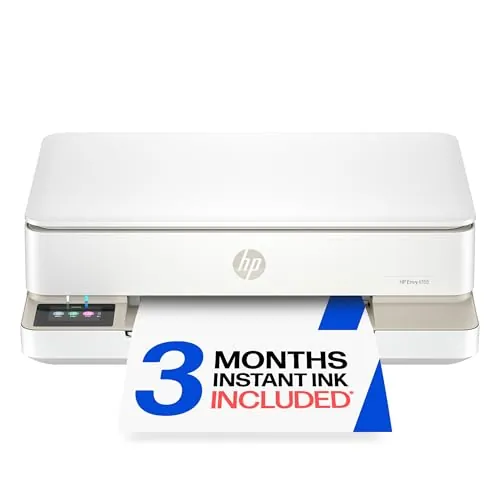
HP Envy 6155 All-in-One Printer
The assigned HP U.S. configuration is the Envy 6155, part C2WR7A#B1H. HP lists print, copy and scan functions, a 2.4-inch color touchscreen and HP 68 black and tri-color cartridges. Its page also describes dynamic security for cartridges using HP chips; check current cartridge support before choosing supplies.
Model C2WR7A#B1H
Amazon ASIN B0GMKRR64P
Canon
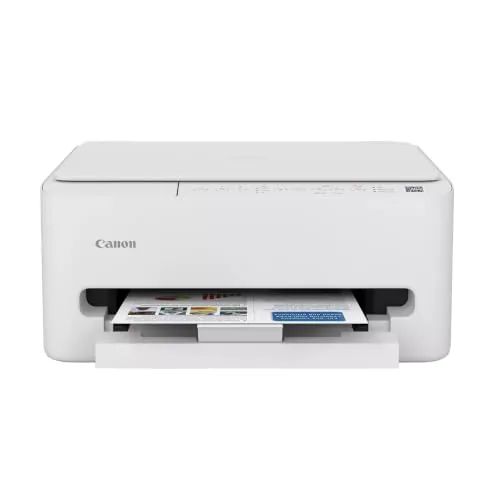
Canon PIXMA TS4320 Wireless Color All-in-One Printer
The assigned Canon U.S. model is the PIXMA TS4320, part 7181C002. Canon lists print, copy and scan functions, a flatbed scanner, duplex printing, and a cassette that holds up to 100 sheets of plain paper. Its specifications list no display and identify PG-295 black and CL-286 color ink.
Model TS4320
Amazon ASIN B0FMBGXC2C
Differences that matter
What matters most to you?
Choose a priority to see what it changes.
Sources for Replacement cartridge family
Sources for Paper capacity and two-sided printing
Sources for Printer-side controls and scanning
Sources for Counter envelope with paper loaded
Sources for Phone and network workflow
Start with the ink you will actually keep stocked
The cleanest first filter is the cartridge label: HP identifies this Envy 6155 configuration as using HP 68 black and tri-color replacement cartridges. Canon identifies the TS4320's pair as PG-295 pigment black and CL-286 dye color. Those are distinct supply families, and neither page supports a like-for-like cost or page-yield conclusion here. If a household already has a supply drawer for one family, verify cartridge codes against the exact printer and selected retail configuration before switching.
HP's specification also says the printer uses dynamic security and is intended for new or reused cartridges with an HP chip. Treat that as a compatibility check for future supplies, not as a cost verdict. Canon lists individual or pack purchase options for its PG-295/CL-286 system. This guide omits temporary subscription promotions and does not compare refill economics.
For everyday paper, compare the workflow around the tray
The core paper setup is similar on the published specs: HP lists one input tray with up to 100 sheets, while Canon lists a 100-sheet plain-paper cassette. Both list two-sided printing; HP explicitly labels its duplex mode automatic. Canon's support page also names supported photo and envelope sizes; check the exact media list if you routinely load something other than ordinary letter paper.
The Envy 6155 has the clearer front-panel distinction: HP lists a 2.4-inch color capacitive touchscreen. Canon lists the TS4320 display as N/A. Both name wireless phone or computer workflows, but the app names differ—HP app versus Canon PRINT—and the maker pages do not establish identical setup or scan-app behavior.
Treat scanning as a page-by-page glass workflow unless a feeder is confirmed
HP identifies a flatbed scanner with a listed maximum scan size of 8.5 × 11.7 inches. Canon also identifies a flatbed up to 8.5 × 11.7 inches and explicitly marks ADF capacity as N/A. For a short form, photo or a book page, the listed glass size is the useful check. For a batch of loose pages, do not assume automatic feeding: Canon does not list an ADF, and the HP page cited here gives no feeder capacity. Confirm the exact Envy configuration if that would change the purchase.
This pair is therefore best assessed as two compact all-in-ones for single-page glass scanning, with the HP touchscreen as a documented convenience distinction, rather than as a comparison of multi-page scanning speed or output quality.
Measure the installed paper path, not only the closed body
For Envy 6155, HP reports 17.05 × 14.21 × 5.35 inches as width × depth × height, and a maximum envelope of 17.05 × 20.19 × 5.35 inches. Canon reports TS4320 at 14.8 × 14 × 6.7 inches closed, labeled length × width × height; with paper installed its listed width grows to 21 inches. These are maker-reported states and axis orders, not identical measurement conventions.
Before buying for a shallow shelf or tight cabinet, mark the orientation you will use, allow the documented paper-loaded envelope and leave usable access to load paper and collect output. If the fit is close, measure the actual shelf and compare it with the maker's current manual rather than treating a closed-body number as working clearance.
Product details
HP Envy 6155 All-in-One Printer
- Ink family
- HP lists HP 68 black and HP 68 tri-color replacement cartridges; the setup cartridges are separately identified as setup units. Source
- Paper and duplex
- Up to 100 sheets in the input tray; automatic duplex printing. Source
- Control and scanner
- 2.4-inch color capacitive touchscreen; flatbed scanner, with maximum listed scan size 8.5 × 11.7 inches. Source
- Listed dimensions
- 17.05 × 14.21 × 5.35 in (W × D × H); maximum listed envelope is 17.05 × 20.19 × 5.35 in. Source
Canon PIXMA TS4320 Wireless Color All-in-One Printer
- Ink family
- PG-295 pigment black and CL-286 dye color (cyan, magenta, yellow and black); Canon lists individual or pack ink purchase options. Source
- Paper and duplex
- Cassette capacity: 100 sheets of plain paper; 2-sided (duplex) printing is listed. Source
- Control and scanner
- Display: N/A; flatbed scanner, maximum document size 8.5 × 11.7 in; ADF capacity: N/A. Source
- Listed dimensions
- 14.8 × 14 × 6.7 in (L × W × H) closed; with paper installed, Canon lists 14.8 × 21 × 6.7 in. Source
Before you buy
Community discussions
A TS4320 owner tests grayscale photos on matte paper
Canon PIXMA TS4320 Wireless Color All-in-One Printer
A new TS4320 owner reported a blue tint in grayscale photos on matte paper and asked what else to check before returning the unit.
What to check
If you regularly print grayscale images, test a representative file with your usual paper and print settings.
An Envy 6155e owner tries printing from iOS Mail
HP Envy 6155 All-in-One Printer
An owner reported occasional AirPrint jobs from iOS Mail that reached the queue without printing. Other apps sometimes worked.
What to check
Try a typical email attachment or document from your own phone app after connecting the printer to your usual network.
Common questions
Do both printers list two-sided printing?
Both list duplex printing: HP specifies automatic duplex for the Envy 6155, while Canon lists 2-sided (duplex) printing for the PIXMA TS4320. This is a shared documented feature rather than a reason to choose one over the other.HP Envy 6155 All-in-One Printer — HP U.S. product page and specificationsCanon PIXMA TS4320 Support — Canon U.S.A. product specifications
Which cartridges should I check before buying?
For the assigned Envy 6155, HP lists HP 68 black and HP 68 tri-color replacement cartridges. For the assigned TS4320, Canon lists PG-295 pigment black and CL-286 dye color. Confirm these exact codes against the final offer and your supply plan; page-yield figures are not compared here.HP Envy 6155 All-in-One Printer — HP U.S. product page and specificationsCanon PIXMA TS4320 Support — Canon U.S.A. product specifications
Can either one scan a stack of pages automatically?
Both cited model pages describe flatbed scanning. Canon's exact TS4320 specifications list ADF capacity as N/A. HP's cited Envy 6155 page identifies a flatbed scanner but does not give an ADF capacity, so verify the exact HP configuration if a feeder is a must-have.HP Envy 6155 All-in-One Printer — HP U.S. product page and specificationsCanon PIXMA TS4320 Support — Canon U.S.A. product specifications
How much room should I leave on a shelf?
HP gives a maximum dimension envelope of 17.05 × 20.19 × 5.35 inches in width, depth and height. Canon lists 14.8 × 21 × 6.7 inches with paper installed in length, width and height. The axis labels differ, so orient the printer as intended and measure the required loading and output clearance rather than comparing just the closed body.HP Envy 6155 All-in-One Printer — HP U.S. product page and specificationsCanon PIXMA TS4320 Support — Canon U.S.A. product specifications
Sources and scope
This is a model-specification comparison, not a print, scan, reliability or running-cost test. Cartridge page yields are omitted because they depend on the test basis and are not a like-for-like cost comparison. The manufacturers report dimensions using different axis labels and paper-loaded states; measure the printer with its trays open in your intended spot. No subscription offer or trial terms are included.
Related comparisons

Canon PIXMA TR7120 vs TS4320: ADF, Ink and Paper Handling
For the exact white U.S. models TR7120 (7178C002) and TS4320 (7181C002), the meaningful difference is document handling: TR7120 has a 35-sheet ADF and 1.42-inch OLED, while TS4320 has a flatbed and no display. Canon lists the same PG-295 black and CL-286 color cartridges, a 100-sheet plain-paper cassette, dual-band Wi-Fi and USB for both. Both print two-sided; that does not establish automatic duplex scanning.
Read comparison
Canon PIXMA TR8620a vs TS4320: Do You Need Separate Ink Tanks and an ADF?
The TR8620a adds five individual ink tanks, a 20-sheet Letter / 5-sheet Legal ADF, a second paper feed, and fax. The TS4320 uses two cartridges and a flatbed. Canon documents automatic two-sided printing for TR8620a. Published TS4320 automatic-duplex records disagree, so verify that feature if it affects your choice.
Read comparison