
Products compared
Logitech G
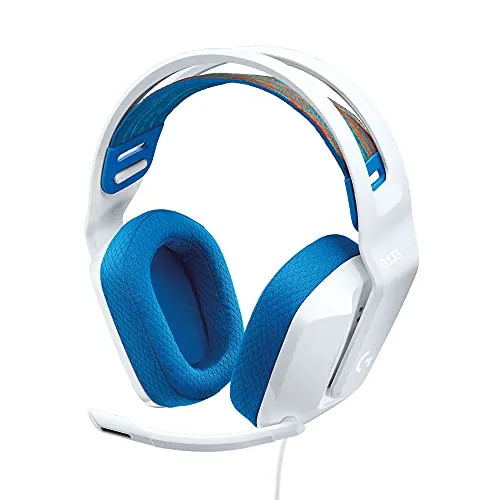
Logitech G335 Wired Gaming Headset (White)
White Logitech G335 with a 3.5 mm wired connection. Logitech documents an adjustable suspension strap, sliding earcups, an on-ear volume control and a flip-up-to-mute boom microphone. Its quick-start guide illustration shows a splitter cable; verify the current package if that accessory matters for your PC.
Model G335 (981-001017)
Amazon ASIN B08KKZ8S36
Logitech G
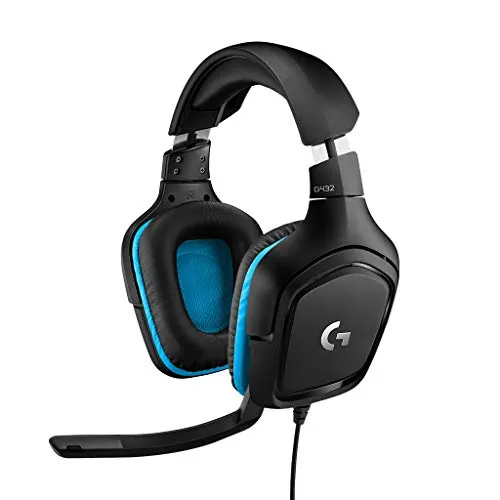
Logitech G432 Wired Gaming Headset (Black/Blue)
Logitech G432, part 981-000769, has a 3.5 mm connection and an included USB-A audio adapter. Logitech lists the adapter for PC, PlayStation 4 and docked Nintendo Switch, and 3.5 mm use for compatible consoles or mobile devices. DTS Headphone:X 2.0 and EQ presets require Windows and G HUB; the adapter is required for G HUB surround.
Model G432 (981-000769)
Amazon ASIN B07MRMHML9
Differences that matter
Sources for Connection path for the host you actually use
Sources for What the included adapter unlocks—and where software applies
Sources for Mic mute and everyday adjustment
Sources for Splitter and USB adapter in the package
Match the headset path to your device
For a controller or device with a 3.5 mm headset jack, both models have a documented wired route. Logitech describes the G335 as 3.5 mm plug-and-play. The G432 also supports 3.5 mm use for consoles or mobile devices, while its included USB audio adapter is the documented path for PC, PS4 or docked Nintendo Switch.
For a desktop with separate audio and microphone jacks, inspect the splitter accessory in the exact package. The G335 quick-start guide illustrates a splitter cable; the G432 manual explicitly lists one. If you want G432 DTS Headphone:X 2.0 or EQ presets, check Windows and G HUB support and use the included USB audio adapter for surround in G HUB.
Treat mic mute as shared; compare handling preferences separately
Both sources document a boom that flips up to mute, so this is not a differentiator by itself. The G335 adds a reversible suspension band and sliding earcups; Logitech describes the G432 with padded leatherette and earcups that rotate. Those are different ways to adjust or set the headset down, not evidence of which one will feel more comfortable or sound better.
Logitech's G432 support page adds the main software boundary: DTS Headphone:X 2.0 and EQ presets require Windows and G HUB. A buyer using another OS can still compare the documented wired route, but should not count those software features as available without checking current support for the exact device.
Product details
Logitech G335 Wired Gaming Headset (White)
- Wired connection
- 3.5 mm audio jack; Logitech lists Xbox, PlayStation, Nintendo Switch, most PCs and laptops, and mobile devices. Source
- Mic and local controls
- Flip-up-to-mute 6 mm boom mic; on-ear volume control. Source
- Adjustment
- Adjustable reversible suspension band and sliding earcups; these features do not establish individual fit or comfort. Source
Logitech G432 Wired Gaming Headset (Black/Blue)
- Included connection accessories
- The official manual lists a splitter cable and USB audio adapter. The US product page documents USB DAC use with PC, PS4 and docked Nintendo Switch, plus 3.5 mm for consoles or mobile devices. Source
- Software condition
- DTS Headphone:X 2.0 and EQ presets are available only on Windows and require Logitech G HUB; Logitech support says the included USB DAC is required to enable surround in G HUB. Source
- Mic and handling
- 6 mm flip-to-mute boom mic; Logitech describes padded leatherette headband and earcups, with earcups rotating up to 90 degrees. Source
Before you buy
Community discussions
Choosing a PC connection for the G432
Logitech G432 Wired Gaming Headset (Black/Blue)
A G432 buyer asks whether to connect through the PC's 3.5 mm port or the USB adapter. The post asks which route to use but does not report a comparison result.
What to check
Check which input your PC has and whether you want a direct 3.5 mm connection or the included USB adapter. The buyer's question does not establish an audio-quality winner for either route.
Common questions
Does the G432 need Windows and G HUB just to use its wired connection?
Logitech specifically limits DTS Headphone:X 2.0 and EQ presets to Windows with G HUB. Its product page separately documents a USB audio adapter route and a 3.5 mm route. The software condition applies to those surround/EQ features, not to a claim that every basic wired connection requires G HUB.Logitech G432 Wired Gaming Headset, US model 981-000769
Do both headsets have a flip-up mic mute?
Yes. Logitech's G335 guide and G432 product page each describe a boom microphone that flips up to mute. That shared control does not establish equal microphone sound quality.Logitech G335 Setup GuideLogitech G432 Wired Gaming Headset, US model 981-000769
What should I check before plugging one into a desktop PC?
Check whether the computer has one combo headset jack or separate headphone and microphone jacks, and confirm the exact splitter in the selected package. For G432 surround in G HUB, Logitech says to use its included USB audio adapter; the DTS and EQ feature path is Windows-only.Logitech G335 Setup GuideLogitech G432 User Manual and Box ContentsLogitech G432/G431: Enabling DTS and Surround
Sources and scope
This comparison follows the selected listing order: Logitech G335 White, model 981-001017, then Logitech G432 Black/Blue, model 981-000769. Logitech's US product pages and manuals identify the models and documented hardware, but do not independently bind the assigned Amazon ASINs to a particular listing package; check the exact live listing and included parts before ordering. No side-by-side sound, microphone, fit, comfort, or durability test was performed. Logitech's G432 product page and manual describe the volume-control location differently, so this guide does not use that detail to recommend either headset.
Related comparisons
JBL Quantum 100M2 vs Logitech G432: Host Connections and Mic Controls
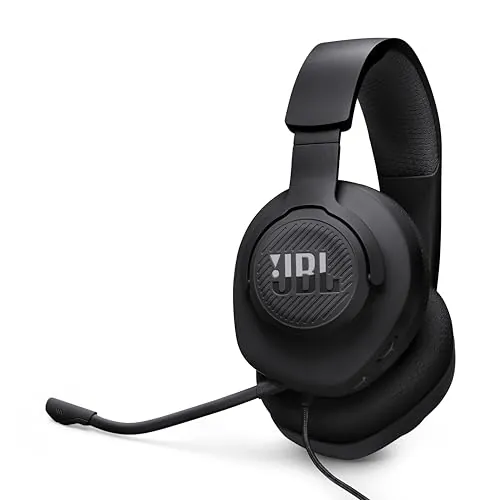
These are wired headsets with different documented setup choices. JBL's exact black Quantum 100M2 listing uses a 1.2 m cable and 3.5 mm connection; JBL lists PC, PlayStation, Xbox, Switch, mobile, Mac and VR, and says the boom microphone detaches. Logitech's G432 page documents an included USB DAC for PC, PS4 and docked Switch, plus 3.5 mm use on consoles or mobile. Its DTS Headphone:X 2.0 and EQ presets require Windows and G HUB, while the boom flips up to mute. Pick by host, connection, software and whether removing the mic matters. No listening, mic-capture or comfort test was performed.
Read comparison
HyperX Cloud III Wired vs Logitech G432: Ports, Mic Mute, and PC Software
The black HyperX Cloud III Wired (727A8AA) offers USB-C, USB-A through its included adapter, and 3.5 mm, with an earcup mic-mute button and LED indicator. Logitech G432 (981-000769) uses its included USB DAC for PC, PS4, and docked Switch, or 3.5 mm for consoles and mobile; its boom flips up to mute. G432 DTS Headphone:X 2.0 and EQ presets require Windows and Logitech G HUB. Neither headset was tested for sound or microphone quality.
Read comparison