
Products compared

Logitech G
Logitech G502 HERO Wired Gaming Mouse, Black
U.S. black wired G502 HERO. This is not a G502 LIGHTSPEED or G502 X variant.
Model 910-005469
Amazon ASIN B07GBZ4Q68
Logitech G
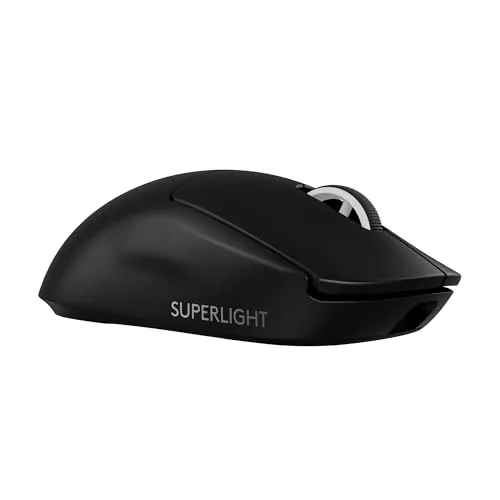
Logitech G PRO X SUPERLIGHT 2 LIGHTSPEED Wireless Gaming Mouse, Black
U.S. black standard PRO X SUPERLIGHT 2, identified by Logitech product code 910-006628. This is not the asymmetrical DEX or the newer 2c.
Model 910-006628
Amazon ASIN B09NBWL8J5
Differences that matter
What matters most to you?
Choose a priority to see what it changes.
Sources for Connection and power routine
Sources for Programmable controls and scroll actions
Sources for Weight configuration and receiver handling
Sources for POWERPLAY charging option
Start with the actual job of the mouse
For command-heavy use, first list the actions you expect to map. Logitech's G502 HERO guide shows eleven programmable inputs and a separate wheel-mode shift. SUPERLIGHT 2's guide maps five physical inputs, including left/right/middle clicks and browser back/forward. Those are different control layouts, not a game-performance ranking.
For a cable-free desk, the standard PRO X SUPERLIGHT 2 uses LIGHTSPEED with a USB receiver. Its setup guide shows the receiver installed in the extension adapter, the USB charging/data cable, and how the receiver can be stored inside the mouse. G502 HERO's guide shows a direct wired USB connection.
Turn the button count into a quick pre-buy check
Put each must-have action next to an input: ordinary clicks, wheel click, side actions, DPI changes, profile switching and wheel tilt. G502 HERO's count includes its regular clicks and the wheel-tilt directions, so eleven does not mean eleven thumb buttons. The manual marks wheel-mode shift as not programmable.
SUPERLIGHT 2's five-input list includes the three normal clicks and two browser actions. If your configuration needs more physical shortcuts, its lighter design does not add missing command positions. If five is enough, the simpler map may suit your routine; no hand-size or ergonomic conclusion is implied.
Plan the power and travel routine
G502 HERO's manual describes wired USB setup and optional weights. The PRO X SUPERLIGHT 2 guide documents USB-C charging/data, the wireless receiver and an in-mouse storage spot. If charging feels like unwanted upkeep, a cable may be the more useful trade-off; if the mouse cable bothers your setup, decide whether receiver and battery care are acceptable.
Logitech lists PRO X SUPERLIGHT 2 as compatible with POWERPLAY 2. That is a separate charging-system choice, not evidence that a pad, coin or extra receiver ships in the mouse box. Verify the accessory package separately before counting it in your setup.
Product details
Logitech G502 HERO Wired Gaming Mouse, Black
- Connection
- Wired USB mouse; the setup guide shows connecting its cable to a computer USB port. Source
- Programmable input map
- 11 programmable inputs include ordinary clicks, wheel click, back/forward, DPI controls, wheel tilt and profile selection. The wheel-mode shift is separate and not programmable. Source
- Weight setup
- Guide supports up to five optional 3.6 g weights in different positions; adding them is optional and changes the configured weight/balance. Source
Logitech G PRO X SUPERLIGHT 2 LIGHTSPEED Wireless Gaming Mouse, Black
- Connection and charging
- LIGHTSPEED wireless uses the USB receiver; the mouse charges and transfers data through its USB port using the included cable. Source
- Physical inputs
- Five mapped physical inputs: left click, right click, middle click/scroll, browser forward and browser back. Power switch, LED and aperture door are not extra command buttons. Source
- Manufacturer-listed design mass
- 60 g on Logitech's U.S. product page; a published specification, not a matched test of the two mice in a chosen configuration. Source
Before you buy
Community discussions
Trying the mouse weight before choosing
Logitech G502 HERO Wired Gaming Mouse, Black
A G502 HERO owner buying their first gaming mouse liked its controls but asked about the weight they felt in use.
What to check
Try lifting and repositioning each mouse with your usual grip. Check the listed weight basis and any included weights.
Common questions
Does G502 HERO have eleven side buttons?
No. The eleven programmable inputs include ordinary left/right and wheel clicks, DPI controls, both wheel-tilt directions and profile selection. The separate wheel-mode shift is not programmable. SUPERLIGHT 2's five-input map also includes the three ordinary clicks plus browser forward and back.Logitech G502 HERO Setup GuideLogitech G PRO X SUPERLIGHT 2 Setup Guide
Can I use PRO X SUPERLIGHT 2 while charging?
The setup guide identifies a USB charging/data cable and shows the receiver connected through the cable and extension adapter; the guide supports cable connection during setup and charging. It does not establish a performance or battery-life result for a particular play session.Logitech G PRO X SUPERLIGHT 2 Setup Guide
Is POWERPLAY included with SUPERLIGHT 2?
The guide lists the mouse, receiver, USB charging/data cable, extension adapter, preparation cloth and optional parts; POWERPLAY 2 is a separately described charging system. Logitech lists PRO X SUPERLIGHT 2 as compatible, but that does not mean the accessory is in the mouse box.Logitech G PRO X SUPERLIGHT 2 Setup GuideLogitech G POWERPLAY 2 compatibility and setup page
Does the lower listed weight mean SUPERLIGHT 2 is more comfortable or accurate?
No such conclusion follows from the manufacturer mass specification. Hand fit, grip, surface, settings and personal preference vary, and this guide contains no matched comfort, accuracy, latency or gaming test.Logitech G PRO X SUPERLIGHT 2, U.S. black SKU pageLogitech G502 HERO Setup Guide
Sources and scope
This is a documentation-based feature-fit guide, not a matched gaming, latency, tracking, battery-life, durability, fatigue or comfort test. Logitech lists SUPERLIGHT 2 at 60 g. The earlier exact G502 HERO earlier product-page information in the published source listed 121 g, while the live listing data currently reports 122.47 g; avoid treating those observations as a precise measured weight difference. G502's five supplied 3.6 g weights are optional and change its configured mass. Check the exact black SKU (G502 HERO 910-005469 or standard PRO X SUPERLIGHT 2 910-006628) before buying; G502 LIGHTSPEED, G502 X, PRO X SUPERLIGHT 2 DEX and PRO X SUPERLIGHT 2c are separate models.
Related comparisons
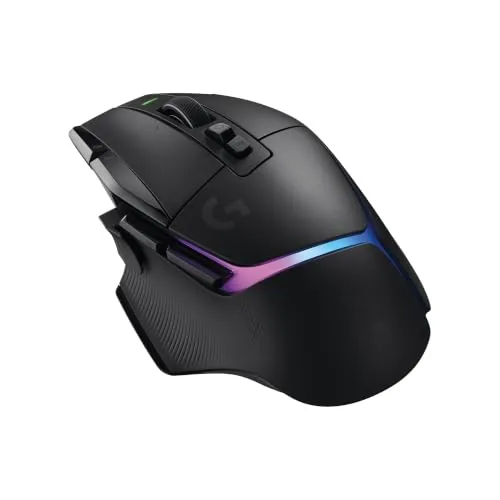
Logitech G502 HERO vs G502 X PLUS: Wired or Rechargeable Wireless?
These black U.S. models suit different desk routines. The G502 HERO 910-005469 stays connected by its 2.1 m cable and has Logitech-documented weight adjustment. The G502 X PLUS 910-006160 uses a LIGHTSPEED USB-A receiver, recharges over USB-C, and can switch to data-over-cable use when connected directly to a PC. Its DPI-Shift button can be repositioned or replaced by a cover. Decide whether cable-free movement and the X PLUS control adjustment are worth adding a receiver and charging routine.
Read comparison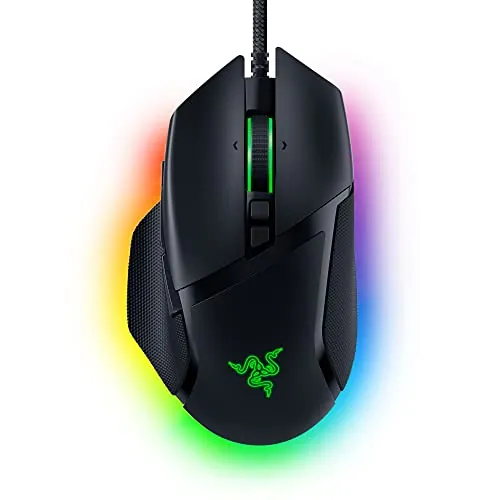
Logitech G502 HERO vs Razer Basilisk V3: Scroll Controls, Weights and Setup
Both are wired, right-handed gaming mice with tilt wheels and configurable controls. The Logitech G502 HERO uses a physical button to switch its wheel between notched and free-spin modes and accepts up to five removable weights. The original Razer Basilisk V3 has a four-way tilt wheel with electronically actuated notched/free-spin modes; its Smart-Reel behavior is enabled in Razer Synapse. Compare the control routine and software you can use on your computer, then check cable routing and the exact model code before buying.
Read comparison