
Products compared
Logitech
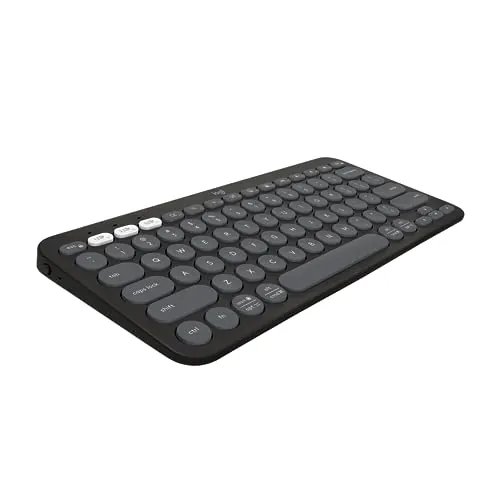
Logitech Pebble Keys 2 K380s
Tonal Graphite standalone keyboard; compact layout and three Bluetooth device channels. Logi Bolt is a separately purchased receiver option; Logitech says Bolt is included only with Pebble 2 Combo.
Model 920-011775
Amazon ASIN B0BT4DP7SC
Logitech
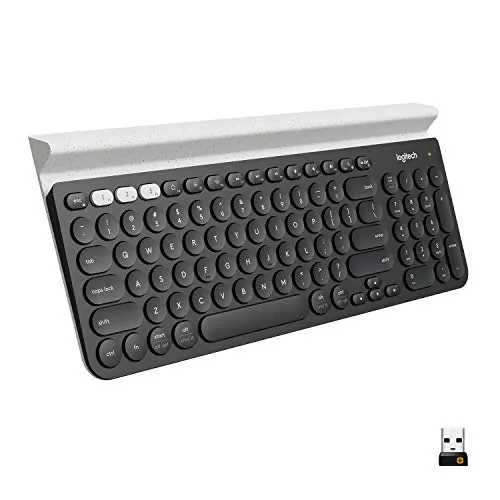
Logitech K780 Multi-Device Wireless Keyboard
Full keyboard layout with a built-in numeric keypad and integrated phone/tablet cradle; Bluetooth or pre-paired Unifying USB receiver.
Model 920-008025
Amazon ASIN B01LZTBKBG
Differences that matter
What matters most to you?
Choose a priority to see what it changes.
Sources for USB receiver in the selected setup
Sources for Three-device workflow
Start with the layout you want on your desk
K380s 920-011775 is Logitech's compact Pebble Keys 2 layout. Its official Tonal Graphite keyboard image shows the typing area without a separate number pad. K780 920-008025 has a built-in numeric keypad. If you enter figures frequently and want dedicated number keys, that is the clearest reason to favor K780; if you want the compact layout, start with K380s. The manufacturer pages do not establish a typing-speed or ergonomic winner.
K780 also builds a phone/tablet cradle into the keyboard. Logitech lists it for phones through a 12-inch iPad, but a device plus protective case may not share those dimensions. Confirm the particular device/case fit instead of treating the example as a universal clearance guarantee.
Map the computer connection before counting the channels
Both models support up to three device channels. K380s pairs over Bluetooth Low Energy and Logitech also documents Logi Bolt as an optional USB receiver that must be bought and paired separately for the standalone keyboard. Logitech says Bolt is included only with Pebble 2 Combo; the K380s specification lists the keyboard and user documentation as box contents.
K780 supports Bluetooth or Unifying, and its setup guide says an included pre-paired Unifying USB receiver is stored beneath the battery door. If your computer needs a receiver, K780 documents a ready-to-use one in its package. Bolt and Unifying are different systems and Logitech says they cannot pair with each other's products. Check the computer's actual port, including whether it needs an adapter, and don't expect a receiver to add another device slot.
Run this quick pre-buy check
Write down the computer, phone and tablet you will switch between. Mark which devices have working Bluetooth and which computer, if any, requires a USB receiver. A receiver-connected host occupies one of the three K780 channels, just as a Bluetooth host does.
Next, decide whether you need a number pad or a built-in device cradle. If not, the K380s compact form may be enough; if either is a requirement, K780 documents both. Finally, verify the selected box: K380s standalone is not the receiver-included Combo; for a used K780, confirm the Unifying receiver is actually present. Confirm any cradle fit with your exact device and case.
Product details
Logitech Pebble Keys 2 K380s
Logitech K780 Multi-Device Wireless Keyboard
Before you buy
Community discussions
Switching between a work laptop and iPad
Logitech K780 Multi-Device Wireless Keyboard
The K780 owner paired it to a work laptop through Unifying and an iPad through Bluetooth, then reported difficulty switching back while the work device restricted Bluetooth and pairing software. The thread does not report a confirmed resolution.
What to check
Before relying on three-host switching, check which connection and pairing steps each computer permits, especially on a managed work device. The post describes one restricted setup, not general K780 reliability.
Choosing a receiver for a replacement keyboard
Logitech K780 Multi-Device Wireless Keyboard
A K780 owner looking for a replacement says they would prefer a keyboard using the Bolt receiver already used by their mouse, while remaining open to other wireless receiver options. The post does not test the K780 with Bolt.
What to check
Check the exact receiver family for each keyboard and host. The K780 guide describes Unifying, while this owner is seeking Bolt; do not assume those receivers pair across systems.
Common questions
Can the K380s use the Unifying receiver included with K780?
No. Logitech documents the K380s optional receiver as Logi Bolt and the K780 receiver as Unifying, and states that Bolt and Unifying products cannot pair across those receiver systems. Use Bluetooth for both if the hosts support it, or plan for the correct receiver for each keyboard.Getting Started: Pebble Keys 2 K380sK780 Multi-Device Keyboard guideWhat is the difference between Bolt and Unifying receivers?
Does the K380s standalone keyboard include a USB receiver?
Logitech's K380s support page describes Bluetooth and optional Logi Bolt; it says the Bolt receiver is included only with Pebble 2 Combo and must otherwise be purchased separately. Its K380s specification page lists the keyboard and user documentation in the box. Check the exact selected offer rather than assuming it is the Combo.Getting Started: Pebble Keys 2 K380sSpecification: Pebble Keys 2 K380s
Does the K780 receiver add a fourth device?
No. Logitech's K780 guide specifies up to three total devices connected through Bluetooth Smart or the Unifying receiver. Treat a receiver-connected computer as one of those three channels.K780 Multi-Device Keyboard guide
Will a phone or tablet fit in the K780 cradle with its case?
Logitech says the integrated cradle holds a range of phones and tablets and gives a 12-inch iPad as an example. That does not confirm every device/case combination. Check the exact device's dimensions and thickness against the cradle and its supplied instructions.K780 Multi-Device US product page, 920-008025
Sources and scope
Manufacturer feature and setup comparison, not a typing, comfort, noise, speed, battery-life or wireless-reliability test. Check the exact host OS, available USB port, current seller box and device/case fit before ordering.
- Pebble Keys 2 K380s US product page, 920-011775
- K380s Tonal Graphite official keyboard layout image
- Getting Started: Pebble Keys 2 K380s
- Specification: Pebble Keys 2 K380s
- K780 Multi-Device US product page, 920-008025
- K780 Multi-Device Keyboard guide
- What is the difference between Bolt and Unifying receivers?
Related comparisons

Logitech MX Keys S vs K780: Desk Footprint, Receiver and Phone Cradle
This U.S. comparison covers the Graphite Logitech MX Keys S (920-011558) and Speckled White Logitech K780 (920-008025). MX Keys S is 430.20 mm wide and 131.63 mm deep, uses Bluetooth or a Logi Bolt USB receiver, and its rechargeable battery can charge over USB-C while you continue typing. K780 is 380 mm wide and 153 mm deep, uses Bluetooth or Logitech's Unifying receiver, and its built-in cradle holds phones through a 12-inch iPad class; Logitech lists a maximum device thickness of 11.3 mm. K780 uses two replaceable AAA cells and has no backlight. The practical choice is whether your desk and phone/tablet routine benefit more from an integrated cradle or from illumination and rechargeable upkeep—not a typing-quality verdict.
Read comparison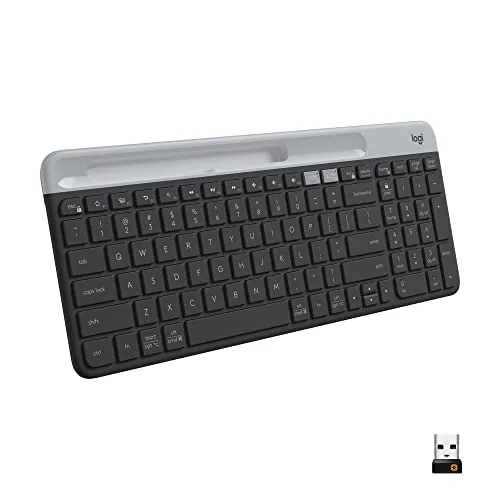
Logitech Pebble Keys 2 K380s vs K585: Layout, Device Switching and Receiver
The English-US Tonal Graphite Pebble Keys 2 K380s (920-011775) is the more compact layout, omits a dedicated number pad and can keep up to three devices paired for Easy-Switch. The Graphite K585 (920-011479) adds a number pad and phone cradle, switches between two paired devices and includes a Unifying USB receiver. Both can connect over Bluetooth Low Energy. Before buying, count your regular hosts and check whether the receiver type and keyboard width fit your actual desk or bag.
Read comparison