
Products compared
Logitech
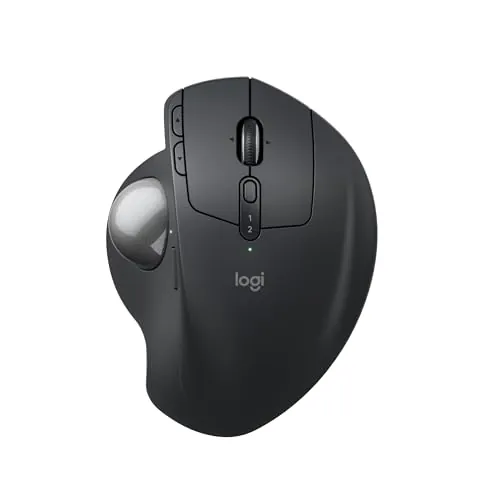
Logitech MX Ergo S Wireless Trackball Mouse
Graphite standard MX Ergo S configuration; Logitech distinguishes the MX Ergo S Plus, which adds a detachable wedge. The standard U.S. specification lists a Logi Bolt receiver, while the USB-C charging cable is not included.
Model 910-007259
Amazon ASIN B0D6PTR6MP
Logitech
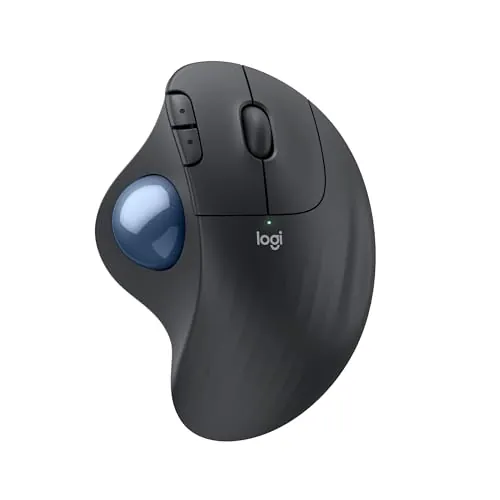
Logitech ERGO M575S Wireless Trackball Mouse
Graphite with Blue Ball. Logitech describes a sculpted, thumb-operated shape and lists Bluetooth, a Logi Bolt receiver and one AA battery in the standard box.
Model 910-007027
Amazon ASIN B0BBQ3ZYNY
Differences that matter
What matters most to you?
Choose a priority to see what it changes.
Sources for Platform angle and hand position
Sources for Pointer speed and thumb-button workflow
Sources for Receiver, Bluetooth and computer switching
Sources for Charging, battery replacement and included hardware
Start with the angle and control style you will use
The MX Ergo S's headline physical distinction is its stated 20-degree tilt. Logitech pairs it with a thumb-operated ball and a physical DPI button that toggles between speed and high-precision tracking. The ERGO M575S also uses thumb control in a sculpted angled shape, but Logitech's cited M575S pages give no numeric angle and describe cursor-speed changes through Options+.
These specs describe the products, not how either will feel to a particular person. Decide whether a stated 20-degree setup and on-mouse mode toggle matter to your desk routine; do not treat Logitech's ergonomic language as a personal comfort guarantee.
Map the buttons and host setup before choosing
MX Ergo S lists six customizable buttons, a DPI control and two-channel Easy-Switch. Logitech Support says its Easy-Switch can move between two devices without re-pairing. M575S lists three customizable buttons and software-based cursor-speed adjustment. Its support guide explains Bluetooth and Logi Bolt setup but does not say how many saved hosts it can switch between, so ask Logitech if you specifically require a multi-computer toggle.
Both assigned configurations list Bluetooth and a Logi Bolt USB-A receiver. Check whether the computers you plan to use have Bluetooth available or an open USB-A port; both receivers are listed in the respective manufacturer specification pages.
Choose the power routine and check the exact box
The MX Ergo S has a rechargeable internal battery; Logitech's specification gives an up-to-120-day estimate per full charge and says the USB-C cable is not included. M575S uses one replaceable AA listed in the box and carries an up-to-18-month Logitech estimate for either included Logi Bolt or Bluetooth Low Energy use. These figures come from separate maker conditions and should not be read as matched runtime results.
One configuration detail matters: the manufacturer's MX Ergo S Plus adds a detachable wedge, while the standard MX Ergo S configuration in this comparison does not list that extra wedge. Verify the offer model number and the seller's box, especially for marketplace listings.
Product details
Logitech MX Ergo S Wireless Trackball Mouse
- Tilt and pointer controls
- A stated 20-degree tilt and a DPI button to toggle speed/high-precision tracking; six customizable buttons. Source
- Connection and host switching
- Bluetooth Low Energy or the included Logi Bolt USB-A receiver; two-channel Easy-Switch can switch between two devices without re-pairing. Source
- Power and box
- Rechargeable battery rated up to 120 days per full charge; Logi Bolt receiver included and USB-C charging cable not included. Source
Logitech ERGO M575S Wireless Trackball Mouse
- Thumb controls and pointer speed
- Three customizable buttons; cursor speed can be adjusted in Logi Options+. Logitech describes a sculpted angled shape but gives no numeric tilt angle in these sources. Source
- Connection and box
- Bluetooth Low Energy or Logi Bolt USB receiver; the specification lists the receiver and one AA battery in the box. The cited M575S/M575SP setup page does not state a saved-host count. Source
- Power routine
- One user-replaceable AA battery, rated by Logitech for up to 18 months with Logi Bolt or Bluetooth Low Energy. Source
Before you buy
Community discussions
Trying fine pointer movements with a thumb trackball
Logitech MX Ergo S Wireless Trackball Mouse
A longtime mouse user switched to the MX Ergo S and found large movements easy early on, while small adjustments still took practice.
What to check
Try the ball and tilt positions on your usual desk. Compare small pointer corrections across both models.
Common questions
Does the MX Ergo S switch between two computers?
Logitech documents two-channel Easy-Switch for the MX Ergo S and says it can switch between two devices without re-pairing. The M575S setup pages checked here explain Bluetooth and Logi Bolt setup but do not state a saved-host count; ask Logitech if that behavior is essential for the M575S.Getting Started - MX Ergo SGetting Started - ERGO M575S
Are the two battery-life figures a direct comparison?
No. Logitech rates the rechargeable MX Ergo S for up to 120 days per full charge and the M575S for up to 18 months on one AA under its stated connection conditions. Those are different maker estimates, not results from a matched test.Specification - MX Ergo SSpecification - ERGO M575S
Does the standard MX Ergo S include the extra wedge and USB-C cable?
Logitech's specification lists the detachable wedge for MX Ergo S Plus, not the standard MX Ergo S. It also says the charging cable is not included with either listed version. Check the exact seller package before purchase.Specification - MX Ergo S
Does the M575S have a numeric tilt angle?
The Logitech M575S product and support pages cited here describe a sculpted angled shape but do not list a numeric tilt angle. This does not imply that the shape lacks an angle; it means the numeric angle is not established by these sources.ERGO M575S - Wireless Trackball MouseGetting Started - ERGO M575S
Sources and scope
This guide compares Logitech's published specifications and setup information for the U.S. models identified below. It does not test either mouse, assess personal comfort or accuracy, or establish a universal ergonomic choice. Battery-life figures are manufacturer estimates under stated conditions and are not a matched runtime comparison. The M575S support material reviewed here does not specify a saved-host count; confirm that feature with Logitech if it is essential. Seller bundles can differ, so verify the selected model and box contents.
Related comparisons
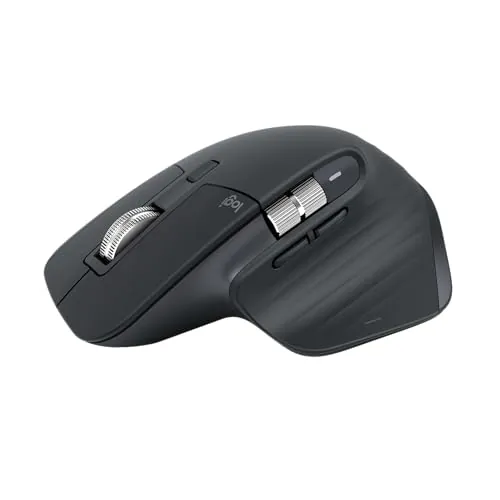
Logitech MX Master 3S Bluetooth Edition vs MX Ergo S: Mouse Movement, Desk Space and Receiver Fit
This pair is specific: Graphite MX Master 3S Bluetooth Edition, part 910-007499, versus the base Graphite MX Ergo S, part 910-007259 (not MX Ergo S Plus). The Master is a conventional mouse with a MagSpeed main wheel, thumb wheel and gesture button; the Ergo S moves the pointer with a thumb-operated ball, has a 20-degree tilted base and a tilt-capable scroll wheel. Logitech lists three Easy-Switch computer channels for the Master and two for Ergo S. The Master Bluetooth Edition does not include a Logi Bolt receiver, while the base Ergo S box does; both can pair over Bluetooth and neither includes its USB-C charging cable. On a desk, Ergo S has the larger published device footprint, but the trackball does not require sweeping the mouse body to steer the pointer. Measure your fixed space and the Master mouse's travel area separately; Logitech's device dimensions do not establish the room any one person needs.
Read comparison
Logitech MX Vertical vs MX Ergo S: Mouse Movement, Desk Space and Setup
Both are rechargeable Logitech pointing devices, but their day-to-day motion is different. MX Vertical is a conventional mouse with a 57° upright shape, a Unifying receiver, Bluetooth and a cable mode. MX Ergo S is a thumb-operated trackball that stays put, tilts 20°, and connects by Bluetooth or its included Logi Bolt receiver. Check the desk movement you can spare and whether the receiver you already own matches.
Read comparison