
Products compared

Logitech
Logitech MX Vertical Advanced Ergonomic Mouse
US/AMR Graphite variant; conventional rechargeable mouse with an upright 57° shape.
Model MX Vertical (910-005447)
Amazon ASIN B07FNJB8TT
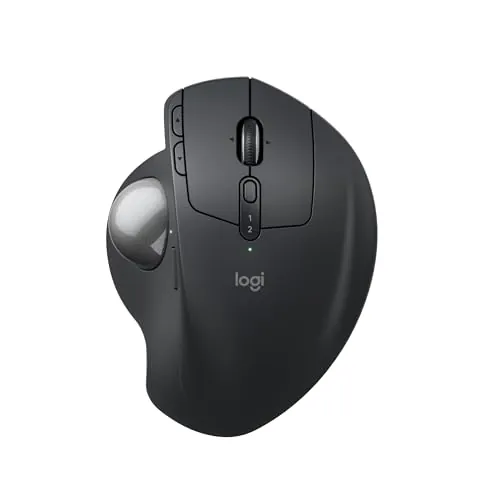
Logitech
Logitech MX Ergo S Advanced Wireless Trackball
US Graphite base S variant; thumb-operated trackball with a 20° tilt base. The Plus version is a separate style with an extra detachable wedge.
Model MX Ergo S (910-007259)
Amazon ASIN B0D6PTR6MP
Differences that matter
What matters most to you?
Choose a priority to see what it changes.
Sources for How the pointer moves
Sources for Desk placement dimensions
Sources for Receiver type and wireless connection
Sources for Wired use and charging cable
Sources for Switching between computers
Sources for On-device cursor control
Start with the movement you want to make
MX Vertical moves like a conventional mouse: you glide its body over the desk. The maker lists a 57° vertical angle and describes a high precision optical sensor with a cursor-speed switch. MX Ergo S changes the pointing action: your thumb rolls the trackball while the base stays put. Its listed 20° tilt is a base angle, not an alternative movement mode.
That makes the choice concrete. If you want mouse-body travel and the feel of a standard pointer, consider Vertical. If your setup makes mouse travel inconvenient and you are willing to use a thumb-operated ball, consider Ergo S. These product descriptions cannot predict whether either shape will feel comfortable or work better for a particular person.
Plan the footprint and access, not just the body size
Logitech lists MX Vertical at 79 mm wide by 120 mm long. It needs both that resting space and a clear path to move the body. MX Ergo S is listed at 99.8 mm wide by 51.4 mm deep; its shell stays stationary during pointing, but your thumb and fingers still need room to reach the ball, scroll wheel and buttons. Treat these as maker-listed dimensions for rough placement, then check the actual desk and how you plan to position your hand.
Check the port and receiver before buying
MX Vertical can connect by Bluetooth, Unifying receiver, or USB-C cable; Logitech says the cable can be used to operate it corded. Its support page documents up to three paired devices. MX Ergo S is wireless over Bluetooth or the included Logi Bolt receiver and offers two switching channels. Its specifications identify USB-C as a charge port, say the product is wireless, and note that the cable is not included.
A USB-A receiver plan depends on the exact receiver protocol: the Vertical's Unifying receiver will not pair with Ergo S, and Ergo S's Bolt receiver will not pair with Vertical. If USB ports are scarce, Bluetooth is listed on both models; check your computer's Bluetooth support and OS requirements before relying on it.
Product details
Logitech MX Vertical Advanced Ergonomic Mouse
- Pointing style
- Conventional optical mouse; move the body across the desk. Manufacturer lists a 57° vertical angle. Source
- Listed body dimensions
- 78.5 mm H × 79 mm W × 120 mm L. Source
- Connections and device switching
- Bluetooth, Unifying USB receiver, or USB-C cable for corded operation; up to three paired devices. Source
Logitech MX Ergo S Advanced Wireless Trackball
- Pointing style
- Thumb-operated trackball; the mouse body stays in place while the thumb moves the ball. Manufacturer lists an adjustable 20° angle. Source
- Listed body dimensions
- 132.5 mm H × 99.8 mm W × 51.4 mm D; cable is not included. Source
- Connections and device switching
- Bluetooth or included Logi Bolt USB-A receiver; two Easy-Switch device channels; wireless operation only. Source
Before you buy
Community discussions
Trying fine pointer movements with a thumb trackball
Logitech MX Ergo S Advanced Wireless Trackball
A longtime mouse user switched to the MX Ergo S and found large movements easy early on, while small adjustments still took practice.
What to check
Check how much desk motion each style needs. Try accurate clicks and long pointer moves with your own hand.
Common questions
Which one needs less room to move across the desk?
MX Ergo S is a trackball: its body stays in place and the thumb moves the ball. MX Vertical is a conventional mouse that moves across the surface. The Ergo S still occupies a listed 99.8 × 51.4 mm footprint and needs clear access to the ball; measure your actual workspace.Logitech MX Ergo S US product pageMX Ergo S SpecificationsMX Vertical Advanced Ergonomic Mouse Data Sheet (US/AMR Graphite part 910-005447)
Can I reuse the same Logitech receiver for both?
No. MX Vertical uses a Unifying receiver, while MX Ergo S uses Logi Bolt. Logitech states that Bolt and Unifying devices are not compatible with each other's receivers. Both models also support Bluetooth.Getting Started - MX VerticalGetting Started - MX Ergo SAre Logi Bolt devices compatible with Unifying USB receivers?
Can MX Ergo S work as a wired mouse while charging?
Logitech lists MX Ergo S as wireless, with Bluetooth or Logi Bolt as its computer connections. USB-C is its charging port and the cable is not included; do not treat the charge cable as a wired data connection.MX Ergo S SpecificationsGetting Started - MX Ergo S
How many computers can each mouse switch between?
Logitech documents up to three paired devices for MX Vertical and two Easy-Switch channels for MX Ergo S. Compare that with the number of computers you intend to switch among.Getting Started - MX VerticalGetting Started - MX Ergo S
Sources and scope
This guide compares manufacturer-documented design and connection details, not comfort, medical outcomes, productivity or measured tracking performance. A listed device footprint is not a guarantee of fit for a particular hand or desk. MX Vertical's US/AMR Graphite part number 910-005447 matches the product listing listed model; MX Ergo S is the Graphite base S model 910-007259, not the Plus bundle with its extra wedge. Confirm the exact model and receiver type on the listing and in the box.
Related comparisons
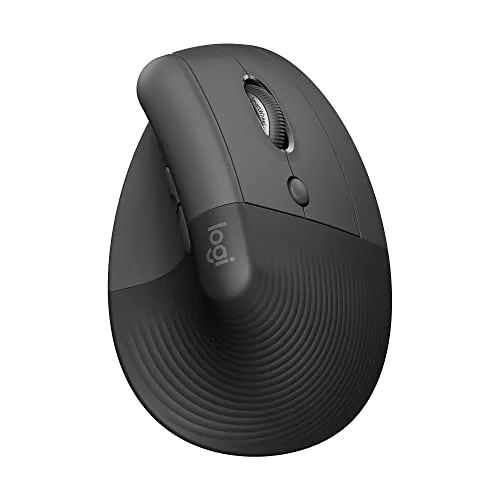
Logitech Lift vs MX Vertical: Hand Fit, Receiver and Charging
These are both right-handed Logitech vertical mice, but Logitech positions them for different hand-size ranges. Lift uses one AA battery and a Logi Bolt receiver; MX Vertical recharges over USB-C, can stay connected by cable while charging, and uses a Unifying receiver. Bluetooth is available on both.
Read comparison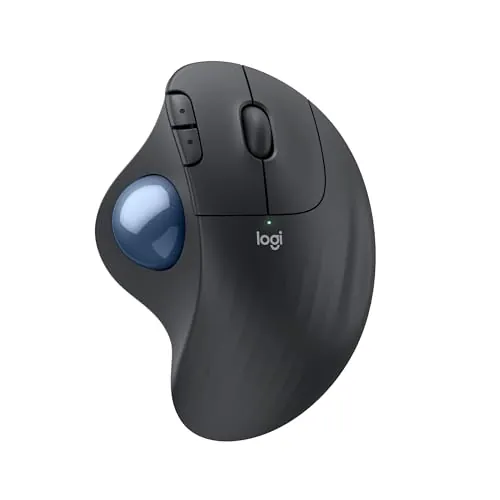
Logitech MX Ergo S vs ERGO M575S: Tilt, Thumb Controls and Power
Both are thumb-operated Logitech trackballs with Bluetooth and a Logi Bolt receiver in the manufacturer-listed box. The MX Ergo S adds a stated 20-degree tilt, a physical button for switching between speed and high-precision tracking, six customizable buttons and two-channel Easy-Switch; it recharges over USB-C, but the cable is not included. The ERGO M575S uses Logi Options+ for cursor-speed changes, offers three customizable buttons, and runs on one replaceable AA battery rated by Logitech for up to 18 months. Logitech's M575S support pages checked here do not state its saved-host count, so verify that requirement before relying on it for multi-computer switching.
Read comparison