
Products compared
Logitech
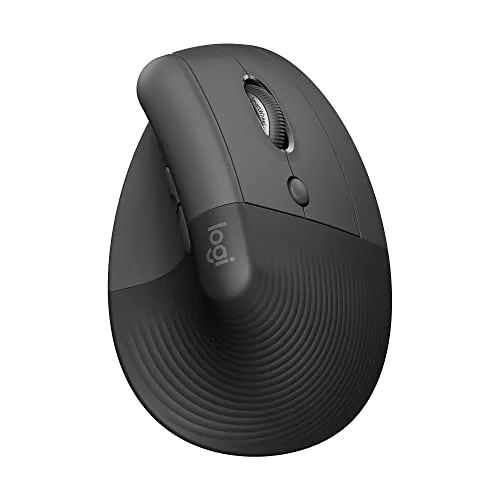
Logitech Lift Vertical Ergonomic Mouse (Graphite, right-handed)
US Graphite Lift; the left-handed Graphite option is a separate model.
Model Lift, part 910-006466
Amazon ASIN B09J1TB35S

Logitech
Logitech MX Vertical Advanced Ergonomic Mouse (Graphite, right-handed)
US/AMR Graphite configuration; official datasheet maps part 910-005447 to Graphite.
Model MX Vertical, part 910-005447
Amazon ASIN B07FNJB8TT
Differences that matter
Sources for Receiver and connection setup
Sources for Documented operating-system setup
Start with hand fit, then check handedness
Logitech places Lift in the small-to-medium hand range and MX Vertical in the medium-to-large range. That makes the middle of the range an overlap rather than a clean cutoff. Use the guidance to shortlist a shape, then try the mouse if fit is uncertain; these labels do not predict personal comfort.
Both assigned Graphite models are for right-handed use. Lift Left is a separate Graphite configuration, so a left-handed shopper should verify the part number rather than selecting the standard Lift by color alone.
Match the receiver to your computer
Both mice can pair over Bluetooth. If you prefer a USB receiver, the Lift uses Logi Bolt and the MX Vertical uses Logitech Unifying; the Lift setup guide specifically calls for a USB-A port, and Logitech's MX Vertical specifications also list USB-A for its receiver. Check your existing receiver's protocol instead of assuming any Logitech receiver will work.
Logitech provides Windows and macOS pairing steps for both products. The MX Vertical's technical sheet also names iPadOS, ChromeOS and Linux for certain connection modes, but its compatibility table is marked as support at release. For another host or a newer OS, verify the exact connection mode and software needs in current support documentation.
Pick the power routine you will keep up with
Lift uses one AA battery, which means its power routine is replacement rather than charging. MX Vertical has a rechargeable battery and charges over USB-C; Logitech says the mouse remains connected through the cable while charging. That is useful if you want to keep using it in wired mode during a charge, but it is not a battery-life comparison.
Before buying, check which routine suits your desk: a spare AA on hand, or a USB-C charging cable and the option to work wired while charging. Logitech publishes runtime estimates, but they depend on use and computing conditions, and this comparison does not treat them as a matched test.
Product details
Logitech Lift Vertical Ergonomic Mouse (Graphite, right-handed)
Lift Graphite part 910-006466 is the right-handed Lift configuration. Logitech positions Lift for small-to-medium hands; it connects by Bluetooth LE or Logi Bolt and runs on one AA battery.
Logitech MX Vertical Advanced Ergonomic Mouse (Graphite, right-handed)
The official MX Vertical datasheet maps part 910-005447 to AMR Graphite and lists right-handed use. Logitech positions it for medium-to-large hands; it supports Bluetooth, a Unifying receiver and USB-C charging/cabled use.
Before you buy
Community discussions
An MX Vertical owner asks whether the mouse fits a 17.5 cm hand
Logitech MX Vertical Advanced Ergonomic Mouse (Graphite, right-handed)
On their first full day using an MX Vertical, one owner with a 17.5 × 6.8 cm hand says they can reach its buttons and asks whether the mouse is too large or whether they need more time to adapt. The post gives no longer-term fit result.
What to check
Compare your own hand and button reach with Logitech's published hand-size guidance, and try the shape if fit is decisive. This first-day question does not establish how the mouse will feel after more use or how it compares with Lift for other hands.
Common questions
Is the assigned Logitech Lift left-handed?
No. The assigned Graphite Lift is part 910-006466. Logitech lists Lift Left separately; its Graphite Left page uses part 910-006467. Confirm the model number in the listing if handedness matters.Lift Vertical Ergonomic Mouse, Graphite, part 910-006466Lift Vertical Ergonomic Mouse, Graphite Left, part 910-006467
Do the two mice use the same USB receiver?
No. Logitech documents a Logi Bolt receiver for Lift and a Unifying receiver for MX Vertical. Both also support Bluetooth, so check the host's available connection and do not choose by the word “Logitech receiver” alone.Getting Started – LIFT Vertical Ergonomic MouseGetting Started – MX Vertical
Can I use the MX Vertical while it charges?
Logitech says MX Vertical stays connected through its cable while charging. Lift instead uses one AA battery.Getting Started – MX VerticalGetting Started – LIFT Vertical Ergonomic Mouse
Sources and scope
Logitech's hand-size bands are broad guidance, not a personal fit guarantee. This is a source-based setup comparison, not a test of comfort, pain relief, cursor performance, reliability or battery runtime. Verify current OS support and the exact receiver included in the retailer's listing.
- Lift Vertical Ergonomic Mouse, Graphite, part 910-006466
- Lift Vertical Ergonomic Mouse, Graphite Left, part 910-006467
- Getting Started – LIFT Vertical Ergonomic Mouse
- MX Vertical Ergonomic Wireless Mouse
- MX Vertical Technical Specifications
- Getting Started – MX Vertical
- MX Vertical Advanced Ergonomic Mouse data sheet
Related comparisons
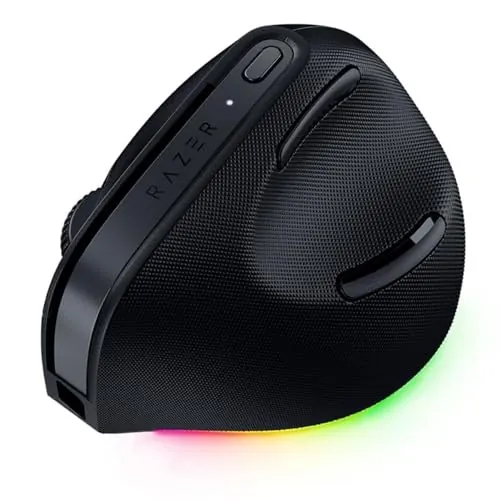
Razer Pro Click V2 Vertical Edition vs Logitech Lift: Fit, Connections and Power
The Razer Pro Click V2 Vertical Edition is a right-handed vertical mouse with USB-C wired, 2.4 GHz and Bluetooth modes; Logitech Lift Graphite is also a right-handed vertical mouse, with Logitech guidance for small-to-medium hands and Bolt or Bluetooth LE. Compare the shapes with a mouse you already handle comfortably, then check device switching, receiver needs and software support. Neither maker's specifications establish a comfort or health outcome.
Read comparison
Logitech MX Master 4 vs Lift: Choose by Grip, Controls and Setup
This is a feature-fit choice between the MX Master 4’s MagSpeed wheel, thumb wheel and customizable Actions Ring, and Lift’s 57° vertical shape, SmartWheel and side-button horizontal-scroll gesture. The exact Graphite Lift SKU here is the standard right-handed version. Check setup too: MX Master 4 uses a USB-C receiver and rechargeable USB-C power; Lift uses a USB-A Logi Bolt receiver and one AA battery. These are documented differences, not comfort or performance test results.
Read comparison