
Products compared
Razer
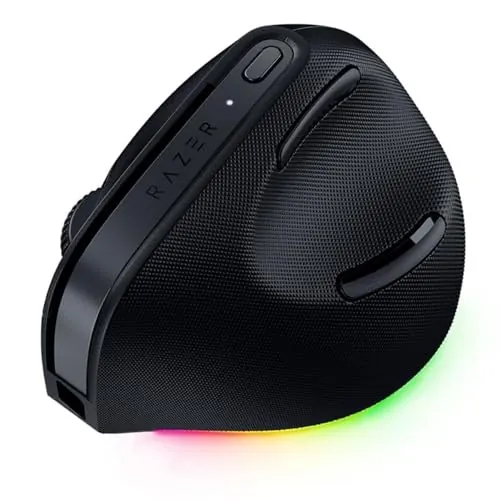
Razer Pro Click V2 Vertical Edition
Razer's right-handed vertical edition. Razer lists the standard Pro Click V2 separately; confirm the selected offer says Vertical Edition.
Model RZ01-0525 / RZ01-05250100-R3U1
Amazon ASIN B0DVD5RTZ5
Logitech
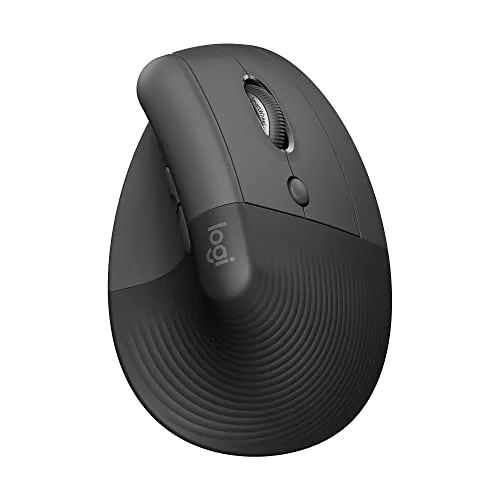
Logitech Lift Vertical Ergonomic Mouse (Graphite, right-handed)
The selected US Logitech product page is for Graphite and its regular Lift type; Logitech offers a separate Lift Left option. Check the selected offer remains Graphite and right-handed.
Model 910-006466 / M/N MR0094
Amazon ASIN B09J1TB35S
Differences that matter
Sources for Host connections and device switching
Sources for Battery upkeep
Sources for Button customization and software
Start with the exact handed version and a familiar mouse
Both selected products are right-handed vertical designs. The Razer US page identifies the Pro Click V2 Vertical Edition, part RZ01-05250100-R3U1; the separate standard Pro Click V2 has its own model family. Logitech's US URL selects part 910-006466, Graphite, and the regular Lift type; Lift Left is a separate option.
Logitech calls Lift a fit for small-to-medium hands. Razer publishes approximate body dimensions instead. Compare those dimensions with a mouse you already use, and test the grip if possible. Neither maker's published shape proves comfort, posture, pain relief or a medical benefit for a particular person.
Match switching and connection to your hosts
Razer documents USB-C wired, HyperSpeed 2.4 GHz and Bluetooth modes, with a bottom switch for wireless versus wired/off and a multifunction button for pairing and changing wireless slots. Logitech Lift is wireless-only and supports either Bluetooth Low Energy or its Logi Bolt USB receiver; Logitech describes Easy-Switch for up to three devices.
Make a short host list before ordering: note which machines support Bluetooth, whether a receiver can stay in an open USB port and whether you need a wired connection. Razer is the only one in this pair with an explicitly documented wired mode. If receiver contents are essential, verify the exact selected offer's package rather than relying on a family-level support page.
Separate the two power routines from runtime claims
Logitech specifies a replaceable, non-rechargeable AA and up to 24 months, with a use-conditions caveat. Razer advertises up to six months; conditions are not visible alongside its estimate on the US product page, and the currently readable Razer sources do not settle battery type or the exact charge routine.
Treat these as different maintenance descriptions, not a head-to-head runtime test. Lift offers a clear spare-cell routine. For Razer, confirm battery and charging details in the exact model instructions before purchase if that routine matters to you; USB-C wired mode alone does not establish its charging behavior.
Check app support before buying for custom button actions
Razer's Pro Click V2 Vertical support material directs mouse configuration through Synapse 4. Logitech lists Logi Options+ for Lift button customization on Windows and macOS and notes that basic functions can work without software on other supported systems.
If an assigned action is important to your workflow, check the current app requirements on the exact computer first. Do not assume the two apps offer the same mappings or that a feature available on one operating system carries to another.
Product details
Razer Pro Click V2 Vertical Edition
- Published body size
- Approx. 111 × 88 × 79 mm (Razer support specification). Source
- Connection modes
- HyperSpeed 2.4 GHz, Bluetooth and USB-C wired mode; Razer support describes the mode switch and connection/pairing button. Source
- Published battery estimate
- Up to six months; Razer's US product page does not show conditions beside this estimate. Source
- Controls and software path
- Razer describes a six-button vertical layout and points to Synapse 4 for mouse configuration; verify software support for your host before relying on remapped controls. Source
Logitech Lift Vertical Ergonomic Mouse (Graphite, right-handed)
- Hand-size guidance and dimensions
- Logitech describes Lift as a fit for small-to-medium hands; its M/N MR0094 specification lists 108 × 70 × 71 mm and 125 g. Source
- Connection and device switching
- Logitech lists Logi Bolt USB receiver and Bluetooth Low Energy; Lift's Easy-Switch workflow supports up to three paired devices. The mouse is wireless-only. Source
- Power routine
- One non-rechargeable, user-replaceable AA battery; Logitech estimates up to 24 months and notes life varies by user and computing conditions. Source
- Button software path
- Logi Options+ is the listed customization software for Windows and macOS; Logitech notes basic functions work without software on other supported systems. Source
Before you buy
Community discussions
A split-keyboard user compares Lift and Razer placement and clicking
Razer Pro Click V2 Vertical Edition
A user listing both Lift and Razer Pro Click V2 Vertical in a split-keyboard setup says Lift feels small for them, prefers keeping the mouse to the keyboard's right rather than between the halves, and reports that clicking with the Razer can nudge it. These are observations about one user's hand and desk setup, not a general fit or performance finding.
What to check
Compare your own hand fit and split-keyboard layout, and try the main click motion in your intended position if possible. The post does not establish which mouse will fit another person or how either performs generally.
Common questions
Does the Logitech Lift suit every hand size?
No fit is guaranteed by the specification. Logitech describes Lift as designed for small-to-medium hands. Compare its listed dimensions with a mouse you already use, and try it in person if you can; the Razer page provides dimensions but no hand-size range in the reviewed material.Lift Vertical Ergonomic Mouse (US product page, Graphite)Specification - LIFT Vertical Ergonomic MouseRazer Pro Click V2 Vertical Edition | RZ01-0525 Support & FAQs
Can the Lift work without its USB receiver?
Logitech lists Bluetooth Low Energy as an alternative to the Logi Bolt USB receiver. If your host has no compatible open USB port, check that its Bluetooth and operating-system support meet Logitech's current requirements.Specification - LIFT Vertical Ergonomic Mouse
Do the battery-life claims show that one mouse lasts longer?
No. Razer advertises up to six months without visible conditions beside that claim; Logitech says up to 24 months for an AA and notes user and computing conditions affect battery life. They are not matched runtime results, and Razer's battery and charging details remain unconfirmed here.Razer Pro Click V2 Vertical EditionSpecification - LIFT Vertical Ergonomic Mouse
Sources and scope
This is a manufacturer-documentation comparison, not a comfort, health, tracking, scrolling, battery-runtime or durability test. Razer advertises up to six months of battery life without visible conditions beside that claim; Logitech gives up to 24 months and says use conditions affect it, so the figures are not directly comparable. Razer's battery type and exact charging routine were not established from the currently readable sources. The exact Logitech US product page confirms the Graphite Lift selection, while the Lift support specification is for model M/N MR0094; confirm the final Amazon listing and in-box receiver for the selected offer.
Related comparisons

Logitech Lift vs MX Vertical: Hand Fit, Receiver and Charging
These are both right-handed Logitech vertical mice, but Logitech positions them for different hand-size ranges. Lift uses one AA battery and a Logi Bolt receiver; MX Vertical recharges over USB-C, can stay connected by cable while charging, and uses a Unifying receiver. Bluetooth is available on both.
Read comparison
Razer Pro Click V2 Vertical Edition vs Logitech MX Master 4 Graphite
The Razer Pro Click V2 Vertical Edition (RZ01-05250100-R3U1) is a right-handed vertical design with six-button layout and 2.4 GHz, Bluetooth, or wired USB-C options. Logitech MX Master 4 Graphite (910-007558) keeps the MX Master shape and adds a customizable Haptic Sense Panel, Actions Ring, MagSpeed wheel, and a separate thumb wheel for side-to-side scrolling. Neither shape is a comfort guarantee; pick the grip you prefer, then confirm software and receiver fit.
Read comparison