
Products compared
Razer
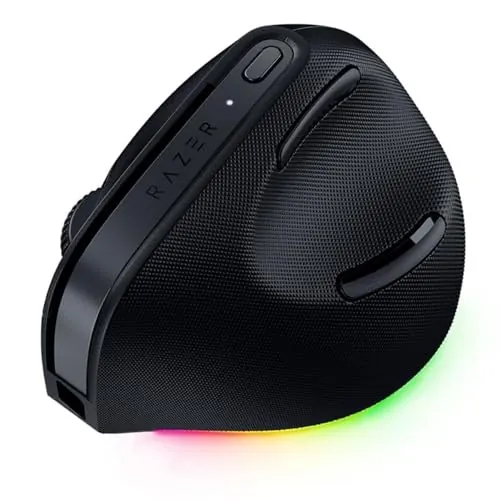
Razer Pro Click V2 Vertical Edition
Razer Pro Click V2 Vertical Edition, U.S. model; right-handed vertical edition.
Model RZ01-05250100-R3U1
Amazon ASIN B0DVD5RTZ5

Logitech
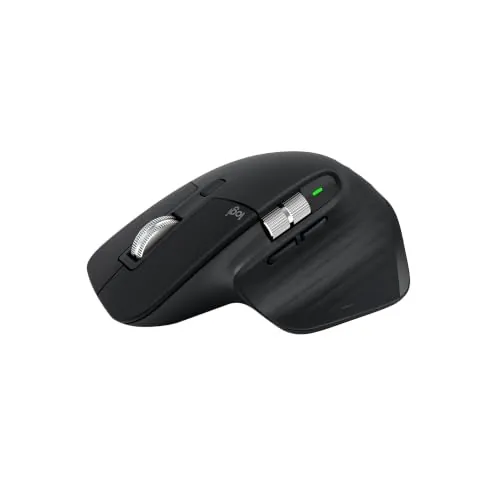
Logitech MX Master 4 Graphite
Standard Graphite U.S. edition; not the Mac edition
Model 910-007558
Amazon ASIN B0FC5SJNQX
Differences that matter
Sources for Scrolling and side-to-side navigation
Sources for Programmable actions and haptics
Sources for Receiver, Bluetooth, and computer switching
Start with the grip, not a comfort claim
The Razer Pro Click V2 Vertical Edition is explicitly a right-handed vertical model, with Razer listing a 71.7° angle. Logitech describes the MX Master 4 as retaining the familiar MX Master shape. These specifications identify two different designs; neither tells you how comfortable it will feel in your hand.
If you already know you prefer a vertical mouse, the Razer is the direct fit for that preference. If you want to stay with the MX Master style and use its thumb wheel or haptic panel, the Logitech keeps that design direction.
The controls change the daily workflow
Razer lists six buttons and up to eight programmable controls through Synapse, plus an AI Prompt Master shortcut. Logitech puts the Haptic Sense Panel and Actions Ring on the MX Master 4; the same mouse also has a MagSpeed main wheel and separate thumb wheel. Actions Ring, customizable haptics, and extended thumb-wheel functions involve Logi Options+.
For wide spreadsheets or horizontal timelines, Logitech documents side-to-side scrolling on the thumb wheel. Razer's exact-part specification lists no tilt scroll wheel. That distinction helps identify the control layout, but it is not a claim about which mouse is faster.
Check the connection plan and exact listing
The detailed Razer specification for part RZ01-05250100-R3U1 lists a HyperSpeed 2.4 GHz dongle, Bluetooth connections for up to three hosts, and wired USB-C. Logitech's MX Master 4 setup page documents an included wireless USB receiver or Bluetooth and Easy-Switch across up to three computers.
Before checkout, check that your computer has a usable receiver port or Bluetooth, decide whether you need wired operation, and verify the box contents on the exact US listing. Logitech's advanced Actions Ring and customization rely on Options+; Razer's Synapse enables its optional controls and personalization.
Product details
Razer Pro Click V2 Vertical Edition
- Form and controls
- Right-handed vertical design; six-button design with up to eight controls customizable through Razer Synapse Source
- Connections and host switching
- 2.4 GHz Razer HyperSpeed dongle, Bluetooth for up to three hosts, or wired USB-C; Razer lists multi-device switching Source
- Tilt-scroll control
- The exact-model specification lists no tilt scroll wheel Source
Logitech MX Master 4 Graphite
- Shape and scroll controls
- Retains the familiar MX Master shape; MagSpeed main wheel plus a separate thumb wheel for side-to-side scrolling Source
- Haptics and Actions Ring
- Haptic Sense Panel supports customizable feedback and opens Actions Ring; Logi Options+ is required for customization and Actions Ring Source
- Connections and host switching
- Included wireless USB receiver or Bluetooth; Easy-Switch pairs with up to three computers Source
Before you buy
Community discussions
An early MX Master 4 review flags mouse lifting as a fit check
Logitech MX Master 4 Graphite
After a few hours with the Master 4, one reviewer liked the extra button, adjustable haptics and thumb control, but said its weight and changed grip felt uncomfortable when lifting it to reposition. They compared it with their prior MX Master 3 and MX3S experience and were still testing.
What to check
Try the mouse in your normal workspace, including the small lifts or repositioning you actually do. This short-term report is one person's fit experience and does not predict comfort for other hands or compare it with Razer's vertical model.
A monitor-hub receiver path failed in one KVM setup
Logitech MX Master 4 Graphite
A user reports that the Master 4's USB-C receiver was not detected through a specific monitor KVM and USB hub, though it worked when plugged directly into the Mac or PC. They then got it recognized from a USB-A hub port using an adapter. The thread does not establish why the first path failed.
What to check
If you plan to use a receiver through a hub or KVM, test the exact receiver and adapter path with your computers before relying on it. This single case does not establish general USB-C or OS support.
Common questions
Is the Razer Pro Click V2 Vertical the same as the standard Pro Click V2?
No. This comparison covers the Vertical Edition with part number RZ01-05250100-R3U1. Razer lists it as a right-handed vertical mouse; do not use specifications for the standard Pro Click V2.Razer Pro Click V2 Vertical Edition — U.S. product page
Which mouse has a dedicated horizontal scroll control?
The MX Master 4 has a separate thumb wheel for side-to-side scrolling. Razer's exact-model specification lists no tilt scroll wheel, so do not assume its main wheel tilts horizontally.The Intricate Design of Logitech’s New MX Master 4Razer Pro Click V2 Vertical Edition — regional product specifications for exact part RZ01-05250100-R3U1
Do the advanced controls work without the maker's software?
Razer says Synapse is optional for basic use but provides additional customization. Logitech's setup guide says Logi Options+ is needed for the Actions Ring and documents Options+ setup for customizable haptics and extended thumb-wheel actions.Razer Pro Click V2 Vertical Edition — U.S. product pageGetting Started — MX Master 4
Sources and scope
This guide compares documented design and setup features, not measured comfort, wrist-health outcomes, tracking performance, productivity, or user preference. Razer's detailed connectivity table is on its regional page for the same exact part number; confirm the included contents on the US listing before purchase. Logitech's Actions Ring and customizable haptics depend on Logi Options+.
Related comparisons
Logitech MX Master 4 vs MX Master 3S Bluetooth Edition: Receiver and Haptics
The U.S. Graphite MX Master 4 (910-007558) includes a USB-C receiver and adds configurable haptic feedback for supported actions. The Black MX Master 3S Bluetooth Edition (910-007500) is Bluetooth-first; Logitech says a Logi Bolt receiver is optional and not included. Both can use Logi Options+ for customization and Actions Ring workflows.
Read comparison
Logitech MX Master 4 vs M720 Triathlon: Receiver, Scroll and Setup
The Logitech MX Master 4 Graphite (910-007558) pairs a separate thumbwheel with the Actions Ring, which requires Logi Options+, and a rechargeable USB-C setup. The M720 Triathlon Black (910-006036) moves horizontally by tilting its main wheel and uses a replaceable AA battery with a Unifying receiver in the box. Both also offer Bluetooth and can pair with up to three computers. Decide by your preferred controls, software setup, host connection and power routine; this is not a comfort or performance ranking.
Read comparison