
Products compared

Logitech
Logitech MX Master 4 Wireless Mouse
U.S. Graphite model. Logitech documents a MagSpeed main wheel, separate thumbwheel, Haptic Sense Panel/Actions Ring, USB-C charging and wireless receiver or Bluetooth connection.
Model 910-007558
Amazon ASIN B0FC5SJNQX

Logitech
Logitech M720 Triathlon Multi-Device Wireless Mouse
U.S. Black M720 Triathlon. Logitech documents Bluetooth or Unifying receiver connectivity, a tilt wheel, up to three paired devices, and one replaceable AA battery included.
Model 910-006036
Amazon ASIN B087Z6LSHW
Differences that matter
Sources for Where horizontal scrolling happens
Sources for Receiver and Bluetooth setup
Sources for Charging or replacing a battery
Sources for Software and switching between computers
Pick the scroll control you want to use every day
The MX Master 4 has two distinct scroll controls: a MagSpeed main wheel and a separate thumbwheel. Logitech's setup guide says its Haptic Sense Panel opens the Actions Ring, a software-configured shortcut overlay. The M720 Triathlon uses a tilt wheel for horizontal scrolling and has physical side and thumb buttons for shortcuts.
Before buying, point to one task you repeat—moving across a wide spreadsheet, scrubbing a timeline, or triggering an app shortcut. Would you rather move the thumbwheel separately, tilt the main wheel, or use an on-screen Actions Ring? That concrete preference is a better fit test than assuming a premium model will feel better.
Check the receiver and software before counting shortcuts
For a receiver-based setup, Logitech's MX Master 4 guide names the included Logi Bolt receiver. M720's technical specifications list a Unifying receiver in the box. These are different receiver systems; verify the exact dongle and host port you plan to use. Both guides also document Bluetooth, which can avoid the receiver when your computer supports pairing.
The MX Master 4 Actions Ring requires Logi Options+. Logitech says M720 buttons can be customized through Options+ on Windows and macOS. If your main reason to choose a mouse is software customization, check Logitech's current supported device and operating-system instructions before purchase; app support can change over time.
Choose the battery routine and multi-computer setup
MX Master 4 uses a rechargeable battery and USB-C charging port. M720 uses a replaceable AA, and Logitech lists one AA in its box. This is a maintenance choice rather than an endurance result; no battery-life figure is applied to your workload.
Both Logitech setup pages document pairing with up to three computers through Easy-Switch. Logitech also describes M720's Flow feature, but this guide does not assume identical software behavior or transfer a feature to the MX Master 4. If three host devices are the key requirement, verify which operating systems and app setup you need on each computer.
Product details
Logitech MX Master 4 Wireless Mouse
- Scroll and shortcuts
- MagSpeed main wheel, separate thumbwheel and Haptic Sense Panel that opens the configurable Actions Ring; Logitech says the Actions Ring requires Logi Options+. Source
- Wireless connection
- Logitech documents the included Logi Bolt wireless receiver or direct Bluetooth pairing for MX Master 4. Source
- Power
- Rechargeable battery with a USB-C charging port; no battery-life figure is used in this comparison. Source
Logitech M720 Triathlon Multi-Device Wireless Mouse
- Scroll and buttons
- Dual-mode main wheel with tilt-wheel horizontal scrolling; side and thumb buttons can be customized through Logi Options+ on Windows and macOS. Source
- Wireless connection
- Bluetooth Low Energy or a 2.4 GHz Unifying receiver; Logitech's M720 technical specifications list one Unifying receiver in the box. Source
- Power
- One replaceable AA battery; no battery-life estimate is used here. Source
Before you buy
Community discussions
A buyer asks about switching between two USB receivers
Logitech MX Master 4 Wireless Mouse
A shopper using separate Windows and Mac computers asks whether an MX Master 4 can switch between two USB receivers without Bluetooth and whether the device-switch control can be remapped to a top button. The post is a question; it does not report a verified setup.
What to check
Confirm the exact package's included receiver and test the switching method you want on your computers before relying on it.
A new owner is still deciding how to use the MX Master 4 gesture button
Logitech MX Master 4 Wireless Mouse
An owner moving from an MX Anywhere 2S says the Master 4's buttons were initially confusing and planned to keep the Actions Ring specific to apps while standardizing other button assignments. The post shares a setup intention, not a tested app-support result.
What to check
List the repeated actions you want on mouse buttons, then check whether the exact software and app setup you use can assign them before treating the Actions Ring as a reason to switch.
A monitor-hub receiver path failed in one KVM setup
Logitech MX Master 4 Wireless Mouse
A user reports that the Master 4's USB-C receiver was not detected through a specific monitor KVM and USB hub, though it worked when plugged directly into the Mac or PC. They then got it recognized from a USB-A hub port using an adapter. The thread does not establish why the first path failed.
What to check
If you plan to leave the receiver in a monitor, hub or KVM, test that exact path and adapter before relying on it. This is one setup report, not a general receiver-compatibility result.
Common questions
Does MX Master 4 use the same receiver as the M720 Triathlon?
The MX Master 4 setup guide names an included Logi Bolt wireless receiver. Logitech's M720 technical specifications name a Unifying receiver. Treat them as distinct receiver setups and check the receiver included with the exact offer; both products also list Bluetooth as a connection option.Getting Started — MX Master 4 (Logi Bolt and Bluetooth setup)M720 Triathlon Technical SpecificationsGetting Started — MX Master 4
Does the MX Master 4 Actions Ring work without Logi Options+?
Logitech's MX Master 4 setup instructions say Logi Options+ is necessary to use the Actions Ring. If you do not plan to install the app, do not count that configurable shortcut layer as part of your reason to choose this model.Getting Started — MX Master 4
How do the mice scroll horizontally?
Logitech documents a separate thumbwheel on the MX Master 4. The M720 Triathlon uses tilt-wheel movement of its main wheel for horizontal scrolling. Choose the control placement you prefer; the product pages do not measure which is more comfortable or faster.Getting Started — MX Master 4Logitech M720 Triathlon Multi-Computer Wireless Mouse, Black
Do both mice switch between multiple computers?
Yes. Logitech says each can pair with up to three computers using Easy-Switch. M720's product page describes switching with its Easy-Switch button; the MX Master 4 guide describes selecting a channel. Logitech also lists Flow for M720, but this comparison does not assume an identical software setup or cross-operating-system behavior for both models.Getting Started — MX Master 4Logitech M720 Triathlon Multi-Computer Wireless Mouse, Black
Sources and scope
This guide covers the selected U.S. MX Master 4 Graphite part 910-007558 and M720 Triathlon Black part 910-006036 using Logitech's product and support materials. Software availability and OS support can change; check Logitech's current Options+ device and operating-system support before buying for a customization-dependent workflow. The guide does not test comfort, accuracy, speed, connectivity reliability or battery duration.
- MX Master 4 Wireless Mouse, Graphite, part 910-007558
- Getting Started — MX Master 4
- Specification — MX Master 4
- Getting Started — MX Master 4 (Logi Bolt and Bluetooth setup)
- Logitech M720 Triathlon Multi-Computer Wireless Mouse, Black
- M720 Triathlon Technical Specifications
- Logi Options+ Support and System Requirements
Related comparisons
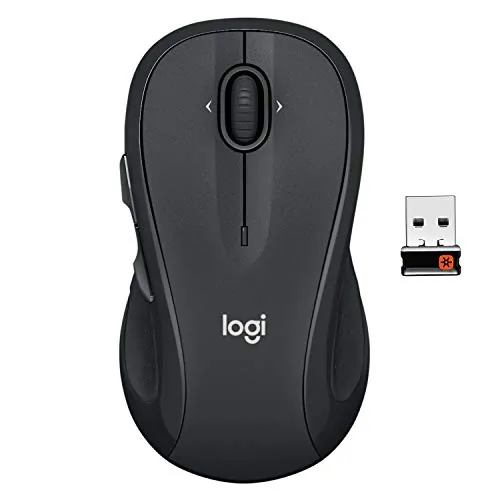
Logitech M510 vs M720 Triathlon: Receiver, Bluetooth, and Scrolling
The selected U.S. retail items are M510 Comfort Plus Graphite (910-006030) and M720 Triathlon Black (910-006036). Logitech's M510 model documentation describes a Unifying USB receiver, line-by-line scrolling, and tilt scrolling. The M720 adds Bluetooth Low Energy, up to three paired-device channels with a physical Easy-Switch button, and a wheel that toggles between faster and line-by-line scrolling. Check your host OS and available ports: Logitech's current M510 receiver compatibility list names Windows 10/11, ChromeOS, and Linux, while its M720 materials also list macOS and iPadOS support. Logitech's public M510 and M720 model pages do not identify the two assigned retail part numbers, so verify the exact listing and in-box receiver before buying.
Read comparison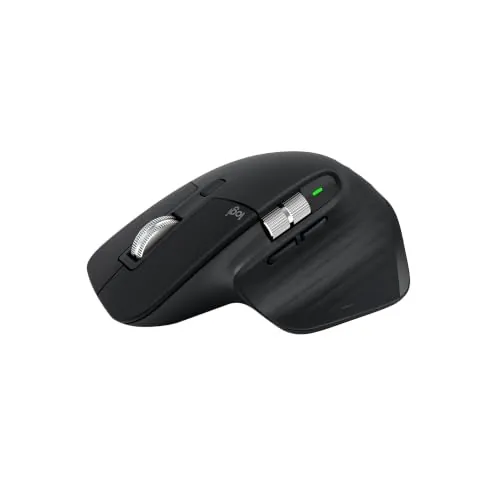
Logitech MX Master 4 vs MX Master 3S Bluetooth Edition: Receiver and Haptics
The U.S. Graphite MX Master 4 (910-007558) includes a USB-C receiver and adds configurable haptic feedback for supported actions. The Black MX Master 3S Bluetooth Edition (910-007500) is Bluetooth-first; Logitech says a Logi Bolt receiver is optional and not included. Both can use Logi Options+ for customization and Actions Ring workflows.
Read comparison