
Products compared
Logitech
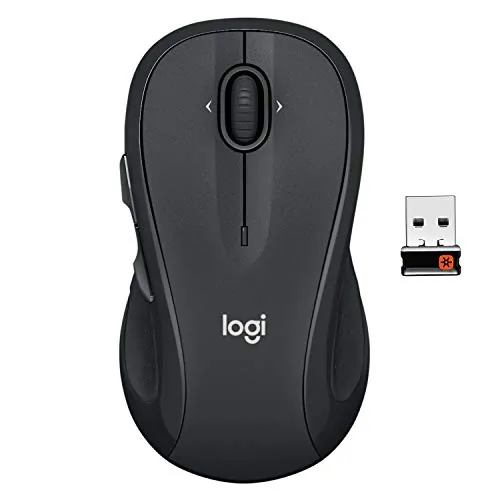
Logitech M510 Comfort Plus Wireless Mouse — Graphite
Assigned U.S. listing in Graphite. Logitech's reviewed M510 documentation is model-level and does not name retail part 910-006030; check the exact listing for variant and included hardware.
Model M510 Comfort Plus, retail part 910-006030
Amazon ASIN B087Z5WDJ2

Logitech
Logitech M720 Triathlon Multi-Device Wireless Mouse — Black
Assigned U.S. listing in Black. Logitech's reviewed M720 materials identify the model and its connection/control features but do not identify retail part 910-006036; confirm exact listing contents.
Model M720 Triathlon, retail part 910-006036
Amazon ASIN B087Z6LSHW
Differences that matter
Sources for Pairing and switching between computers
Sources for Wheel controls for documents and wide pages
Sources for Exact listing and receiver verification
Start with how each host connects
The M510 model is documented around a 2.4 GHz Unifying USB receiver. Logitech says it can connect only to a receiver carrying the Unifying logo. Its current listed receiver compatibility names Windows 10/11, ChromeOS, and Linux; the compatibility section does not list Bluetooth or current macOS support. The M720 adds Bluetooth Low Energy as well as Unifying, and Logitech names Windows, macOS, ChromeOS, Linux, and iPadOS among supported platforms. Check the connection route for each exact host before buying.
For two or three hosts, map the M720 channels first
If you plan to move between a work computer, personal laptop, and tablet, list which ones support Bluetooth and which need a receiver. Logitech documents up to three M720 pairings with an Easy-Switch button. Its setup guide shows choosing a channel and pairing over Bluetooth or Unifying. This is a manually selected connection per channel, not simultaneous control of several computers.
Choose the wheel by the pages and spreadsheets you use
Both Logitech model pages describe a tilt wheel for horizontal movement and line-by-line scrolling. The M720 adds a button for switching between faster wheel scrolling and line-by-line precision. That is useful when the same session moves between long webpages and detailed rows. It does not establish that one mouse feels better or scrolls faster in a measured test.
Confirm the exact part before checkout
The selected listing variants are Graphite M510 Comfort Plus 910-006030 and Black M720 Triathlon 910-006036. Logitech's public M510 page checked lists a different part number; the reviewed M720 documentation names the M720 model but not 910-006036. Treat their documented features as model-level evidence and check the live listing for the exact variant and package contents, including the receiver.
Product details
Logitech M510 Comfort Plus Wireless Mouse — Graphite
- Documented connection
- M510 model uses a 2.4 GHz Logitech Unifying USB receiver; Logitech says it pairs only with receivers bearing the Unifying logo Source
- Documented scroll controls
- Line-by-line wheel scrolling and tilt scrolling for horizontal movement Source
- Current listed host compatibility
- USB receiver required; Logitech's current M510 page lists Windows 10/11, ChromeOS, and Linux. It does not list current macOS support in that receiver compatibility section. Source
Logitech M720 Triathlon Multi-Device Wireless Mouse — Black
- Documented connection
- Bluetooth Low Energy or a 2.4 GHz Logitech Unifying receiver Source
- Device switching
- Three Easy-Switch channels; Logitech documents pairing with up to three devices and switching by the mouse button Source
- Documented scroll controls
- Switchable faster scrolling or line-by-line precision, plus a tilt wheel for horizontal scrolling Source
- Host compatibility
- Logitech lists Windows, macOS, ChromeOS, Linux, and iPadOS for M720; the exact supported connection route depends on the host Source
Before you buy
Community discussions
An M720 owner's multi-device routine
Logitech M720 Triathlon Multi-Device Wireless Mouse — Black
An M720 owner says the device-switching feature is useful, though they do not need all three device channels.
What to check
Count the computers or tablets you expect to pair. If you use one host, decide whether the M720's extra device-switching controls add value to your routine compared with the M510's simpler receiver setup.
Common questions
Can the M510 connect to Bluetooth?
Logitech's M510 product and support materials reviewed here describe a 2.4 GHz USB receiver and Unifying pairing, not Bluetooth. Its current listed receiver compatibility names Windows 10/11, ChromeOS, and Linux. If your host has no suitable USB port or is not listed, verify compatibility before buying rather than assuming a Bluetooth route.Logitech M510 U.S. product details and compatibilityLogitech Support — Using an M510 with a different USB receiver
Can the M720 switch between my computer and tablet?
Logitech documents up to three paired devices and an Easy-Switch button. The M720 can use Bluetooth Low Energy or a Unifying receiver, so check the tablet's supported connection and assign a channel for each host you intend to use.Logitech M720 Triathlon U.S. product pageLogitech Support — M720 Triathlon Technical SpecificationsLogitech M720 Triathlon Setup Guide
Do both mice support horizontal scrolling?
Yes. Logitech documents tilt scrolling for both M510 and M720. The M720 also documents a switch between faster scrolling and line-by-line precision; the M510 page describes line-by-line scrolling.Logitech M510 U.S. product pageLogitech M720 Triathlon U.S. product page
Does the Logitech product page confirm the exact selected Amazon part numbers?
Not in the pages checked. The listing data assigns the Graphite M510 Comfort Plus part 910-006030 and Black M720 Triathlon part 910-006036. Logitech's M510 page reviewed here identifies a different part number, and its M720 materials identify the model without the selected retail part number. Verify the exact listing and included hardware before checkout.Logitech M510 U.S. product details and compatibilityLogitech M720 Triathlon U.S. product page
Sources and scope
This guide applies Logitech's published M510 and M720 model-level features to the selected listing items, but the manufacturer pages checked do not identify retail parts 910-006030 or 910-006036. Verify the selected listing, included receiver and host compatibility. No hands-on hand-fit, pointer, tracking, scrolling-speed, durability or battery-runtime comparison is claimed.
Related comparisons

Logitech MX Master 4 vs M720 Triathlon: Receiver, Scroll and Setup
The Logitech MX Master 4 Graphite (910-007558) pairs a separate thumbwheel with the Actions Ring, which requires Logi Options+, and a rechargeable USB-C setup. The M720 Triathlon Black (910-006036) moves horizontally by tilting its main wheel and uses a replaceable AA battery with a Unifying receiver in the box. Both also offer Bluetooth and can pair with up to three computers. Decide by your preferred controls, software setup, host connection and power routine; this is not a comfort or performance ranking.
Read comparison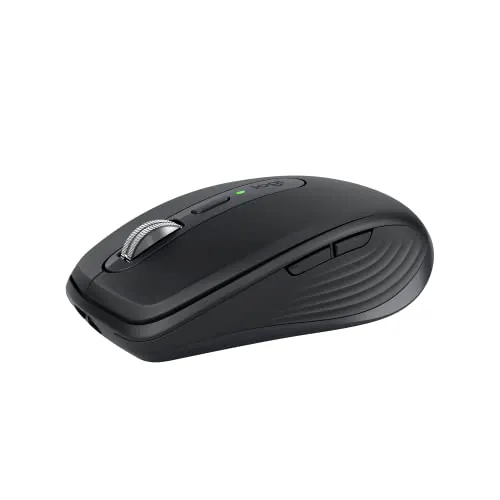
Logitech M720 Triathlon vs MX Anywhere 3S: Receiver, Wheel and Power
The useful difference is how each mouse connects and how you move through long pages or wide spreadsheets. Logitech's M720 package lists a Unifying receiver and replaceable AA; the MX Anywhere 3S supports Bluetooth or a Logi Bolt receiver that is not included, and charges through its included USB-C cable. M720 tilts its wheel for direct horizontal scroll, while Anywhere 3S uses a side-button-plus-wheel gesture and a MagSpeed wheel with SmartShift. Both support switching among up to three paired computers. Choose from the port, battery and scroll routine you prefer; this is not a fit or runtime test.
Read comparison