
Products compared

Logitech
Logitech M720 Triathlon Multi-Device Wireless Mouse
Black; selected listing part number 910-006036. Logitech's M720 support specification identifies the mouse model number as M-R0062 and lists one Unifying receiver plus one AA battery in the box.
Model M720 Triathlon
Amazon ASIN B087Z6LSHW
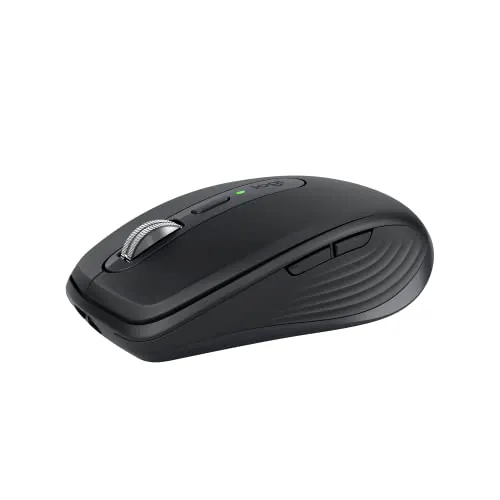
Logitech
Logitech MX Anywhere 3S Compact Wireless Performance Mouse
Graphite. Logitech's U.S. page for part 910-006925 says Bluetooth is available for up to three devices and the compatible Logi Bolt USB receiver is not included. A USB-C charging cable is included; the standard model's support specification identifies the cable as USB-A to USB-C.
Model MX Anywhere 3S, 910-006925
Amazon ASIN B0BPY4ZQXG
Differences that matter
What matters most to you?
Choose a priority to see what it changes.
Sources for Receiver included versus receiver you must add
Sources for Horizontal scroll and wheel mode
Sources for Replace an AA or recharge over USB-C
Start with the receiver in your computer
M720's official support specification lists a Unifying receiver in the box, plus one AA battery. The MX Anywhere 3S U.S. page says its Logi Bolt receiver is not included and that its receiver support is Logi Bolt only. Both mice can also pair over Bluetooth, so an available Bluetooth connection lets you begin without buying a receiver.
If a USB receiver is important, check the name printed on the one you already own. M720's Unifying receiver is a different system from Logi Bolt; it is not a substitute for the MX Anywhere 3S receiver. This is the most practical pre-purchase check for a desktop with limited USB ports or a computer where you prefer a receiver connection.
Both switch devices; their connection paths differ
Each mouse can pair with up to three computers and has an Easy-Switch channel button. M720's quick-start guide says the three channels can be paired through Bluetooth Smart or Unifying. Logitech's Anywhere 3S page describes Bluetooth connections to up to three devices and separately lists Logi Bolt support; the setup guide explains pressing its Easy-Switch button to select a channel.
Logitech Flow is separate from changing channels: its pages describe moving a cursor and copying items between computers after installing Options+ on the relevant machines. If you only need to change which computer receives input, use the hardware channel button; install the software only if its additional cross-computer workflow matters to you.
Try the two horizontal-scroll gestures
M720 changes its wheel between speed and precision modes and uses a side-to-side tilt of the wheel for horizontal movement. Logitech specifically presents that action for spreadsheets, large images and web pages. MX Anywhere 3S has a MagSpeed SmartShift wheel: it can move automatically between ratchet and free-spin, or you can press its mode button to change modes manually.
For horizontal scrolling on MX Anywhere 3S, press and hold a back or forward side button while turning the main wheel. Logitech Support notes that assigning a long-press function to a side button disables horizontal scrolling for that button; if both side buttons are assigned long-press functions, the gesture is disabled. If sideways movement is part of your daily work, consider which hand motion is easier for you to repeat; no speed or precision test between the two was performed.
Decide how you want to manage power
M720 uses one replaceable AA, and its support specification lists that battery in the box. MX Anywhere 3S uses a rechargeable Li-Po battery and includes a USB-A-to-USB-C cable for the standard model. That makes the everyday upkeep different: replace a cell when needed, or connect a charging cable. This guide does not compare battery life or claim how often either buyer will need to replace or recharge.
Before ordering, check receiver and cable needs together: if you choose MX Anywhere 3S receiver use, obtain a Logi Bolt receiver separately; if you use Bluetooth, the included USB-C cable is for charging and does not replace the receiver.
Product details
Logitech M720 Triathlon Multi-Device Wireless Mouse
- Included receiver and battery
- M720 support specification lists one Unifying receiver and one replaceable AA battery in the box. It supports Bluetooth Low Energy or Unifying wireless. Source
- Scroll controls
- Hyper-fast wheel can switch between speed and precision scrolling; the wheel tilts for horizontal scrolling. Three Easy-Switch channels can pair through Bluetooth Smart or Unifying. Source
Logitech MX Anywhere 3S Compact Wireless Performance Mouse
- Receiver and charging
- Bluetooth connection for up to three devices; compatible with Logi Bolt USB receiver only and the receiver is not included. Standard MX Anywhere 3S package includes a USB-A to USB-C charging cable and a rechargeable 500 mAh Li-Po battery. Source
- Scroll controls
- MagSpeed SmartShift can switch automatically between line-by-line and free-spin, or be shifted manually with its mode button. Horizontal scrolling uses a held side button together with the main wheel. Source
Before you buy
Community discussions
Keeping the keyboard and mouse on the same computer
Logitech M720 Triathlon Multi-Device Wireless Mouse
A person with an M720 and K850 switched among three PCs and sometimes found the keyboard and mouse on different computers.
What to check
Try the channel switches on both devices and decide whether you are comfortable switching them separately. Check exact software and receiver support before relying on a combined setup.
Checking the receiver for a managed computer
Logitech MX Anywhere 3S Compact Wireless Performance Mouse
A shopper could use Bluetooth on personal devices but needed a USB receiver on a work laptop where Options+ was unavailable.
What to check
Compare the receiver families and what is included in each package. Confirm that your actual setup and permissions let you pair the mouse.
Common questions
Does the MX Anywhere 3S include a USB receiver?
No. Logitech's U.S. page says a Logi Bolt receiver is compatible but not included. The standard MX Anywhere 3S model can connect through Bluetooth and includes a USB-A-to-USB-C charging cable. Its receiver support is Logi Bolt only, not M720's Unifying receiver.Logitech MX Anywhere 3S, part 910-006925, U.S. product pageSpecification - MX Anywhere 3S
How do I scroll sideways with each mouse?
M720 uses a tilt wheel for horizontal scrolling. On MX Anywhere 3S, hold a back or forward side button and turn the main wheel. Logitech says long-press assignments can disable that horizontal-scroll function on the assigned button; if both side buttons receive such assignments, the gesture is disabled on both.Logitech M720 Triathlon Multi-Computer Wireless Mouse, U.S. product pageHow does Horizontal Scroll work on MX Anywhere 3 and MX Anywhere 3S?
Can both mice switch between three computers?
Yes. Logitech documents up to three paired devices for M720 and up to three computers for MX Anywhere 3S, with an Easy-Switch button on each. M720 can pair its channels through Bluetooth Smart or Unifying; the Anywhere 3S U.S. page describes Bluetooth for up to three and Logi Bolt receiver support separately.Logitech M720 Triathlon Multi-Computer Wireless Mouse, U.S. product pageM720 Triathlon Mouse Setup GuideGetting Started - MX Anywhere 3SLogitech MX Anywhere 3S, part 910-006925, U.S. product page
Which one has longer battery life?
This guide does not compare runtime. M720 uses a replaceable AA; MX Anywhere 3S has a rechargeable Li-Po battery and USB-C charging. Manufacturer ratings use different power systems and conditions, so they are not a like-for-like endurance test.M720 Triathlon Technical SpecificationsSpecification - MX Anywhere 3S
Sources and scope
The M720 uses an AA and includes a Unifying receiver. MX Anywhere 3S charges over USB-C and its Bolt receiver is sold separately. If you use horizontal scrolling, try the side-button-and-wheel gesture before reassigning the button.
- Logitech M720 Triathlon Multi-Computer Wireless Mouse, U.S. product page
- M720 Triathlon Technical Specifications
- M720 Triathlon Mouse Setup Guide
- Logitech MX Anywhere 3S, part 910-006925, U.S. product page
- Getting Started - MX Anywhere 3S
- How does Horizontal Scroll work on MX Anywhere 3 and MX Anywhere 3S?
- Specification - MX Anywhere 3S
Related comparisons
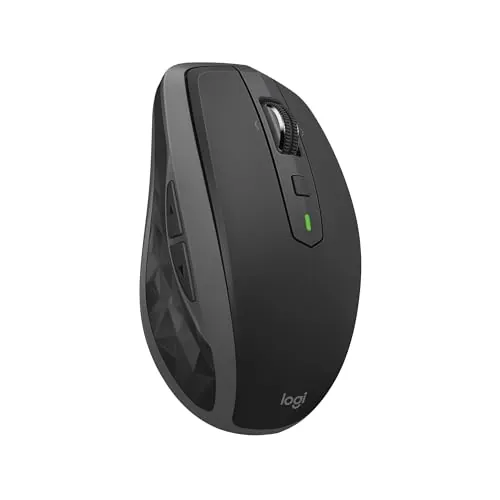
Logitech MX Anywhere 3S vs MX Anywhere 2S Bluetooth Edition: Receivers, USB-C and OS Fit
This comparison is for the assigned graphite SKUs: MX Anywhere 3S 910-006925 / ASIN B0BPY4ZQXG and MX Anywhere 2S Bluetooth Edition 910-007232 / ASIN B0CJXQVMHL. Both pair with up to three computers and support Bluetooth. The 3S can also use a Logi Bolt receiver, which Logitech says is not included; it cannot use a Unifying receiver. The 2S model family lists both Bluetooth and Unifying, but the assigned Bluetooth Edition listing says no USB receiver is included. Charging also differs: USB-C on the 3S, Micro-USB on the 2S. Decide by the receiver you own, the port and cable you want, and whether your computer can use Logitech's customization app.
Read comparison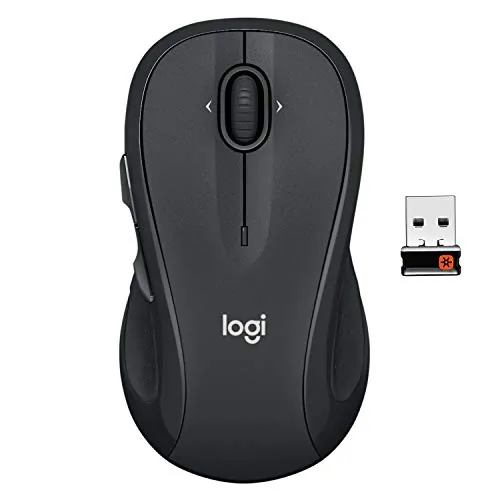
Logitech M510 vs M720 Triathlon: Receiver, Bluetooth, and Scrolling
The selected U.S. retail items are M510 Comfort Plus Graphite (910-006030) and M720 Triathlon Black (910-006036). Logitech's M510 model documentation describes a Unifying USB receiver, line-by-line scrolling, and tilt scrolling. The M720 adds Bluetooth Low Energy, up to three paired-device channels with a physical Easy-Switch button, and a wheel that toggles between faster and line-by-line scrolling. Check your host OS and available ports: Logitech's current M510 receiver compatibility list names Windows 10/11, ChromeOS, and Linux, while its M720 materials also list macOS and iPadOS support. Logitech's public M510 and M720 model pages do not identify the two assigned retail part numbers, so verify the exact listing and in-box receiver before buying.
Read comparison