
Products compared

Logitech
Logitech MX Master 4 Wireless Mouse, Graphite
Rechargeable mouse with USB-C receiver, Bluetooth, MagSpeed ratchet/free-spin modes, thumb wheel and a Haptic Sense Panel that opens customizable Actions Ring shortcuts. Actions Ring customization requires Logi Options+.
Model 910-007558
Amazon ASIN B0FC5SJNQX
Logitech
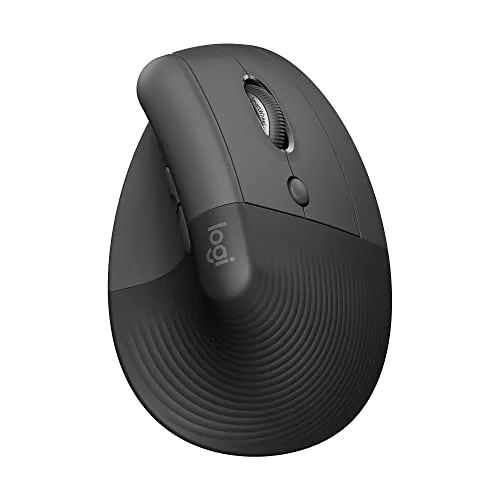
Logitech Lift Vertical Ergonomic Mouse, Graphite (right-handed)
57° vertical mouse for which Logitech states a small-to-medium hand fit. This exact Graphite SKU is the standard Lift type, not the separately offered Lift Left. It uses SmartWheel, Bluetooth or Logi Bolt USB-A, and one AA battery.
Model 910-006466
Amazon ASIN B09J1TB35S
Differences that matter
What matters most to you?
Choose a priority to see what it changes.
Sources for Grip shape and fit guidance
Sources for Scrolling and shortcut controls
Sources for Receiver and multi-device setup
Start with the grip you want to use
The first question is about shape, not a claimed ergonomic winner. Logitech describes Lift as a 57° vertical mouse designed for small-to-medium hands. Its U.S. product page lists Lift and Lift Left separately; the assigned 910-006466 Graphite SKU is standard Lift. The reviewed MX Master 4 U.S. page does not give a matching hand-size range. If you are unsure about a vertical profile, try the shape rather than treating a maker fit statement as a personal result.
Match the scrolling routine to your work
MX Master 4 places MagSpeed modes, a thumb wheel and a Haptic Sense Panel/Actions Ring in its control layout. Lift uses SmartWheel modes and a button-plus-wheel gesture for horizontal scrolling. Logitech says Actions Ring customization requires Logi Options+; Lift setup also describes software-based button customization. Choose the controls you will actually use, and check app and operating-system support before depending on custom shortcuts.
Check receiver ports and battery routine
Both can pair over Bluetooth Low Energy and switch among as many as three paired devices. The MX Master 4 standard guide shows a USB-C dongle; Lift’s Logi Bolt receiver uses USB-A and sits behind the battery door. MX Master 4 recharges over USB-C, while Lift uses one AA cell. Check available ports if you prefer a receiver, and confirm seller package details because an offer may differ from the manufacturer’s standard box.
Product details
Logitech MX Master 4 Wireless Mouse, Graphite
Logitech Lift Vertical Ergonomic Mouse, Graphite (right-handed)
- Model and finish
- 910-006466 / Graphite; Lift Left is listed as a separate type Source
- Connection
- Bluetooth Low Energy or Logi Bolt USB-A receiver; pairing with up to three devices Source
- Power and fit guidance
- One AA battery; maker-rated life up to 24 months. Logitech describes a 57° vertical design for small-to-medium hands. Source
Before you buy
Community discussions
Lift scroll-wheel click force question
Logitech Lift Vertical Ergonomic Mouse, Graphite (right-handed)
A prospective buyer asked Lift owners whether pressing the scroll wheel for a middle click takes more force than a left or right click. The post does not provide a confirmed answer.
What to check
If you often use middle-click, test the Lift wheel press in person and check whether its click force suits you before choosing between these control layouts.
Checking a shortcut while holding a click
Logitech MX Master 4 Wireless Mouse, Graphite
An MX Master 4 owner who previously used a 3S found their macOS window-drag shortcut did not carry over when they held the main button and pressed the thumb button.
What to check
If a shortcut combines a held click and a thumb gesture, reproduce it in the apps you use before switching mice.
Trying two different scroll styles
Logitech Lift Vertical Ergonomic Mouse, Graphite (right-handed)
A Lift owner said its wheel felt different from the MX Master they used, especially when moving through long files.
What to check
Try a slow, precise scroll and a long jump on both wheels. Pick around the documents or code you navigate every day.
Common questions
Is the Graphite Lift here the left-handed version?
No. This assignment is the standard Graphite Lift SKU 910-006466. Logitech lists Lift Left as a separate type, so verify that variant and part number if you need it.Lift Vertical Ergonomic Mouse, Graphite (910-006466)
Do these mice use the same receiver?
No. The MX Master 4 standard guide documents a USB-C receiver. Lift’s Logi Bolt receiver is USB-A and stored behind its battery door. Both also support Bluetooth Low Energy.MX Master 4 Universal Quick Start GuideGetting Started - MX Master 4Getting Started - LIFT Vertical Ergonomic Mouse
How do their scroll controls differ?
MX Master 4 has MagSpeed ratchet/free-spin modes and a thumb wheel. Lift SmartWheel switches between line-by-line and inertia; Logitech documents horizontal scrolling by holding a side button while turning the wheel.Getting Started - MX Master 4Getting Started - LIFT Vertical Ergonomic Mouse
Does either design guarantee better comfort?
No. Logitech states a small-to-medium hand target and 57° vertical shape for Lift, but that does not establish a personal comfort or health result. The reviewed MX Master 4 U.S. page does not provide a comparable hand-size range.MX Master 4 Wireless Mouse, Graphite (910-007558)Lift Vertical Ergonomic Mouse, Graphite (910-006466)
Sources and scope
This guide compares documented shape, controls, setup and power details. Logitech gives Lift a small-to-medium hand-size target but no comparable range for MX Master 4 on the reviewed U.S. listing. Neither product description establishes individual comfort, pain relief, tracking quality or measured productivity. Seller package contents may differ from the manufacturer’s standard box, so check the exact live offer.
Related comparisons

Logitech Lift vs MX Vertical: Hand Fit, Receiver and Charging
These are both right-handed Logitech vertical mice, but Logitech positions them for different hand-size ranges. Lift uses one AA battery and a Logi Bolt receiver; MX Vertical recharges over USB-C, can stay connected by cable while charging, and uses a Unifying receiver. Bluetooth is available on both.
Read comparison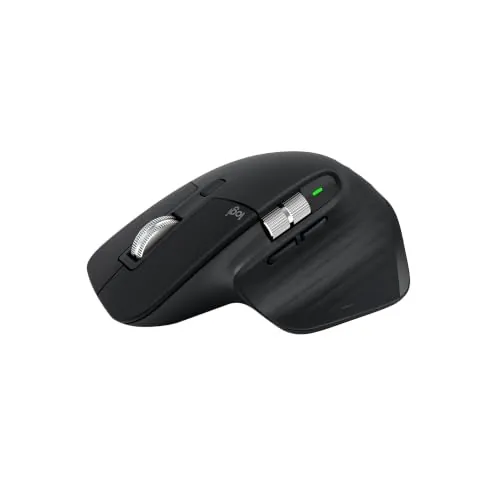
Logitech MX Master 4 vs MX Master 3S Bluetooth Edition: Receiver and Haptics
The U.S. Graphite MX Master 4 (910-007558) includes a USB-C receiver and adds configurable haptic feedback for supported actions. The Black MX Master 3S Bluetooth Edition (910-007500) is Bluetooth-first; Logitech says a Logi Bolt receiver is optional and not included. Both can use Logi Options+ for customization and Actions Ring workflows.
Read comparison