
Products compared
Logitech
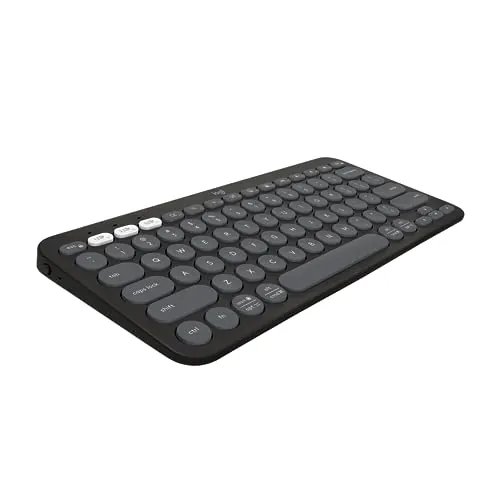
Logitech Pebble Keys 2 K380s Wireless Bluetooth Keyboard
Tonal Graphite 920-011775 uses round keys, OS-adaptive modifiers and replaceable AAA cells. It supports Bluetooth and a separately sold Logi Bolt receiver. Target’s exact-model specifications list unlit keys.
Model 920-011775 · Tonal Graphite
Amazon ASIN B0BT4DP7SC
Logitech
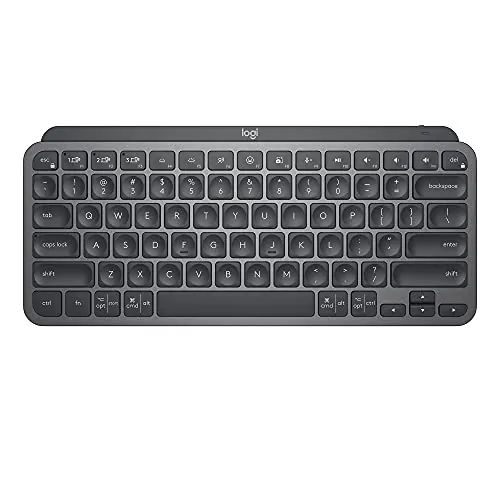
Logitech MX Keys Mini Minimalist Wireless Illuminated Keyboard
The exact Graphite retailer offer identifies standard MX Keys Mini model 920-010388, not an explicitly named 'for Mac' edition. Logitech documents PC and Mac legends on this keyboard, Bluetooth Low Energy and Logi Bolt compatibility, Easy-Switch for three paired computers, smart backlighting, and a built-in rechargeable battery that charges over USB-C while typing. The exact offer's box contents did not establish whether a Bolt receiver is included.
Model 920-010388 · Graphite
Amazon ASIN B098JPSVKY
Differences that matter
What matters most to you?
Choose a priority to see what it changes.
Sources for Bluetooth, Logi Bolt and receiver contents
Sources for Switching among computers and tablets
Sources for Battery and charging routine
Start with the exact keyboard version
The assigned products are Logitech Pebble Keys 2 K380s 920-011775 in Tonal Graphite and standard MX Keys Mini 920-010388 in Graphite. The MX Keys Mini US page is tied to 920-010388; the support guide describes both PC and Mac legend positions. Do not substitute a separate listing explicitly marked 'for Mac' without checking its item number and key legends.
Both are compact Bluetooth keyboards that can pair with up to three devices. Logitech documents OS support for Mac and Windows on both; the practical difference is the K380s's split, automatically OS-adaptive modifiers versus the MX model's PC and Mac legends. If a specific modifier symbol or placement matters, inspect the exact unit or retailer photos rather than relying on a family name.
Decide whether Bluetooth or a Logi Bolt receiver fits your desk
If the computer has Bluetooth Low Energy, pair directly and use Easy-Switch for each saved device. K380s also supports a Logi Bolt USB receiver, but Logitech says the optional receiver is purchased separately for the keyboard and is included only with Pebble 2 Combo. That is not the same as the standalone 920-011775 product.
MX Keys Mini 920-010388 is described by Logitech as Logi Bolt-compatible as well as Bluetooth Low Energy. The exact B098JPSVKY box contents were not verified in the manufacturer material available for this article. If the host has no Bluetooth and you plan to use Bolt, check the seller's included-items list or budget for a compatible receiver instead of assuming it is supplied.
Pick the power routine and lighting evidence you need
K380s uses two replaceable AAA alkaline cells. MX Keys Mini uses a built-in battery and charges through USB-C; Logitech says you can continue typing during charging. Choose by whether you would rather keep spare cells available or connect a cable when recharging. The cited life estimates use different feature conditions and are not a fair head-to-head runtime test, so this guide does not rank battery life.
For dim-room typing, Logitech documents adaptive backlighting on the MX Keys Mini. Target’s exact K380s Tonal Graphite listing identifies unlit keys.
Product details
Logitech Pebble Keys 2 K380s Wireless Bluetooth Keyboard
- OS layout behavior
- Split modifier keys adapt to the operating system on the currently selected device when connected by Bluetooth; Logitech also documents manual OS selection for Bolt connections or failed detection. Source
- Wireless and switching
- Bluetooth Low Energy; supports up to three paired devices with Easy-Switch. Optional Logi Bolt receiver is sold separately for this model; Logitech says a receiver is included only with Pebble 2 Combo. Source
- Power
- Two AAA alkaline cells, replaceable through the battery compartment. Source
- Lighting
- Target lists the exact 920-011775 without a backlight. Source
Logitech MX Keys Mini Minimalist Wireless Illuminated Keyboard
- Mac and PC legends
- The 920-010388 Graphite product is the standard MX Keys Mini model. Logitech's model guide identifies PC and Mac legend positions and supports both Windows and macOS; check the actual printed key labels if choosing among standard and 'for Mac' listings. Source
- Wireless and switching
- Bluetooth Low Energy and Logi Bolt-compatible; Easy-Switch pairs up to three computers. Bolt receiver inclusion for this exact B098JPSVKY offer remains unverified. Source
- Backlighting and battery
- Backlit keys respond to hand proximity and ambient light. The built-in battery recharges through USB-C, and Logitech says typing can continue while it charges. Source
Before you buy
Community discussions
Check pairing on each computer
Logitech Pebble Keys 2 K380s Wireless Bluetooth Keyboard
A Pebble Keys 2 K380s owner had trouble pairing it with their computers during the initial setup.
What to check
Check the initial connection method and operating-system requirements for each device you plan to pair.
Plan for multi-computer pairing
Logitech MX Keys Mini Minimalist Wireless Illuminated Keyboard
An MX Keys Mini owner switching between two Windows computers found they were prompted to set up the connection again.
What to check
If you switch hosts several times a day, try both connection slots with your operating systems while you can still return the keyboard.
Common questions
Do both keyboards work with Mac and Windows?
Logitech documents multi-OS support for both. K380s has split modifier keys that adapt to the currently selected OS over Bluetooth. The standard MX Keys Mini guide shows PC and Mac legend positions. Check the exact model number and printed legends, especially when a listing says 'for Mac.'Getting Started — Pebble Keys 2 K380s — Logitech SupportGetting Started — MX Keys Mini — Logitech SupportMX Keys Mini Wireless Keyboard — Logitech US product page
Does the K380s include a Logi Bolt receiver?
The assigned K380s 920-011775 is the standalone Pebble Keys 2 keyboard, not the Pebble 2 Combo. Logitech says K380s can use an optional Logi Bolt receiver purchased separately and says a receiver is included only with Pebble 2 Combo.Pebble Keys 2 K380s Bluetooth Keyboard — Logitech US product pageGetting Started — Pebble Keys 2 K380s — Logitech Support
Is a Logi Bolt receiver included with the MX Keys Mini offer?
The exact 920-010388 model is listed as Logi Bolt-compatible, but the manufacturer's in-box details available for this review did not verify whether the exact Amazon ASIN B098JPSVKY includes a receiver. Use Bluetooth or confirm the seller's included items before relying on a receiver.Specification — MX Keys Mini — Logitech SupportMX Keys Mini Wireless Keyboard — Logitech US product page
Can each keyboard switch among three devices?
Yes. Logitech's K380s and MX Keys Mini support pages both describe pairing up to three devices and switching with their Easy-Switch controls.Getting Started — Pebble Keys 2 K380s — Logitech SupportGetting Started — MX Keys Mini — Logitech Support
Can I type on the MX Keys Mini while it charges?
Logitech says to charge through USB-C and states that typing can continue while it is charging.Getting Started — MX Keys Mini — Logitech Support
Does the exact K380s model have backlit keys?
Target’s exact Tonal Graphite 920-011775 listing says it has no backlight. Logitech documents adaptive backlighting for the MX Keys Mini.Target exact Pebble Keys 2 K380s 920-011775 listingGetting Started — MX Keys Mini — Logitech Support
Sources and scope
Both manufacturer manuals document their pairing and battery workflows. For the K380s, the exact Target model listing provides the lighting specification. Confirm whether the selected MX Keys Mini retail box includes a Logi Bolt receiver before relying on it.
- Pebble Keys 2 K380s Bluetooth Keyboard — Logitech US product page
- Getting Started — Pebble Keys 2 K380s — Logitech Support
- MX Keys Mini Wireless Keyboard — Logitech US product page
- Getting Started — MX Keys Mini — Logitech Support
- Specification — MX Keys Mini — Logitech Support
- Logi Bolt mice, keyboards and combos: features and information — Logitech Support
- Target exact Pebble Keys 2 K380s 920-011775 listing
Related comparisons
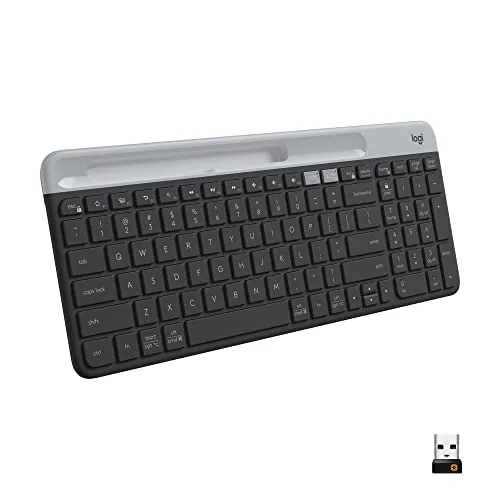
Logitech Pebble Keys 2 K380s vs K585: Layout, Device Switching and Receiver
The English-US Tonal Graphite Pebble Keys 2 K380s (920-011775) is the more compact layout, omits a dedicated number pad and can keep up to three devices paired for Easy-Switch. The Graphite K585 (920-011479) adds a number pad and phone cradle, switches between two paired devices and includes a Unifying USB receiver. Both can connect over Bluetooth Low Energy. Before buying, count your regular hosts and check whether the receiver type and keyboard width fit your actual desk or bag.
Read comparison
Logitech Pebble Keys 2 K380s vs Wave Keys: Compact Carry or Number Pad?
Both Logitech keyboards pair with up to three devices over Bluetooth and can use Logi Bolt. The Pebble Keys 2 K380s is the much smaller, low-profile round-key option; Wave Keys adds a wave-shaped layout, cushioned palm rest, a documented 10-key number pad and an included Bolt receiver. Check the desk or bag footprint and whether you will use Bluetooth or the receiver before choosing.
Read comparison