
Products compared
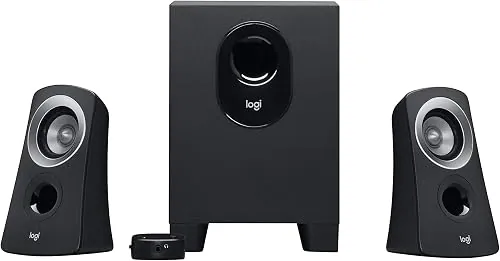
Logitech
Logitech Z313 Speaker System with Subwoofer, Black
Selected U.S. black configuration. Logitech describes two satellite speakers, a separate subwoofer and a wired control pod. The documented source connection is 3.5 mm analog, and the setup guide shows a separate electrical outlet connection.
Model Z313 (980-000382)
Amazon ASIN B002HWRZ2K
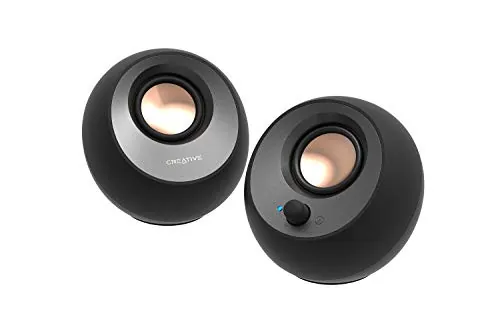
Creative
Creative Pebble V3 Minimalistic 2.0 USB-C Speakers with Bluetooth
Selected U.S. black MF1700 model. It is a supplied left/right speaker pair with USB Audio, Bluetooth and 3.5 mm analog input modes. USB power remains necessary; the exact guide says its AUX-in cable and power adapter are not included and lists a USB-C-to-A converter if required.
Model Pebble V3 (MF1700)
Amazon ASIN B08F57GSJ7
Differences that matter
Sources for Computer audio path
Sources for Power and extra purchases
Sources for Supplied enclosures and cable route
Sources for Everyday controls and headphone route
Start with the computer connection
The Z313's documented path is 3.5 mm analog audio plus power from an electrical outlet. Logitech's current U.S. page places the input on the back of the subwoofer, while its setup guide illustrates a 3.5 mm lead from the control pod; check the labeling and instructions that ship with your exact unit.
Pebble V3 can use USB Audio when the computer connection supports audio and provides suitable power. Its guide lists Bluetooth and 3.5 mm AUX as other input modes. Those alternatives still need USB power, so a laptop's audio capability and its USB power capability are separate checks.
Plan the enclosures and cables
Z313's documented system has a separate subwoofer, two satellites and a wired control pod. Before choosing it, mark where each piece can sit and trace the satellite, audio and power leads without crossing a walkway or blocking a desk control.
Pebble V3's supplied 2.0 layout avoids an additional supplied subwoofer enclosure, but it still has two speakers joined by a cable and needs a power source. The guide lists a USB-C-to-A converter if required; it explicitly excludes the AUX cable and power adapter. The sources do not provide a comparable total-footprint measurement, so use the actual desk and cable route rather than assuming a specific area saving.
Choose the control routine you prefer
The Z313 control pod puts speaker power and volume within reach and provides a headphone jack. Logitech's guide says headphone volume is adjusted at the connected audio source, not by the speaker-volume wheel.
Pebble V3's guide shows a source button and volume knob on the right speaker and the gain switch underneath it. If you plan to use its high-gain mode, follow the guide's USB power conditions. The listed wattage is a stated specification and does not predict how either system will sound in your room.
A practical pre-buy check
Write down the source device, its available audio outputs, the USB ports documented for audio and power, and the outlet locations. Then measure a usable location for each speaker and, for Z313, its separate subwoofer and control pod. Finally check whether the Pebble setup needs a separately supplied AUX cable or USB adapter. This turns the choice into a concrete connection and placement check without relying on an unverified sound-quality ranking.
Product details
Logitech Z313 Speaker System with Subwoofer, Black
- Documented audio connection
- 3.5 mm analog input; Logitech's current U.S. product page locates it on the back of the subwoofer, while the setup guide illustrates the 3.5 mm lead from the control pod. Follow the labels and guide supplied with the exact unit. Source
- Supplied layout and control
- Two satellite speakers, a separate subwoofer and a wired control pod with speaker power/volume and a headphone jack. Source
- Power setup
- The setup guide shows the system power cord connected to an electrical outlet separately from the 3.5 mm audio lead. Source
Creative Pebble V3 Minimalistic 2.0 USB-C Speakers with Bluetooth
- Audio and power modes
- USB Audio, Bluetooth and 3.5 mm analog stereo-in; input is 5 V / 2 A. USB Audio requires a host connection that actually supports USB audio, not merely a USB power outlet. Source
- High-gain power condition
- The guide states up to 8 W RMS when Gain is High and powered by a 10 W USB-C port/adapter or 5 V / 2 A USB-A adapter. The adapter is not included; this is a stated specification, not a sound comparison. Source
- Included and separate items
- The quick-start guide lists a USB-C-to-A converter if needed. It explicitly marks the AUX-in cable and power adapter as not included. Source
Before you buy
Community discussions
Z313 buyer asks about PC audio recognition
Logitech Z313 Speaker System with Subwoofer, Black
A Z313 buyer asked why the speakers were not recognized by a PC they had previously used with headphones and wondered whether dedicated drivers were needed.
What to check
Before choosing, compare your computer's available audio connection with each speaker's listed input, especially if you expect USB-style device recognition. This post captures the buyer's question; it does not establish a compatibility problem.
A new desk changed how a Z313 owner routed audio
Logitech Z313 Speaker System with Subwoofer, Black
After moving desks, one Z313 owner tried feeding audio from a monitor and reported that the sound was different from their previous setup.
What to check
Decide which device sends audio at your desk and match its available outputs to the inputs on each speaker set.
Common questions
Will any USB-C port make Pebble V3 work as a one-cable computer speaker?
No. Creative says USB Audio mode is used with a PC or Mac connection that supports USB Audio. A power-only source will not provide that audio path. Check the host or dock documentation as well as available USB power.Creative Pebble V3 MF1700 Quick Start Guide, revision B
Can I connect Pebble V3 by Bluetooth or 3.5 mm AUX instead?
Yes. Creative lists Bluetooth and AUX input as alternatives to USB Audio. The speakers still require USB power, and the cited guide says the AUX cable and power adapter are not included.Creative Pebble V3 MF1700 Quick Start Guide, revision B
What should I plan for on the Logitech Z313 desk?
The guide shows two satellite speakers connected to a separate subwoofer, a power cord to an electrical outlet, and a 3.5 mm audio lead from the control pod. Leave the wired pod accessible; its volume wheel controls the speakers, while headphone level is adjusted at the source.Logitech Z313 Complete Setup Guide
Sources and scope
This guide applies to Logitech Z313 black model 980-000382 and Creative Pebble V3 MF1700 in the assigned U.S. comparison. It compares manufacturer-documented connection, included-layout and control workflows, not listening performance. Logitech's current product page locates the 3.5 mm input at the subwoofer, while the setup guide illustrates the cable from the control pod; use the labels and guide for the exact unit. Logitech's cited setup guide does not establish a numeric mains-voltage range. Creative's cited guide establishes its named modes and input conditions but does not prove a universal host compatibility list. No matched physical footprint or desk-area advantage is claimed.
Related comparisons
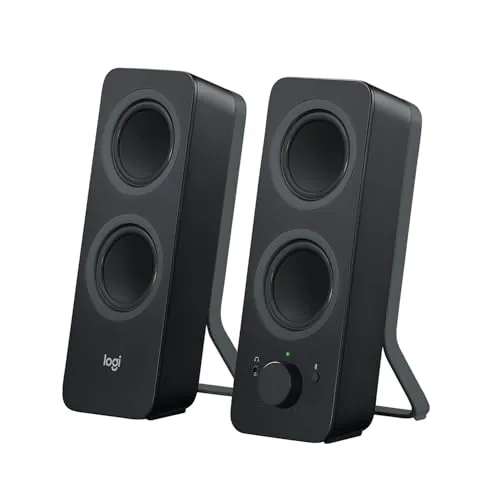
Logitech Z207 vs Creative Pebble V3: Choose by Desk Connections
For a desktop speaker setup, the black Logitech Z207 (980-001294) and Creative Pebble V3 (MF1700) solve different connection problems. Logitech documents two paired Bluetooth devices plus one 3.5 mm input and an Easy-Switch routine. Creative documents USB-C audio and power, Bluetooth 5.0 and AUX; its package material lists a USB-C-to-USB-A converter but no USB power adapter or AUX cable. Check which ports your computer actually has and whether you need separate USB power when using analog audio.
Read comparison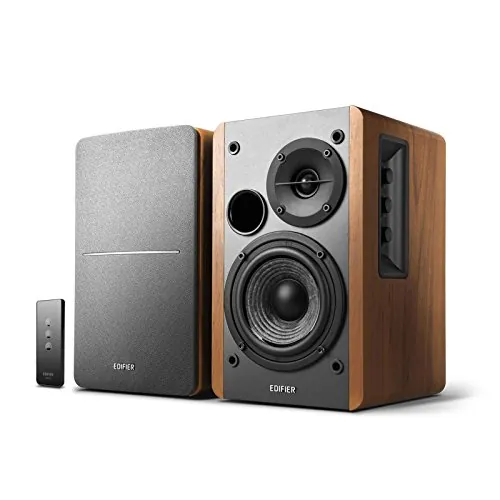
Creative Pebble V3 vs Edifier R1280T: USB Desk Speakers or Wired Bookshelf Pair?
The Creative Pebble V3 (MF1700) is the compact computer-first option: USB audio, Bluetooth 5.0 or 3.5 mm AUX, with USB power. The Edifier R1280T is a larger two-speaker wired setup with dual RCA inputs, an AC power cord, remote and side tone controls; it has no Bluetooth. Before choosing, map each source to the cable you will actually use, confirm a nearby outlet for the R1280T, and reserve space for its two cabinets. The R1280T manual says two connected sources both play, so it does not automatically switch between them. No matched listening test establishes a sound-quality winner.
Read comparison