
Products compared
Logitech
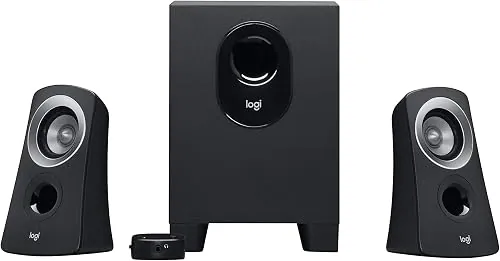
Logitech Z313 2.1 Multimedia Speaker System with Subwoofer
A three-enclosure arrangement: two satellite speakers connect to a separate subwoofer, with a wired pod for power and speaker volume.
Model Z313
Amazon ASIN B002HWRZ2K
Edifier
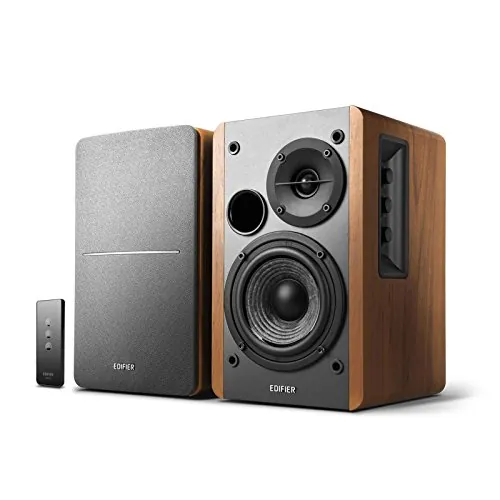
Edifier R1280T Powered Bookshelf Speakers
A two-speaker active/passive pair. The included speaker cable joins the pair; a supplied 3.5 mm-to-RCA lead supports an analog source, and the remote handles volume and mute.
Model R1280T
Amazon ASIN B016P9HJIA
Differences that matter
What matters most to you?
Choose a priority to see what it changes.
Sources for Boxes and placement
Sources for Where volume and power are controlled
Sources for Analog source and cable check
Sources for Two connected sources on the R1280T
Start with the boxes you can place
The Z313 spreads across three speaker enclosures: two satellites and a separate subwoofer. Its satellites connect to that subwoofer, so include the subwoofer's spot and the cable path in your desk sketch. The R1280T uses two bookshelf speakers, one active and one passive, linked by a supplied speaker cable. That makes the placement question different, not automatically smaller; measure your own surfaces and trace where the cables would run.
Neither manufacturer source gives a directly comparable total footprint for the exact retail bundles. Decide by locating the boxes and outlets in your room rather than comparing a single width or assuming one layout occupies less space.
Put the volume control where you sit
Z313's inline pod carries its speaker-volume wheel, power/standby button and headphone jack. Before choosing it, check that the pod's cable can reach your usual hand position without leaving the subwoofer or satellite cables in the way. Its headphone jack does not make the pod a headphone-volume control; the guide assigns headphone level to the source device.
R1280T's remote has volume and mute controls. Its master-volume, bass and treble knobs are on the active speaker, and power is switched at the rear. If you expect to change tone settings or switch power often, consider whether the active speaker remains easy to reach. The manual documents a CR2025 battery in the remote; verify that your exact retail package includes the same remote and battery before relying on them.
Confirm the source and cable route before buying
Both sets need AC power and an analog audio connection. Logitech documents the Z313's 3.5 mm source lead. Edifier lists dual RCA inputs and its manual includes a 3.5 mm-to-dual-RCA cable as well as a dual-RCA lead. Match those connectors to the actual output on your computer, TV or other source; if it provides only digital audio, check the source maker's instructions for a compatible conversion path.
One R1280T detail can matter in a mixed desk setup: its manual says that two connected audio sources play simultaneously. It does not describe the remote as an input selector. If you plan to leave two sources plugged in, account for how you will mute or turn down the one you are not using.
A practical choice
Start with Z313 if the separate subwoofer and satellites fit your planned layout and you want speaker volume beside you on a wired pod. Start with R1280T if a two-box bookshelf arrangement fits and remote volume/mute is more useful, while you can still reach its active-speaker controls.
If both arrangements work, compare the analog output on your source and the exact cable paths; those checks are more useful than assuming either system will sound better. The available materials do not provide a controlled Z313-versus-R1280T listening test.
Product details
Logitech Z313 2.1 Multimedia Speaker System with Subwoofer
- Speaker layout
- Two satellite speakers connect to a separate subwoofer. Source
- Source connection
- 3.5 mm analog audio connection; powered from an AC outlet. Source
- Control pod
- Wired pod has speaker-volume wheel, power/standby button and headphone jack; headphone volume is adjusted at the audio source. Source
Edifier R1280T Powered Bookshelf Speakers
- Speaker layout
- One active speaker connects to one passive speaker using the included speaker cable. Source
- Audio inputs
- Dual RCA inputs; the manual lists an included 3.5 mm-to-dual-RCA cable and dual-RCA cable. Source
- Control locations
- Remote buttons adjust volume and mute; master volume, bass and treble dials are on the active speaker, with a rear power switch. Source
Before you buy
Community discussions
Z313 owner reroutes a new desk setup
Logitech Z313 2.1 Multimedia Speaker System with Subwoofer
After moving to a new desk, an owner described a Z313 connection issue: a monitor connection behaved differently from routing advice they had found about connecting through the subwoofer.
What to check
Check the model's hookup diagram against the audio output and cable route you plan to use, and allow space for the subwoofer and control pod. The post describes one owner's setup experience.
A Z313 buyer’s first setup with a separate subwoofer
Logitech Z313 2.1 Multimedia Speaker System with Subwoofer
A new Z313 owner accustomed to a pair of desk speakers asked how to connect the extra speakers and subwoofer in their setup.
What to check
Measure the desk and the proposed subwoofer location. Then identify where you will reach the volume control.
Common questions
Does the Z313 control headphone volume from its pod?
No. The Logitech guide says the pod's wheel adjusts speaker volume; headphone volume is adjusted from the connected audio source.Z313 Complete Setup Guide
Does the R1280T remote switch between its two audio inputs?
The manual documents remote volume and mute buttons. It says two connected audio sources play together, so it does not support treating the remote as an input selector.R1280T User Manual, V1.3
Which model should I choose for a TV or computer?
Choose by the output your specific device provides and the cable route you can manage. Z313 uses a 3.5 mm analog input; R1280T uses RCA inputs and includes a 3.5 mm-to-RCA lead. Check the device manual if it offers only HDMI, optical or another digital output.Z313 Complete Setup GuideR1280T Powered Bookshelf Speakers
Sources and scope
Check the audio connector on your source and leave room for the power and speaker cables. Confirm the specific cable bundle on the seller’s exact listing.
Related comparisons
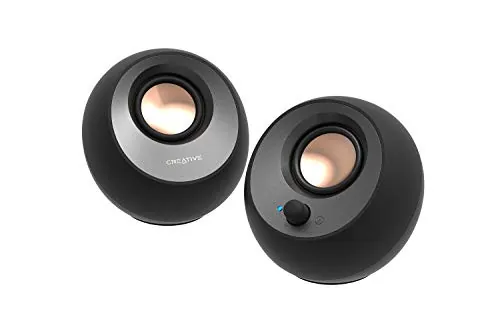
Creative Pebble V3 vs Edifier R1280T: USB Desk Speakers or Wired Bookshelf Pair?
The Creative Pebble V3 (MF1700) is the compact computer-first option: USB audio, Bluetooth 5.0 or 3.5 mm AUX, with USB power. The Edifier R1280T is a larger two-speaker wired setup with dual RCA inputs, an AC power cord, remote and side tone controls; it has no Bluetooth. Before choosing, map each source to the cable you will actually use, confirm a nearby outlet for the R1280T, and reserve space for its two cabinets. The R1280T manual says two connected sources both play, so it does not automatically switch between them. No matched listening test establishes a sound-quality winner.
Read comparison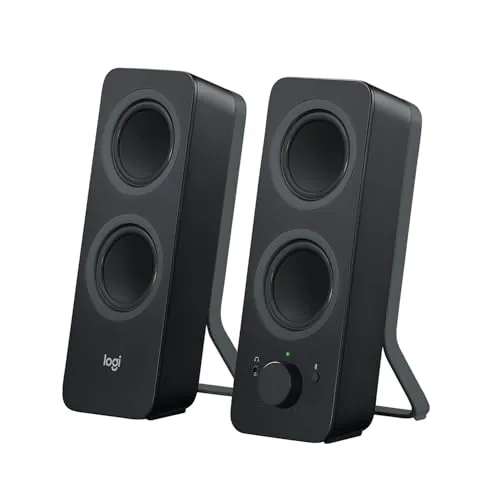
Logitech Z207 vs Edifier R1280T: Bluetooth, Inputs and Desk Setup
Logitech Z207 model 980-001294 accepts Bluetooth and one 3.5 mm analog input, with power and volume at the right speaker. Edifier R1280T has no Bluetooth, but offers two RCA inputs, a remote for volume and mute, and side-panel tone controls. A 3.5 mm source can still connect to the R1280T using its documented 3.5 mm-to-RCA cable; its two connected sources play together rather than auto-selecting.
Read comparison