
Products compared
Apple
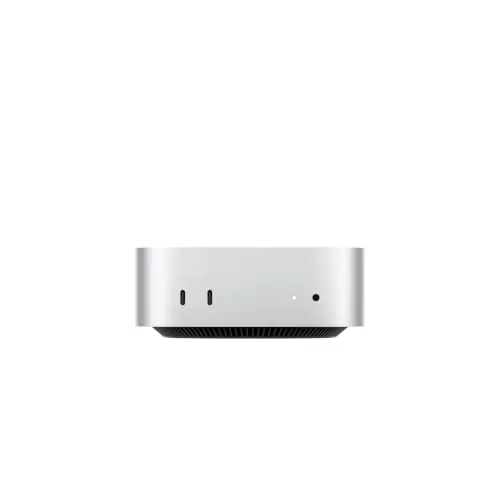
Apple Mac mini with M5 Pro
U.S. configuration MHQN4LL/A: M5 Pro with 15-core CPU, 16-core GPU, 24GB unified memory, and 512GB SSD. Apple lists a 5 × 5 × 2-inch chassis, support for up to three external displays, three rear Thunderbolt 5 ports, HDMI, front USB-C and headphone jack, and 2.5Gb Ethernet configurable to 10Gb. Verify the Ethernet option on the exact offer if it matters.
Model MHQN4LL/A
Amazon ASIN B0HGGHNQY6
Apple
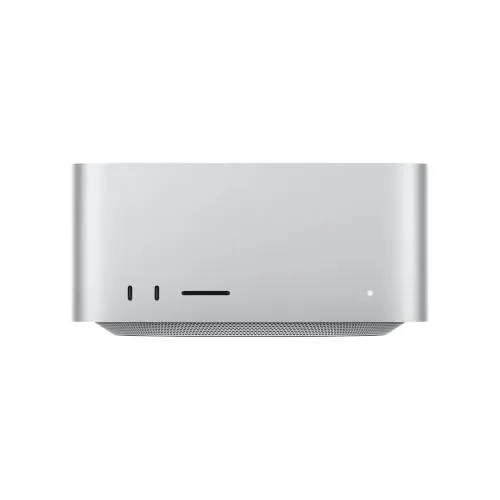
Apple Mac Studio with M5 Max
U.S. configuration MHL64LL/A: M5 Max with 18-core CPU, 32-core GPU, 36GB unified memory, and 512GB SSD. Apple lists support for up to five external displays, a front SDXC UHS-II slot and two front USB-C ports, two rear USB-A ports, four Thunderbolt 5 ports, HDMI 2.1, and 10Gb Ethernet. Chassis size is 7.7 × 7.7 × 3.7 inches (width × depth × height).
Model MHL64LL/A
Amazon ASIN B0HGKSQMX6
Differences that matter
What matters most to you?
Choose a priority to see what it changes.
Sources for Exact memory and internal SSD configuration
Sources for Display plan and monitor combinations
Sources for Cards and legacy USB peripherals
Sources for Chassis dimensions and placement
Compare the memory and storage configurations
The part numbers compared are MHQN4LL/A for the Mac mini M5 Pro with 24GB unified memory and 512GB SSD, and MHL64LL/A for the Mac Studio M5 Max with 36GB unified memory and 512GB SSD. Both offers list 512GB internal storage, so consider whether your active files fit or whether you already have a suitable external or network-storage plan. Apple lists other capacities for these product families; those are not the offers compared here.
The 12GB difference in listed unified memory is a configuration fact, not an application benchmark. Base your choice on known workload requirements and the exact memory configuration available on the order page; this guide does not predict a speed difference in a particular app.
Count displays and map the actual desk ports
Apple lists support for up to three external displays on the M5 Pro Mac mini and up to five on M5 Max Mac Studio. The support pages give specific maximum-resolution arrangements; write down your monitor models, target resolution/refresh, and cables, then verify that exact combination rather than treating the headline count as universal.
For a card-ingest desk, Mac Studio's front SDXC UHS-II slot is a concrete built-in convenience. Studio also lists two rear USB-A ports; Mac mini's listed set instead has two front USB-C ports plus three rear Thunderbolt 5 ports, HDMI and Ethernet. If your mini workflow uses SD cards or USB-A accessories, include the needed reader or hub and check all connector directions and port positions.
Check wired networking and chassis placement
Apple lists 10Gb Ethernet on the M5 Max Studio. The M5 Pro mini specification lists 2.5Gb Ethernet as standard and says 10Gb is configurable. Verify the exact MHQN4LL/A offer includes that option if your network requires it; the product-family configuration note alone does not establish it for every SKU. Network port labels do not predict your real transfer rate, which depends on the rest of the network and storage path.
The published dimensions are 5.0 × 5.0 × 2.0 inches for Mac mini and 7.7 × 7.7 × 3.7 inches for Studio. Measure the desk or shelf, including the space you need to reach ports and route cables. These dimensions help with layout; they do not establish thermal or performance behavior in a particular enclosure.
Pre-buy checklist for your exact workstation
Before ordering, confirm the model/part number and memory/storage shown at checkout; list all displays with their target modes; mark which peripherals need SDXC, USB-A, USB-C or Thunderbolt; confirm whether the mini is configured with 10Gb Ethernet if needed; and measure the planned footprint. This checklist turns the published spec differences into a desk compatibility plan without inferring benchmarks or guaranteeing a particular monitor or network result.
Product details
Apple Mac mini with M5 Pro
- Compared configuration
- M5 Pro, 15-core CPU, 16-core GPU, 24GB unified memory, 512GB SSD; exact Apple part MHQN4LL/A. Source
- External display ceiling
- Up to three external displays for M5 Pro; Apple gives supported resolution combinations, so check the exact monitor arrangement. Source
- Desk footprint
- 5.0 × 5.0 × 2.0 inches (width × depth × height). Source
- Listed connections
- Front: two USB-C (USB 3 up to 10Gb/s) and 3.5mm headphone jack. Rear M5 Pro: three Thunderbolt 5/USB-C, HDMI, 2.5Gb Ethernet configurable to 10Gb. Source
Apple Mac Studio with M5 Max
- Compared configuration
- M5 Max, 18-core CPU, 32-core GPU, 36GB unified memory, 512GB SSD; exact Apple part MHL64LL/A. Source
- External display ceiling
- Up to five external displays for M5 Max; Apple lists supported resolution combinations including four displays up to 6K plus a fifth over HDMI. Source
- Desk footprint
- 7.7 × 7.7 × 3.7 inches (width × depth × height). Source
- Listed connections
- Front: two USB-C ports and SDXC UHS-II slot. Rear: four Thunderbolt 5/USB-C, two USB-A, HDMI 2.1, 10Gb Ethernet and headphone jack. Source
Before you buy
Community discussions
Balancing editing memory and external storage
Apple Mac mini with M5 Pro
A 4K video editor compares the 24GB M5 Pro Mac mini and 36GB M5 Max Mac Studio while setting aside money for fast working storage and a NAS.
What to check
Check where your current editing sessions run out of memory or storage, then budget separately for the computer, working drive, and client-file storage.
Common questions
Do these exact offers have the same internal storage?
Yes. Apple’s part-number list matches MHQN4LL/A Mac mini M5 Pro to 24GB memory/512GB SSD and MHL64LL/A Mac Studio M5 Max to 36GB memory/512GB SSD. These offers differ in memory and connectivity, not listed SSD capacity.NASPO PSS Apple Branded Product Schedule — exact U.S. part numbers and configurations
How many displays can each support?
Apple lists up to three external displays for M5 Pro Mac mini and up to five for M5 Max Mac Studio, with constraints on supported combinations and resolutions. Check the exact table for your display models, refresh targets and cabling.Mac mini (M6 or M5 Pro) — Tech SpecsMac Studio (M5 Max or M5 Ultra) — Tech Specs
Does the Mac mini have 10Gb Ethernet?
Apple lists 2.5Gb Ethernet for the M5 Pro Mac mini and says it can be configured to 10Gb. Check whether the exact MHQN4LL/A offer includes that option before purchase. Apple lists 10Gb Ethernet on the M5 Max Mac Studio.Mac mini (M6 or M5 Pro) — Tech SpecsMac Studio (M5 Max or M5 Ultra) — Tech SpecsNASPO PSS Apple Branded Product Schedule — exact U.S. part numbers and configurations
Which model has built-in SD and USB-A ports?
Apple lists a front SDXC UHS-II slot and two rear USB-A ports on M5 Max Mac Studio. The M5 Pro Mac mini port list names front USB-C/headphone and rear Thunderbolt 5, HDMI and Ethernet; it does not list SDXC or USB-A, so plan for an adapter or reader if needed.Mac mini (M6 or M5 Pro) — Tech SpecsMac Studio (M5 Max or M5 Ultra) — Tech Specs
Sources and scope
This guide compares Apple-documented configurations and physical connections for U.S. parts MHQN4LL/A and MHL64LL/A. It does not test application performance, displays, network throughput, thermals, or real-world speed. Display limits depend on the combinations, resolutions, and cabling Apple lists, so check your monitor setup. Apple says the Mac mini M5 Pro’s 2.5Gb Ethernet can be configured to 10Gb, but check whether the exact MHQN4LL/A offer includes that option. Both offers list a 512GB SSD; no post-purchase internal-upgrade claim is made.
Related comparisons
Apple Mac mini M6 16GB/512GB vs M5 Pro 24GB/512GB: Memory, Ports and Displays
The compared Apple configurations share a 512GB SSD and support up to three external displays, so the choice is not simply “three monitors or fewer.” Part MHQL4LL/A pairs the M6 with 16GB unified memory and three Thunderbolt 4 ports; MHQN4LL/A has M5 Pro, 24GB, and Thunderbolt 5. Apple lists different maximum display combinations, especially for the third display. Before buying, map your monitors’ resolution and refresh needs and check your existing dock or storage against the ports you plan to use.
Read comparison
MacBook Neo MHFF4LL/A vs Mac mini M6 MHQL4LL/A: complete laptop or desk build?
The Indigo MacBook Neo (A18 Pro, 8GB/256GB) is a 13-inch laptop with its own display and input devices. The Mac mini M6 (16GB/512GB) is a small desktop that comes with a power cord, so plan a separate display and input devices unless you already have them. Compare your desk ports and monitor plan before choosing; these specs do not show which chip is faster in your apps.
Read comparison