
Products compared
Apple
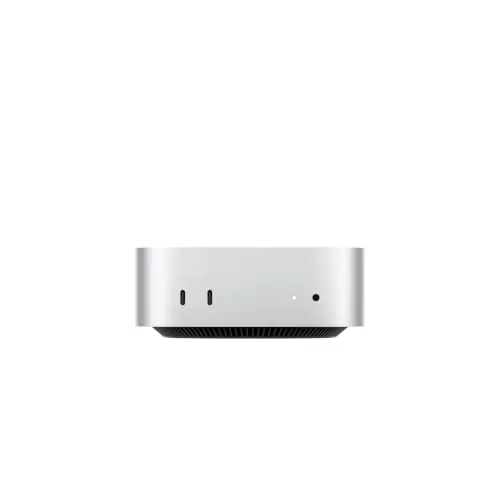
Apple Mac mini with M6 chip, 16GB unified memory, 512GB SSD
Exact U.S. part MHQL4LL/A: M6 with 12-core CPU/12-core GPU, 16GB unified memory and 512GB SSD. The current Apple product table lists the part and matching configuration.
Model MHQL4LL/A
Amazon ASIN B0HGGC82BG
Apple
Apple Mac mini with M5 Pro chip, 24GB unified memory, 512GB SSD
Exact U.S. part MHQN4LL/A: M5 Pro with 15-core CPU/16-core GPU, 24GB unified memory and 512GB SSD. The current Apple product table lists the part and matching configuration.
Model MHQN4LL/A
Amazon ASIN B0HGGHNQY6
Differences that matter
What matters most to you?
Choose a priority to see what it changes.
Sources for Exact memory and SSD configuration
Sources for Thunderbolt and peripheral path
Sources for Three-display mode combinations
Sources for Physical desktop footprint
Start from the exact memory configuration
The products in this comparison are not the base-memory choices suggested by their chip names alone. Apple lists part MHQL4LL/A as Mac mini M6 with 16GB unified memory and 512GB SSD, and part MHQN4LL/A as M5 Pro with 24GB unified memory and 512GB SSD. That makes storage equal here and memory the immediate configuration difference.
Choose from a memory requirement you have established for your workload. This guide does not predict app speed, and the M5 Pro's higher memory configuration alone does not establish a universal performance advantage.
Both support three displays; compare the specific screen modes
A three-monitor count alone does not separate these two. Apple lists up to three external displays for both models. In the M6 combination with two displays up to 6K/60Hz or 4K/165Hz, the third is listed up to 5K/60Hz over Thunderbolt or 4K/60Hz over HDMI. Apple lists M5 Pro for three displays up to 6K/60Hz or 4K/165Hz, and says three displays can connect over one Thunderbolt port.
Make a simple desk map: write down each display's resolution and refresh goal, which ports you intend to use, and whether all screens need to pass through one dock cable. Then check the exact dock and monitor manuals as well as Apple's host limits. Apple's stated maximum modes are not a guarantee for every third-party adapter chain.
Match Thunderbolt to your peripherals, not an assumed benchmark
The M6 configuration has three rear Thunderbolt 4 ports and HDMI; Apple lists Thunderbolt 4 up to 40Gb/s. The M5 Pro has three Thunderbolt 5 ports and HDMI; Apple lists Thunderbolt 5 up to 120Gb/s. Both also have two front USB-C ports. This matters if your desk already depends on a particular dock, external drive, or connection path.
Before ordering, check the exact peripheral requirement, display arrangement and cable route. A higher interface maximum does not establish a measured transfer speed or app advantage with devices you have not specified. Both chassis are listed at 5×5×2 inches, so include room for the hub, cords and monitor connections when comparing desk fit.
Product details
Apple Mac mini with M6 chip, 16GB unified memory, 512GB SSD
Choose this exact M6 build when 16GB fits a requirement you have already established and the ports/modes in your monitor plan match Apple's listed support. It retains a three-display option, with a lower listed maximum for the third screen in the specific combination Apple describes.
- Compared configuration
- M6, 16GB unified memory, 512GB SSD. Source
- Rear expansion
- Three Thunderbolt 4 (USB-C) ports, listed up to 40Gb/s, plus HDMI; 2.5Gb Ethernet on this configuration. Source
- External displays
- Up to three. With two displays up to 6K/60Hz or 4K/165Hz, a third is listed up to 5K/60Hz over Thunderbolt or 4K/60Hz over HDMI. Apple also lists up to two displays over one Thunderbolt port. Source
Apple Mac mini with M5 Pro chip, 24GB unified memory, 512GB SSD
Choose this exact M5 Pro build if the named 24GB configuration, a Thunderbolt 5 connection, or its listed three-display modes solve a requirement in your existing setup. Apple lists three-display support for both models; check the exact resolutions and refresh rates you need rather than using monitor count alone.
- Compared configuration
- M5 Pro, 24GB unified memory, 512GB SSD. Source
- Rear expansion
- Three Thunderbolt 5 (USB-C) ports, listed up to 120Gb/s, plus HDMI; 2.5Gb Ethernet on this configuration. Source
- External displays
- Up to three displays listed at up to 6K/60Hz or 4K/165Hz; Apple also lists support for routing three external displays over a single Thunderbolt port. Source
Before you buy
Community discussions
Picking memory for a development desktop
Apple Mac mini with M5 Pro chip, 24GB unified memory, 512GB SSD
A developer’s shortlist includes a 16GB M6 mini and a 24GB M5 Pro mini, both with 512GB storage. They also consider a 24GB M6 configuration.
What to check
Estimate what will run together during a normal session, such as your editor, simulators, and local models, and compare the memory configurations you can buy.
Common questions
Is M5 Pro the only one that can run three displays?
No. Apple lists up to three external displays for both. The supported resolution/refresh combinations differ: M6's stated two-high-resolution-plus-third setup lists a lower third-display limit, while M5 Pro lists three displays up to 6K/60Hz or 4K/165Hz and supports routing three through one Thunderbolt port.Mac mini (M6 or M5 Pro) — Tech Specs
Do both configurations in this comparison have the same internal storage?
Yes. Apple’s U.S. part-number table identifies MHQL4LL/A as M6 with 16GB memory and MHQN4LL/A as M5 Pro with 24GB; both list a 512GB SSD.Apple NASPO PSS Apple-Branded Products — September 2026 model/part table
Does the Thunderbolt generation predict which Mac will be faster for my apps?
No. Thunderbolt is an interface specification, not an application benchmark. Match it to a peripheral or dock requirement you have; this guide makes no performance prediction.Mac mini (M6 or M5 Pro) — Tech Specs
Sources and scope
This guide compares only the U.S. part numbers MHQL4LL/A (M6, 16GB unified memory, 512GB SSD) and MHQN4LL/A (M5 Pro, 24GB unified memory, 512GB SSD). Apple’s published display limits are maximum supported modes, not guarantees for every monitor, dock, or cable combination. Both support up to three displays, but the listed combinations differ. No performance tests or predictions are included; the guide does not establish how a particular application will run.
Related comparisons
Mac mini M5 Pro vs Mac Studio M5 Max: Memory, Displays and Desk I/O
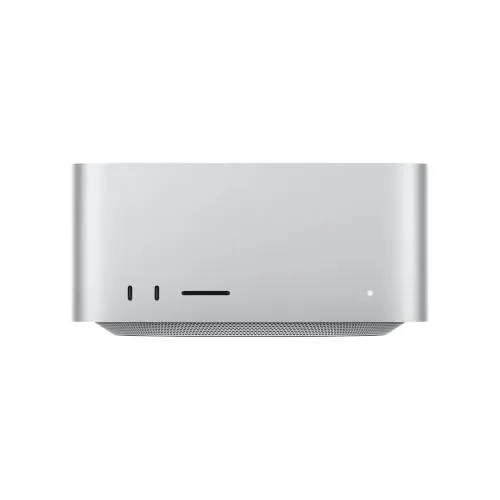
For U.S. parts MHQN4LL/A and MHL64LL/A, the choice is about configuration and desk workflow, not an assumed benchmark winner. Both offers have 512GB SSDs; the Mac mini M5 Pro configuration has 24GB unified memory, while the Mac Studio M5 Max has 36GB. Apple lists support for up to three external displays on the mini and up to five on the Studio. The Studio also lists a front SDXC UHS-II slot and two rear USB-A ports, plus 10Gb Ethernet. The mini is 5 × 5 × 2 inches and lists three rear Thunderbolt 5 ports, HDMI, and 2.5Gb Ethernet; its M5 Pro Ethernet can be configured to 10Gb, so check the exact part for that option. Inventory your displays, cards, USB-A devices, and network before deciding.
Read comparison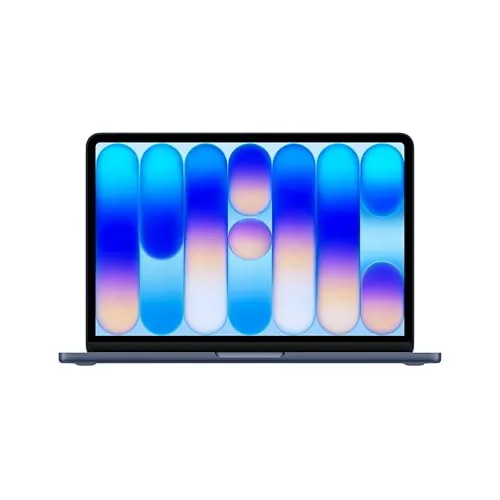
MacBook Neo MHFF4LL/A vs Mac mini M6 MHQL4LL/A: complete laptop or desk build?
The Indigo MacBook Neo (A18 Pro, 8GB/256GB) is a 13-inch laptop with its own display and input devices. The Mac mini M6 (16GB/512GB) is a small desktop that comes with a power cord, so plan a separate display and input devices unless you already have them. Compare your desk ports and monitor plan before choosing; these specs do not show which chip is faster in your apps.
Read comparison