
Products compared
OLIGHT
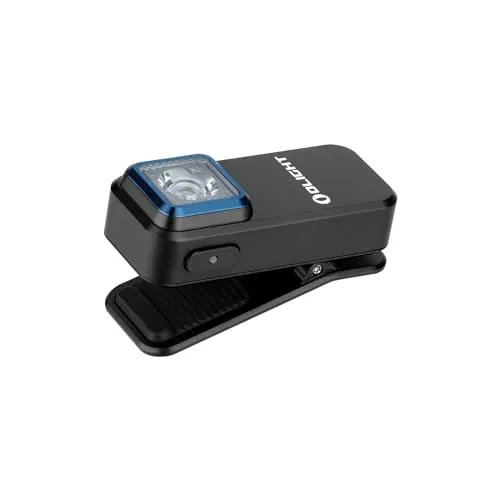
Olight Oclip Mini (listing title; verify exact listing)
Black US listing. The listing title says Oclip Mini; the model/part field is OCLIP-BK-300000. Olight's manual for Oclip documents white and red light modes, but does not map an Amazon ASIN to the model number.
Model OCLIP-BK-300000
Amazon ASIN B0CCJDRK76
OLIGHT
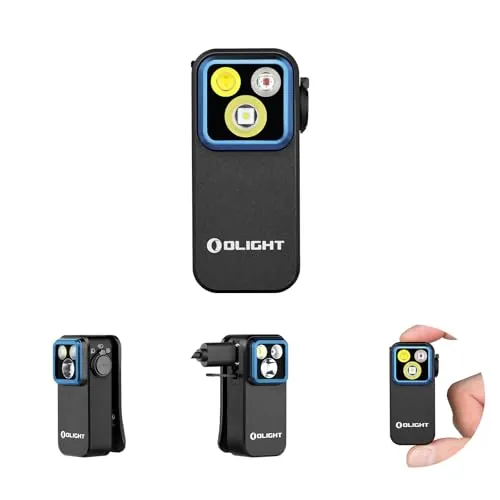
Olight Oclip Pro
Black US listing. Olight's Oclip Pro manual documents a rotary selector for floodlight, spotlight and red-light modes.
Model OCLIPPRO-BK-300000
Amazon ASIN B0DDC4MH84
Differences that matter
What matters most to you?
Choose a priority to see what it changes.
Sources for Mode control
Sources for Published body envelope (L × W × H)
Sources for Attachment options shown in the manuals
Sources for Charging path
Pick the control you will actually use
Olight's Oclip manual documents a double-press, while on, to switch between white and red light. Its Oclip Pro manual describes a rotary selector for floodlight, spotlight and red-light modes. If your household task only needs the two documented Oclip modes, the added Pro selector does not by itself prove a better result; choose it when direct selection among those three source types fits your routine.
These are manufacturer-documented controls and mode labels. This guide has no comparable hands-on measurement of brightness, runtime, beam distance or illumination of a room.
Check the attachment point and clearance
Both manuals show a clip, magnetic attachment and lanyard hole, so the practical pre-buy check is your own intended attachment point: inspect its edge or strap and confirm whether a magnetic surface is available. The documents do not establish that a particular garment, shelf or metal surface will hold either light securely.
The manuals list Oclip at 48.5 × 21 × 23 mm and Oclip Pro at 57 × 28.05 × 27.83 mm. Compare those figures with the space you have, but treat them as a clearance screen, not a guarantee that the item will fit or feel comfortable.
Resolve the listing title before buying
The current the product listing entry for product 20625 is titled Olight Oclip Mini and lists model OCLIP-BK-300000. The official manual used for its documented Oclip controls is titled Oclip and does not provide the ASIN-to-model crosswalk. Check the seller's exact model or part number before treating the title and manual as the same configuration. This comparison does not substitute the newer Oclip2.
For charging, both manuals describe USB-C. Confirm the exact listing's package contents and follow the applicable manual; the shared charging connector is not a reason by itself to choose one model.
Product details
Olight Oclip Mini (listing title; verify exact listing)
- Documented mode selection
- While on, double-press to switch between white and red light. Source
- Published body dimensions
- 48.5 × 21 × 23 mm (L × W × H), per the Oclip manual; verify the exact retail model because the listing title differs. Source
- Attachment shown in manual
- Clip, magnetic base and lanyard hole are shown; the manual does not establish fit or holding strength for a particular surface. Source
Olight Oclip Pro
- Documented mode selection
- Rotate the selector to choose floodlight, spotlight or red-light mode. Source
- Published body dimensions
- 57 × 28.05 × 27.83 mm (L × W × H), per the Oclip Pro manual. Source
- Charging and attachment
- The manual shows a USB-C charging port, clip, magnetic attachment and lanyard hole. These details do not establish runtime or holding strength. Source
Before you buy
Community discussions
NLD: Oclip pro
Olight Oclip Pro
A new Oclip Pro owner planned to keep it on a backpack for daily use.
What to check
Check where each clip would fit on your backpack and whether you can reach the controls in that position.
Is the Oclip worth it?
Olight Oclip Pro
An Oclip Pro owner describes using the USB-C cable they already carry and clipping the light to a work vest.
What to check
Check which charging cable you already keep nearby and whether the clip location is convenient for the way you carry the light.
Common questions
How do the controls differ?
The Oclip manual says to double-press while the light is on to switch between white and red. Oclip Pro's manual shows a rotary selector for floodlight, spotlight and red-light modes.Oclip User Manual (Version C)Oclip Pro User Manual (Version B, 2024-08-15)
Can either light attach without being held?
Both manuals show a clip, magnetic attachment and lanyard hole. Check whether the specific edge or surface in your setup suits the attachment; the manuals do not establish fit or holding strength for it.Oclip User Manual (Version C)Oclip Pro User Manual (Version B, 2024-08-15)
Does the Oclip Pro take up more space?
Its manual lists 57 × 28.05 × 27.83 mm, compared with 48.5 × 21 × 23 mm in the Oclip manual. Treat this as a published clearance comparison, not a fit or comfort result, and verify product 20625's exact model because its listing title differs from the manual title.Oclip User Manual (Version C)Oclip Pro User Manual (Version B, 2024-08-15)
Sources and scope
This is a document-based comparison, not a hands-on brightness, runtime, beam-distance, water-resistance, durability, comfort or attachment-strength test. current listing data title for product 20625 says Oclip Mini, while its model/part field is OCLIP-BK-300000 and the corresponding manufacturer manual is titled Oclip. The manual does not provide an ASIN crosswalk, so verify that the retail listing shows the same model before purchase. The Oclip Pro manual is for Oclip Pro; no newer Oclip2 model is included here.
Related comparisons
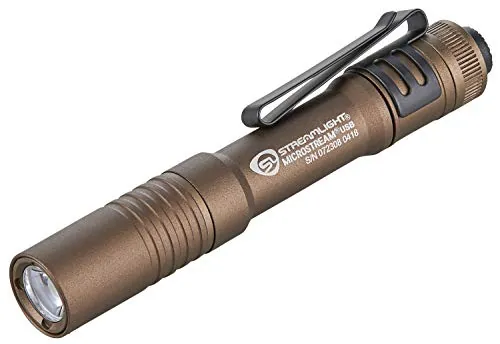
Olight Oclip Pro vs Streamlight MicroStream USB: Placement and Controls
The original black Olight Oclip Pro has a magnetic clip, lanyard hole, and selector for spotlight, floodlight, or red light. The Coyote Streamlight MicroStream USB 66608 has a removable pocket clip that Streamlight specifically describes for a hat brim, with high/low modes on its tail switch. The included 66608 info sheet lists a micro-USB cord; check the exact package if connector compatibility matters.
Read comparison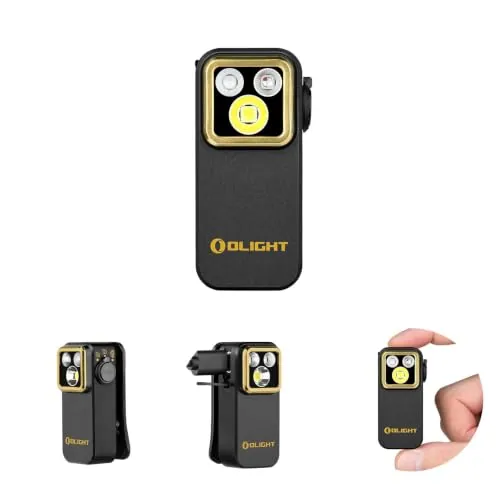
Olight Oclip Pro vs Oclip Pro S: Spotlight Selector or RGB and UV Modes?
The Oclip Pro selector has separate spotlight, floodlight and red positions. The Oclip Pro S manual shows a white-light position plus RGB and UV. Choose by the light positions you want to select.
Read comparison