
Products compared
Razer
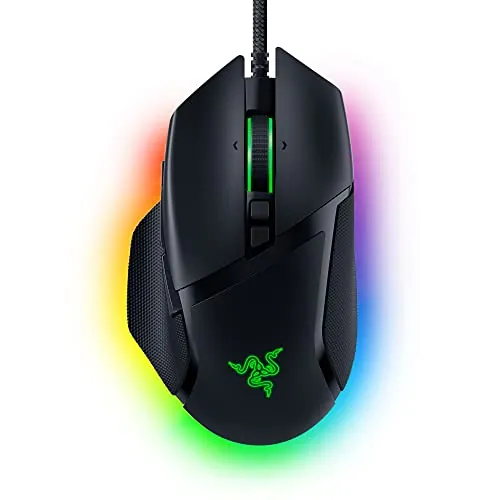
Razer Basilisk V3 Wired Gaming Mouse, Black
Black U.S. Basilisk V3; wired model.
Model RZ01-04000100-R3U1
Amazon ASIN B09C13PZX7
Razer
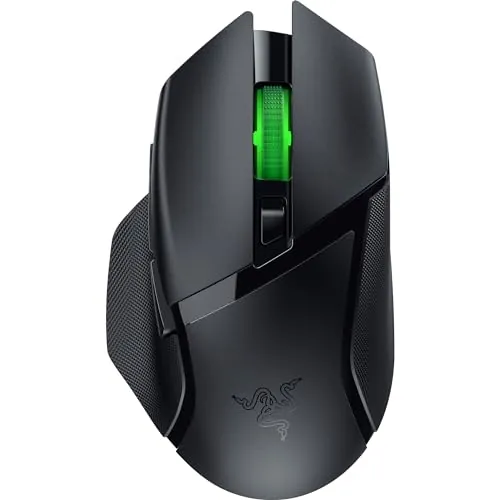
Razer Basilisk V3 X HyperSpeed Wireless Gaming Mouse, Black
Black U.S. Basilisk V3 X HyperSpeed; wireless model.
Model RZ01-04870100-R3U1
Amazon ASIN B0BXBC26X8
Differences that matter
What matters most to you?
Choose a priority to see what it changes.
Sources for Scroll-wheel controls
Check the setup before you choose
The V3 is a direct wired choice: route its Speedflex cable and it needs no battery. The V3 X is the wireless option, with a 2.4 GHz receiver connection or Bluetooth and one AA cell. If using its receiver, confirm your computer has a usable port; if using Bluetooth, confirm pairing support on your computer.
For scrolling, the V3 is the only assigned model whose exact product documentation confirms four-way tilt plus notched and free-spinning modes. The V3 X guide says it has no tilt scroll wheel and does not establish free-spin behavior.
Treat Razer's button counts as differently labeled facts
The V3 technical specifications list 11 programmable buttons. Razer's V3 X overview calls its layout 9 customizable controls, while the exact-model manual lists 7 programmable buttons. Those terms may describe different count scopes; this comparison preserves the source labels instead of declaring a numerical winner. Review the control diagram against the actions you intend to assign.
Product details
Razer Basilisk V3 Wired Gaming Mouse, Black
The V3 suits a desk where a cable is acceptable, especially if you will use the documented four-way tilt input or switch between notched and free-spinning scrolling. Its cable-powered setup avoids replacing mouse batteries.
Razer Basilisk V3 X HyperSpeed Wireless Gaming Mouse, Black
The V3 X is the wireless choice if you want either the 2.4 GHz receiver connection or Bluetooth and are comfortable replacing one AA cell. Its official guide explicitly rules out a tilt scroll wheel; do not assume that its wheel free-spins.
- Wireless options
- Razer HyperSpeed Wireless at 2.4 GHz or Bluetooth. Source
- Power and rated runtime
- Uses one AA cell; the exact-model guide rates up to 285 hours on HyperSpeed under constant motion at 1000 Hz, or up to 535 hours on Bluetooth. These are mode-specific maxima, not a promised replacement interval. Source
- Scroll and control documentation
- The exact-model guide lists 7 programmable buttons and says “Tilt scroll wheel: No.” The product overview calls the controls “9 customizable controls”; those differently labeled counts are not directly comparable. Free-spin behavior is not specified. Source
Before you buy
Community discussions
Wanting a similar grip without the cable
Razer Basilisk V3 Wired Gaming Mouse, Black
A wired Basilisk V3 owner liked its fuller shape and was considering the V3 X HyperSpeed because the cable bothered them.
What to check
Compare the grip profile and check whether you prefer a cable on your desk or keeping a spare battery handy.
Checking which scroll controls you use
Razer Basilisk V3 X HyperSpeed Wireless Gaming Mouse, Black
Someone who moved from the wired Basilisk V3 to the V3 X HyperSpeed said they did not use the wired model’s extra scroll controls.
What to check
Try your usual games or apps and note whether you use side scrolling or switch scroll modes. Compare the wheel controls before deciding.
Common questions
Does the Basilisk V3 X HyperSpeed have a tilt wheel?
Razer's exact-model guide says “Tilt scroll wheel: No.” Razer documents a four-way tilt wheel for the wired Basilisk V3. The V3 X guide does not say whether its wheel free-spins, so that feature remains unverified.Razer Basilisk V3 — U.S. model RZ01-04000100-R3U1 product and technical specificationsRazer Basilisk V3 X HyperSpeed Master Guide
How long does the V3 X's AA battery last?
Razer's manual lists up to 285 hours on HyperSpeed under constant motion at 1000 Hz and up to 535 hours on Bluetooth. These mode-specific maximums are not a personal replacement schedule; the wired V3 has no battery.Razer Basilisk V3 — U.S. model RZ01-04000100-R3U1 product and technical specificationsRazer Basilisk V3 X HyperSpeed Master Guide
Which model has more programmable controls?
Razer lists 11 programmable buttons for the Basilisk V3. For the V3 X, its product overview says 9 customizable controls while its manual lists 7 programmable buttons; because the labels differ, this guide does not treat those numbers as directly comparable totals.Razer Basilisk V3 — U.S. model RZ01-04000100-R3U1 product and technical specificationsRazer Basilisk V3 X HyperSpeed — U.S. model RZ01-04870100-R3U1 product and technical specificationsRazer Basilisk V3 X HyperSpeed Master Guide
Sources and scope
Related comparisons
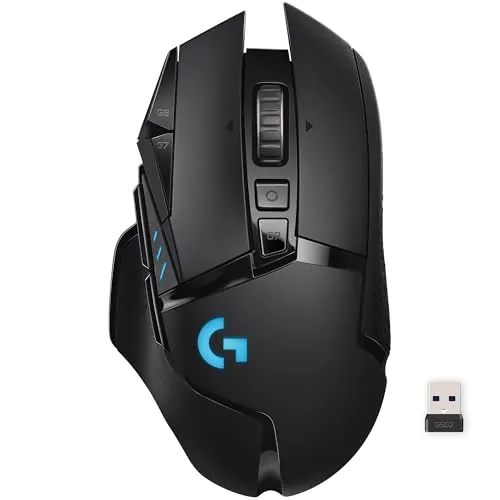
Logitech G502 LIGHTSPEED vs Razer Basilisk V3 X HyperSpeed: Controls, Receiver and Battery
The Logitech G502 LIGHTSPEED (910-005565) and Razer Basilisk V3 X HyperSpeed (RZ01-04870100-R3U1) are wireless gaming mice with different command layouts and power routines. Choose the G502 for its 11 programmable buttons, included receiver extension and rechargeable battery; choose the Basilisk if you prefer one AA cell, Bluetooth as an alternative to its HyperSpeed receiver, and Razer Hypershift secondary commands. Their control counts use different definitions, so this is a feature-fit guide, not a button-count ranking or performance test.
Read comparison
Logitech G502 HERO vs Razer Basilisk V3: Scroll Controls, Weights and Setup
Both are wired, right-handed gaming mice with tilt wheels and configurable controls. The Logitech G502 HERO uses a physical button to switch its wheel between notched and free-spin modes and accepts up to five removable weights. The original Razer Basilisk V3 has a four-way tilt wheel with electronically actuated notched/free-spin modes; its Smart-Reel behavior is enabled in Razer Synapse. Compare the control routine and software you can use on your computer, then check cable routing and the exact model code before buying.
Read comparison