
Products compared
ASUS
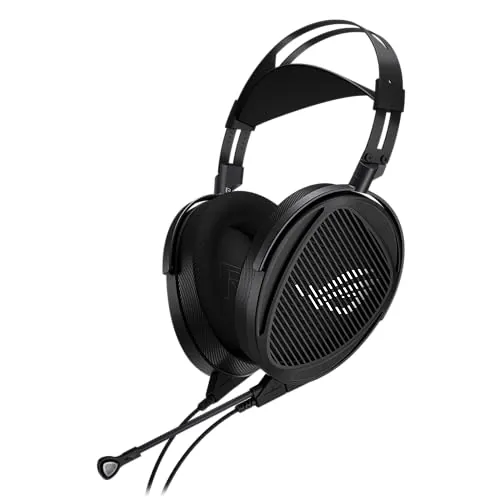
ASUS ROG Kithara
ASUS documents Kithara as a wired open-back headset. Its listed setup includes a cable with swappable 3.5 mm, 6.3 mm single-ended and 4.4 mm balanced plugs, a separate dual-3.5 mm boom-mic cable, and a USB-C-to-dual-3.5 mm adapter. ASUS lists PC microphone use through dual 3.5 mm or USB-C; its Xbox controller row says 3.5 mm audio only and microphone unsupported.
Model A702
Amazon ASIN B0GG53SPJC
Audeze
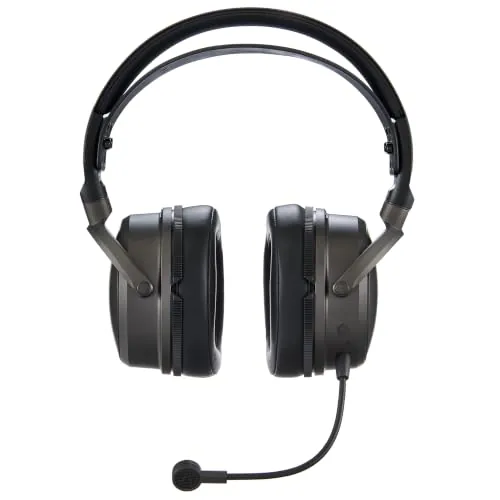
Audeze Maxwell 2 Wireless Gaming Headset (Xbox version)
Audeze Maxwell 2 Xbox edition, model 207-MW-1125-01. Audeze documents Xbox Series S|X use by wireless dongle or 3.5 mm AUX through compatible gamepads. The product page lists a detachable boom mic, wireless dongle, USB cables and a 3.5 mm TRRS analog cable. Audeze says the Game/Chat Mix wheel works only while party chat is active.
Model 207-MW-1125-01
Amazon ASIN B0GNSHCPPY
Differences that matter
What matters most to you?
Choose a priority to see what it changes.
Sources for Xbox signal and chat route
Sources for PC and DAC cable layout
Sources for What the box adds to setup
Sources for Open-back or closed-back construction
Match the host ports and microphone route
Kithara is the straightforward choice when your PC or DAC can use its wired plugs and you want the included split mic lead. ASUS lists a cable with interchangeable 3.5 mm, 6.3 mm and 4.4 mm plugs, plus a separate boom-mic lead whose audio and mic signals end in two 3.5 mm plugs. The included USB-C-to-dual-3.5 mm adapter is another documented PC connection option. Check your host’s actual audio and mic inputs before relying on a port name alone.
For Maxwell 2 Xbox, Audeze documents Xbox Series S|X use by the USB-C wireless dongle or AUX through a compatible gamepad. It also lists USB-C digital audio for compatible hosts. On Xbox, the Game/Chat Mix wheel is only active when party chat is running. This distinction is about the stated routing and control workflow, not signal quality or latency.
Check the exact bundle before buying
Kithara’s manufacturer list includes its swappable-plug cable, separate dual-3.5 mm boom-mic cable, USB-C-to-dual-3.5 mm adapter and two cushion sets. Audeze’s Maxwell 2 page lists its detachable boom mic with pop filter, wireless dongle, USB-C cable, USB-A adapter cable and TRRS analog cable. These are different setup parts, so make a short list of what your PC, controller or DAC already provides and what must be in the delivered box.
The Maxwell 2 compared here is the Xbox edition. Audeze publishes separate Xbox and PlayStation connection guides, so check that an offer is for the edition you need before relying on its connection options or included license.
Use room design as a preference, not a performance score
ASUS identifies Kithara as open-back and says some environmental sound passes through, sound may leak, and it is not recommended for noisy environments. Audeze identifies Maxwell 2 as closed-back. If you prefer an open construction and can use it in a private, quieter space, Kithara matches that preference; if you prefer closed-back cups for a shared room, Maxwell 2 matches that design preference. No pair-specific measurement here establishes actual leakage or isolation.
Neither product’s driver material, published marketing language or design label substitutes for a controlled listening test. If your decision depends on sound, microphone quality, spatial positioning, comfort, isolation or battery performance, seek independent testing that evaluates these exact editions under comparable conditions.
Product details
ASUS ROG Kithara
- Connection
- Wired; the included audio cable has swappable 3.5 mm, 6.3 mm single-ended and 4.4 mm balanced plugs. Source
- Microphone route
- Separate dual-3.5 mm mic cable; ASUS lists PC mic use through dual 3.5 mm or USB-C. Xbox controller use is listed as audio only, with mic unsupported. Source
- Included adapter and construction
- USB-C-to-dual-3.5 mm adapter; open-back design. Source
Audeze Maxwell 2 Wireless Gaming Headset (Xbox version)
- Xbox connection
- Audeze documents Xbox Series S|X connection by wireless dongle or 3.5 mm AUX through compatible gamepads. Source
- Included routing hardware
- Product-page package list includes a USB-C wireless dongle, USB-C to USB-C cable, USB-C to USB-A adapter cable and 3.5 mm TRRS analog cable, plus a detachable boom mic with pop filter. Source
- Room-facing construction and chat control
- Audeze lists Maxwell 2 as over-ear, closed-back. Its Xbox guide says Game/Chat Mix is available only during an active party chat. Source
Before you buy
Community discussions
Check the audio ports on the computer you already have
ASUS ROG Kithara
A shopper considering the ROG Kithara asked how to connect it to a PC without a USB-C port.
What to check
Inventory your computer’s audio and USB ports. Check the maker’s connection guidance and what comes with each exact headset.
Common questions
Can I use the Kithara boom mic through an Xbox controller?
ASUS lists the Xbox controller connection as 3.5 mm audio only and microphone support as unsupported. The separate Kithara microphone cable carries audio and mic on two plugs; check another documented route if Xbox chat is essential.ROG Kithara Gaming Headset (US)
How does the Maxwell 2 Xbox edition connect to Xbox?
Audeze documents Xbox Series S|X connection through the wireless dongle or 3.5 mm AUX via compatible gamepads. Its Game/Chat Mix wheel works only while party chat is active. Verify that the offer is the Xbox edition, not the separate PlayStation version.Maxwell 2 User Guide – Maxwell 2 (Xbox)Maxwell 2 Wireless Gaming Headset
Does this comparison show which headset sounds better or blocks more noise?
No. The sources establish cable, console, microphone and physical cup-design details, but they are not a matched test of sound, microphone performance, leakage or isolation. ASUS’s open-back comments are qualitative design guidance for Kithara, not a measurement of this pair.ROG Kithara Gaming Headset (US)Maxwell 2 Wireless Gaming Headset
Sources and scope
This guide compares manufacturer-documented configurations and design features, not measured sound, microphone quality, leakage, isolation, comfort, latency or battery performance. Check the exact Xbox edition and the ports on your own controller, console, PC or DAC before purchase.
Related comparisons
Audeze Maxwell 2 for Xbox vs SteelSeries Arctis Nova Elite Sage & Gold: Which Setup Fits?
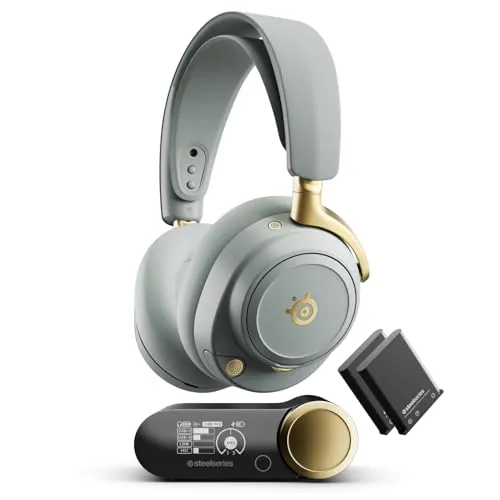
For an Xbox-first setup, Maxwell 2 for Xbox documents a wireless-dongle or compatible-gamepad AUX path, plus a Game/Chat Mix wheel that works during active party chat. Nova Elite Sage & Gold uses GameHub USB 3 for Xbox and has documented USB source-mixing routes, Bluetooth-plus-2.4GHz audio, two microphones with a retractable boom, and a charging slot for its spare battery. Choose around your actual source map and mic routine, not an untested sound or noise-control winner.
Read comparison
SteelSeries Arctis Nova 5 vs CORSAIR VOID Wireless v2
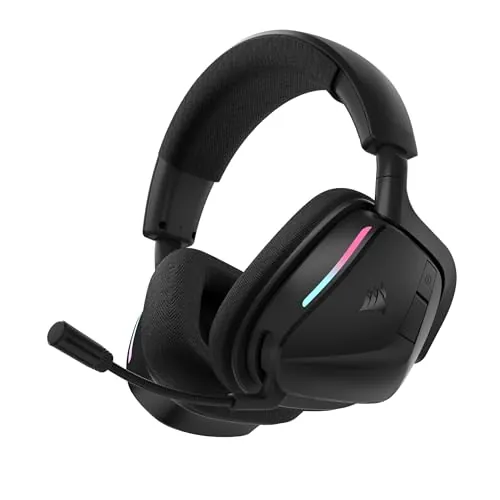
For Nintendo Switch, the Nova 5 has clearer USB-dongle guidance: SteelSeries lists the Nova 5 family for Switch and Switch 2, with a firmware/USB-audio caveat on Switch 2. CORSAIR's product page shows Switch compatibility, but its support chart does not list the VOID Wireless v2 for Switch. For PC or PlayStation, compare Bluetooth switching and mic controls: the Nova 5 changes between 2.4GHz and Bluetooth; the VOID v2 can take phone calls in RF mode but requires Bluetooth mode for Bluetooth media.
Read comparison