
Products compared
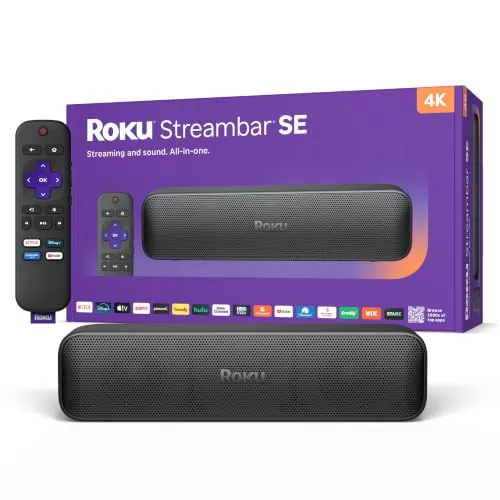
Roku
Roku Streambar SE
Roku's 2-in-1 soundbar and streaming player, model 9104R, with built-in 4K Roku streaming.
Model 9104R
Amazon ASIN B0CTBF4MKS
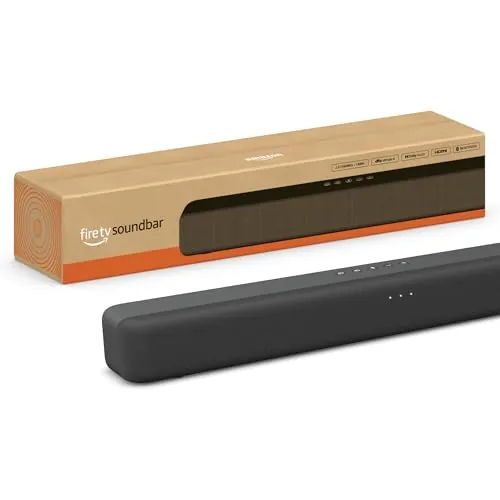
Amazon
Amazon Fire TV Soundbar
Standalone Amazon Fire TV Soundbar, model EVG487. Amazon describes this model as audio-only; a Fire TV streaming media player or smart TV is needed for the Fire TV experience.
Model EVG487
Amazon ASIN B0C4BZ28PG
Differences that matter
What matters most to you?
Choose a priority to see what it changes.
Sources for Streaming built into the bar or supplied separately
Sources for HDMI ARC/eARC setup and remote routine
Sources for Optical fallback and cable in the box
Sources for Other source or equipment you need
First choose where streaming comes from
Roku identifies Streambar SE 9104R as a 2-in-1 audio and Roku streaming device. Amazon describes Fire TV Soundbar EVG487 as a standalone audio-only bar and says a Fire TV streaming media player or smart TV is needed for the Fire TV experience.
This changes what you need to have already: Roku's streaming player is part of the bar, while the Amazon setup needs a Fire TV Stick/Cube or smart TV source. Amazon's setup guide shows separate steps for a Fire TV streamer and for a smart TV.
Match the soundbar to the TV port and remote routine
Both manufacturers document HDMI ARC/eARC as a soundbar connection to the TV. Roku's model-specific support guide recommends its ARC port and says CEC may need to be enabled for power and volume control. Amazon's EVG487 guide uses the TV's ARC/eARC port and says the TV remote can control volume and power over that route.
If a Fire TV Stick or Cube is in the setup, Amazon's diagram leaves it in a regular HDMI port and reserves the TV's ARC/eARC port for the soundbar. Before buying, check that the ARC/eARC port exists and is available; also check whether your TV's CEC behavior matches the remote routine you want.
Use optical only after checking cable contents
Both setup guides document an optical route for a TV with optical output. Amazon says its optical cable is sold separately and instructs users to select Optical input. Roku says to connect HDMI plus optical when the TV lacks ARC, but its official pages conflict: the product-details box list says the optical cable is optional, while the FAQ and setup guide describe it as included.
If optical is the only audio output on your TV, count the cable as a required part of the setup. Buy it separately for Amazon; check the exact Roku listing contents before checkout rather than assuming the cable is in the box.
Count the devices and accessories in the full setup
The Amazon EVG487 offer lists the soundbar, remote, HDMI and power cables, two AAA batteries, wall-mount kit and quick-start guide; it does not list a Fire TV Stick or Cube. Pair it with a Fire TV streamer you already own or a smart TV source, as Amazon documents.
Roku's model 9104R listing includes the streaming device itself, remote, batteries, power adapter and HDMI cable, with the optical cable's status inconsistent across Roku's official pages. If you're considering the Amazon Fire TV Soundbar, no standalone Fire TV Stick/Cube is assumed to be included.
Product details
Roku Streambar SE
- Streaming
- Built-in Roku streaming; Roku lists streaming up to 4K on compatible TVs Source
- TV audio inputs
- HDMI 2.0a ARC and optical S/PDIF Source
- Included setup hardware
- Remote with TV controls, two AAA batteries, power adapter, Premium High Speed HDMI cable; optical cable wording conflicts across Roku's official pages Source
Amazon Fire TV Soundbar
- Streaming/source role
- Audio-only soundbar; Amazon says a Fire TV streaming media player or smart TV is needed to access the Fire TV experience Source
- TV audio inputs
- HDMI ARC/eARC or optical; the optical cable is sold separately Source
- Included items in selected listing
- Soundbar, remote, HDMI cable, power cable, two AAA batteries, wall mounting kit, and quick start guide Source
Before you buy
Community discussions
Deciding whether one remote is enough
Roku Streambar SE
A Roku Streambar SE owner wanted to use the Roku remote for both TV power and volume and asked where to set that up.
What to check
List the TV functions you want on one remote. Check which functions the exact Streambar and your TV support together.
Leaving enough TV inputs for your other devices
Amazon Fire TV Soundbar
An EVG487 owner considered optical because they wanted to keep an HDMI port free.
What to check
Count your TV’s inputs, identify its audio output and check which cable the exact soundbar needs.
Common questions
Does the Amazon Fire TV Soundbar have Fire TV streaming built in?
No. The exact selected listing describes EVG487 as audio-only and says a Fire TV streaming media player or smart TV is needed for the Fire TV experience. Roku describes 9104R as a soundbar with Roku streaming built in.Amazon Fire TV Soundbar exact ASIN B0C4BZ28PG listingRoku Streambar SE product page and FAQ
Can I connect either bar to a TV without HDMI ARC/eARC?
Both manufacturers document optical audio as an alternative. Amazon says the optical cable is sold separately. Roku's product-details box list says optional, while other official Roku setup/product-page wording says included; verify the selected Roku offer if you need that cable.How to set up your Roku Streambar SERoku Streambar SE 9104R product detailsRoku Streambar SE product page and FAQHow to set up Fire TV Soundbar
Will the TV remote control either soundbar?
Roku lists TV controls on the Streambar SE remote and explains that HDMI-CEC settings enable TV power/volume behavior. Amazon says the TV remote can control volume and power when Fire TV Soundbar EVG487 uses the TV's ARC/eARC input. Confirm the TV supports and has the relevant setting enabled.How to set up your Roku Streambar SEHow to set up Fire TV Soundbar
Do I need a Fire TV Stick if I buy the Fire TV Soundbar?
A Fire TV Stick or Cube is one supported source path, but Amazon's exact listing also names a smart TV as the other option for the Fire TV experience. Decide which source you will use and check what is already in your setup before buying.Amazon Fire TV Soundbar exact ASIN B0C4BZ28PG listingHow to set up Fire TV Soundbar
Sources and scope
This is a U.S. setup and feature comparison of Roku Streambar SE model 9104R and Amazon Fire TV Soundbar model EVG487. It does not compare measured sound, dialogue clarity, bass, loudness, surround effects, reliability or fit. Roku’s official pages conflict about whether the optical cable is included or optional, so confirm the selected offer’s box contents if you need that cable. For Amazon, check the EVG487 listing and TV setup before purchase; no setup outcome is inferred from another TV.
Related comparisons

Roku Streambar SE 9104R vs Sony HT-S100F: TV Ports, Streaming and Remote Setup
This U.S. comparison covers the Roku Streambar SE model 9104R and Sony HT-S100F. Roku combines a soundbar with built-in 4K streaming and an included remote with TV power, volume and mute buttons; TV audio needs HDMI ARC or HDMI plus optical and Roku's SE setup requires PCM stereo from the TV. Sony is a soundbar for audio from an existing TV or source; its manual documents HDMI ARC or optical TV input, Dolby Digital or two-channel Linear PCM, plus Bluetooth and USB playback. Sony includes a remote and batteries, and the manual explains when the TV remote's IR signal may need to pass through the bar. Neither product is presented as the better-sounding option: the choice turns on source, ports, audio settings and controls.
Read comparison
Roku Streambar SE vs Bose TV Speaker: Streaming and TV Connection Fit
Roku Streambar SE combines a Roku streaming player with TV audio. Bose TV Speaker is documented as a TV-audio speaker with HDMI ARC or optical input and Bluetooth from a mobile device. Roku’s exact setup requires internet/account activation and PCM Stereo for TV audio; Bose Support identifies Dolby Digital and PCM 2.0 support for model 838309-1100. Check your television’s actual ports and source-output settings before choosing.
Read comparison