
Products compared

TP-Link
TP-Link Archer BE400 BE6500 Dual-Band Wi-Fi 7 Router
US-market Archer BE400 listing; the manufacturer's US support page identifies the supported US hardware line as Archer BE400 (US) V1.6. Confirm the hardware label on the received unit before applying firmware.
Model Archer BE400
Amazon ASIN B0DVBP5L6Y
ASUS
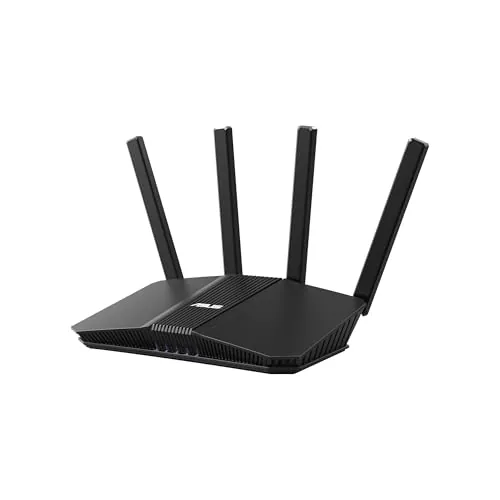
ASUS RT-BE58U BE3600 Dual-Band Wi-Fi 7 Router
US-market RT-BE58U listing. ASUS support separates RT-BE58U hardware revisions, so verify the label on the unit before downloading firmware or planning revision-specific setup.
Model RT-BE58U
Amazon ASIN B0DHWBS9G6
Differences that matter
What matters most to you?
Choose a priority to see what it changes.
Sources for Wired port roles
Sources for Wireless band fit
Sources for Backup internet choices
Sources for Hardware revision and firmware
A port-by-port check before you order
First mark the connection from your modem or ONT as WAN, then list each wired device and its required port speed. If your plan includes a 2.5G internet handoff and a NAS or switch that also needs a dedicated 2.5G LAN connection, TP-Link's published BE400 layout shows one dedicated socket for each role. The three remaining listed LAN ports are 1 Gbps.
On RT-BE58U, confirm the revision on the router or its box and find the matching ASUS port diagram. Plan the internet uplink first, then count the wired clients you can connect. Check phone and carrier support if you intend to use USB tethering.
Take a photo or sketch of your current router's WAN and LAN cables, note the link rate printed in its interface or device manual, and compare that list with the product port roles. If a required port is missing from either plan, investigate a compatible switch and its own speed limits before purchase.
Mesh is a system choice, not a shared feature name
The Archer BE400 is listed as EasyMesh-compatible, and TP-Link notes it is not compatible with Deco mesh systems. RT-BE58U is listed as an AiMesh primary router or node. These labels describe separate compatibility programs; the pages used here do not say that EasyMesh and AiMesh units can form one shared mesh. Check your existing model against the exact compatibility list before adding a node.
For RT-BE58U, the support page separates hardware revisions and says to match firmware to the label on the product or box. This guide cannot map the Amazon ASIN to a revision, so verify the received hardware before selecting firmware or relying on revision-specific mesh behavior.
Product details
TP-Link Archer BE400 BE6500 Dual-Band Wi-Fi 7 Router
- Wireless bands
- Dual-band Wi-Fi 7: 2.4 GHz and 5 GHz; no 6 GHz band is listed in the US specifications Source
- Ethernet ports
- 1 × dedicated 2.5 Gbps WAN; 1 × dedicated 2.5 Gbps LAN; 3 × 1 Gbps LAN Source
- Mesh
- EasyMesh-compatible; TP-Link says it is not compatible with Deco mesh systems Source
- USB
- 1 × USB 3.0; manufacturer lists FTP, media and Samba server functions Source
ASUS RT-BE58U BE3600 Dual-Band Wi-Fi 7 Router
- Wireless bands
- Dual-band Wi-Fi 7: 2.4 GHz and 5 GHz; no 6 GHz band is listed in the US specifications Source
- Ethernet ports
- ASUS’s U.S. spec sheet lists five Ethernet sockets, while its user guide shows four. Match the hardware label to the correct layout. Source
- WAN options
- ASUS lists Dual WAN and USB 4G/5G mobile tethering; WAN/LAN port roles are configurable Source
- Mesh
- AiMesh primary router or node; pair with a supported AiMesh-compatible ASUS router Source
Before you buy
Community discussions
Planning around an existing Deco setup
TP-Link Archer BE400 BE6500 Dual-Band Wi-Fi 7 Router
A two-story-home user describes buying an Archer BE400 after using Deco units and finding that the expected wireless extension did not work for their arrangement. They also disliked keeping both units' Wi-Fi active in a wired setup. This is one user's report, not general compatibility guidance.
What to check
If you plan to keep Deco, confirm the exact Deco and router models and their documented mesh or operating modes before buying. Decide whether your plan needs one or both systems to broadcast Wi-Fi.
Common questions
Does the Archer BE400 have two 2.5G Ethernet ports?
Yes. TP-Link's US specifications list one dedicated 2.5 Gbps WAN port and one separate dedicated 2.5 Gbps LAN port, plus three 1 Gbps LAN ports. That port layout is useful if you want a multi-gig internet connection and a wired multi-gig local device at once; it does not guarantee internet or device throughput.Archer BE400 | BE6500 Dual-Band Wi-Fi 7 Router
Can the ASUS RT-BE58U use a phone or cellular modem for backup internet?
ASUS lists USB 4G/5G mobile tethering and Dual WAN. Confirm that your exact phone or modem, carrier and intended WAN configuration are supported in current ASUS documentation before relying on it for failover.ASUS RT-BE58U WiFi 7 Router (US product page)ASUS RT-BE58U Tech Specs (US)
Can these routers join the same mesh system?
The manufacturer pages describe different systems: TP-Link EasyMesh and ASUS AiMesh. The cited documentation does not establish that these models join one another's mesh network. Check the exact existing router or node on the appropriate maker's compatibility list before buying.Archer BE400 | BE6500 Dual-Band Wi-Fi 7 RouterASUS RT-BE58U WiFi 7 Router (US product page)ASUS RT-BE58U Tech Specs (US)
Does the ASUS Amazon listing identify the hardware revision?
The listing data and Amazon ASIN identify the product as RT-BE58U, but the manufacturer's support page lists revision-specific files and instructs users to check the serial-number or box label. Verify the revision on the received unit before firmware updates; the exact revision for this ASIN is unresolved here.ASUS RT-BE58U BIOS and Firmware Support (US)
Sources and scope
This guide compares manufacturer-published port layouts and supported setup options. It does not report independent throughput, latency, wireless range or client-capacity testing. Published Wi-Fi rates are not real-world speed guarantees. The Amazon ASIN-to-hardware-revision mapping for RT-BE58U is not established by the public manufacturer pages; check the unit label and the exact support page before choosing firmware or a mesh configuration.
Related comparisons

Deco X55 3-Pack vs Archer BE400: Three-Node Mesh or Wi-Fi 7 Router?
The selected US offers are TP-Link Deco X55 3-pack ASIN B09PRB1MZM and one Archer BE400 ASIN B0DVBP5L6Y. X55 is a three-unit Wi-Fi 6 Deco mesh kit with three Gigabit ports on each node. BE400 is a single Wi-Fi 7 router; TP-Link’s US specifications list one 2.5Gbps WAN, one 2.5Gbps LAN and three 1Gbps LAN ports, with EasyMesh support. TP-Link says Deco Mesh and Archer EasyMesh cannot form one unified mesh. Before choosing, map the rooms, modem, Ethernet jacks and wired clients; for BE400, also confirm the exact hardware version and clarify an Amazon box-contents field that says Archer BE230 even though the listing model is BE400.
Read comparison
TP-Link Archer BE400 vs BE230: Match Wi-Fi Tier to Your Wired Setup
The assigned US listings are Archer BE400 ASIN B0DVBP5L6Y (one unit) and Archer BE230 ASIN B0DC99N2T8 (one unit). TP-Link's US pages show the same port count on both: one 2.5Gbps WAN, one 2.5Gbps LAN, and three 1Gbps LAN ports, plus USB 3.0. The main published distinction is wireless class: BE400 is BE6500 dual-band Wi-Fi 7 with six external antennas; BE230 is BE3600 dual-band Wi-Fi 7 with four. Before choosing, draw the modem-to-router connection and list each wired endpoint by link rate. The BE400 Amazon page's captured model fields identify BE400, but a separate box field names BE230; confirm the shipped item with the seller. Neither Amazon listing establishes the unit's hardware revision.
Read comparison