
Products compared
TP-Link
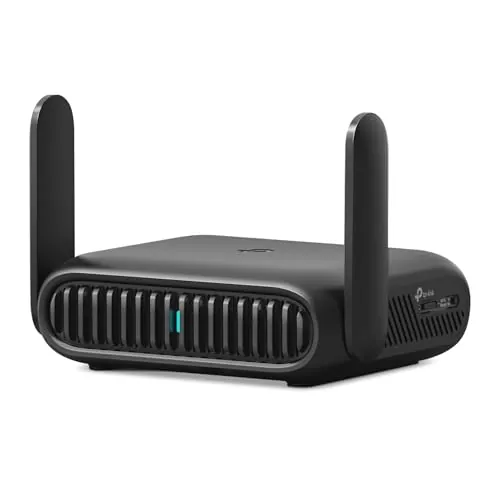
TP-Link Roam 7 BE3600 Travel Router
U.S. black dual-band Wi-Fi 7 travel router; exact TL-WR3602BE model
Model TL-WR3602BE
Amazon ASIN B0FHZGXZH7
TP-Link
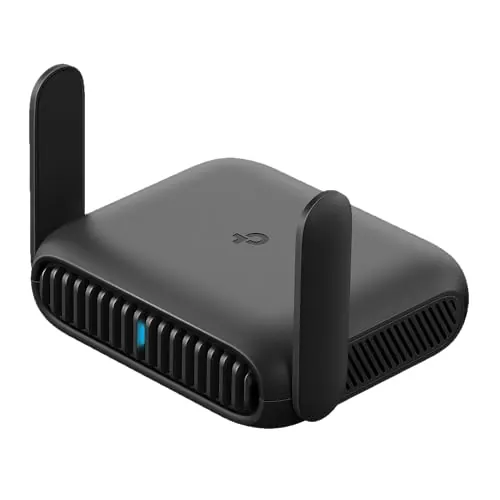
TP-Link Roam 6 AX1500 Travel Router
U.S. black dual-band Wi-Fi 6 travel router; exact TL-WR1512X model, not TL-WR1502X or TL-WR3002X
Model TL-WR1512X
Amazon ASIN B0GLP6QL6R
Differences that matter
What matters most to you?
Choose a priority to see what it changes.
Choose the travel connection before the Wi-Fi generation
Start with the network source you expect to use: an Ethernet handoff, a venue's permitted Wi-Fi, phone USB tethering, or a compatible USB mobile modem. TP-Link lists Router, Hotspot, USB Tethering, USB Modem, Access Point, Range Extender and Client modes for both Roam 7 TL-WR3602BE and Roam 6 AX1500 TL-WR1512X. The devices' mode lists overlap, but a phone or modem still needs to be compatible and the venue's access conditions still apply.
Then check your client devices. Roam 7 is dual-band Wi-Fi 7 and its page lists Multi-Link Operation; TP-Link says clients need to support the corresponding Wi-Fi 7 feature. Roam 6 is dual-band Wi-Fi 6. Both are 2.4/5 GHz products, so this pair is not a way to add 6 GHz. The advertised Wi-Fi link-rate labels do not predict a result in a particular room or on a particular upstream service.
Map each Ethernet port to the cable you will connect
If the travel setup uses wired venue Internet, Roam 7 gives you a 2.5 Gbps port configured as WAN by default and a separate Gigabit LAN port. TP-Link's exact setup guide says the 2.5 Gbps port can be changed to LAN when needed. Roam 6 TL-WR1512X is documented with one Gigabit WAN and one Gigabit LAN port; its guide shows the 1G WAN in Router mode and a WAN-or-LAN connection in Access Point mode.
This only matters if the upstream service and equipment can provide more than Gigabit and the actual mode uses that port. A 2.5 Gbps WAN does not create faster hotel Internet by itself: compatible upstream service/equipment and cabling are required, and Roam 7's second LAN port remains Gigabit. If your usual source and wired client are Gigabit, map the physical plugs and mode instead of choosing from the 2.5G label alone.
Treat drive sharing and power as separate checks
Roam 7's model guide identifies USB 3.0 for a storage drive, USB modem or tethered device and identifies the separate USB-C port as power. On the Roam 6 AX1500, TP-Link's U.S. product specification lists USB 2.0, but the official TL-WR1512X installation guide and datasheet say USB 3.0. If your drive workflow depends on the interface generation, confirm the exact hardware revision or the current unit before ordering rather than treating one of these pages as a guaranteed port class.
For power, Roam 7's exact installation guide recommends the included adapter or a certified 5V/3A source and says the router has no built-in battery. Roam 6's exact installation guide also says to use the included USB-C adapter or a compliant 5V/3A adapter, but its product page separately lists 9V/12V PD/QC bank guidance and 12V/1.5A in the detailed power table. Use the included adapter or check the device label for the hardware revision before relying on a substitute power bank.
Product details
TP-Link Roam 7 BE3600 Travel Router
The exact U.S. product page identifies TL-WR3602BE / Roam 7 BE3600 and Wi-Fi 7. Its product-and-installation guide makes the port roles, power connector and recommended input clearer: 2.5 Gbps WAN by default (reconfigurable as LAN), 1 Gbps LAN, USB 3.0 data, and Type-C power.
- Wireless standard
- Dual-band Wi-Fi 7 (2.4 and 5 GHz); TP-Link lists MLO and says the corresponding client must support the feature Source
- Wired uplink and LAN
- 2.5 Gbps WAN by default, configurable as LAN; separate 1 Gbps LAN port Source
- USB and power ports
- USB 3.0 data port for drive sharing, USB tethering or a compatible USB modem; separate USB-C power port Source
- Power
- Product guide recommends the included adapter or a certified 5V/3A adapter; no built-in battery Source
TP-Link Roam 6 AX1500 Travel Router
The exact U.S. model is TL-WR1512X, Roam 6 AX1500. TP-Link documents the same seven travel modes as Roam 7 and one Gigabit WAN plus one Gigabit LAN. Its own U.S. product page and official model guide disagree about the USB data-port generation and USB-C input figures; those are flagged for verification rather than used as a confident advantage.
- Wireless standard
- Dual-band Wi-Fi 6, with published 1201 Mbps (5 GHz) and 300 Mbps (2.4 GHz) link rates; these are not measured throughput Source
- Wired uplink and LAN
- One Gigabit WAN and one Gigabit LAN port; TP-Link's installation guide describes the WAN port as a 1G input in router mode Source
- USB and power ports
- A separate USB data port supports drive sharing, phone tethering or a compatible USB modem. U.S. TP-Link sources conflict on whether it is USB 2.0 or USB 3.0; Type-C is identified as a power input. Source
- Power
- TP-Link's exact model installation guide recommends the included USB-C adapter or 5V/3A; the product page also gives conflicting power-bank/adapter voltage details, so verify the current unit before substituting a bank Source
Before you buy
Community discussions
Packing the router and power accessories together
TP-Link Roam 7 BE3600 Travel Router
A TL-WR3602BE owner wanted a pouch to carry the Roam 7 and its accessories on trips.
What to check
Compare the room you need for the router, your power source and the cables you will carry. Check which items are included in the exact kit.
Common questions
Do Roam 7 and Roam 6 AX1500 support different travel modes?
TP-Link lists the same seven modes for both: Router, Hotspot, USB Tethering, USB Modem, Access Point, Range Extender and Client. The setup still depends on the upstream connection and a compatible phone or modem; the mode list alone does not guarantee service access.TL-WR3602BE | TP-Link Roam 7 (BE3600) — U.S. product pageTL-WR1512X | Roam 6 AX1500 Wi-Fi 6 Travel Router — U.S. product pageTL-WR3602BE Product and Installation GuideTL-WR1512X Product and Installation Guide
Can Roam 7 provide 2.5 Gbps internet in every hotel?
No. It has a 2.5 Gbps WAN port by default, but TP-Link says actual network speed can be limited by the service plan, upstream equipment, cable, router port and other conditions. The port is configurable as LAN, and its separate LAN port is Gigabit.TL-WR3602BE Product and Installation GuideTL-WR3602BE | TP-Link Roam 7 (BE3600) — U.S. product page
Is the Roam 6 AX1500 USB drive port definitely USB 2.0?
TP-Link's exact U.S. product page lists a USB 2.0 port in its hardware specifications, while its TL-WR1512X Product and Installation Guide and datasheet describe USB 3.0. Those official sources conflict. Confirm the hardware version or current unit specification before relying on a USB generation for a drive workflow.TL-WR1512X | Roam 6 AX1500 Wi-Fi 6 Travel Router — U.S. product pageTL-WR1512X Product and Installation GuideTL-WR1512X Datasheet
Can I power the Roam 6 from any USB-C power bank?
Do not assume so. TP-Link's U.S. product page includes conflicting 5V PD-compatible and 9V/12V PD/QC guidance, and its detailed hardware table lists a 12V/1.5A adapter. Its model guide says use the included USB-C adapter or a 5V/3A adapter. Use the included adapter or verify the power label for the exact revision before substituting a bank.TL-WR1512X | Roam 6 AX1500 Wi-Fi 6 Travel Router — U.S. product pageTL-WR1512X Product and Installation GuideTL-WR1512X Datasheet
Sources and scope
This is a specification and setup-fit comparison, not a speed, range, latency, stability or security test. TP-Link's U.S. materials disagree on the Roam 6's USB data-port generation and USB-C input/power-bank voltage. The article does not resolve those conflicts by inference; verify the current hardware revision or device label if USB transfer class or power-bank compatibility is decisive. Both models are dual-band, not 6 GHz routers.
Related comparisons
TP-Link Roam 7 vs GL.iNet Opal: Ports, Travel Modes and Packing Fit
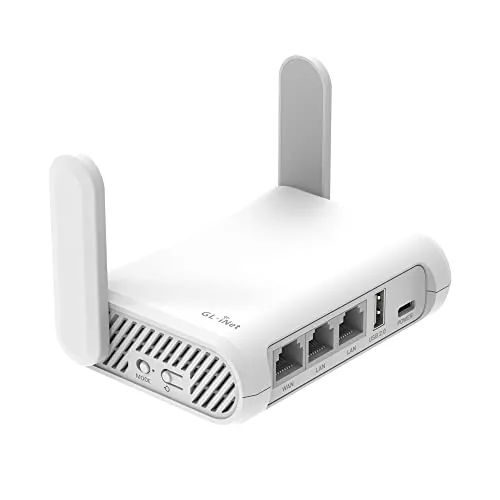
The Roam 7 has one 2.5 Gbps WAN port and one 1 Gbps LAN port; the Opal has one 1 Gbps WAN and two 1 Gbps LAN ports. Both offer travel-friendly ways to use an authorized Ethernet, Wi-Fi or phone-tethered uplink, with different mode labels and setup flows. The Roam 7’s multi-gig WAN matters only when the upstream service and equipment support it; a device on its 1 Gbps LAN does not get a 2.5 Gbps link. Measure the router body and leave room for cables, power and any antennas before packing.
Read comparisonTP-Link Roam 6 vs GL.iNet Opal: Travel Router Ports, USB and Power
The TP-Link Roam 6 TL-WR1512X documents a Tether captive-portal flow and several travel modes; GL.iNet Opal GL-SFT1200 documents repeater, Ethernet and USB-tethering paths and lists two LAN ports. Compare the exact uplink and cable plan. TP-Link's own product page and guide conflict on USB and power details, so verify its current adapter requirements before packing a substitute.
Read comparison