
Products compared
ASUS
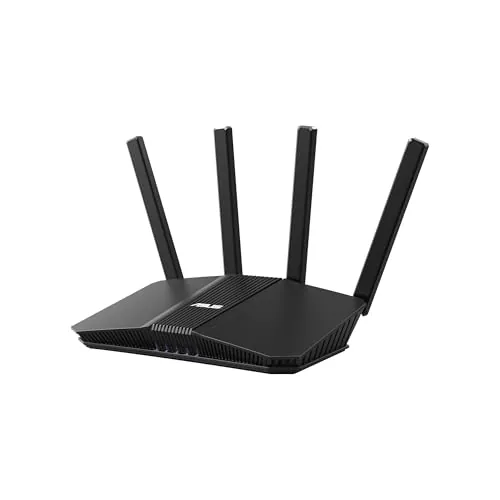
ASUS RT-BE58U Dual-Band Wi-Fi 7 Router
The assigned U.S. listing data ASIN maps to ASUS RT-BE58U, black. ASUS's U.S. product and technical-spec pages identify the same model and list Wi-Fi 7 on 2.4/5 GHz, MLO, two role-configurable WAN/LAN ports and three fixed 1G LAN ports.
Model RT-BE58U
Amazon ASIN B0DHWBS9G6
TP-Link
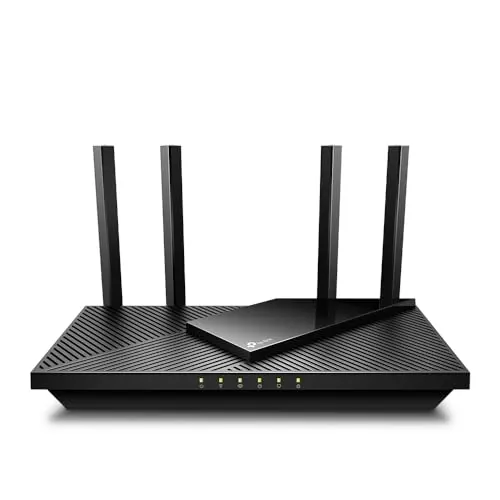
TP-Link Archer AX21 V5 AX1800 Dual-Band Wi-Fi 6 Router
The assigned U.S. listing data ASIN is identified as Archer AX21 V5. TP-Link's U.S. product page provides a V5 selector; its V5.6 datasheet and support page cover the V5 hardware family. The hardware-version label on the delivered unit should be checked against current regional support materials.
Model Archer AX21 V5
Amazon ASIN B08H8ZLKKK
Differences that matter
What matters most to you?
Choose a priority to see what it changes.
Sources for Wireless generation, bands and MLO client fit
Sources for WAN/LAN allocation and remaining wired ports
Sources for Hardware version and physical setup space
Start with the clients and bands in the house
ASUS lists the RT-BE58U as dual-band Wi-Fi 7 operating on 2.4 and 5 GHz, with MLO described across those bands. TP-Link's exact Archer AX21 V5 is dual-band Wi-Fi 6 on 2.4 and 5 GHz. Neither exact model's reviewed band list includes 6 GHz.
MLO is a client-and-router feature, not a label that every connected device can use. TP-Link says both devices need Wi-Fi 7; a Wi-Fi 6 or older client can connect but will not use MLO. If the household doesn't have Wi-Fi 7 clients, choose based on the wired layout and mesh fit instead of assuming the ASUS feature changes those devices' connection.
Draw the WAN and LAN map before setting up
The ASUS has two role-configurable jacks: one 2.5G WAN/LAN and one 1G WAN/LAN, plus three fixed 1G LAN ports. In a typical router layout, one configurable jack connects to the modem or gateway as WAN; the other can be assigned as LAN beside the three fixed LAN ports. If a multi-gig wired device is part of the plan, the 2.5G jack's role matters, but the published port rating does not promise an actual internet or local transfer rate.
Archer AX21 V5 lists a dedicated Gigabit WAN and four dedicated Gigabit LAN ports. That is a clear fit when the planned wired devices need Gigabit LAN and four jacks are enough. List the modem/gateway, switch, desktop, TV and other wired endpoints before choosing; then confirm your ISP equipment and cable path.
Pre-buy check: mesh family, version label and shelf space
The expansion ecosystems differ. ASUS lists RT-BE58U as an AiMesh primary router or node. TP-Link's AX21 V5 page describes EasyMesh and also lists OneMesh in its specifications. Before buying an extender or node, check the exact model and firmware against the relevant manufacturer's support list; don't assume the brands' systems mix.
For the TP-Link, match the delivered unit's hardware-version label to its regional support page. The U.S. support page identifies V5.60 and says V5.0 maps to V5.6/V5.8 documents, while warning version availability varies by region. Finally, measure shelf clearance and cable reach by the modem or gateway. Published dimensions help with physical planning but do not predict coverage in your home.
Product details
ASUS RT-BE58U Dual-Band Wi-Fi 7 Router
A fit to consider if the home has Wi-Fi 7 clients for MLO, needs the listed 2.5G WAN/LAN role, or already uses compatible AiMesh equipment.
- Wireless generation and bands
- ASUS lists Wi-Fi 7 (802.11be) and operating frequencies of 2.4 GHz and 5 GHz. It describes MLO across those bands and notes supported modes/bands may vary by client. No 6 GHz band is listed. Source
- Ethernet roles
- ASUS lists one 2.5G WAN/LAN port, one 1G WAN/LAN port and three fixed 1G LAN ports. If one role-configurable port is used as WAN, the remaining wired LAN layout includes four ports: the other configurable port plus the three fixed LAN ports. Source
- Mesh ecosystem and size
- ASUS lists RT-BE58U as an AiMesh primary router or node. Published dimensions are 238 × 147 × 193 mm; check orientation and clearance for the real location. Source
TP-Link Archer AX21 V5 AX1800 Dual-Band Wi-Fi 6 Router
A fit to consider if Wi-Fi 6 meets the household's client requirements and four fixed Gigabit LAN jacks match the wired-device plan.
- Wireless generation and bands
- TP-Link's U.S. Archer AX21 V5 page identifies a dual-band Wi-Fi 6 router; its V5.6 U.S. datasheet lists 2.4 GHz and 5 GHz. Neither band list includes 6 GHz. Source
- Fixed Ethernet port layout
- TP-Link lists one Gigabit WAN port and four Gigabit LAN ports. The WAN is a fixed dedicated port, with four wired LAN ports remaining in a typical router setup. Source
- Mesh documentation and dimensions
- The U.S. V5 product page describes EasyMesh support and also lists OneMesh support in its specifications; confirm compatibility with the exact expansion device and firmware. Published dimensions are 261.1 × 134.5 × 41 mm. Source
Before you buy
Community discussions
Checking download and upload separately on Windows
TP-Link Archer AX21 V5 AX1800 Dual-Band Wi-Fi 6 Router
One user reported very slow Windows downloads with an Archer AX21 US V5.46 on firmware 1.1.2 while uploads remained much faster. They saw it on Wi-Fi and wired Ethernet. The report covers that setup and hardware subrevision.
What to check
Keep the intended PC and cable in the test when comparing the two Ethernet layouts. Check both directions of a wired transfer and record the exact hardware revision.
Common questions
Does the ASUS RT-BE58U have a 6 GHz band?
ASUS lists the RT-BE58U's operating frequencies as 2.4 GHz and 5 GHz. Its MLO description is across those two bands; the cited specification page does not list a 6 GHz band for this model.RT-BE58U WiFi 7 Router — ASUS U.S.RT-BE58U Technical Specifications — ASUS U.S.
Will the RT-BE58U's MLO work with Wi-Fi 6 phones or laptops?
TP-Link's MLO explainer says both router and client need Wi-Fi 7 for MLO; older clients can connect but do not use MLO. ASUS also says supported modes and bands vary by client. Check the exact client's specifications if MLO is a purchase requirement.RT-BE58U WiFi 7 Router — ASUS U.S.Wi-Fi 7 MLO: What Both Router and Client Devices Need — TP-Link U.S.
How many wired LAN ports remain after connecting a modem?
The ASUS lists three fixed 1G LAN ports plus two WAN/LAN ports, one 2.5G and one 1G. Configure one WAN/LAN port for the modem; the other may be assigned as LAN, so four LAN jacks remain. The AX21 V5 lists one fixed Gigabit WAN and four Gigabit LAN ports, leaving four LAN ports in a typical router setup.RT-BE58U Technical Specifications — ASUS U.S.Archer AX21 V5 AX1800 Dual-Band Wi-Fi 6 Router — TP-Link U.S.
Can I add the same mesh units to either router?
ASUS identifies RT-BE58U as AiMesh-capable. TP-Link lists EasyMesh and OneMesh support for AX21 V5. Those are model-specific ecosystem labels; verify the exact add-on model and hardware/firmware support rather than assuming cross-brand compatibility.RT-BE58U Technical Specifications — ASUS U.S.Archer AX21 V5 AX1800 Dual-Band Wi-Fi 6 Router — TP-Link U.S.Archer AX21 Support and Hardware-Version Documentation — TP-Link U.S.
Sources and scope
This guide compares manufacturer-published standards, band, port roles, mesh ecosystem and dimensions. It makes no real-world speed, range, reliability, security or vulnerability claim. ASUS describes MLO for the RT-BE58U across 2.4 and 5 GHz and cautions supported modes/bands vary by client; TP-Link says MLO requires Wi-Fi 7 on both router and client. The AX21 manufacturer U.S. selector identifies V5 and its support page maps V5.0 to V5.6/V5.8 documentation, but a buyer's individual hardware sticker and regional suffix should be checked against the current support page. TP-Link's AX21 page discusses EasyMesh and also lists OneMesh support; verify exact extender model and firmware before buying an add-on.
- RT-BE58U WiFi 7 Router — ASUS U.S.
- RT-BE58U Technical Specifications — ASUS U.S.
- Archer AX21 V5 AX1800 Dual-Band Wi-Fi 6 Router — TP-Link U.S.
- Archer AX21 Support and Hardware-Version Documentation — TP-Link U.S.
- Archer AX21 (U.S.) V5.6 Datasheet — TP-Link
- Wi-Fi 7 MLO: What Both Router and Client Devices Need — TP-Link U.S.
Related comparisons

TP-Link Archer BE400 vs ASUS RT-BE58U: Check the Wired Ports Before You Choose
Archer BE400 lists separate 2.5G WAN and 2.5G LAN ports, plus three 1G LAN ports. For RT-BE58U, ASUS’s U.S. specs and user guide show different wired layouts. Check the hardware label before planning around dual WAN, while BE400’s dedicated ports can simplify wiring.
Read comparison
ASUS RT-BE58U vs TP-Link Archer BE230: Plan Your 2.5G Ports and Mesh
Both are dual-band BE3600 Wi-Fi 7 routers, but the practical wired decision is whether you need a dedicated 2.5G internet input and a separate 2.5G wired device port at the same time. TP-Link documents both ports separately on Archer BE230. ASUS publishes distinct RT-BE58U A1 and V2 hardware documentation, so check the unit label before applying a port diagram or buying a mesh node.
Read comparison