
Products compared
ASUS
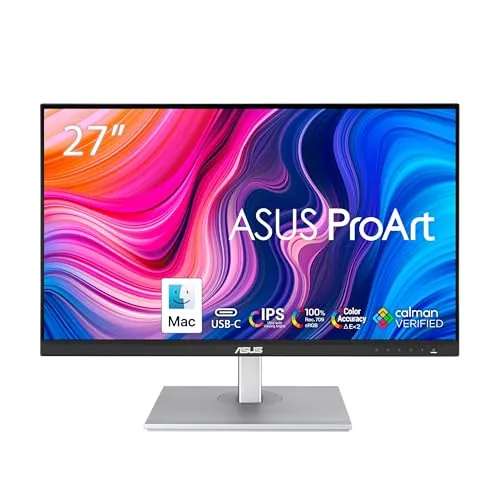
ASUS ProArt Display PA278CV
Exact assigned U.S. listed model PA278CV, a 27-inch QHD productivity and creative-work monitor. Confirm PA278CV on the retailer's listing; similarly named ProArt displays are not interchangeable.
Model PA278CV
Amazon ASIN B08LCPY1TR
ASUS
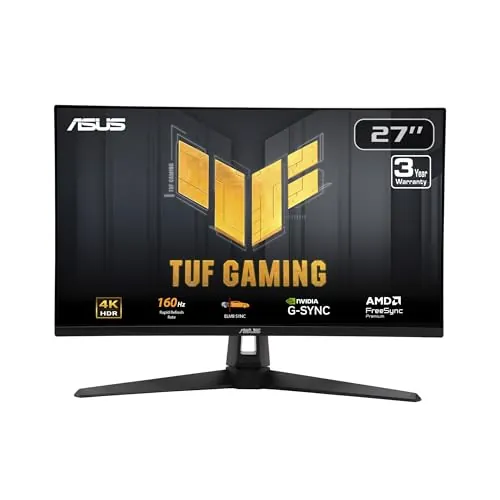
ASUS TUF Gaming VG27UQ1A
Exact assigned U.S. listed model VG27UQ1A, a 27-inch 4K monitor with HDMI 2.1 and DisplayPort 1.4 inputs. Its USB-C port is marked service-only in the manual; do not treat it as laptop display, data-hub or charging input.
Model VG27UQ1A
Amazon ASIN B0DHG1GTG2
Differences that matter
What matters most to you?
Choose a priority to see what it changes.
Sources for Resolution and documented target modes
Sources for Laptop cabling, power and peripheral path
Sources for Included stand and screen positioning
Start with the port and timing your source can deliver
These are not two sizes of the same refresh target. PA278CV is QHD and listed at up to 75Hz; its manual's supported timing table includes 2560 × 1440 at 74.924Hz. VG27UQ1A is 4K: ASUS describes 4K/160Hz PC operation with a suitable graphics card and 4K/120Hz console visuals over HDMI 2.1. The mode you can actually select still depends on the computer or console, cable, port and settings. Check those as a chain before paying for a higher ceiling.
For console use, start from the VG27UQ1A's HDMI 2.1 ports and ASUS's stated 4K/120Hz path, then check that the exact console and game support the desired output. For a PC targeting 4K/160Hz, verify the graphics card and DisplayPort 1.4 DSC route. Choose PA278CV when QHD/75Hz covers the work and higher-resolution or refresh targets are not part of the setup.
Check whether a laptop can use the PA278CV's one-cable desk
PA278CV's USB-C upstream combines DisplayPort video, USB data and up to 65W power delivery; it also connects the monitor's USB-A downstream ports. The key check is the laptop: it needs USB-C DisplayPort Alt Mode, and 65W must be enough for its charging needs. If either condition fails, plan a separate display or power cable instead of assuming any USB-C socket behaves the same.
VG27UQ1A takes video through HDMI or DisplayPort. Its manual labels USB-C service-only and lists no USB 3.2 Gen 1 ports, so it is not the same hub-and-laptop-charging setup. If choosing it for a gaming PC while also docking a laptop, allow for a separate hub and charger.
Decide whether a separate monitor arm belongs in the budget
The included PA278CV stand raises by up to 150mm, swivels ±45°, pivots ±90° and tilts. That makes the stock stand a fit to consider when screen height or portrait mode is part of the desk plan. VG27UQ1A's supplied stand only tilts from −5° to +20°; it does not raise, swivel or pivot. Its manual lists a 100 × 100mm VESA mounting pattern, so a compatible arm is a separate setup decision.
A useful pre-buy check is to mark the screen's desired top edge and portrait position, then compare the supplied stand range. If the VG27UQ1A's mode fit matters more, verify the VESA plate, monitor load rating and arm reach before ordering. No stand range by itself establishes personal comfort.
Product details
ASUS ProArt Display PA278CV
- Panel and listed refresh
- 27-inch QHD 2560 × 1440; ASUS lists 75Hz maximum. The manual timing table includes QHD at 74.924Hz. Source
- Laptop connection
- USB-C upstream carries DisplayPort video, USB data and up to 65W power; a USB-C-to-A connection enables downstream USB only, not display video or laptop power delivery. Source
- Supplied stand
- Up to 150mm height, ±45° swivel, ±90° pivot and tilt from −5° to +35°. Source
ASUS TUF Gaming VG27UQ1A
- Panel and listed refresh
- 27-inch 4K 3840 × 2160; ASUS lists up to 160Hz for PC use with a suitable graphics card and up to 4K/120Hz via HDMI 2.1 for console use. Source
- Inputs
- 2 × HDMI 2.1 and 1 × DisplayPort 1.4; the USB-C port is for service only, and the manual lists no USB 3.2 Gen 1 ports. Source
- Supplied stand and mount
- Tilt −5° to +20°; no height, swivel or pivot adjustment. 100 × 100mm VESA pattern for a separately planned compatible mount. Source
Before you buy
Community discussions
Trying two displays from one laptop port
ASUS ProArt Display PA278CV
A PA278CV owner connected a laptop to the first monitor by USB-C. They said the second PA278CV was not detected when connected by DisplayPort from the first.
What to check
Map the video connection for each screen before choosing. Verify the host and display settings if you need to extend a desktop from one cable.
Common questions
Can the PA278CV charge and display a laptop over one USB-C cable?
The PA278CV manual says its USB-C upstream can carry DisplayPort video and USB data and provide up to 65W. The laptop must support USB-C DisplayPort Alt Mode, and its power requirement must fit within that ceiling. A USB-C-to-A connection supports the USB downstream ports only.ASUS PA278CV Series LCD Monitor User Guide
Does VG27UQ1A support 4K at 120Hz from a console?
ASUS describes up to 4K/120Hz visuals over HDMI 2.1 for this model. Confirm the console's output mode, HDMI cable, selected input and settings; the monitor does not make every game or source output 120Hz.ASUS TUF Gaming VG27UQ1A — U.S. product pageASUS TUF Gaming VG27UQ1A Series User Guide
Can I raise the VG27UQ1A on its supplied stand?
Its manual lists tilt from −5° to +20° and no height, swivel or pivot adjustment. It lists a 100 × 100mm VESA pattern for a separately purchased mount; check mount capacity and desk clearance.ASUS TUF Gaming VG27UQ1A Series User Guide
Is PA278CV's QHD maximum the same as VG27UQ1A's high-refresh modes?
No. PA278CV is a QHD/75Hz model. VG27UQ1A is a 4K model with ASUS-listed PC and console modes that depend on the source and input. These are supported specifications, not evidence of comparative image quality or game performance.ASUS ProArt Display PA278CV — U.S. product pageASUS PA278CV Series LCD Monitor User GuideASUS TUF Gaming VG27UQ1A — U.S. product page
Sources and scope
This is a specification-based setup comparison, not a matched image-quality, color, game-frame-rate, motion or latency test. A listed maximum does not ensure a source, port, cable and setting can produce it. ASUS describes the VG27UQ1A's 4K/160Hz PC path with suitable graphics cards and its 4K/120Hz console path via HDMI 2.1; confirm the exact device and cable. PA278CV USB-C provides up to 65W, which may not meet every laptop's power requirement.
Related comparisons

ASUS ProArt PA278CV vs PA279CRV: QHD or 4K for Your Desk?
Both are 27-inch ProArt IPS monitors with factory calibration claims, USB-C video, and daisy-chain connections. The PA278CV is 2560×1440 at 109 PPI, rated up to 75Hz, and lists 100% sRGB/100% Rec.709 with 65W USB-C power. The PA279CRV is 3840×2160 at 163 PPI, 60Hz, and lists 99% Adobe RGB and 99% DCI-P3 with 96W USB-C power. Choose by your deliverable color space, laptop charging needs, and host support for multi-display output.
Read comparison
ASUS ProArt PA278CV vs PA278QV: USB-C or Legacy Monitor Ports?
The PA278CV and PA278QV are both 27-inch QHD ProArt monitors with ASUS-listed 75Hz refresh, 100% sRGB/Rec.709 coverage and adjustable stands. The practical difference is the connection path: PA278CV combines USB-C video (when the host supports DisplayPort Alt Mode), USB data and up to 65W power, plus a DisplayPort output. PA278QV has DVI-D and Mini DisplayPort inputs but no digital output. Check your laptop port, charger requirement and multi-monitor plan before choosing.
Read comparison