
Products compared
ASUS
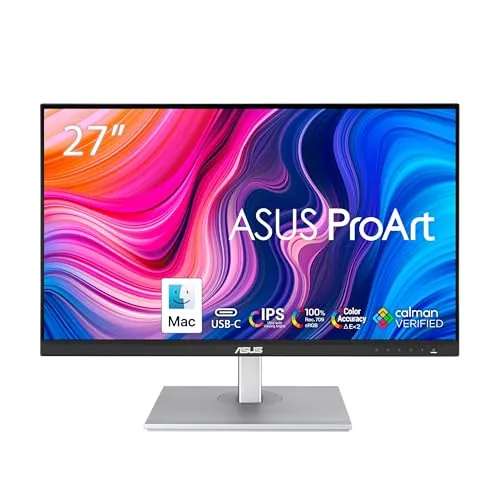
ASUS ProArt Display PA278CV 27-inch QHD Monitor
Exact assigned US listed model; 27-inch QHD IPS monitor.
Model PA278CV
Amazon ASIN B08LCPY1TR

ASUS
ASUS ProArt Display PA278QV 27-inch QHD Monitor
Exact assigned US listed model; 27-inch QHD IPS monitor.
Model PA278QV
Amazon ASIN B088BC5HMM
Differences that matter
What matters most to you?
Choose a priority to see what it changes.
Sources for Laptop connection and charging
Sources for Monitor-to-monitor DisplayPort path
Sources for Shared screen and stand baseline
Start with the computer you will connect
For a laptop, check the model-specific USB-C port specification, not just the connector shape. PA278CV video over USB-C requires host DisplayPort Alt Mode. Its port combines video, USB data and up to 65W power delivery, while the monitor still plugs into AC. A USB-C-to-A connection activates the monitor's USB-A hub only; it does not provide the USB-C video path.
For an older desktop or dock, compare the actual video output against PA278QV's inputs: DVI-D, Mini DisplayPort, HDMI or DisplayPort. If you also want its USB hub, plan a separate USB-B upstream link. Confirm any adapter and cable against the host and monitor manuals before ordering.
A DisplayPort input is not a DisplayPort output
PA278QV accepts DisplayPort, but its manual lists Digital Output: No. PA278CV has a separate DP output and is the only one of these two documented to pass a signal onward. ASUS's manual describes up to four monitors only for its stated QHD-at-30Hz/no-USB-C configuration, with OSD DP Stream at 1.2 and Auto Source Detection off; DP 1.1 clones the connected displays.
Do not treat that chain description as a promise for every laptop or graphics card. ASUS says the source needs a DisplayPort 1.2 output. Check the exact host's maximum supported display count and the resolution/refresh combinations before choosing a topology. If the host drives each display from its own output, PA278QV can still be a normal endpoint; it simply cannot forward the signal to a following monitor.
What is shared, and what is not a measured result
Both are 27-inch QHD IPS models, listed at up to 75Hz, with ASUS-listed 100% sRGB and 100% Rec.709 coverage. The manufacturer also lists factory calibration and Calman verification for both. Those statements describe ASUS's specifications and claims; they do not establish equal sample-to-sample uniformity or a measured image-quality tie.
Their stands are both listed as adjustable, and both manuals list 150mm height adjustment. That makes port fit the sharper distinction for this pair. If vertical clearance, the exact swivel range, a specific VESA arm, color consistency or another real-world result determines your choice, check the exact manuals/host setup or seek comparable independent testing; this guide does not claim to have tested either monitor.
Product details
ASUS ProArt Display PA278CV 27-inch QHD Monitor
- Display
- 27-inch IPS, 2560 × 1440 QHD; ASUS lists up to 75Hz. Source
- USB-C host connection
- USB-C upstream supports data, DisplayPort source input and up to 65W power delivery. USB-C video requires host DisplayPort Alt Mode; the monitor still uses AC power. Source
- DisplayPort topology
- One DisplayPort input and a separate DisplayPort daisy-chain output. ASUS documents chain conditions including 2560 × 1440 at 30Hz with no USB-C device connected, DP Stream set to 1.2 and Auto Source Detection off. Source
- Stand adjustment
- ASUS lists tilt, swivel, pivot and 150mm height adjustment. Source
ASUS ProArt Display PA278QV 27-inch QHD Monitor
- Display
- 27-inch IPS, 2560 × 1440 QHD; ASUS lists up to 75Hz. Source
- Video inputs
- DisplayPort, Mini DisplayPort, HDMI and DVI-D inputs. The manual lists Digital Output: No. Source
- USB hub connection
- A separate USB Type-B upstream cable enables the monitor's USB ports; it is distinct from the video cable. Source
- Stand adjustment
- The manual lists tilt, swivel, pivot and 150mm height adjustment. Source
Before you buy
Community discussions
Two PA278CV monitors mirror in one Windows daisy-chain setup
ASUS ProArt Display PA278CV 27-inch QHD Monitor
A user connected a desktop GPU to one PA278CV over DisplayPort, then chained a second PA278CV from its DisplayPort output. Windows showed the second display as a mirror rather than an extended desktop. The reported chain used a 15 m cable from the GPU; the post does not identify the cause.
What to check
Before planning this topology, confirm MST support and the PA278CV OSD settings for the exact GPU and Windows setup, then test Extend mode with the intended cables. Do not assume the reported long cable caused the mirroring.
Trying two displays from one laptop port
ASUS ProArt Display PA278CV 27-inch QHD Monitor
A PA278CV owner connected a laptop to the first monitor by USB-C. They said the second PA278CV was not detected when connected by DisplayPort from the first.
What to check
Check whether the laptop output and both monitors support the daisy-chain setup you want. Test that the computer sees two displays before ordering a second screen.
Switching between HDMI and DisplayPort at a desk
ASUS ProArt Display PA278QV 27-inch QHD Monitor
A PA278QV owner using HDMI and DisplayPort for different devices asked whether the monitor’s shortcut buttons could switch directly between the inputs.
What to check
Try the input menu with both of your sources connected. If you switch often, check how many button presses it takes.
Common questions
Can any laptop use the PA278CV's USB-C video connection?
No. ASUS says video over USB-C requires the source to support DisplayPort Alt Mode. The monitor provides up to 65W power delivery, so check whether that meets your laptop's charging requirement. The PA278CV also needs AC power.ASUS PA278CV Series LCD Monitor User Guide (English)
Does PA278QV's DisplayPort connector support daisy-chaining another monitor?
The PA278QV manual lists DisplayPort as a digital input and says Digital Output: No. It can receive a DisplayPort signal but cannot forward it to the next screen. ASUS documents a separate DisplayPort output on the PA278CV, subject to the manual's setup conditions.ASUS PA278QV / PA278QEV Series LCD Monitor User Guide (English)ASUS PA278CV Series LCD Monitor User Guide (English)
Are PA278CV and PA278QV different screen-resolution classes?
Both are 27-inch, 2560 × 1440 QHD IPS monitors and ASUS lists up to 75Hz for each. This comparison is mainly about connection and host workflow, not a resolution-generation upgrade. No side-by-side image-quality test is claimed here.ProArt Display PA278CV — ASUS USAProArt Display PA278QV — ASUS USA
Do both displays still need a power cord?
Yes. The PA278CV's up-to-65W USB-C power delivery is an output to the connected host, not a way to power the monitor. The PA278QV manual separately shows its AC input and power cord connection.ASUS PA278CV Series LCD Monitor User Guide (English)ASUS PA278QV / PA278QEV Series LCD Monitor User Guide (English)
Sources and scope
This guide compares manufacturer-documented connections and setup conditions. It does not test picture quality, color uniformity, compatibility with a particular computer, or multi-monitor performance. Confirm your exact computer, ports, operating system, display limit, cables and required laptop charging wattage before buying.
- ProArt Display PA278CV — ASUS USA
- ProArt Display PA278QV — ASUS USA
- ASUS PA278CV Series LCD Monitor User Guide (English)
- ASUS PA278QV / PA278QEV Series LCD Monitor User Guide (English)
- [ProArt Display] How to Daisy Chain Monitors (Multi-Monitors)? — ASUS Global Support
- [Graphics Card] How to connect multiple monitors and Settings — ASUS USA Support
Related comparisons

ASUS ProArt PA279CRV vs PA278QV: 4K USB-C or QHD Legacy Inputs?
Both are 27-inch ASUS ProArt IPS monitors, but they solve different desk problems. PA279CRV is 3840×2160 (4K) and its USB-C input supports DisplayPort Alt Mode and up to 96 W Power Delivery; with a compatible laptop it can carry video and USB data through one cable while connecting the monitor's hub. PA278QV is 2560×1440 (QHD), lists HDMI, DisplayPort, Mini DisplayPort and dual-link DVI-D, and has a four-port USB-A hub that needs a separate USB-B upstream connection. Before buying, check the laptop's USB-C video support and power needs, or check which legacy video port your desktop uses. ASUS lists different color-space coverage on the two models; these manufacturer specifications do not predict a user's calibrated result.
Read comparisonASUS ProArt PA278CV vs PA279CRV: QHD or 4K for Your Desk?
Both are 27-inch ProArt IPS monitors with factory calibration claims, USB-C video, and daisy-chain connections. The PA278CV is 2560×1440 at 109 PPI, rated up to 75Hz, and lists 100% sRGB/100% Rec.709 with 65W USB-C power. The PA279CRV is 3840×2160 at 163 PPI, 60Hz, and lists 99% Adobe RGB and 99% DCI-P3 with 96W USB-C power. Choose by your deliverable color space, laptop charging needs, and host support for multi-display output.
Read comparison