
Products compared
ASUS
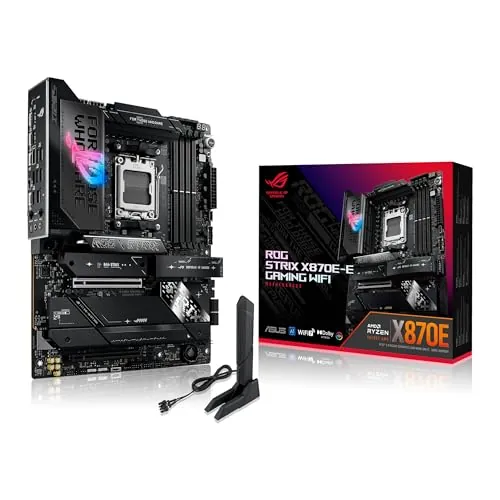
ASUS ROG Strix X870E-E Gaming WiFi
Original U.S. ROG STRIX X870E-E GAMING WIFI model. ASUS documents two rear USB4 ports and five M.2 sockets, with CPU-generation-specific lane sharing. Confirm that exact full model name on the listing; do not substitute an X870E-E WiFi7 Neo or another board.
Model ROG STRIX X870E-E GAMING WIFI
Amazon ASIN B0DDZNZF76
ASUS
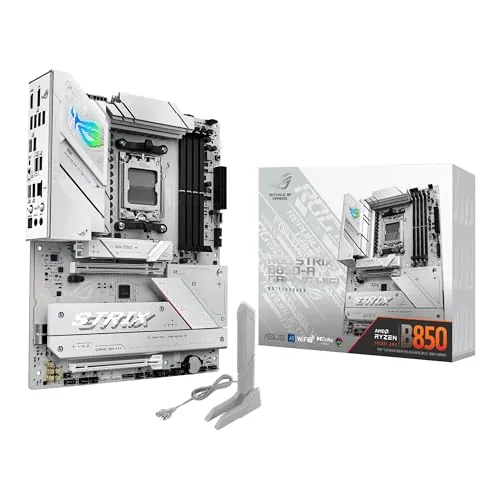
ASUS ROG Strix B850-A Gaming WiFi
Original U.S. ROG STRIX B850-A GAMING WIFI model. Its rear-I/O list includes USB 20Gbps Type-C and slower listed USB links, but no built-in rear USB4 port; ASUS also lists an internal USB4/Thunderbolt header. The header alone does not confirm a card, port arrangement or compatibility. Verify any required add-in card and the exact slot/storage layout before purchase.
Model ROG STRIX B850-A GAMING WIFI
Amazon ASIN B0DPLP33YR
Differences that matter
I require built-in rear USB4 ports on the motherboard
ASUS ROG Strix X870E-E Gaming WiFi · ASUS lists two rear USB4 40Gbps Type-C ports on X870E-E; B850-A's rear-I/O list has no built-in rear USB4 port.
View ROG STRIX X870E-E GAMING WIFI on Amazon (paid link)Sources for Rear USB ports and USB4 plan
Sources for M.2 count and CPU/PCIe sharing
Sources for DDR5 capacity and kit qualification
Sources for Wired network port
Plan the exact build, not just the chipset
These are both AM5 ATX DDR5 boards for Ryzen 7000, 8000 and 9000 desktop processors, but the CPU generation affects which slots and storage sockets are usable. X870E-E lists five M.2 sockets and four SATA ports; B850-A lists four M.2 and two SATA. The deciding question is whether the sockets you plan to populate remain available alongside your CPU and expansion cards.
The X870E-E's second and third M.2 positions are CPU-attached. With Ryzen 7000 or 9000, using either position changes the primary PCIEX16(G5) slot to x8. The board's specification marks both positions unsupported with Ryzen 8000. B850-A's M.2_3 shares with the secondary chipset PCIEX16(G4) slot and is disabled while that slot operates. Check the complete motherboard slot table for your processor before assigning a drive or card.
USB4 is a rear-port decision on these listings
X870E-E lists two rear USB4 40Gbps Type-C connections. B850-A's rear list instead shows one 20Gbps Type-C, three 10Gbps, four 5Gbps and two USB 2.0 Type-A ports. Its internal USB4/Thunderbolt header is a separate board connector, not itself a rear port or a guarantee that any add-in card will work.
Start with the device you want to connect and the port it requires. If you plan an optional card, verify the exact card against the current ASUS documentation and card-maker compatibility information. The published port rates do not tell you the measured speed of your full device, cable and host setup.
Memory and networking need the rest of the system
Both pages list four DDR5 DIMM sockets and up to 256GB. The X870E-E page shows different OC data-rate ceilings by Ryzen generation, while B850-A lists up to 8000+ MT/s (OC); both warn that supported memory type, data rate and module count vary by CPU and configuration. Treat the OC figures as published ceilings, then verify the exact kit and number of modules in ASUS's current support list.
X870E-E lists 5Gb Ethernet and B850-A lists 2.5Gb Ethernet. This matters only if the rest of the wired network can use the selected link rate. Neither board's port label predicts internet speed or guarantees measured throughput.
A pre-purchase slot and port check
Before ordering, record the exact Ryzen CPU, DDR5 kit and number of DIMMs. List each SSD and its target M.2 socket, then place the graphics card and every add-in card into the board's slot map. For X870E-E, specifically check whether Ryzen 7000/9000 plus M.2_2 or M.2_3 is acceptable, and remember those sockets are unsupported with Ryzen 8000. For B850-A, decide whether operating PCIEX16(G4) is worth losing M.2_3. Finally, compare your actual rear devices with the port list and verify any optional USB4 card independently.
This checklist flags documented sharing conditions. It does not test or guarantee compatibility for a particular CPU, memory kit, GPU, SSD, peripheral or expansion card.
Product details
ASUS ROG Strix X870E-E Gaming WiFi
- Memory slots and capacity
- 4 DDR5 DIMM slots, up to 256GB listed; supported data rate and DIMM count vary with CPU and memory configuration Source
- Rear USB4 and storage
- Two rear USB4 40Gbps Type-C ports; five M.2 and four SATA ports listed. With Ryzen 7000/9000, M.2_2 or M.2_3 use reduces the primary PCIEX16(G5) slot to x8; both sockets are unsupported with Ryzen 8000 Source
- Wired Ethernet
- One onboard 5Gb Ethernet port listed Source
ASUS ROG Strix B850-A Gaming WiFi
- Memory slots and capacity
- 4 DDR5 DIMM slots, up to 256GB listed; supported data rate and DIMM count vary with CPU and memory configuration Source
- Rear USB and storage
- Rear list includes one USB 20Gbps Type-C, three 10Gbps, four 5Gbps and two USB 2.0 ports; four M.2 and two SATA listed. M.2_3 is disabled while the secondary chipset PCIEX16(G4) slot operates Source
- Wired Ethernet
- One onboard 2.5Gb Ethernet port listed Source
Before you buy
Community discussions
Planning two SSDs around the primary graphics slot
ASUS ROG Strix X870E-E Gaming WiFi
An X870E-E buyer wanted two M.2 drives and asked how the second drive would affect the main graphics slot.
What to check
Before choosing a board, list the drives you plan to install and look up how that exact combination shares lanes in the board manual.
Checking room for a top-mounted radiator
ASUS ROG Strix B850-A Gaming WiFi
A shopper considering the B850-A GAMING WIFI wanted to know whether their case had room above it for both the radiator and its fans.
What to check
Check the assembled radiator thickness against the clearance above the motherboard in your exact case.
Common questions
Does the ROG Strix B850-A have USB4?
ASUS's rear-I/O list for the B850-A does not show a built-in rear USB4 port. Its internal connectors list includes a USB4/Thunderbolt header. That listing alone does not verify a particular add-in card, compatibility or port arrangement, so confirm the exact card and board setup before purchase. X870E-E lists two rear USB4 40Gbps Type-C ports.ROG STRIX B850-A GAMING WIFI technical specificationsROG STRIX X870E-E GAMING WIFI technical specifications
Will installing another M.2 SSD reduce graphics-slot bandwidth?
On X870E-E, ASUS says that with Ryzen 7000/9000, using M.2_2 or M.2_3 changes the primary PCIEX16(G5) slot to x8; those two sockets are unsupported with Ryzen 8000. On B850-A, M.2_3 is disabled when the secondary chipset PCIEX16(G4) slot operates. Check the manual and support information for your exact CPU and intended slot map.ROG STRIX X870E-E GAMING WIFI technical specificationsROG STRIX X870E-E GAMING WIFI user manual, revised edition V2ROG STRIX B850-A GAMING WIFI technical specifications
Are both boards rated for 256GB of DDR5?
Yes. ASUS's specifications list four DDR5 DIMM slots and up to 256GB for each model. The same specification pages warn that supported memory type, data rate and DIMM count depend on the CPU and memory configuration, so check the exact kit against the relevant support list.ROG STRIX X870E-E GAMING WIFI technical specificationsROG STRIX B850-A GAMING WIFI technical specifications
Sources and scope
This US-model comparison uses ASUS specifications and the exact ROG Strix X870E-E manual. It does not test USB throughput, storage, memory stability, gaming or other performance. ASUS lists different CPU-dependent lane and storage rules; check the latest support list and manual for your exact processor and components. B850-A's specification lists an internal USB4/Thunderbolt header but does not establish a particular add-in card's compatibility or what it will displace in a real build; verify a specific card with ASUS and its maker before ordering. Memory overclocking rates are not guaranteed settings and vary with CPU, DIMM count and kit qualification.
Related comparisons
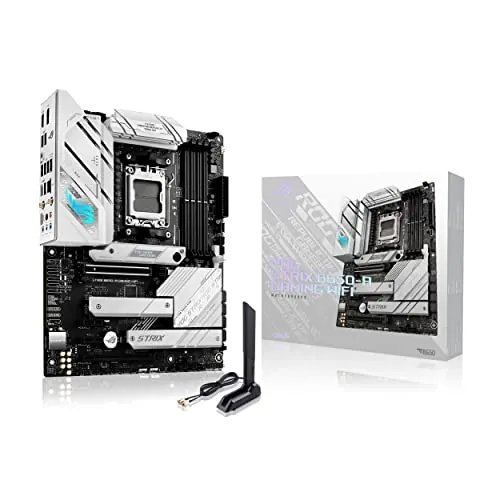
ASUS ROG Strix B650-A vs B850-A: Map Your CPU, Drives and Rear I/O
Both are AM5 ATX boards listed for Ryzen 7000, 8000 and 9000 desktop processors, but their practical layouts differ. The B650-A lists 3 M.2 and 4 SATA ports; the B850-A lists 4 M.2 and 2 SATA ports. CPU family changes the primary M.2 and graphics-slot modes, while both boards document shared bandwidth between M.2_3 and a chipset x16 slot. The B650-A manual and its repeated spec footnote disagree about which connection is disabled, so verify that condition before finalizing the card map. Compare the exact CPU, drive and card plan, memory kit, USB plug types and audio connections before choosing.
Read comparisonROG Strix B650-A vs X870E-E: M.2 Lanes, USB4, and RAM Limits
Both are AM5 ROG Strix boards for Ryzen 7000, 8000, and 9000 series, but their lane maps are not interchangeable. B650-A offers three M.2 sockets and a chipset M.2_3 that shares bandwidth with its secondary chipset x4 slot; X870E-E offers five sockets, but Ryzen 8000 disables M.2_2/_3 and Ryzen 7000/9000 drops the primary graphics slot to x8 when either is populated. Choose after mapping your exact CPU, drives, add-in cards, and case USB headers.
Read comparison