
Products compared
ASUS
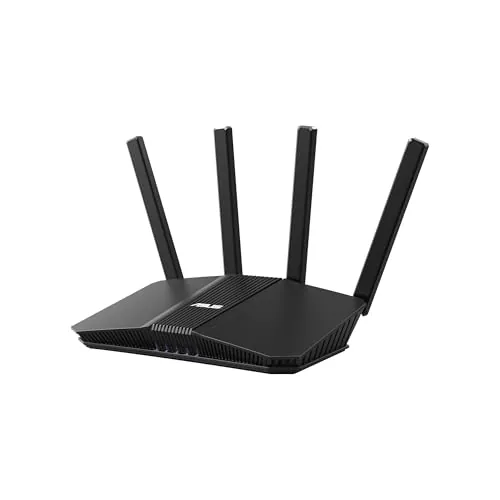
ASUS RT-BE58U Dual-Band Wi-Fi 7 Router
Exact assigned U.S. listed model RT-BE58U. ASUS documents 2.4GHz and 5GHz dual-band Wi-Fi 7, one 2.5G WAN/LAN port, and AiMesh expansion with compatible ASUS routers. Do not assume a similarly named router has the same port roles.
Model RT-BE58U
Amazon ASIN B0DHWBS9G6
TP-Link
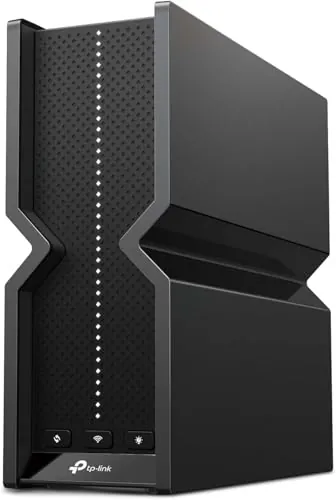
TP-Link Archer BE550 BE9300 Tri-Band Wi-Fi 7 Router
Exact assigned U.S. listed model Archer BE550, the non-Pro model on TP-Link's U.S. product page. That page lists three bands and five 2.5G Ethernet ports: one WAN and four LAN. Check the hardware-version label on the unit before selecting revision-specific firmware or support files.
Model Archer BE550
Amazon ASIN B0CJSNSVMR
Differences that matter
What matters most to you?
Choose a priority to see what it changes.
Sources for Bands available to the household's clients
Sources for Where the 2.5G ports go
Sources for Existing mesh and extension devices
Make the band choice from a real client list
The RT-BE58U is dual-band: ASUS identifies 2.4GHz and 5GHz Wi-Fi 7 and describes its MLO across those bands. The Archer BE550 adds 6GHz. That extra band is a concrete fit only if the devices you want to use it with support 6GHz. TP-Link says compatible clients need Wi-Fi 6E or Wi-Fi 7 and notes that older phones and laptops can continue to connect through 2.4GHz or 5GHz.
Before choosing the tri-band router for 6GHz, write down the exact models of your phones, laptops and other priority clients and check their manufacturers' band specifications. MLO and Wi-Fi 7 features also depend on client support. Treat the band count as available configuration, not a promise of faster downloads, stronger signal or better range in your home.
Plan which physical ports carry the WAN and fast wired links
The key wiring difference is how many 2.5G LAN connections remain after the internet link is assigned. ASUS gives RT-BE58U one 2.5G WAN/LAN combo port and also documents a 1G WAN/LAN option; its model guide labels LAN2–LAN4 plus LAN1/2.5G WAN. TP-Link lists one dedicated 2.5G WAN and four dedicated 2.5G LAN ports on Archer BE550.
Make a small port map: modem or ONT, any switch, then each PC, NAS or access point you want linked above gigabit. Mark each endpoint's port speed and which cable connects it. If the ASUS combo port is used for a 2.5G internet handoff, do not count it again as a separate 2.5G LAN socket. If several wired endpoints need 2.5G LAN at once, the BE550's port list is the more direct match; actual link rate still depends on each endpoint, cable and service.
Check the mesh system before replacing or adding a node
ASUS identifies AiMesh for RT-BE58U and says it works with AiMesh-compatible ASUS routers. TP-Link identifies Archer BE550 as EasyMesh-compatible with EasyMesh routers and range extenders. For a buyer keeping an existing node, look up that exact model in the selected vendor's compatibility information before choosing the main router.
The reviewed pages document each vendor's mesh system, not interoperability between them. If the plan depends on keeping a node from the other brand, verify the exact combination with the manufacturer first. The Archer BE550 support page lists multiple hardware revisions, so check the unit label for any revision-specific setup or firmware question.
Product details
ASUS RT-BE58U Dual-Band Wi-Fi 7 Router
- Wireless bands and MLO scope
- Dual-band 2.4GHz and 5GHz Wi-Fi 7. ASUS says this model's MLO combines or switches across 2.4GHz and 5GHz; supported MLO modes/bands vary by client. Source
- Multi-gig port
- One 2.5G WAN/LAN port; its role depends on the chosen network layout. ASUS also describes a 1G WAN/LAN option. The manual labels LAN2–LAN4 and LAN1/2.5G WAN. Source
- Documented mesh system
- AiMesh; ASUS says it works with AiMesh-compatible ASUS routers, including across Wi-Fi generations. Confirm the exact existing node model's compatibility. Source
TP-Link Archer BE550 BE9300 Tri-Band Wi-Fi 7 Router
- Wireless bands and client check
- Tri-band 2.4GHz, 5GHz and 6GHz Wi-Fi 7. TP-Link says 6GHz clients need Wi-Fi 6E or Wi-Fi 7 support; older clients can use 2.4GHz or 5GHz. Source
- Ethernet layout
- One dedicated 2.5Gbps WAN port and four 2.5Gbps LAN ports. Link speed still depends on the connected device, cable and internet service where applicable. Source
- Documented mesh system
- EasyMesh-compatible with EasyMesh routers and range extenders. TP-Link's U.S. download page lists multiple hardware revisions; match the unit label to the applicable support entry. Source
Before you buy
Community discussions
Planning which routers join a mesh
TP-Link Archer BE550 BE9300 Tri-Band Wi-Fi 7 Router
An Archer BE550 owner with older Deco units described changing their plan and buying a second BE550 to build the household mesh.
What to check
Write down the model and hardware revision of each unit you hope to keep. Check the manufacturer’s supported mesh combinations and the link each would use.
Trying the wired link between rooms
TP-Link Archer BE550 BE9300 Tri-Band Wi-Fi 7 Router
An owner using two Archer BE550 routers reported an upload-speed issue from the satellite after setting it up with an Ethernet link.
What to check
If you plan to link a second unit by cable, test a two-way transfer from the room where it will sit. Check which port the manufacturer assigns to the link.
Common questions
Will the Archer BE550's 6GHz band help devices that only support Wi-Fi 5 or Wi-Fi 6?
Not as a 6GHz connection. TP-Link says 6GHz requires a Wi-Fi 6E or Wi-Fi 7 client; older devices can still connect to the router on 2.4GHz or 5GHz. Check the exact client device specifications before buying for 6GHz.TP-Link Wi-Fi 7 Router and Deco FAQsArcher BE550 | BE9300 Tri-Band Wi-Fi 7 Router
Can the RT-BE58U connect a multi-gig modem and more than one 2.5G wired device?
ASUS documents one 2.5G WAN/LAN combo port, while its manual labels LAN2–LAN4 and LAN1/2.5G WAN. If the combo is assigned to WAN, the router does not list several dedicated 2.5G LAN sockets like the BE550. Count the actual endpoints and check whether a compatible multi-gig switch fits the setup.RT-BE58U | WiFi RoutersASUS RT-BE58U User GuideArcher BE550 | BE9300 Tri-Band Wi-Fi 7 Router
Can I add a TP-Link EasyMesh unit to an ASUS AiMesh network, or vice versa?
The ASUS RT-BE58U page describes AiMesh-compatible ASUS routers, and TP-Link describes Archer BE550 as EasyMesh-compatible. The manufacturer pages reviewed do not establish interoperability between these ecosystems. Match any expansion node to the exact compatibility list for the router you select.RT-BE58U | WiFi RoutersArcher BE550 | BE9300 Tri-Band Wi-Fi 7 Router
Do all Archer BE550 units use the same firmware download?
TP-Link's U.S. support page lists several hardware revisions and instructs owners to verify the hardware version before upgrading. Read the label on the specific unit and select the matching regional support entry; this comparison does not assume the Amazon offer's hardware revision.Download for Archer BE550
Sources and scope
No side-by-side throughput, latency, coverage, roaming, stability, security or reliability testing was performed. Wireless rates and usable coverage depend on clients, placement, interference, walls, traffic and ISP service. A 6GHz radio is useful only to clients that support it and that can use the band under local rules. The TP-Link support site lists multiple Archer BE550 hardware revisions; the revision of the specific retail unit is not identified here. AiMesh and EasyMesh are documented as separate vendor mesh systems; this guide does not establish cross-system compatibility.
Related comparisons

TP-Link Archer BE400 vs BE550: Will You Use 6 GHz and Four 2.5G LAN Ports?
The assigned US listings are one Archer BE400 (ASIN B0DVBP5L6Y) and one Archer BE550 (ASIN B0CJSNSVMR). TP-Link's US pages describe BE400 as dual-band Wi-Fi 7 on 2.4/5GHz with one 2.5Gbps WAN, one 2.5Gbps LAN and three 1Gbps LAN ports. BE550 is tri-band Wi-Fi 7 with 2.4/5/6GHz, one 2.5Gbps WAN and four 2.5Gbps LAN ports. Choose BE550 if you have clients whose exact specifications support 6GHz or need multiple multi-gig wired endpoints. BE400 can fit a 2.4/5GHz household with at most one 2.5G LAN device. Before ordering BE550, verify the hardware revision and confirm your client supports 6GHz; Wi-Fi 7 alone is not enough. The BE400 listing still has a captured BE400-vs-BE230 box-field mismatch that must be confirmed with its seller.
Read comparison
TP-Link Archer BE230 vs BE550: Plan Your 6 GHz and Wired Devices
The Archer BE230 is a dual-band Wi-Fi 7 router with one 2.5 Gbps WAN, one 2.5 Gbps LAN and three 1 Gbps LAN ports. The Archer BE550 adds a 6 GHz band and four 2.5 Gbps LAN ports behind a separate 2.5 Gbps WAN. Choose with a port-by-port device list, then check which household devices can use 6 GHz.
Read comparison