
Products compared
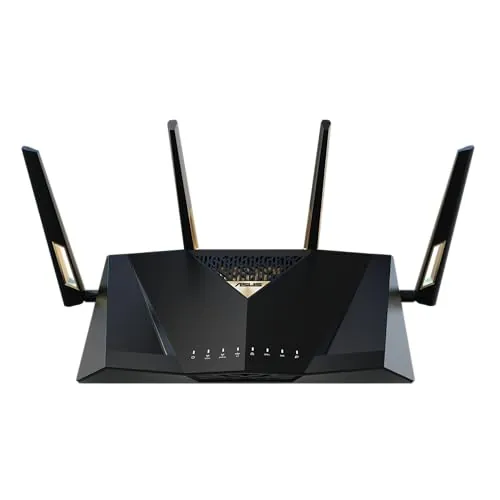
ASUS
ASUS RT-BE88U WiFi 7 Router
U.S. single-router listing. ASUS identifies this as a dual-band Wi-Fi 7 model with four detachable external antennas and mixed 10G, 2.5G and 1G port roles.
Model RT-BE88U
Amazon ASIN B0D55SWRSM
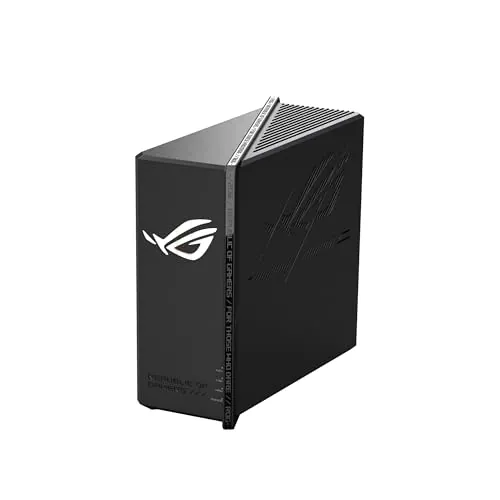
ASUS ROG
ASUS ROG Strix GS-BE12000 WiFi 7 Gaming Router
U.S. single-router listing for the ROG Strix GS-BE12000. ROG U.S. identifies it as tri-band with eight internal antennas and a 2.5G WAN plus seven 2.5G LAN ports.
Model GS-BE12000
Amazon ASIN B0FTP4PMYX
Differences that matter
What matters most to you?
Choose a priority to see what it changes.
Sources for Wireless bands and current client devices
Sources for Wired connection map
Sources for Enclosure and antenna placement
Quick answer: decide whether you need 6 GHz or more 2.5G LAN ports
Choose the ROG Strix GS-BE12000 when you have 6 GHz-capable Wi-Fi clients or want seven 2.5G LAN connections. Choose the RT-BE88U for SFP+, 10G Ethernet or mixed 2.5G/1G wired equipment. Those are feature-fit decisions, not test results.
Both are ASUS Wi-Fi 7 routers and both are listed for AiMesh roles. The more useful first step is to inventory client bands and wired endpoints. If a port or radio capability does not match an actual device or expansion plan, its published presence alone is not a reason to pay for it.
Band check: 6 GHz requires clients that can use it
The RT-BE88U is listed as dual-band, operating at 2.4 and 5 GHz. The GS-BE12000 adds 6 GHz to those two bands. Before choosing by band count, look up the Wi-Fi bands on the devices you expect to connect; a 6 GHz router band does not make a 2.4/5 GHz-only client a 6 GHz client.
ASUS describes model capabilities and theoretical Wi-Fi specifications, not your room's measured coverage or data rate. Wall materials, placement, client radios and the rest of the network affect actual service. This guide does not rank either router for speed, range or gaming.
Port plan: label the WAN, SFP+ and LAN endpoints
The RT-BE88U has two 10G-class interfaces, but they are not interchangeable connector descriptions: one is SFP+, while the other is configurable WAN/LAN Ethernet. It also lists one configurable 2.5G WAN/LAN port, three 2.5G LAN ports and four 1G LAN ports. The user guide labels these physical connections and roles.
GS-BE12000 lists a 2.5G WAN and seven 2.5G LAN connections, including two LAN ports designated for gaming. That can fit a wired plan with multiple 2.5G clients, but does not provide a listed 10G port. Draw the topology, including the modem or ONT, switch and NAS, and verify connector types and WAN assignment before purchase.
Physical placement and mesh planning
ASUS lists four external antennas and dimensions of 300 × 188 × 60.5 mm for the RT-BE88U. ROG's U.S. page identifies eight internal antennas in the GS-BE12000. The ROG U.S. page calls the enclosure compact but does not supply the dimensions used here. A separate ROG global specification page has a package-content entry naming GS-BE18000, so its dimensional and package fields are excluded from this guide.
Both manufacturers list AiMesh capability. ASUS support says compatible firmware may be required. If either unit will extend a current mesh or if you intend to pair these units, confirm the supported-model list, firmware and intended primary/node roles. Do not treat the shared AiMesh label as a guarantee of a specific pairing or all-feature behavior.
Before you buy: check clients, ports and shelf space
1. List the bands supported by the phones, laptops and other clients that need Wi-Fi; choose GS-BE12000 only if having the 6 GHz band matches a real client need. 2. Draw a port map from the ISP handoff through any switch to wired devices; choose RT-BE88U when SFP+, 10G Ethernet or a mix of 1G and 2.5G connections solves that map. 3. Measure the shelf and rear cable clearance, especially around RT-BE88U's external antennas; verify GS-BE12000 dimensions from the exact U.S. listing because we exclude the conflicting global spec-page dimensions.
For an AiMesh setup, check ASUS's current model list and firmware, then confirm which unit is primary and which is node. No claim here says either router is faster, reaches more rooms or reduces gaming latency in a particular home.
Product details
ASUS RT-BE88U WiFi 7 Router
- Operating bands
- 2.4 GHz and 5 GHz; two bands listed Source
- Wired ports
- One 10Gbps WAN/LAN Ethernet; one 10Gbps SFP+; one 2.5Gbps WAN/LAN; three 2.5Gbps LAN; four 1Gbps RJ45 LAN; USB 3.2 Gen 1 Source
- Antenna enclosure
- Four external antennas; ASUS lists product dimensions 300 × 188 × 60.5 mm Source
- AiMesh modes
- Listed as both a primary AiMesh router and an AiMesh node Source
ASUS ROG Strix GS-BE12000 WiFi 7 Gaming Router
- Operating bands
- 2.4 GHz, 5 GHz and 6 GHz; three bands listed Source
- Wired ports
- One 2.5G WAN and seven 2.5G LAN ports; ROG identifies two LAN ports as dedicated gaming ports Source
- Antenna enclosure
- Eight internal antennas; ROG U.S. describes the unit as compact. Numeric dimensions are omitted because a separate spec-page package entry conflicts by naming a different model. Source
- AiMesh modes
- ROG U.S. lists AiMesh support. Check current firmware, supported model list and intended role before pairing. Source
Before you buy
Community discussions
RT-BE88U owner plans wired devices across two floors
ASUS RT-BE88U WiFi 7 Router
One owner describes using two RT-BE88U routers, with a PC connected at one location and a TV at the other. The post is a layout example, not a coverage or speed test.
What to check
Count the wired devices you expect near each planned router and compare that with each unit’s available LAN ports; this household’s arrangement does not establish range or suitability for another home.
Common questions
Does the GS-BE12000 add a 6 GHz band?
Yes. ROG lists 2.4, 5 and 6 GHz for GS-BE12000. ASUS's RT-BE88U U.S. specification lists 2.4 and 5 GHz. To use 6 GHz, the client device must support it; no range or speed advantage is established here.RT-BE88U - Tech Specs | ASUS USAROG STRIX GS-BE12000 | Networking | ROG USA
Which router has a 10G port?
RT-BE88U lists a 10G SFP+ port and a 10G WAN/LAN port. GS-BE12000 lists one 2.5G WAN and seven 2.5G LAN ports. Check the physical connector and WAN/LAN assignment against your network plan.RT-BE88U - Tech Specs | ASUS USART-BE88U User ManualROG STRIX GS-BE12000 | Networking | ROG USA
Can these routers be used in AiMesh?
ASUS lists AiMesh capability for both models. Its support guidance says compatible firmware may be required. Check the current supported-model list, firmware and roles for the exact configuration; this page does not guarantee any particular two-unit pairing behavior.RT-BE88U - Tech Specs | ASUS USAAiMesh: What models of router / Range Extenders support AiMesh? | ASUS USA Support
Sources and scope
This source-based guide covers the assigned single-unit U.S. ASUS RT-BE88U (ASIN B0D55SWRSM) and ROG Strix GS-BE12000 (ASIN B0FTP4PMYX). ASUS lists the former as dual-band at 2.4/5 GHz with four external antennas and a mix of SFP+, 10G Ethernet, 2.5G and 1G connections; ROG lists the latter as tri-band including 6 GHz, with one 2.5G WAN and seven 2.5G LAN ports and eight internal antennas. No controlled speed, range, latency, reliability, security or gaming test is used. ROG's global spec page has a package-content entry naming GS-BE18000 rather than GS-BE12000; that page's package and dimensions are excluded. Verify physical fit and the exact compatible AiMesh role/firmware before buying.
- RT-BE88U - Tech Specs | ASUS USA
- RT-BE88U | WiFi 7 | ASUS USA
- RT-BE88U User Manual
- ROG STRIX GS-BE12000 | Networking | ROG USA
- AiMesh: What models of router / Range Extenders support AiMesh? | ASUS USA Support
- ASUS Unveils RT-BE88U WiFi 7 Dual-Band Router | ASUS Pressroom
- ROG STRIX GS-BE12000 Tech Specs
Related comparisons

ASUS RT-BE88U vs TP-Link Archer BE400: Plan Your Wired Network First
The RT-BE88U is the fit to investigate for a 10G WAN, SFP+ link or several multi-gig wired devices. The Archer BE400 covers a simpler 2.5G WAN, one 2.5G LAN device and three gigabit clients. Both are dual-band Wi-Fi 7 routers, so neither adds a 6GHz band.
Read comparison
ASUS RT-BE9700 vs RT-BE88U: 6GHz Wi-Fi or a Wired-First Setup?
Both are ASUS Wi-Fi 7 routers with AiMesh and a 10Gbps WAN/LAN interface. The RT-BE9700 adds a 6GHz radio and lists up to 320MHz channels there; the dual-band RT-BE88U has no listed 6GHz radio but adds a 10Gbps SFP+ port and four 1Gbps LAN ports. Match the router to the Wi-Fi bands, WAN handoff, wired endpoints and SFP+ equipment in your actual plan. ASUS's RT-BE9700 U.S. product page and technical-spec page differ on the role of its four 2.5Gbps ports, so verify port assignment before finalizing a LAN map.
Read comparison