
Products compared
ASUS
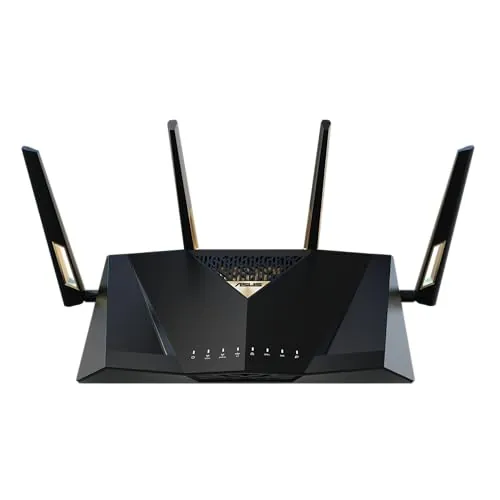
ASUS RT-BE88U Dual-Band WiFi 7 Router
U.S. RT-BE88U dual-band Wi-Fi 7 router with MLO and configurable multi-gigabit copper/fiber port options.
Model RT-BE88U
Amazon ASIN B0D55SWRSM
TP-Link
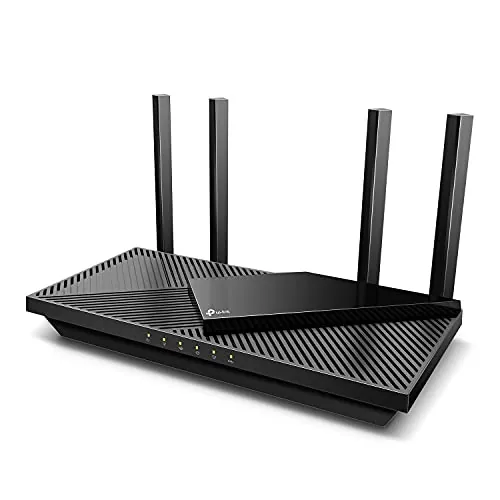
TP-Link Archer AX55 AX3000 Dual-Band Wi-Fi 6 Router
U.S. Archer AX55 dual-band Wi-Fi 6 router. The exact retail unit's hardware revision is not identified in the selected listing.
Model Archer AX55
Amazon ASIN B09G5W9R6R
Differences that matter
Sources for Wireless bands and client feature support
Sources for WAN, LAN, fiber, and wired-device plan
Sources for Mesh expansion and setup path
Start with the radios your clients can use
Both specifications list 2.4GHz and 5GHz. ASUS calls the RT-BE88U a dual-band Wi-Fi 7 model and also lists older Wi-Fi generations; TP-Link calls Archer AX55 a dual-band Wi-Fi 6 router. ASUS's MLO support article says compatible end devices are required, so check the Wi-Fi features listed for the specific phone, laptop, or adapter you plan to connect. Neither product's band list includes 6GHz, and the generation labels do not establish a speed advantage in your home.
Map ports before paying for multi-gigabit hardware
The ASUS port list is unusually varied: separate copper and SFP+ 10Gbps options, a 2.5Gbps WAN/LAN port, three 2.5Gbps LAN ports, and four Gigabit LAN ports. TP-Link lists the AX55 with one Gigabit WAN and four Gigabit LAN. Draw your own path from modem or ONT to router, then from router to any switch, NAS, desktop, or access point. For each hop, verify the interfaces on both ends, the port role you will assign, and any fiber module or cable needed; this comparison does not establish what accessories are included beyond the listed package, or predict internet throughput.
Keep mesh expansion inside a verified system
RT-BE88U lists ASUS AiMesh router and node modes; ASUS's setup instructions call for two AiMesh-supported ASUS routers. TP-Link advertises EasyMesh on the AX55 page, and its U.S. compatibility list separately lists Archer AX55 as a supported model—the adjacent “Planned” labels belong to other entries, not AX55. Mesh terms are not proof that the two brands will pair as a single mesh system, so keep a planned expansion within a verified vendor system.
AX55's retail identity here does not reveal the hardware revision. TP-Link's U.S. selector has V1, V1.60, V4, and V4.60 support pages, and its download instructions say to match firmware to hardware revision and purchase region. The V1 and V1.6 firmware histories explicitly document EasyMesh Ethernet backhaul; those notes apply to those revisions and listed releases only. If wired backhaul or another mesh feature determines the purchase, check the actual unit label and that exact revision's official firmware notes before checkout.
A five-minute pre-buy network worksheet
Write down (1) the modem/ONT's handoff type and service interface, (2) any switch, NAS, desktop, access point, or other wired device, and (3) the wireless standards and MLO support of your frequent clients. Mark the chosen router's WAN port and count the remaining LAN connections, then match each cable or SFP+ endpoint along the full path. If the worksheet only needs Wi-Fi 6 plus Gigabit connections, the AX55's listed configuration may be sufficient; if it names an MLO-capable client or a concrete 2.5/10Gbps/fiber link, RT-BE88U offers the corresponding documented options. These are buyer-fit conditions, not speed, coverage, or value predictions.
Product details
ASUS RT-BE88U Dual-Band WiFi 7 Router
- Wireless bands and modes
- Dual-band 2.4GHz and 5GHz; ASUS lists Wi-Fi 7 plus Wi-Fi 6 and earlier standards. MLO needs client devices that support MLO. Source
- Wired ports
- One 10Gbps WAN/LAN, one 10Gbps SFP+, one 2.5Gbps WAN/LAN, three 2.5Gbps LAN, and four Gigabit LAN ports. WAN/LAN roles depend on network configuration; SFP+ module inclusion is not established here. Source
- Mesh role
- ASUS lists AiMesh router and node modes; setup requires supported ASUS AiMesh routers and designates a router and node. Source
TP-Link Archer AX55 AX3000 Dual-Band Wi-Fi 6 Router
- Wireless bands
- Dual-band Wi-Fi 6, with 2.4GHz and 5GHz standards listed by TP-Link. Source
- Wired ports
- One Gigabit WAN and four Gigabit LAN ports, plus one USB 3.0 port. Source
- Mesh and hardware revision
- TP-Link's U.S. AX55 page advertises EasyMesh and its U.S. compatibility list includes Archer AX55. The support selector exposes V1, V1.60, V4, and V4.60 pages; verify the unit label and matching firmware before relying on a specific mesh or Ethernet-backhaul feature. Source
Before you buy
Community discussions
When a gigabit WAN link negotiates at 100 Mbps
TP-Link Archer AX55 AX3000 Dual-Band Wi-Fi 6 Router
An AX55 user reported that the Ethernet link from their fiber terminal negotiated at 100 Mbps. Forcing 1 Gbps made the router report the WAN cable as unplugged. They did not establish a cause.
What to check
For a bottleneck check, confirm the actual link speed on the gateway-to-router cable and on the Ethernet device you care about before paying for more port capacity.
Using the AX55 behind an ISP fiber router
TP-Link Archer AX55 AX3000 Dual-Band Wi-Fi 6 Router
One owner used the Archer AX55 in access-point mode while their ISP fiber terminal handled routing. They asked about other layouts after being disappointed with their own results when routing with PPPoE on the AX55.
What to check
Write down where routing and Ethernet connections will live if the ISP box stays. That can change which router ports and expansion features you will use.
Common questions
Does the RT-BE88U have a 6GHz Wi-Fi band?
No 6GHz band is listed in the cited U.S. specifications: ASUS lists 2.4GHz and 5GHz. Its Wi-Fi 7/MLO feature is dual-band here, and MLO operation also depends on client support.RT-BE88U Technical Specifications | ASUS USA[Wi-Fi 7 Wireless Router] What is MLO (Multi-Link Operation) and how it works? | ASUS Support
How many wired devices can the RT-BE88U and Archer AX55 connect directly?
Their listed port counts differ. The RT-BE88U has configurable multi-gigabit/fiber ports plus four Gigabit LAN ports; the AX55 lists one Gigabit WAN and four Gigabit LAN ports. Count only LAN ports available after assigning a WAN role, and add a switch if your layout needs more wired LAN connections.RT-BE88U Technical Specifications | ASUS USAArcher AX55 | AX3000 Dual Band Gigabit Wi-Fi 6 Router | TP-Link USA
Can an Archer AX55 join an EasyMesh network?
TP-Link advertises EasyMesh on its U.S. Archer AX55 page and includes AX55 in its U.S. compatible-model list. Before relying on a particular EasyMesh feature such as Ethernet backhaul, read the hardware version from the unit and check the matching U.S. support page and firmware notes. ASUS AiMesh is a separate vendor system; these sources do not verify cross-brand mesh operation.Archer AX55 | AX3000 Dual Band Gigabit Wi-Fi 6 Router | TP-Link USATP-Link EasyMesh Devices | U.S. compatibility listDownload for Archer AX55 | TP-Link U.S. Support (hardware-version selector)Download for Archer AX55 V1 | TP-Link U.S. SupportDownload for Archer AX55 V1.60 | TP-Link U.S. Support[AiMesh] How to setup AiMesh system (Web GUI)? | ASUS USA Support
Sources and scope
Manufacturer specifications describe available features and interfaces, not the speed, coverage, roaming quality, or reliability you will get in a particular home. Confirm the TP-Link unit's hardware version and matching U.S. firmware/support notes, then match every intended WAN, LAN, and mesh connection to the equipment you own.
- RT-BE88U Technical Specifications | ASUS USA
- RT-BE88U | ASUS USA
- [Wi-Fi 7 Wireless Router] What is MLO (Multi-Link Operation) and how it works? | ASUS Support
- RT-BE88U User Guide
- [AiMesh] How to setup AiMesh system (Web GUI)? | ASUS USA Support
- Archer AX55 | AX3000 Dual Band Gigabit Wi-Fi 6 Router | TP-Link USA
- TP-Link EasyMesh Devices | U.S. compatibility list
- Download for Archer AX55 | TP-Link U.S. Support (hardware-version selector)
- Download for Archer AX55 V1 | TP-Link U.S. Support
- Download for Archer AX55 V1.60 | TP-Link U.S. Support
Related comparisons

Deco X55 3-Pack vs Archer AX55: Do You Need Three Wi-Fi Nodes?
The assigned Deco X55 is a three-unit Wi-Fi 6 mesh kit; the Archer AX55 offer is one Wi-Fi 6 router. That difference changes where Wi-Fi and Ethernet connections are available. X55 gives you three units to place in separate locations, optional Ethernet backhaul, and three Gigabit ports per unit. AX55 concentrates one Gigabit WAN, four Gigabit LAN ports, and a USB 3.0 port at the router. Before buying, map the modem, rooms that need another node, power outlets, wall Ethernet runs, and wired devices. Both support router and access-point operation, but Archer expansion uses a compatible OneMesh or EasyMesh path and cannot merge with Deco mesh; check the exact AX55 hardware version and firmware if expansion matters.
Read comparison
TP-Link Archer BE400 vs AX55: Do You Need 2.5-Gigabit Links?
These are two single-router US listings: Archer BE400 ASIN B0DVBP5L6Y and Archer AX55 ASIN B09G5W9R6R. TP-Link lists BE400 as a dual-band BE6500 Wi-Fi 7 router with one 2.5Gbps WAN, one 2.5Gbps LAN and three 1Gbps LAN ports. AX55 is a dual-band AX3000 Wi-Fi 6 router with one Gigabit WAN and four Gigabit LAN ports. Both have four LAN jacks, but one BE400 LAN jack is multi-gig. If your modem, plan and a wired endpoint can use over 1Gbps, BE400 offers a path AX55 does not; if your network and clients are Gigabit/Wi-Fi 6, the AX55 feature set may already match. Before buying, map modem-to-WAN, then assign the fastest wired endpoint and count remaining LAN clients. The BE400 Amazon listing also has a model/box-field conflict that needs seller confirmation. Neither ASIN page identifies the router's hardware revision.
Read comparison