
Products compared

TP-Link
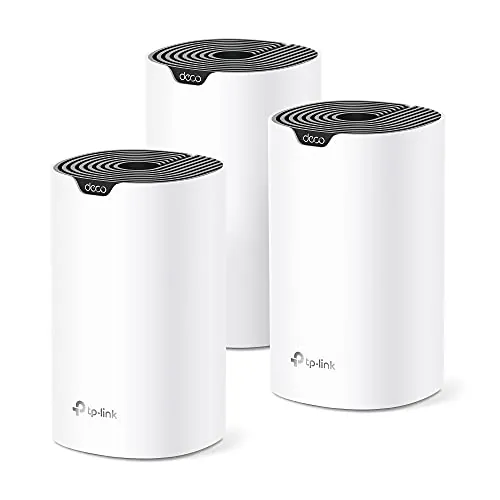
TP-Link Deco X55 AX3000 Whole Home Mesh Wi-Fi 6 System (3-Pack)
The selected listing identifies a three-pack. TP-Link's US product page offers the Deco X55 in a 3-pack configuration and lists three X55 units, three power adapters and one Ethernet cable in that box. It does not map this Amazon ASIN to a hardware revision; verify the exact seller listing before ordering.
Model Deco X55
Amazon ASIN B09PRB1MZM
TP-Link
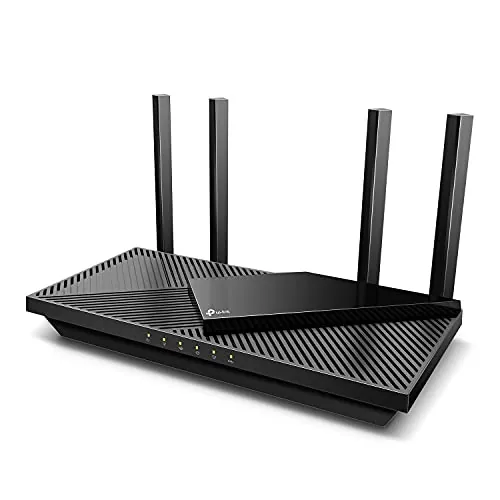
TP-Link Archer AX55 AX3000 Dual-Band Wi-Fi 6 Router
The selected listing is the standard Archer AX55 single router, not Archer AX55 Pro. TP-Link's US product and support pages identify the plain Archer AX55; the support page lists V1, V1.60, V4 and V4.60 hardware versions, so the selected ASIN does not establish which revision is in a particular unit.
Model Archer AX55
Amazon ASIN B09G5W9R6R
Differences that matter
What matters most to you?
Choose a priority to see what it changes.
Sources for USB storage and box contents
Start with the number of Wi-Fi locations you need
The assigned Deco X55 product is a three-pack. TP-Link lists three Deco units in that package; the Archer AX55 product is one router. The more useful comparison than the AX3000 names is where the hardware can sit: Deco can be placed at a main location and two additional powered locations, while AX55 concentrates its Wi-Fi, wired LAN and USB connections at one router.
Draw the rooms and mark where you can put a powered unit. If one central router is your plan, AX55 matches that equipment count. If you need units in several locations, X55 provides them in the box, subject to a workable wireless or Ethernet link. These facts do not establish actual coverage in your building.
Ports are useful only where the cable reaches
Archer AX55 has one Gigabit WAN and four Gigabit LAN ports at its single chassis. Each Deco X55 has three Gigabit auto-sensing WAN/LAN ports. For Deco, a cable for the internet uplink or a wired link between mesh units uses a port at that node. A group of wired devices beside the router may fit AX55's four LAN jacks; devices spread across rooms may make the X55 nodes useful, but only when their placement and backhaul plan work.
List every wired device next to its room, including TV, game console, desktop and any wall outlet. Then sketch whether each wall run returns to the router closet, an upstream gateway or the main Deco. Do not count a socket at a remote node as usable for a device located elsewhere.
Choose the network mode before connecting satellite cables
Both product pages list Router Mode and Access Point Mode. Decide which device should perform the routing: the ISP gateway, Archer, or main Deco. If you keep an existing router upstream, examine AP mode; if the new device takes over as router, follow its Router-mode setup. This mode choice changes how network connections should be arranged.
For Deco Ethernet backhaul, TP-Link says to bring all units online wirelessly first, then attach the Ethernet runs. In Router mode, satellites must connect downstream of the main Deco's LAN port (directly or through a switch); connecting them to the router ahead of the main Deco creates a loop. In AP mode, satellites can connect to a Deco unit or the upstream router. Check the current Deco guide while setting up the actual network.
Do not assume the Archer can join a Deco mesh
Archer AX55 lists OneMesh and EasyMesh options, while X55 uses Deco Mesh. TP-Link says Deco, OneMesh and EasyMesh do not interoperate as a single unified mesh; an Archer router and Deco system used together do not provide seamless roaming between the systems. If you buy X55, plan any mesh expansion within the Deco family. If you buy AX55, verify an Archer-compatible device and the feature support for the exact router hardware and firmware.
The US support page lists AX55 hardware versions V1, V1.60, V4 and V4.60, but the selected ASIN does not tell us which version ships in a specific retail box. If future mesh expansion is part of your purchase decision, inspect the device label and current firmware notes before choosing the add-on.
USB storage may settle the one-router choice
TP-Link lists a USB 3.0 port on Archer AX55, along with supported formats and storage-sharing functions. If you want to connect a drive directly to the router, verify the drive format and the particular sharing function you plan to use. The X55 product page lists its Ethernet ports and box contents but does not list a USB storage port.
USB storage is separate from the mesh-location question. You may prefer AX55 for a drive plugged in beside the router even if you have other coverage plans; a USB connector by itself does not prove the device will behave like a dedicated NAS or achieve a particular transfer rate.
Product details
TP-Link Deco X55 AX3000 Whole Home Mesh Wi-Fi 6 System (3-Pack)
The practical advantage of this bundle is having three mesh units included for locations you can power and connect. Put them on a sketch before purchase; the unit count alone does not establish coverage or performance. If using Ethernet backhaul, reserve the necessary ports and follow the wiring topology for the selected Router or Access Point mode.
- Included node count
- TP-Link lists three X55 units in its US 3-pack configuration. Source
- Ethernet at each node
- Three Gigabit Ethernet ports per Deco unit, with WAN/LAN auto-sensing; optional Ethernet backhaul. Source
- Network modes and mesh
- Router Mode or Access Point Mode; X55 is part of TP-Link's Deco mesh system. Source
TP-Link Archer AX55 AX3000 Dual-Band Wi-Fi 6 Router
AX55 concentrates its WAN, LAN and USB connections at one location. That suits a setup where the router sits near the modem and wired devices, or where a directly attached storage drive is useful. If adding a satellite later is important, plan and verify the exact supported Archer mesh system and hardware/firmware; an Archer AX55 does not become a Deco node.
- Ethernet at the router
- One Gigabit WAN port and four Gigabit LAN ports, all at the single router. Source
- USB storage connection
- One USB 3.0 port; TP-Link lists FAT32, exFAT, HFS+ and NTFS partition support and Time Machine, FTP, media and Samba server functions. Source
- Operating and expansion modes
- Router Mode or Access Point Mode; TP-Link lists OneMesh and EasyMesh, with compatibility and features subject to supported device, revision and firmware. Source
Before you buy
Community discussions
Using the AX55 behind an ISP fiber router
TP-Link Archer AX55 AX3000 Dual-Band Wi-Fi 6 Router
One owner used the Archer AX55 in access-point mode while their ISP fiber terminal handled routing. They asked about other layouts after being disappointed with their own results when routing with PPPoE on the AX55.
What to check
With your ISP box left in place, decide whether a single access point at that spot can cover the endpoints or the layout calls for more than one Deco node.
When a gigabit WAN link negotiates at 100 Mbps
TP-Link Archer AX55 AX3000 Dual-Band Wi-Fi 6 Router
An AX55 user reported that the Ethernet link from their fiber terminal negotiated at 100 Mbps. Forcing 1 Gbps made the router report the WAN cable as unplugged. They did not establish a cause.
What to check
Verify the gateway-to-router Ethernet link before comparing performance in remote rooms. That gives you a wired baseline for the single-router and mesh layouts.
Common questions
Does the Deco X55 3-pack include three routers?
It includes three Deco X55 mesh units, according to TP-Link's US product page. The units form a Deco mesh system; one functions as the main node in the network setup. The bundle does not establish that your home will receive any specific coverage or speed result.Deco X55 AX3000 Whole Home Mesh WiFi 6 System — TP-Link US
How many wired devices can I connect near each product?
AX55 has four Gigabit LAN ports at its single router, separate from the WAN port. Each X55 node has three Gigabit WAN/LAN auto-sensing ports. On Deco, count the port used for the internet uplink or any backhaul at the node where its cable ends before allocating ports to local devices.Archer AX55 AX3000 Dual Band Gigabit Wi-Fi 6 Router — TP-Link USDeco X55 AX3000 Whole Home Mesh WiFi 6 System — TP-Link USEthernet Backhaul for Deco: Setup, Benefits and Troubleshooting — TP-Link US
Can I add an Archer AX55 to the Deco X55 mesh later?
No. TP-Link says Archer OneMesh/EasyMesh and Deco Mesh cannot be combined into one unified mesh, and an Archer router used alongside a Deco system will not provide seamless roaming between the systems. If you already own Deco, add a compatible Deco; if you choose Archer, verify a compatible Archer mesh satellite or extender separately.TP-Link Mesh Compatibility: Deco, OneMesh, EasyMesh & Omada — TP-Link USDeco X55 AX3000 Whole Home Mesh WiFi 6 System — TP-Link USArcher AX55 AX3000 Dual Band Gigabit Wi-Fi 6 Router — TP-Link US
Can I keep my ISP router with either product?
Both TP-Link product pages list Router Mode and Access Point Mode. Access Point Mode is the relevant choice to examine when the existing ISP router remains upstream; follow the current setup instructions for your equipment. For Deco wired satellites, the cable topology differs by mode: Router mode places them downstream of the main Deco, while AP mode allows a satellite to connect to the upstream router.Deco X55 AX3000 Whole Home Mesh WiFi 6 System — TP-Link USArcher AX55 AX3000 Dual Band Gigabit Wi-Fi 6 Router — TP-Link USEthernet Backhaul for Deco: Setup, Benefits and Troubleshooting — TP-Link US
Does Archer AX55 support Wi-Fi mesh expansion?
TP-Link lists OneMesh and EasyMesh for Archer AX55. However, the specific devices and features supported depend on hardware version and firmware, and AX55's US support page lists multiple revisions. The selected ASIN does not identify the revision in the box, so check the hardware label and current compatibility page before buying an expansion unit. Archer mesh cannot be combined with Deco Mesh.Archer AX55 AX3000 Dual Band Gigabit Wi-Fi 6 Router — TP-Link USDownload for Archer AX55 — TP-Link US SupportTP-Link Mesh Compatibility: Deco, OneMesh, EasyMesh & Omada — TP-Link US
Does Archer AX55's USB port replace a network-attached storage device?
TP-Link lists USB storage-sharing functions including Time Machine, FTP, media and Samba server features, and supported file-system formats. Whether those features meet your needs depends on the drive, format, devices and software you plan to use. The product specification alone does not establish file-transfer speed or suitability as a dedicated NAS.Archer AX55 AX3000 Dual Band Gigabit Wi-Fi 6 Router — TP-Link US
Sources and scope
This guide compares TP-Link's listed US Deco X55 3-pack with the assigned plain Archer AX55 single-router listing identity. TP-Link's US pages identify both models and their listed features, but the assigned ASINs are not mapped to the specific hardware revision of every unit sold. Archer AX55 support lists multiple revisions; EasyMesh support and Ethernet backhaul can depend on hardware and firmware. Check the version label and current support page before relying on an expansion feature. The sources do not compare speed, latency, reliability, or real-home coverage under controlled conditions; a three-pack does not guarantee that any particular floor plan will be covered.
- Deco X55 AX3000 Whole Home Mesh WiFi 6 System — TP-Link US
- Archer AX55 AX3000 Dual Band Gigabit Wi-Fi 6 Router — TP-Link US
- Download for Archer AX55 — TP-Link US Support
- Download for Deco X55 — TP-Link US Support
- TP-Link Mesh Compatibility: Deco, OneMesh, EasyMesh & Omada — TP-Link US
- Ethernet Backhaul for Deco: Setup, Benefits and Troubleshooting — TP-Link US
Related comparisons
TP-Link Deco X55 vs Deco S4 3-Pack: Wi-Fi Generation, Port Count and Wiring
The selected listing data pair is TP-Link Deco X55 3-pack ASIN B09PRB1MZM versus Deco S4 3-pack ASIN B084GTH5LL. TP-Link documents Wi-Fi 6 and three Gigabit ports per X55 unit. Deco S4 is Wi-Fi 5, but its official US specifications vary by hardware version: V1 lists two Gigabit ports per unit, while V3.60 lists three. The listing data and selected ASIN do not establish which S4 hardware version a live offer contains. Both product pages support optional Ethernet backhaul. Choose by Wi-Fi generation and verified unit-level port needs, not by an assumed speed or coverage result.
Read comparison
Deco X55 3-Pack vs Archer BE400: Three-Node Mesh or Wi-Fi 7 Router?
The selected US offers are TP-Link Deco X55 3-pack ASIN B09PRB1MZM and one Archer BE400 ASIN B0DVBP5L6Y. X55 is a three-unit Wi-Fi 6 Deco mesh kit with three Gigabit ports on each node. BE400 is a single Wi-Fi 7 router; TP-Link’s US specifications list one 2.5Gbps WAN, one 2.5Gbps LAN and three 1Gbps LAN ports, with EasyMesh support. TP-Link says Deco Mesh and Archer EasyMesh cannot form one unified mesh. Before choosing, map the rooms, modem, Ethernet jacks and wired clients; for BE400, also confirm the exact hardware version and clarify an Amazon box-contents field that says Archer BE230 even though the listing model is BE400.
Read comparison