
Products compared
ASUS
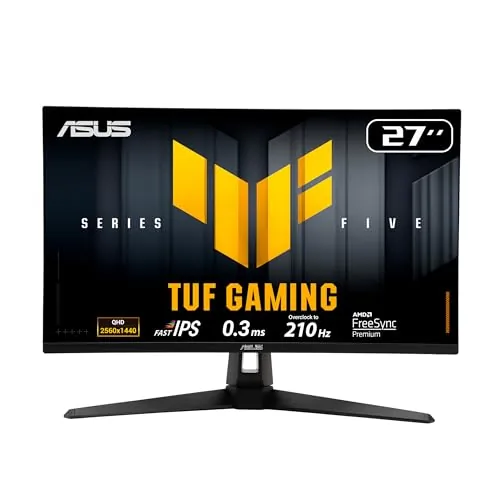
ASUS TUF Gaming VG27AQL5A 27-inch QHD Gaming Monitor
ASUS’s U.S. specifications identify the TUF Gaming VG27AQL5A: a 27-inch 2560 × 1440 display rated up to 210 Hz, with HDMI and DisplayPort inputs, a service-only USB-C port and an adjustable stand. The refresh-rate figure is a manufacturer specification, not a measured result.
Model VG27AQL5A
Amazon ASIN B0F237NSVQ
ASUS
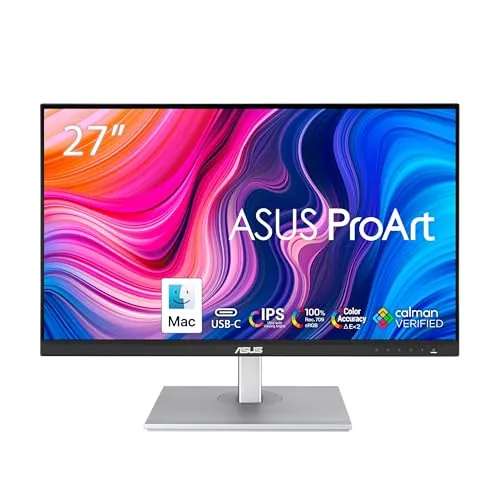
ASUS ProArt Display PA278CV 27-inch QHD Monitor
ASUS’s U.S. specifications identify the ProArt PA278CV: a 27-inch 2560 × 1440 display rated up to 75 Hz, USB-C with DisplayPort Alt Mode and up to 65 W power delivery, four USB-A hub ports and an adjustable stand. Confirm that your laptop supports video over USB-C and can charge within the monitor’s power limit.
Model PA278CV
Amazon ASIN B08LCPY1TR
Differences that matter
What matters most to you?
Choose a priority to see what it changes.
Sources for Stand movement and desk clearance
Sources for Preset and color controls
Start with the video mode your computer can send
Both models are 27-inch QHD screens, but their listed refresh ceilings differ. ASUS specifies VG27AQL5A up to 210 Hz over DisplayPort and 144 Hz over HDMI; the 210 Hz mode requires its overclock setting and a capable graphics source. PA278CV is listed up to 75 Hz, and its manual's QHD 75 Hz timing requires OverScan to be disabled.
That makes the TUF a feature-fit choice for a PC setup targeting QHD above 75 Hz. It does not promise that a game, console, GPU, adapter or cable will supply that signal. If 75 Hz is enough for your use, ProArt's connection and stand features may matter more than the TUF's higher maximum.
Treat USB-C as a different kind of feature on each model
VG27AQL5A's Type-C connection is labelled service-only, not a video and charging input. Use HDMI or DisplayPort for its screen signal and keep laptop power or USB accessories on separate connections.
PA278CV is the laptop-desk option when the host supports DisplayPort Alt Mode over USB-C: ASUS lists video, USB hub connectivity and up to 65 W of charging through that link. Its manual clarifies that a Type-C-to-Type-A cable connects the hub only, while video needs a DP Alt Mode host and suitable USB-C cable. Check the exact computer's charging demand before expecting to leave its charger behind.
Check the stand range and actual desk footprint
ASUS lists 130 mm of height travel, ±20° swivel and ±90° pivot for the TUF. ProArt lists 150 mm height travel, ±45° swivel and ±90° pivot. Both list 100 × 100 mm VESA mounting. ProArt therefore has more listed height and swivel adjustment; the specifications do not establish better comfort or fit for an individual.
Before choosing the bundled stand or an arm, measure the desk depth and screen height you want. The U.S. pages label assembled dimensions as estimates that can vary by region; also check the arm's weight and mounting requirements if you plan to use one.
Use the listed color controls as workflow options, not a quality verdict
The VG27AQL5A lists GameVisual and four color-temperature modes; ASUS describes eight selectable presets, including sRGB and modes for games, movies and scenery. PA278CV lists named ProArt presets such as sRGB and Rec.709, plus six-axis color and gamma adjustments. If your workflow depends on a specific preset or manual adjustment, check that the menu exposes it.
ASUS publishes gamut and color-accuracy figures in different specification language for these monitors. They are not treated here as a directly comparable test, and this page does not rank color accuracy, uniformity, brightness, HDR appearance or motion quality.
Product details
ASUS TUF Gaming VG27AQL5A 27-inch QHD Gaming Monitor
- QHD input timings
- ASUS lists 2560 × 1440, up to 210 Hz over DisplayPort and up to 144 Hz over HDMI. Its VG27AQL5A guide states that 210 Hz uses the overclock setting and depends on a capable graphics source. Source
- USB-C
- The port list labels its USB-C connector as a service port; use HDMI or DisplayPort for video and plan charging/peripheral connections separately. Source
- Stand and picture controls
- ASUS lists 130 mm height adjustment, tilt, swivel and pivot, GameVisual presets and four color-temperature modes. These are controls and listed ranges, not a comfort or color-quality test. Source
ASUS ProArt Display PA278CV 27-inch QHD Monitor
- QHD refresh ceiling
- ASUS lists 2560 × 1440 at a maximum 75 Hz. Its manual's listed QHD 75 Hz timing requires OverScan to be off. Source
- USB-C laptop connection
- USB-C supports DisplayPort Alt Mode, USB data and up to 65 W power delivery; four USB-A ports are listed for hub use. The host must support DP Alt Mode, and the charge limit must suit the laptop. Source
- Stand and OSD controls
- ASUS lists 150 mm height adjustment, tilt, swivel and pivot. Its ProArt Preset menu includes sRGB and Rec.709 options, with six-axis color and gamma adjustments; their presence does not establish image accuracy in use. Source
Before you buy
Community discussions
Using a DisplayPort dock with the VG27AQL5A
ASUS TUF Gaming VG27AQL5A 27-inch QHD Gaming Monitor
A VG27AQL5A owner in Germany connected a work laptop through a USB-C dock with DisplayPort output.
What to check
If you keep your current dock, check which display output and cable it uses for the monitor you plan to order.
Using the PA278CV hub with a MacBook Pro
ASUS ProArt Display PA278CV 27-inch QHD Monitor
A PA278CV owner connected a MacBook by USB-C and used the monitor to plug in a mouse and an audio interface.
What to check
List what you want to connect directly to the monitor. Compare its hub ports and charging options with what your laptop and accessories need.
Common questions
Can the VG27AQL5A deliver its listed QHD 210 Hz over HDMI or USB-C?
ASUS lists HDMI up to 144 Hz and DisplayPort up to 210 Hz in the U.S. specs; its USB-C port is marked service-only. The VG27AQL5A guide says the 210 Hz mode requires overclocking and a capable graphics source. Match the source, cable and input before relying on that timing.TUF Gaming VG27AQL5A — U.S. Technical SpecificationsASUS TUF VG5A User Guide — VG27AQL5A sections
Will PA278CV charge every laptop over USB-C?
No universal charging guarantee follows from the connector. ASUS lists up to 65 W power delivery and requires a compatible USB-C host for video. Check your laptop's USB-C DisplayPort Alt Mode support and charging requirement; if it needs more than the monitor's listed limit, plan to keep its own charger connected.ProArt Display PA278CV — U.S. Technical SpecificationsASUS PA278CV Series LCD Monitor User Guide
Which one has more stand adjustment?
ASUS lists 150 mm height adjustment and ±45° swivel for PA278CV, compared with 130 mm and ±20° for VG27AQL5A. Both list ±90° pivot and VESA 100 × 100 mm. These are published adjustment ranges, not a guarantee that either stand fits your desk or feels better to you.TUF Gaming VG27AQL5A — U.S. Technical SpecificationsProArt Display PA278CV — U.S. Technical Specifications
Sources and scope
This guide compares the U.S. ASUS TUF Gaming VG27AQL5A and ProArt PA278CV. It relies on ASUS specifications and manuals, not hands-on or instrument testing. The computer, cable and selected input must support the desired signal; PA278CV’s 65 W maximum may not meet every laptop’s charging demand. ASUS lists color spaces, preset controls and calibration information, but the cited pages do not establish comparative visual quality. Regional packages and published dimensions can vary.
Related comparisons

ASUS ProArt PA278CV vs PA279CRV: QHD or 4K for Your Desk?
Both are 27-inch ProArt IPS monitors with factory calibration claims, USB-C video, and daisy-chain connections. The PA278CV is 2560×1440 at 109 PPI, rated up to 75Hz, and lists 100% sRGB/100% Rec.709 with 65W USB-C power. The PA279CRV is 3840×2160 at 163 PPI, 60Hz, and lists 99% Adobe RGB and 99% DCI-P3 with 96W USB-C power. Choose by your deliverable color space, laptop charging needs, and host support for multi-display output.
Read comparison
ASUS ProArt PA278CV vs PA278QV: USB-C or Legacy Monitor Ports?
The PA278CV and PA278QV are both 27-inch QHD ProArt monitors with ASUS-listed 75Hz refresh, 100% sRGB/Rec.709 coverage and adjustable stands. The practical difference is the connection path: PA278CV combines USB-C video (when the host supports DisplayPort Alt Mode), USB data and up to 65W power, plus a DisplayPort output. PA278QV has DVI-D and Mini DisplayPort inputs but no digital output. Check your laptop port, charger requirement and multi-monitor plan before choosing.
Read comparison